
1. Product Overview
The Xiaomi Buds 3 are lightweight, semi in-ear wireless earbuds designed for comfortable wear and high-quality audio. They feature advanced Bluetooth connectivity and intuitive touch controls.

The Xiaomi Buds 3 earbuds resting in their sleek, white charging case.

An individual wearing a Xiaomi Buds 3 earbud, demonstrating its comfortable semi in-ear fit.

Detailed view of the left and right Xiaomi Buds 3 earbuds, highlighting their design.
Key Features:
- Lightweight Design: Each earbud weighs only 4.5g, ensuring comfort during extended use.
- Qualcomm QCC3040 Bluetooth Chipset: Provides stable connectivity and efficient power consumption.
- 12mm Dynamic Driver: Delivers high-resolution sound quality with natural detail.
- Qualcomm cVc Echo Cancelling and Noise Suppression: Ensures crystal clear voice calls.
- Bluetooth 5.2: For enhanced connection stability and speed.
- IP54 Dustproof & Waterproof: Offers protection against dust and splashes.
- MIUI Pop-up for Quick Pairing: Seamless pairing experience with compatible Xiaomi devices.
- Touch Control: Intuitive controls for music playback and call management.
2. Setup and Pairing
Initial Charge:
Before first use, fully charge the earbuds and the charging case. Connect the charging case to a power source using the provided USB-C cable. The indicator light on the case will show charging status.

The charging case being powered via its USB-C port.
Pairing with a Device:
- Ensure the earbuds are in the charging case and the case lid is open.
- On your device (smartphone, tablet, etc.), enable Bluetooth.
- For compatible Xiaomi devices, a MIUI Pop-up will appear on your screen, prompting you to connect. Tap to confirm.
- For other devices, search for "Redmi Buds 3" in your device's Bluetooth settings and select it to pair.
- Once paired, the earbuds are ready for use.
Official video demonstrating the quick pairing process for the Redmi Buds 3.
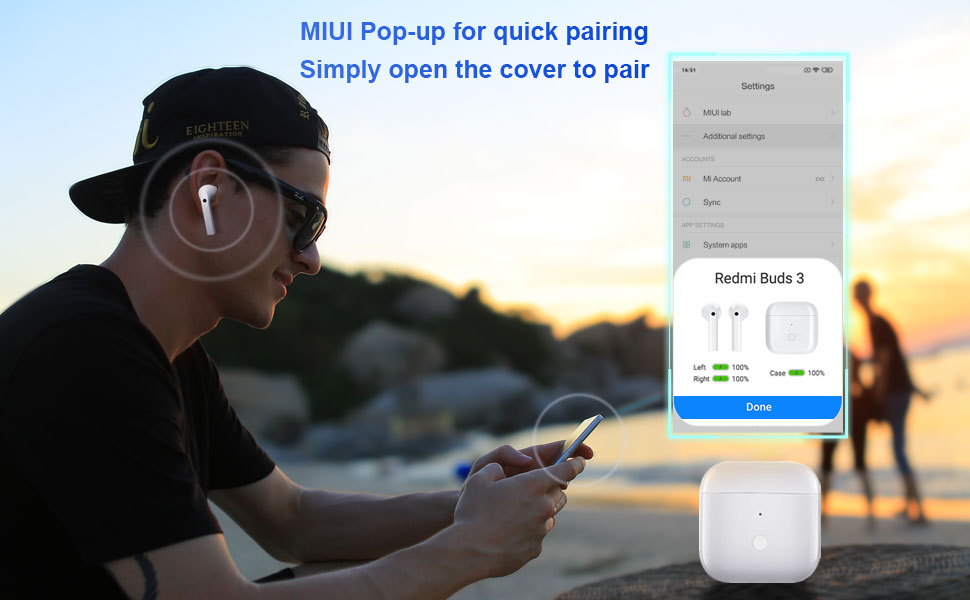
Illustration of the MIUI Pop-up feature for seamless and quick pairing with compatible devices.
3. Operating Instructions
Touch Controls:
The Xiaomi Buds 3 feature intuitive touch controls on each earbud. The touch-sensitive area is located on the upper part of the earbud stem.
- Tap Twice: Next track / Answer a call
- Press and Hold (either earbud): Pause/Play music
- Tap Three Times: Previous track / Hang up a call / Reject a call

Visual guide to the smart touch controls for music and call management.
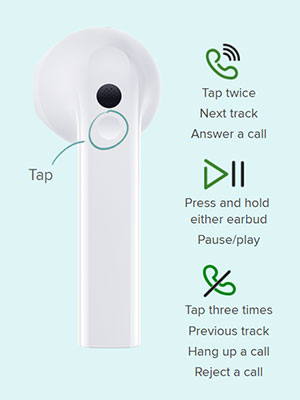
Close-up illustration of the touch-sensitive area and corresponding actions.
Wearing Detection:
The earbuds support wearing detection. Music playback will automatically pause when you remove an earbud and resume when you put it back in.
4. Battery Life and Charging
The Xiaomi Buds 3 offer extended battery life for all-day listening.
- Earbuds: Up to 90 minutes (1.5 hours) on a single charge.
- With Charging Case: Up to 25 hours of total playback time.
- Quick Charge: 10 minutes of charging provides additional listening time.
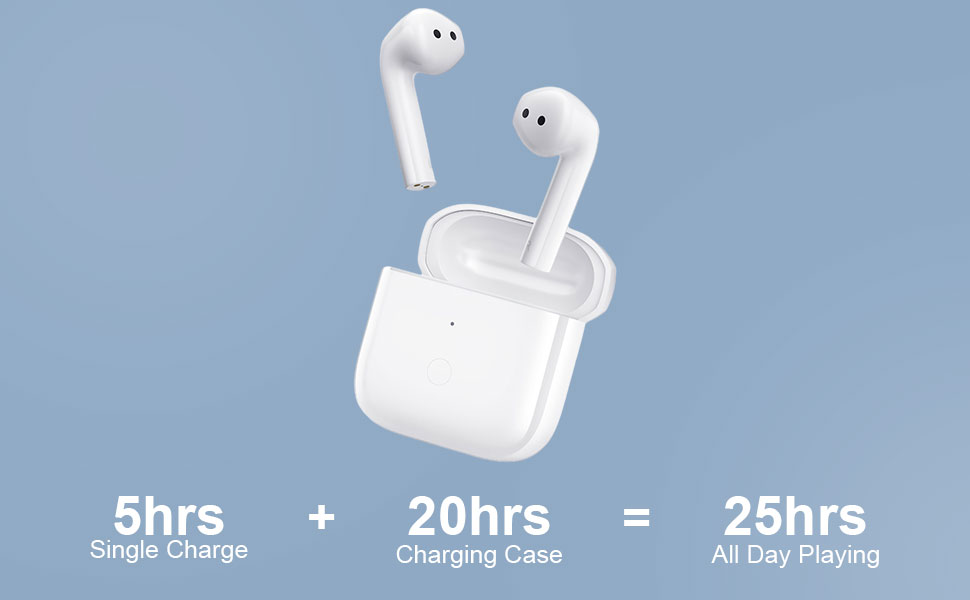
Visual representation of the combined battery life of the earbuds and charging case.
5. Maintenance and Care
To ensure the longevity and optimal performance of your Xiaomi Buds 3, follow these care guidelines:
- Cleaning: Regularly clean the earbuds and charging case with a soft, dry, lint-free cloth. Do not use abrasive materials or harsh chemicals.
- Water Resistance: The earbuds are IP54 dustproof and waterproof, meaning they are resistant to splashes and light rain. Do not submerge them in water or expose them to strong jets of water.
- Storage: When not in use, store the earbuds in their charging case to protect them and keep them charged.
- Temperature: Avoid exposing the earbuds to extreme temperatures (hot or cold) or high humidity.

The earbuds are designed to be resistant to dust and water splashes, indicated by the IP54 rating.
6. Troubleshooting
If you encounter issues with your Xiaomi Buds 3, refer to the table below for common problems and solutions.
| Problem | Possible Solution |
|---|---|
| Earbuds not pairing | Ensure Bluetooth is enabled on your device. Place earbuds in case, close and reopen lid. Try forgetting the device in Bluetooth settings and re-pairing. Ensure earbuds are charged. |
| No sound from one earbud | Check battery level of both earbuds. Place both earbuds back in the case, close the lid for a few seconds, then reopen. Re-pair the earbuds with your device. |
| Low volume | Adjust volume on your connected device. Clean any debris from the earbud speakers. |
| Earbuds not charging | Ensure the charging cable is securely connected. Check if the charging case has power. Clean the charging contacts on both earbuds and inside the case. |
7. Specifications
| Feature | Detail |
|---|---|
| Model Name | Buds 3 |
| Connectivity Technology | Wireless (Bluetooth) |
| Bluetooth Version | 5.2 |
| Audio Driver Size | 12 Millimeters |
| Earbud Weight | 4.5g (each) |
| Battery Life (Earbuds) | Up to 90 minutes (1.5 hours) |
| Battery Life (with Case) | Up to 25 hours |
| Charging Time | 10 minutes (quick charge) |
| Water Resistance Level | IP54 (Dustproof & Waterproof) |
| Control Method | Touch |
| Included Components | Charging case |
| Dimensions | 5.91 x 2.95 x 1.02 inches (Product) |
| Manufacturer | Xiaomi |
8. Warranty and Support
Your Xiaomi Buds 3 are covered by a manufacturer's warranty. For detailed warranty information, please refer to the warranty card included in your product packaging or visit the official Xiaomi support website.
For technical support, troubleshooting assistance beyond this manual, or service inquiries, please contact Xiaomi customer service through their official channels. Keep your proof of purchase for warranty claims.