
Boer Hermes S50 / CAS50
Boer Hermes S50 / CAS50 Optical Pickup Unit User Manual
Comprehensive guide for installation, operation, and maintenance.
1. Product Overview
This manual provides detailed instructions for the Boer Hermes S50 / CAS50 Optical Pickup Unit, a high-quality replacement component designed for various CD, DVD, and VCD players. This unit is essential for reading optical discs, ensuring clear audio and video playback.
The optical pickup unit, also known as a laser lens or laser assembly, is a critical part of your player's disc reading mechanism. Proper installation and care will ensure optimal performance and extend the life of your device.
2. Safety Information
Always observe the following safety precautions when handling and installing the optical pickup unit:
- Power Disconnection: Ensure the host device (CD/DVD/VCD player) is completely unplugged from the power source before beginning any installation or maintenance.
- Static Electricity: Wear an anti-static wrist strap or frequently touch a grounded metal object to discharge static electricity, which can damage sensitive electronic components.
- Laser Safety: The optical pickup unit contains a laser. Avoid direct eye exposure to the laser beam. Do not power on the unit outside of its intended enclosure.
- Professional Installation: If you are not comfortable with electronic repairs, seek professional assistance.
- Component Handling: Handle the unit by its edges and avoid touching the laser lens or delicate circuit board components.
3. Installation Guide
This section outlines the general steps for replacing an optical pickup unit. Specific disassembly procedures may vary depending on your player model. Refer to your player's service manual for detailed disassembly instructions.
3.1 Required Tools
- Small Phillips head screwdriver
- Flathead screwdriver (for prying, if necessary)
- Anti-static wrist strap
- Soldering iron and desoldering wick/pump (essential for removing the anti-static solder point)
- Isopropyl alcohol and lint-free cloth (for cleaning)
3.2 Step-by-Step Replacement
- Prepare the Player: Disconnect the player from all power sources and external cables. Allow it to sit for a few minutes to discharge any residual power.
- Access the Optical Drive: Carefully open the player's casing. Locate and remove the screws securing the optical drive mechanism. Disconnect any ribbon cables or power connectors attached to the old optical pickup unit.
- Remove the Old Unit: Gently lift and remove the old optical pickup unit from its housing. Note its orientation for correct installation of the new unit.
- Prepare the New Unit (Crucial Step): Before installing the new optical pickup unit, you must remove the anti-static solder point. This point protects the laser diode from static discharge during shipping and handling. Failure to remove it will prevent the unit from functioning.
- Install the New Unit: Carefully place the new optical pickup unit into the drive mechanism, ensuring it is correctly aligned. Reconnect all ribbon cables and power connectors. Ensure cables are not pinched.
- Test Functionality: Before fully reassembling the player, connect it to power and test its functionality with a known good disc. If the disc reads correctly, proceed to the next step.
- Reassemble the Player: Once confirmed working, carefully reassemble the player's casing, securing all screws.
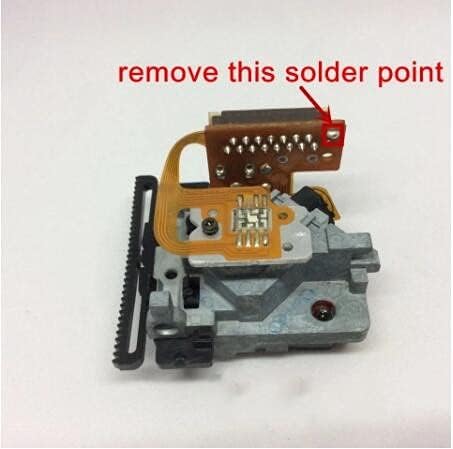
Image: Locate and carefully remove the anti-static solder point using a soldering iron and desoldering wick. This point is typically found on the flexible circuit board.

Image: The Boer Hermes S50 / CAS50 Optical Pickup Unit ready for installation. Ensure proper alignment and secure connections.
4. Operation
The Boer Hermes S50 / CAS50 Optical Pickup Unit operates automatically as part of your CD, DVD, or VCD player. Once installed, it performs the following functions:
- Disc Detection: Detects the presence of a disc in the tray.
- Laser Emission: Emits a laser beam onto the disc surface.
- Data Reading: Reads the reflected laser light, converting optical information into electrical signals.
- Tracking and Focusing: Adjusts the laser focus and tracks the data spiral on the disc for accurate reading.
No direct user interaction is required with the optical pickup unit itself during normal operation of the player.
5. Maintenance
Proper maintenance can prolong the life of your optical pickup unit and ensure consistent performance. Since the unit is enclosed within the player, direct cleaning is not regularly required. However, consider the following:
- Keep Discs Clean: Always use clean, scratch-free discs. Dust and debris on discs are the primary cause of lens contamination.
- Avoid Dust Accumulation: Keep your player in a clean, dust-free environment. Dust can enter the player and settle on the lens over time.
- Professional Cleaning: If you suspect the lens is dirty and causing reading errors, and you are comfortable opening the device, you may gently clean the lens with a specialized optical lens cleaner and a lint-free swab. Do not use abrasive materials or excessive force.
- Avoid Touching the Lens: Never touch the laser lens with your fingers, as oils and dirt can severely impair its function.
6. Troubleshooting
If you experience issues after installing the new optical pickup unit, refer to the following common problems and solutions:
| Problem | Possible Cause | Solution |
|---|---|---|
| Player does not read discs at all. | Anti-static solder point not removed. | Re-open the player and ensure the anti-static solder point on the new optical pickup unit has been completely removed. This is the most common issue. |
| Discs skip, freeze, or have distorted audio/video. | Dirty or scratched disc; dirty laser lens; faulty ribbon cable connection. | Clean the disc. Gently clean the laser lens (if accessible and you are comfortable doing so). Check all ribbon cable connections to ensure they are secure and not damaged. |
| Disc tray opens/closes but disc is not recognized. | Unit not properly seated; ribbon cable issue; faulty unit (rare). | Ensure the optical pickup unit is securely seated in its mechanism. Recheck ribbon cable connections. If issues persist, the unit itself might be faulty, though this is uncommon for new parts. |
| Player makes unusual noises during disc reading. | Mechanical misalignment; foreign object. | Check for any obstructions or misaligned parts within the optical drive mechanism. Ensure the unit moves smoothly along its rails. |
If troubleshooting steps do not resolve the issue, consider consulting a qualified technician or contacting the seller for further assistance.
7. Specifications
- Product Type: Optical Pickup Unit / Laser Lens Assembly
- Compatible Models: S50, CAS50 (and other compatible CD/DVD/VCD players)
- Brand: Boer Hermes
- Item Weight: Approximately 200 grams
- ASIN: B09J4CVVLF
- First Available Date: October 11, 2021
8. Warranty and Support
Specific warranty information for this replacement part is not provided in the product details. For warranty claims, technical support, or further inquiries, please contact the original seller or manufacturer directly.
It is recommended to retain your proof of purchase for any warranty-related matters.
Ask a question about this manual
Ask about setup, troubleshooting, compatibility, parts, safety, or missing instructions. Manuals+ will review the question and use this page’s manual context to help answer it.