
1. Introduction
Thank you for purchasing the Boer Hermes Laser Head. This component is designed as a replacement optical pickup unit for compatible Sony CDP-L3 DVD and CDPL3 Blu-ray/CD players. This manual provides essential information for the proper installation, operation, and maintenance of your new laser head. Please read this manual thoroughly before installation and keep it for future reference.
The laser head is a precision optical component crucial for reading data from optical discs. Proper handling and installation are vital for its optimal performance and longevity.
2. Safety Information
- Laser Radiation: This product contains a laser diode. Do not stare directly into the laser beam. Avoid direct exposure to the laser beam.
- Professional Installation Recommended: Installation of this component requires technical knowledge and experience with electronic devices. If you are not confident in your ability to install it, please seek professional assistance.
- Power Disconnection: Always ensure the host device (DVD/Blu-ray player) is completely disconnected from the power supply before attempting any installation or maintenance.
- Static Electricity: Electronic components are sensitive to static electricity. Use anti-static precautions (e.g., anti-static wrist strap) when handling the laser head.
- Protective Solder Joint: Most laser heads are shipped with a protective solder joint to prevent damage from static electricity during transit. This solder joint MUST be removed before installation and normal use. Failure to remove it will prevent the laser head from functioning correctly.
- Handle with Care: The laser lens is extremely delicate. Avoid touching the lens surface with bare hands or any tools.
3. Product Components
The Boer Hermes Laser Head is a compact and integrated optical pickup unit. It typically consists of the laser diode, optical lens assembly, and tracking/focusing mechanisms.
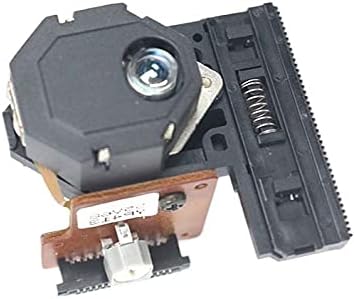
Figure 3.1: Overview of the Boer Hermes Laser Head. This image shows the main optical lens assembly and the integrated circuit board, highlighting its compact and robust design for easy integration into compatible players.
4. Setup and Installation
This section outlines the general steps for installing the laser head. Specific procedures may vary depending on the exact model of your Sony player. Refer to your player's service manual for detailed disassembly/assembly instructions.
- Preparation:
- Disconnect the Sony player from all power sources.
- Gather necessary tools: small Phillips head screwdrivers, flathead screwdrivers, anti-static wrist strap, soldering iron (for solder joint removal).
- Work in a clean, well-lit, and static-free environment.
- Accessing the Old Laser Head:
- Carefully open the player's casing.
- Locate the optical drive mechanism.
- Disconnect any ribbon cables or power connectors attached to the old laser head.
- Unscrew and remove the old laser head assembly.
- Crucial Step: Remove Protective Solder Joint:
- Before installing the new Boer Hermes Laser Head, identify the protective solder joint. This is typically a small blob of solder connecting two pins or pads on the flexible circuit board or near the connector.
- Using a fine-tipped soldering iron, carefully heat and remove this solder joint. Ensure no solder residue remains to short other components. This step is essential for the laser head to function.
- Installing the New Laser Head:
- Carefully place the new laser head into position within the optical drive mechanism.
- Secure it with the appropriate screws. Do not overtighten.
- Reconnect all ribbon cables and power connectors. Ensure they are seated correctly and securely.
- Reassembly and Testing:
- Before fully closing the player's casing, connect it to power and perform a preliminary test with a known good disc.
- If the disc reads correctly, disconnect power and reassemble the player's casing.
5. Operating Instructions
As a component, the laser head does not have direct user operating controls. Its function is integrated into the host Sony CDP-L3 or CDPL3 player. Once correctly installed, the laser head will automatically perform its duties when the player is in operation.
- Disc Loading: Ensure discs are clean and free of scratches or smudges before loading them into the player.
- Disc Compatibility: The laser head is designed to read standard CD, DVD, and Blu-ray discs (depending on the specific player model it's installed in). Ensure you are using compatible media.
- Normal Operation: The laser head will automatically adjust its focus and tracking to read the disc data. You should observe smooth disc loading and playback.
6. Maintenance
Proper maintenance can extend the lifespan of your laser head and ensure consistent performance.
- Lens Cleaning: The laser lens should generally not require frequent cleaning. If disc reading issues arise and are suspected to be due to a dirty lens, use a specialized optical lens cleaning kit or a soft, lint-free cloth with a small amount of isopropyl alcohol. Never touch the lens directly with your fingers.
- Dust Prevention: Keep the player in a clean, dust-free environment. Dust can accumulate on the lens and internal mechanisms, affecting performance.
- Avoid Physical Shock: Protect the player from impacts or vibrations, which can damage the delicate internal components of the laser head.
- Storage: If the player is to be stored for an extended period, ensure it is kept in a dry, cool place, away from direct sunlight and extreme temperatures.
7. Troubleshooting
If you encounter issues after installing the new laser head, refer to the following common problems and solutions:
| Problem | Possible Cause | Solution |
|---|---|---|
| Disc not recognized / No disc error | Protective solder joint not removed. | Crucial: Re-check and ensure the protective solder joint has been completely removed from the laser head. Refer to Section 4.3. |
| Disc skipping / Intermittent playback | Dirty laser lens. | Carefully clean the laser lens using a specialized cleaning kit. |
| Disc skipping / Intermittent playback | Damaged or dirty disc. | Try a different, known good disc. Clean the disc. |
| Disc skipping / Intermittent playback | Loose or improperly connected ribbon cable. | Check all cable connections to the laser head and main board. Ensure they are fully seated. |
| No power to the optical drive | Power cable not connected. | Verify the power cable to the optical drive is securely connected. |
| Player still not working after installation | Other component failure in the player. | The issue might not be with the laser head. Consult a professional repair technician. |
If troubleshooting steps do not resolve the issue, it is recommended to consult a qualified technician or contact customer support.
8. Specifications
| Feature | Detail |
|---|---|
| Product Type | Laser Head / Optical Pickup Unit |
| Brand | Boer Hermes |
| Compatible Models | Sony CDP-L3, Sony CDPL3 (DVD/Blu-ray/CD Players) |
| Model Number (Manufacturer's Designation) | Boer Hermes |
| Color (as per listing) | Sony |
| Item Weight | 233 grams |
| ASIN | B09J39HDQL |
| First Available Date | October 10, 2021 |
9. Warranty and Support
For information regarding warranty coverage, return policies, or technical support, please refer to the documentation provided at the time of purchase or contact the seller/manufacturer directly. Keep your proof of purchase for any warranty claims.
If you require further assistance or have questions not covered in this manual, please reach out to Boer Hermes customer support through the retailer's platform or the manufacturer's official contact channels.