
SHRRADOO Travel Backpacks
SHRRADOO Extra Large 52L Travel Laptop Backpack User Manual
Model: Travel Backpacks
Introduction
Welcome to the user manual for your new SHRRADOO Extra Large 52L Travel Laptop Backpack. This manual provides detailed instructions on the features, setup, operation, and maintenance of your backpack to ensure optimal use and longevity. Designed for versatility and comfort, this backpack is ideal for travel, daily commuting, school, and outdoor activities.
Product Overview
The SHRRADOO backpack is engineered for maximum storage and organization, featuring multiple compartments and innovative design elements for convenience and durability.
Key Features
- Large Capacity & Organized: Features 20 independent pockets and 3 spacious main compartments for extensive storage and organization of various items, including school supplies, travel accessories, clothing, and stationery.
- Multifunctional Design: Can unfold 90 to 180 degrees for easy packing, making it perfect for air travel. Suitable for indoor/outdoor activities, serving as a durable travel backpack, school bag, laptop bag, or spacious daypack.
- Convenient & Practical: Equipped with an external USB charging port with a built-in charging cable for convenient mobile phone charging. Includes a headphone hole for easy earphone access.
- Durable Material: Constructed from high-quality material with a nylon lining for enhanced water resistance and robustness.
- Comfortable Wear: Features a U-shaped three-dimensional ventilation design and wide, breathable mesh shoulder straps with sponge padding to alleviate shoulder stress.
Components and Design
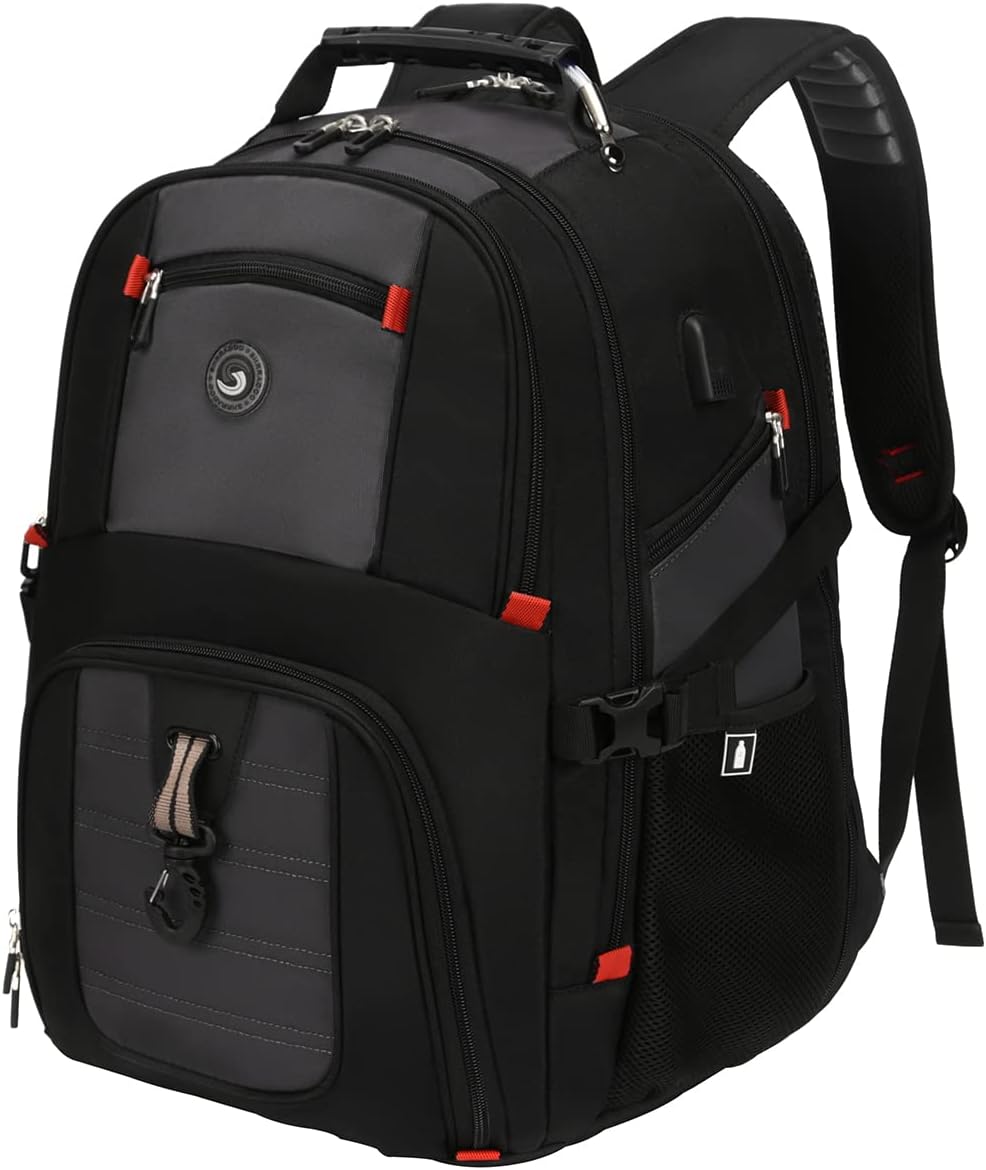
Figure 1: Front view of the SHRRADOO Extra Large Travel Laptop Backpack, showcasing its overall design and multiple zippered compartments.

Figure 2: Side view illustrating key features such as the sturdy handle, adjustable clasps, air cushion shoulder straps, sunglasses strap, and a convenient card pocket. Dimensions are also indicated.

Figure 3: Visual representation of the backpack's large internal capacity, dedicated laptop compartment, accessible front pocket, and elastic side pocket for water bottles or umbrellas.

Figure 4: Diagram highlighting the ventilation and comfort features on the back panel, designed to reduce heat and stress during wear.
Setup
USB Charging Port Setup
- Locate the internal USB cable inside the backpack's main compartment.
- Connect your own power bank to this internal USB cable.
- Connect your mobile phone or other USB-powered device to the external USB port on the side of the backpack using your own USB cable.
- Ensure all connections are secure for proper charging.
Password Lock Setup (if applicable)
Your backpack may include an integrated password lock for added security. Refer to the specific instructions provided with the lock for setting or resetting your personal combination. Typically, this involves:
- Set the dials to the default combination (usually 0-0-0).
- Press and hold the reset button (often a small, recessed button).
- While holding the button, set your desired new combination.
- Release the reset button. Your new combination is now set.

Figure 5: Instructions for connecting a power bank to the internal USB cable and using the external USB port, along with a visual of the password lock.
Operating Instructions
Carrying and Comfort
The backpack is designed for comfortable wear over extended periods. Adjust the shoulder straps to ensure the weight is evenly distributed and the backpack sits comfortably on your back. The air-cushioned back panel and shoulder straps provide ventilation and reduce pressure.

Figure 6: Examples of the backpack being used in different scenarios, demonstrating its versatility and comfortable fit for various activities.
Travel Features
- Luggage Strap: Utilize the integrated luggage strap on the back of the backpack to slide it over the handle of your rolling luggage. This provides a convenient way to carry the backpack and reduces strain on your shoulders during travel.
- 180-Degree Opening: The main compartment, particularly the laptop section, can be unzipped to open flat from 90 to 180 degrees. This feature is especially useful for airport security checks, allowing for quick and easy removal or inspection of your laptop without unpacking the entire bag.

Figure 7: Illustration of the luggage strap for attaching the backpack to a suitcase handle, and the full 180-degree opening capability of the laptop compartment.
Organization and Storage
Make the most of the backpack's numerous pockets and compartments:
- Use the dedicated laptop compartment for secure storage of laptops up to 17 inches.
- The front access pocket is ideal for items you need to reach quickly, such as keys, pens, or a phone.
- The deep zippered side pocket provides easy access to essentials, while the elastic mesh side pockets are perfect for water bottles or umbrellas.
- Utilize the various hidden pockets within the main compartments for valuables or smaller items requiring extra security.
Maintenance
To ensure the longevity and appearance of your SHRRADOO backpack, follow these care instructions:
- Cleaning: Hand wash only. Use a mild detergent and cold water. Gently scrub soiled areas with a soft brush or cloth.
- Drying: Do not machine wash or tumble dry. Air dry the backpack completely in a well-ventilated area, away from direct sunlight or heat sources.
- Storage: Store the backpack in a cool, dry place when not in use. Avoid storing heavy items inside for prolonged periods to prevent deformation.
- Stain Removal: For stubborn stains, a specialized fabric cleaner suitable for polyester may be used, following the product's instructions. Test on an inconspicuous area first.
Troubleshooting
This section addresses common issues you might encounter with your backpack.
USB Charging Port Not Working
- Check Power Bank: Ensure your power bank is charged and functioning correctly.
- Cable Connections: Verify that both the internal cable to the power bank and the external cable to your device are securely connected.
- Device Compatibility: Confirm your device is compatible with standard USB charging.
Zippers Sticking
- Clear Obstructions: Check for any fabric or debris caught in the zipper teeth.
- Lubrication: Apply a small amount of zipper lubricant, graphite from a pencil, or even a bar of soap to the zipper teeth to help it glide smoothly.
Backpack Feels Uncomfortable
- Adjust Straps: Ensure shoulder straps are properly adjusted to distribute weight evenly. The top of the backpack should be level with your shoulders.
- Load Distribution: Pack heavier items closer to your back to maintain balance and reduce strain.
- Overpacking: Avoid overpacking the backpack beyond its intended capacity, as this can lead to discomfort and potential damage.
Specifications
| Attribute | Detail |
|---|---|
| Product Dimensions (L x W x H) | 38.1 x 27.94 x 49.53 cm (15 x 11 x 19.5 inches) |
| Capacity | 50 Liters |
| Laptop Compartment Size | Fits up to 17-inch laptops |
| Fabric Type | 100% Polyester with Nylon Lining |
| Care Instructions | Hand wash only |
| Service | Unisex |
| Model Number | Travel Backpacks |
| ASIN | B09J2S4195 (Current Product), B0CGXXVS2X (Parent ASIN) |
| Manufacturer | SHRRADOO |
Warranty and Support
Specific warranty information for the SHRRADOO Extra Large 52L Travel Laptop Backpack is not provided in this manual. For details regarding warranty coverage, returns, or technical support, please refer to the retailer's policy where the product was purchased or contact SHRRADOO customer service directly through their official website or contact channels.
Always retain your proof of purchase for any warranty claims or support inquiries.
Ask a question about this manual
Ask about setup, troubleshooting, compatibility, parts, safety, or missing instructions. Manuals+ will review the question and use this page’s manual context to help answer it.