
Introduction
This manual provides detailed instructions for the safe and efficient use of your One Beat OB48A Power Strip Surge Protector. Please read this manual thoroughly before operating the device and retain it for future reference.
The One Beat OB48A is designed to provide expanded power access and surge protection for your electronic devices, featuring multiple AC outlets and USB charging ports in a compact, space-saving design.
Product Overview

Figure 0: The One Beat OB48A Power Strip Surge Protector, showcasing its compact white design, 8 AC outlets, 4 USB ports, and a durable braided 5ft extension cord with a flat plug.
The One Beat OB48A Power Strip Surge Protector offers a versatile charging solution for various electronic devices. It includes 8 AC outlets and 4 USB ports, designed to accommodate multiple devices simultaneously while providing surge protection.

Figure 1: The One Beat OB48A Power Strip functioning as a 12-in-1 charging station, illustrating its ability to power and charge multiple devices such as a laptop, tablet, and smartphone simultaneously. The compact design allows for efficient use of space.
Key Features:
- 8 AC Outlets (125V/13A): Provides ample power connections for various appliances.
- 4 USB Charging Ports (Max 5V/3.1A): Smart technology detects devices and delivers optimal charging speed.
- 900 Joules Surge Protection: Safeguards connected electronics from voltage spikes and surges.
- 3-Sided Space-Saving Design: Compact form factor (4.5 x 3.7 x 1.5 inches) with wide-spaced outlets to prevent blocking.
- 5ft Extension Cord with Flat Plug: Heavy-duty cord for extended reach and a low-profile 45° flat plug for discreet placement.
- Wall Mountable: Two keyholes on the back allow for secure wall mounting.
- Overload Protection: Integrated circuit breaker with an ON/OFF switch for safety.
- Multiple Safety Protections: ETL Listed, 1380℉ flame-retardant casing, offering protection against overload, short-circuit, over-voltage, over-current, overheat, and grounding issues.
Setup
- Unpack the Device: Carefully remove the power strip from its packaging. Inspect for any signs of damage.
- Choose a Location: Select a dry indoor location away from water sources and direct sunlight. Ensure adequate ventilation.
- Plug into Wall Outlet: Insert the power strip's flat plug into a standard 3-prong grounded AC wall outlet. The 45° angled plug design allows for easier access in tight spaces.
- Wall Mounting (Optional): If desired, use the two keyholes on the back of the power strip to mount it securely to a wall or desk surface using appropriate screws (not included).
- Verify Surge Protection: Once plugged in, the "SURGE PROTECTED" indicator light on the power strip should illuminate green, confirming that the surge protection feature is active.

Figure 2: Illustration of the 5ft extension cord and the 45-degree right-angle flat plug, demonstrating its ability to fit flush against a wall outlet, making it suitable for use behind furniture or in confined spaces.
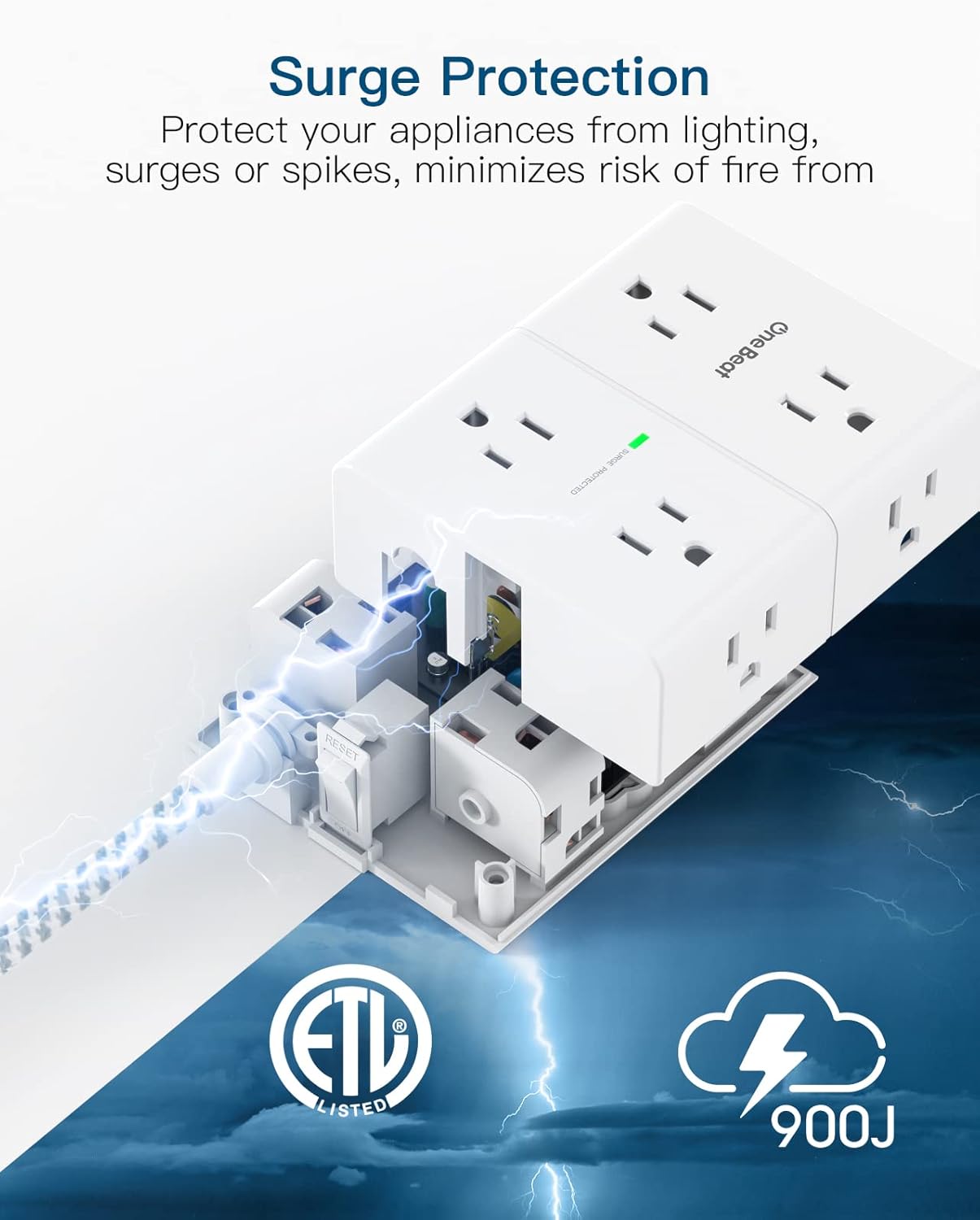
Figure 3: Detailed view of the surge protection mechanism within the One Beat OB48A Power Strip, highlighting the "SURGE PROTECTED" indicator light and the 900 Joules protection rating, which helps protect connected devices from electrical surges.
Operating Instructions
Connecting AC Devices:
Plug your AC-powered devices directly into any of the 8 widely spaced AC outlets. The wide spacing (2.2 inches) is designed to accommodate larger power adapters without obstructing adjacent outlets.

Figure 4: The compact, 3-sided design of the One Beat OB48A Power Strip, illustrating the wide spacing between AC outlets (2.2 inches) to prevent large adapters from blocking adjacent ports. Dimensions are shown as 4.5 x 3.7 x 1.5 inches.
Connecting USB Devices:
Connect your USB-powered devices (e.g., smartphones, tablets, smartwatches) to any of the 4 USB charging ports. The smart charging technology will automatically detect your device and deliver the optimal charging current up to 5V/3.1A.

Figure 5: The four smart USB charging ports on the One Beat OB48A Power Strip, shown actively charging multiple smartphones, demonstrating its capability to deliver optimal charging speeds for various devices.
Power On/Off:
The power strip features an ON/OFF switch with an integrated circuit breaker. Press the switch to turn the power strip on or off. In case of an overload, the circuit breaker will trip, and the switch will pop out, cutting power to connected devices. To reset, unplug some devices, then press the switch back in.
Safety Information
To ensure safe operation and prevent damage, please observe the following safety guidelines:
- Indoor Use Only: This power strip is designed for indoor use in dry locations. Do not expose to moisture or liquids.
- Grounding: Always plug the power strip into a properly grounded 3-prong wall outlet.
- Avoid Overloading: Do not exceed the maximum electrical rating of 1625W (13A, 125V). Overloading can cause the circuit breaker to trip or lead to fire hazards.
- Cord Management: Do not run the power cord under carpets, rugs, or furniture. Avoid placing heavy objects on the cord.
- Children and Pets: Keep the power strip and connected cords out of reach of children and pets.
- Discontinue Use if Damaged: If the power strip, cord, or plug appears damaged, discontinue use immediately and contact customer support.
- No User Serviceable Parts: Do not attempt to open or modify the power strip. Refer all servicing to qualified personnel.

Figure 6: Overview of the multiple safety protections integrated into the One Beat OB48A Power Strip, including a woven fabric cord for durability, a fireproof polycarbonate shell, 900 Joules surge protection, and an ON/OFF switch with overload protection.
Maintenance
The One Beat OB48A Power Strip Surge Protector requires minimal maintenance. Follow these guidelines to ensure its longevity:
- Cleaning: Disconnect the power strip from the wall outlet before cleaning. Use a dry, soft cloth to wipe the exterior. Do not use liquid cleaners or abrasive materials.
- Storage: When not in use for extended periods, store the power strip in a cool, dry place, away from direct sunlight and moisture.
- Cord Inspection: Periodically inspect the power cord and plug for any signs of wear, cuts, or damage. If damage is found, discontinue use.
Troubleshooting
| Problem | Possible Cause | Solution |
|---|---|---|
| No power to devices. |
|
|
| "SURGE PROTECTED" indicator light is off. |
|
|
| USB ports not charging. |
|
|
Specifications
| Model: | OB48A |
| AC Outlets: | 8 |
| USB Ports: | 4 (Max 5V/3.1A total) |
| Input Voltage: | 125V AC, 60Hz |
| Max Current: | 13A |
| Max Power: | 1625W |
| Surge Protection: | 900 Joules |
| Cord Length: | 5 ft (1.5m) |
| Dimensions: | 4.5 x 3.7 x 1.5 inches (11.43 x 9.4 x 3.81 cm) |
| Material: | Polycarbonate (Flame-retardant) |
| Certifications: | ETL Listed |
Warranty and Support
One Beat provides a 12-month worry-free warranty for this product. For technical support, warranty claims, or any questions regarding your One Beat OB48A Power Strip Surge Protector, please contact One Beat customer service. Contact information can typically be found on the product packaging or the official One Beat website.
Please have your model number (OB48A) and purchase date available when contacting support.