
1. Introduction
The GPD Win Max 2021 is an 8-inch handheld gaming PC designed for both high-performance gaming and productivity. It combines the portability of a handheld device with the capabilities of a Windows 10 laptop, featuring an Intel 11th generation Core i7-1195G7 processor and Intel Iris Xe Graphics. This manual provides essential information for setting up, operating, maintaining, and troubleshooting your device.

Figure 1: GPD Win Max 2021 device overview.
2. Setup
2.1 Initial Power On and Charging
Before first use, ensure the device is fully charged. Connect the provided 65W USB-C charger to the device's USB-C port. The charging indicator light will illuminate. A full charge typically takes approximately 2 hours.
2.2 Connecting Peripherals
The GPD Win Max 2021 offers various ports for connecting external devices:
- HDMI 2.0b: Supports 4K/60Hz output for external displays.
- USB 3.1 Gen 1 (Type-A): Three ports for standard USB devices.
- Full Functional Type-C 3.1 Gen 2: For data transfer, video output, and charging.
- Full Speed Thunderbolt 3: For high-speed data transfer and connecting external graphics docks (eGFX) to enhance gaming performance.
- MicroSDXC Card Slot: Supports A2 read and write speeds for expanded storage.
- RJ45 Ethernet Port: For wired network connectivity.
- Headset/Mic Interface: Standard 3.5mm audio jack.
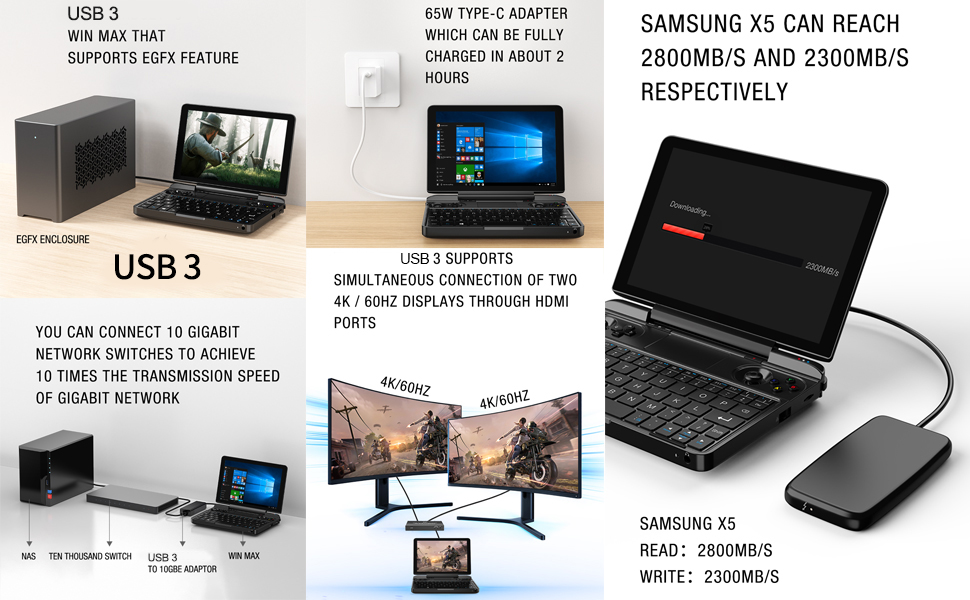
Figure 2: Device ports and interfaces.
2.3 Storage Expansion (SSD)
The device includes dual SSD sockets (Socket 3 / Socket 2) for M.2 NVMe / AHCI 2280 SSDs. When upgrading or replacing the SSD, ensure you use single-sided M.2 2280 SSDs. Double-sided SSDs are not compatible due to space constraints and may cause damage.
3. Operating the Device
3.1 Controls and Input
The GPD Win Max 2021 features a full physical keyboard, a built-in touchpad, and integrated gamepad controls. It also supports 10-point touchscreen operation.
- Gamepad Controls: Includes Alps original factory 3D joysticks (supporting L3/R3 functions), split arrow keys, and ABXY buttons.
- Handle/Mouse Switch: A dedicated switch allows the joysticks to simulate mouse movement, and shoulder buttons to simulate left/right mouse clicks, providing full mouse functionality without an external mouse.
- Keyboard: Full QWERTY keyboard for typing and productivity tasks.

Figure 3: Keyboard and gamepad layout.
3.2 Gaming
The device is capable of running AAA games at 60Hz with medium settings. It supports a wide range of online games, emulators, and Android games. The integrated gamepad controls provide a comfortable gaming experience, reducing strain during extended play.

Figure 4: Handheld gaming in progress.
3.3 Productivity
With its full keyboard and Windows 10 operating system, the GPD Win Max 2021 functions as a compact laptop. It supports various productivity tools and can be connected to external displays for a desktop-like experience. The Thunderbolt 3 port allows connection to an external graphics dock for enhanced performance in demanding applications or games on a larger screen.
3.4 Adjustable TDP
The device features a three-stage adjustable Thermal Design Power (TDP) of 15W, 20W, and 25W. Adjusting the TDP allows you to balance performance and battery life according to your current task. Higher TDP settings provide more processing power, while lower settings conserve battery.
Video 1: GPD WIN MAX Laptop Windows 10 Video Game Console. This video demonstrates various features and usage scenarios of the GPD Win Max 2021, including gaming, port connectivity, and touchscreen functionality.
4. Features Overview
The GPD Win Max 2021 is engineered with advanced components for a premium experience:
- Display: 8-inch H-IPS screen with 1280x800 resolution, Corning Gorilla Glass, 90% DCI-P3 wide color gamut, DC dimming, and 500 nits brightness.
- Processor: Intel 11th Generation 10nm Core i7-1195G7 (4-core, 8-thread, up to 5.0 GHz Turbo frequency).
- Graphics: Intel 12th-generation Iris Xe Graphics 96EU.
- Memory: Dual-channel 16GB LPDDR4X 3733MHz RAM.
- Storage: 1TB M.2 NVMe SSD, with dual SSD sockets for expansion (supports single-sided M.2 2280 SSDs).
- Connectivity: Wi-Fi 6, Bluetooth 5.0, USB 3.1, Type-C, Thunderbolt 3, HDMI 2.0b, RJ45 Ethernet.
- Battery: 3 x 5000mAh / 57Wh high-capacity polymer lithium battery, offering 3-14 hours of use depending on intensity.
- Cooling: Dual desktop-grade turbine fans with dual cooling pipes and 9 ventilation holes for efficient heat dissipation.
- Build Quality: CNC magnesium aluminum alloy upper cover and LG-DOW 121H aviation-grade anti-shock ABS synthetic resin body, designed for durability.
Figure 5: Key features of the GPD Win Max 2021.
5. Maintenance
5.1 Cleaning
Regularly clean the screen with a soft, lint-free cloth. For the body and keyboard, use a slightly damp cloth. Ensure ventilation holes are free from dust and debris to maintain optimal cooling performance.
5.2 Software and Driver Updates
Keep your Windows 10 operating system and device drivers updated to ensure optimal performance and compatibility with new software and games. Check the official GPD website or LANRUO support channels for the latest driver releases.
5.3 Battery Care
To prolong battery life, avoid fully discharging the device frequently. Store the device in a cool, dry place when not in use for extended periods. Use only the provided or approved charging accessories.
6. Troubleshooting
6.1 Common Issues
- Screen After-Images: If static images remain on the screen for extended periods, temporary after-images may occur. These typically resolve within 30 seconds. Avoid leaving static images on the screen for prolonged durations.
- Performance Issues: Ensure drivers are updated. Adjust TDP settings for demanding applications. Close unnecessary background programs.
- SSD Not Recognized: Verify that the installed SSD is a single-sided M.2 2280 NVMe/AHCI drive. Incorrect SSD types can cause recognition issues or damage.
6.2 Seeking Further Assistance
For more detailed troubleshooting or community support, consider joining the official GPD Discord server. This platform offers resources, scripts, and a community of users who can provide assistance and tips for optimizing your device.
7. Specifications
| Feature | Detail |
|---|---|
| Model Number | GPD WIN MAX 2021 |
| Processor | Intel Core i7-1195G7 (11th Gen) |
| Graphics | Intel Iris Xe Graphics 96EU |
| RAM | 16GB LPDDR4X 3733MHz (Dual-channel) |
| Storage | 1TB M.2 NVMe SSD (Dual sockets, supports single-sided M.2 2280) |
| Display | 8-inch H-IPS Touchscreen, 1280x800, 500 nits, 90% DCI-P3 |
| Operating System | Windows 10 |
| Battery | 3 x 5000mAh / 57Wh |
| Charging | 65W Super-fast Charger (PD 3.0) |
| Connectivity | Wi-Fi 6, Bluetooth 5.0, USB 3.1, Type-C, Thunderbolt 3, HDMI 2.0b, RJ45 |
| Dimensions | 7.87 x 7.87 x 1.85 inches |
| Weight | 1.83 pounds |
8. Warranty and Support
8.1 Warranty Information
LANRUO, as an official distributor of GPD products, provides a two-year warranty service for this device. This warranty covers manufacturing defects and hardware malfunctions under normal use conditions.
8.2 Technical Support
For technical assistance, software support, or warranty claims, please contact LANRUO customer service through their official channels. Refer to your purchase documentation for specific contact details. Online resources and community forums, such as the GPD Discord, can also provide valuable support and user-generated solutions.