
Introduction
This manual provides instructions for the CAN-MEAGEREN 539C-268920-W010 replacement remote control, designed for various Skyworth Android TV models. This remote offers direct functionality without the need for programming or pairing. Please read this manual carefully to ensure proper use and to maximize the lifespan of your remote control.
Setup
Battery Installation
The remote control requires two (2) AAA batteries for operation. Batteries are not included with the product.
- Locate the battery compartment on the back of the remote control.
- Press down on the latch and slide the battery cover downwards to open it.
- Insert two (2) AAA batteries, ensuring the positive (+) and negative (-) terminals align correctly with the markings inside the compartment.
- Slide the battery cover back into place until it clicks securely.

The back of the remote control is shown with the battery cover removed, revealing the two AAA battery slots.
Once batteries are installed, the remote control is ready for immediate use with compatible Skyworth Android TVs. No programming or pairing is required.
Operating Instructions
This remote control provides full functionality for your Skyworth Android TV. Ensure there is a clear line of sight between the remote control and the TV's infrared receiver.
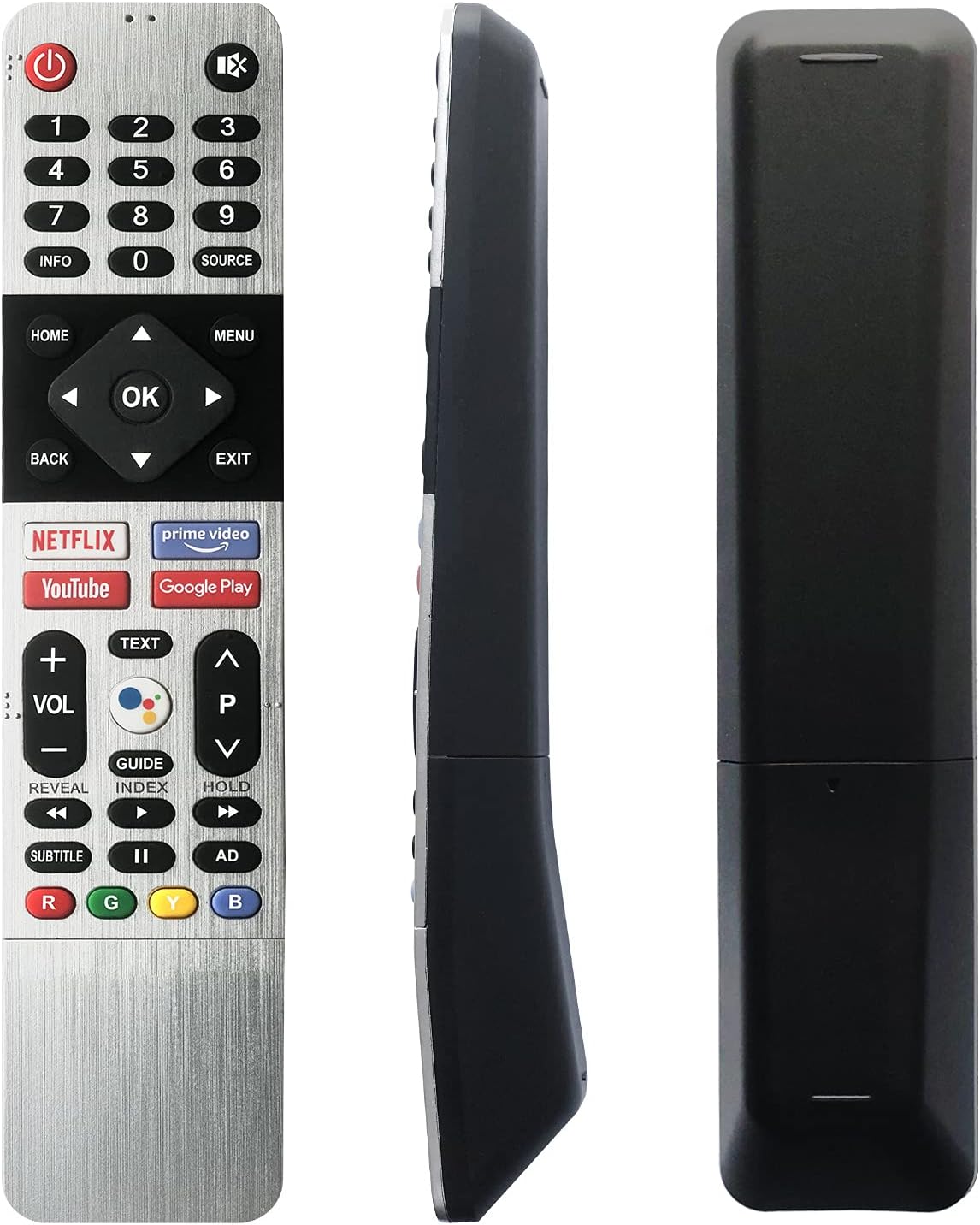
This image displays the front of the remote control, showing all buttons including power, number pad, navigation, volume, channel, and dedicated app buttons for Netflix, Prime Video, YouTube, and Google Play.
Key Functions:
- Power Button (⏻): Turns the TV on or off.
- Number Pad (0-9): Directly input channel numbers.
- Navigation Buttons (Up, Down, Left, Right, OK): Navigate through menus and confirm selections.
- Volume Buttons (VOL +/-): Adjust the TV's volume level.
- Channel Buttons (P ^/v): Change TV channels.
- Home Button: Access the TV's main home screen.
- Menu Button: Open the TV's settings or options menu.
- Back Button: Return to the previous screen or menu.
- Exit Button: Close the current application or menu.
- Dedicated App Buttons: Quick access to Netflix, Prime Video, YouTube, and Google Play applications.

An angled shot of the remote control, emphasizing the Netflix, Prime Video, YouTube, and Google Play quick access buttons.
Maintenance
Cleaning
To clean the remote control, gently wipe it with a soft, dry cloth. For stubborn dirt, slightly dampen the cloth with water or a mild, non-abrasive cleaner. Do not use harsh chemicals or immerse the remote in water.
Storage
Store the remote control in a cool, dry place away from direct sunlight and extreme temperatures. If the remote will not be used for an extended period, it is recommended to remove the batteries to prevent leakage.
Troubleshooting
- Remote not responding:
- Check if the batteries are inserted correctly with the correct polarity.
- Replace old batteries with new AAA batteries.
- Ensure there are no obstructions between the remote control and the TV's infrared sensor.
- Make sure you are within the effective operating range of the TV.
- Buttons not working:
- Clean the remote control surface, especially around the buttons, to remove any dirt or debris that might be causing sticking.
- If only specific buttons are unresponsive, it might indicate a hardware issue.
Specifications
- Model Number: 539C-268920-W010
- Brand: CAN-MEAGEREN
- Compatible Devices: Skyworth Android TV (various models including 32TB5000, 40TB5000, 40TB5050, 43UB5500, 43TB5000, 43TB5050, 43UB5550, 43UB5560, 50UB5500, 50UB5550, 50UB5560, 55UB5500, 55UB5550, 55UB5560)
- Material: ABS & Plastic
- Color: Black, Silver
- Product Dimensions: Approximately 4.72 x 1.18 x 0.79 inches (12 x 3 x 2 cm)
- Item Weight: Approximately 3.7 ounces (105 grams)
- Batteries Required: 2 x AAA (not included)
- Special Feature: Ergonomic design, no programming required

This diagram illustrates the remote control alongside its key specifications: ABS & Plastic material, dimensions of 8.39 x 1.73 x 1.00 inches, and requirement for 2 x AAA batteries.
Warranty and Support
This CAN-MEAGEREN remote control comes with a 1-year warranty for free exchange or return in case of any product quality problems. For support or warranty claims, please contact the seller or manufacturer directly.