
Blackdot 8885019220005
Blackdot Pro Wireless Earbuds User Manual
Model: 8885019220005
1. Introduction
This manual provides comprehensive instructions for the Blackdot Pro Wireless Earbuds. Please read this manual carefully before using the product to ensure proper operation and to maximize your user experience. Keep this manual for future reference.

Image 1.1: Blackdot Pro Wireless Earbuds in their charging case.
2. Package Contents
Verify that all items are present in the package:
- Blackdot Pro Wireless Earbuds (Left and Right)
- Charging Case
- USB Charging Cable
- Eartips (Multiple Sizes)
- User Manual
3. Product Overview
Familiarize yourself with the components of your Blackdot Pro Wireless Earbuds.
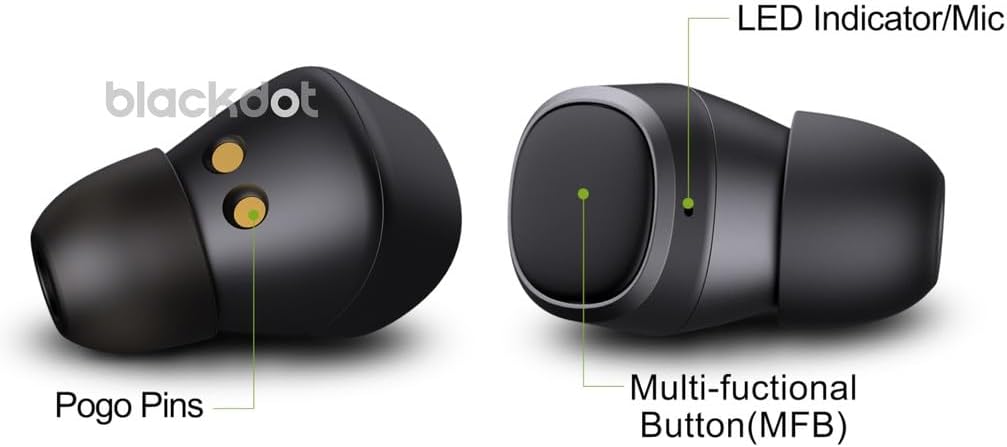
Image 3.1: Detailed view of an earbud showing Pogo Pins, Multi-functional Button (MFB), and LED Indicator/Microphone.
- Multi-functional Button (MFB): Used for playback control, call management, and voice assistant activation.
- LED Indicator/Microphone: Provides status indications and captures audio for calls and voice commands.
- Pogo Pins: Charging contacts for the earbuds when placed in the charging case.
4. Setup
4.1 Charging the Earbuds and Case
Before first use, fully charge the earbuds and charging case.
- Place the earbuds into the charging case. Ensure the Pogo Pins align correctly.
- Connect the USB charging cable to the Type-C port on the charging case and to a power source.
- The LED indicator on the case will show charging status. Once fully charged, the indicator will change or turn off.
- A full charge provides up to 52 hours of total listening time with the charging case.

Image 4.1: Visual representation of key features including Type-C charging and extended battery life.
4.2 Bluetooth Pairing
Follow these steps to pair your earbuds with a Bluetooth-enabled device:
- Open the charging case. The earbuds will automatically enter pairing mode. The LED indicators on the earbuds will flash.
- On your device (smartphone, tablet, laptop), enable Bluetooth.
- Search for available Bluetooth devices and select "Blackdot Pro" from the list.
- Once connected, the LED indicators on the earbuds will stop flashing and remain solid or turn off, indicating successful pairing.
- The earbuds will automatically reconnect to the last paired device when taken out of the case, if Bluetooth is enabled on the device.
5. Operating Instructions
5.1 Button Controls (MFB)
The Multi-functional Button (MFB) on each earbud controls various functions:
| Action | Function |
|---|---|
| Single Press | Play/Pause Music, Answer Call |
| Double Press (Left Earbud) | Previous Track |
| Double Press (Right Earbud) | Next Track |
| Long Press (2 seconds) | Reject Call, Activate Voice Assistant (Google/Siri) |
| Long Press (5 seconds) | Power On/Off |
5.2 Call Management
The earbuds feature built-in microphones for clear communication.
- Answer Call: Press the MFB once.
- End Call: Press the MFB once during a call.
- Reject Call: Long press the MFB for 2 seconds.

Image 5.1: Illustration of call handling and voice assistant functionality.
5.3 Voice Assistant
Activate your device's voice assistant (Google Assistant or Siri) by long-pressing the MFB for 2 seconds. This allows for hands-free control and commands.
6. Maintenance
Proper maintenance ensures the longevity and performance of your earbuds.
- Cleaning: Regularly clean the earbuds and charging case with a soft, dry, lint-free cloth. Do not use abrasive materials or harsh chemicals. Gently clean the Pogo Pins and mesh areas to prevent debris buildup.
- Storage: When not in use, store the earbuds in their charging case to protect them from dust and damage.
- Water Resistance: The earbuds are water-resistant. Avoid submerging them in water or exposing them to excessive moisture. Dry them thoroughly if they get wet.
7. Troubleshooting
If you encounter issues, refer to the following common solutions:
| Problem | Solution |
|---|---|
| Earbuds not pairing | Ensure earbuds are charged. Turn off and on Bluetooth on your device. Forget "Blackdot Pro" from your device's Bluetooth list and re-pair. |
| Only one earbud working | Place both earbuds back into the charging case, close the lid, wait a few seconds, then take them out again. Ensure both are charged. |
| No sound | Check device volume. Ensure earbuds are connected. Try playing audio from a different application. |
| Charging issue | Verify the charging cable and power adapter are working. Clean the charging contacts (Pogo Pins) on the earbuds and in the case. |
8. Specifications
| Feature | Detail |
|---|---|
| Model Number | 8885019220005 |
| Connectivity | Bluetooth 5.3 |
| Microphones | 2 x Built-in Microphones |
| Battery Life (Total with Case) | Up to 52 hours |
| Control Type | Button/Touch Control, Voice Control |
| Water Resistance | Water Resistant |
| Material | Plastic |
| Dimensions | 4.4 x 4.4 x 3.5 cm |
| Weight | 150 g |
| Compatible Devices | Mobile Phones, Laptops, Tablets, Smart Speakers, etc. |
9. Warranty and Support
Blackdot products are designed for reliability and performance. For warranty information or technical support, please refer to the official Blackdot website or contact customer service through your purchase platform.
For further assistance, visit: Blackdot Store on Amazon
Ask a question about this manual
Ask about setup, troubleshooting, compatibility, parts, safety, or missing instructions. Manuals+ will review the question and use this page’s manual context to help answer it.