
SUBZERO M100
SUBZERO Reference Microphone M100 User Manual
Improve the Sound of Your Room
1. Introduction
Thank you for purchasing the SUBZERO Reference Microphone M100. This microphone is engineered to provide accurate acoustic measurements, making it an essential tool for optimizing the sound of your room, studio, or sound system. Its omnidirectional polar pattern and wide frequency response ensure precise data collection for room analysis and audio calibration.
2. Safety Information
Please read and understand the following safety precautions before using the microphone:
- Do not expose the microphone to extreme temperatures, humidity, or direct sunlight.
- Avoid dropping or subjecting the microphone to strong impacts.
- Do not attempt to disassemble or modify the microphone. This will void the warranty and may cause damage.
- Keep the microphone away from strong magnetic fields.
- Use only a clean, dry cloth for cleaning. Do not use liquid cleaners or solvents.
3. Setup
3.1 Unboxing and Components
Upon opening the package, ensure all components are present:
- SUBZERO Reference Microphone M100
- Foam Windscreen
- Microphone Clip

Figure 3.1: Contents of the SUBZERO M100 package, showing the microphone, its clip, and the foam windscreen.
3.2 Connecting the Microphone
The SUBZERO M100 connects via a standard XLR cable (not included) to an audio interface or mixer that provides 48V phantom power. This microphone requires phantom power to operate.
- Attach the microphone clip to a standard microphone stand.
- Securely place the M100 microphone into the microphone clip.
- Connect one end of an XLR cable to the XLR output on the base of the M100 microphone.
- Connect the other end of the XLR cable to an available XLR input on your audio interface or mixer.
- Activate 48V phantom power on the connected audio interface or mixer.
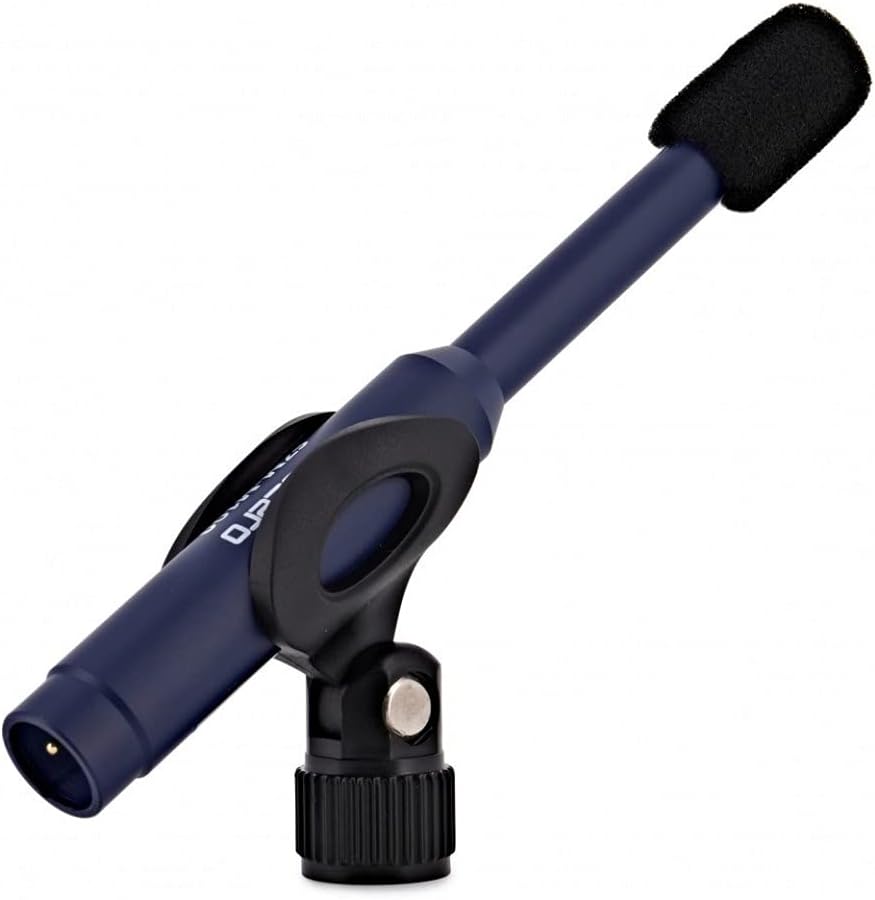
Figure 3.2: The SUBZERO M100 microphone securely mounted in its clip, ready for connection.
4. Operation
4.1 Acoustic Measurement and Placement
The M100 is designed for accurate acoustic measurements. For best results, place the microphone in the listening position or at various points within the room you wish to analyze. Its omnidirectional polar pattern captures sound equally from all directions, providing a comprehensive acoustic snapshot of the environment.

Figure 4.1: Frequency Response Graph. This graph illustrates the microphone's sensitivity across different frequencies, showing its flat response ideal for accurate measurement.

Figure 4.2: Omnidirectional Polar Pattern. This diagram shows the microphone's sensitivity to sound from all directions, confirming its omnidirectional characteristic.
For detailed room analysis, use the M100 in conjunction with appropriate acoustic measurement software (not included) connected to your audio interface. Follow the software's instructions for calibration and measurement procedures.
5. Maintenance
5.1 Cleaning
To maintain the microphone's performance and appearance, wipe the body with a soft, dry, lint-free cloth. Do not use abrasive cleaners, solvents, or chemical sprays. The foam windscreen can be gently hand-washed with mild soap and water, then air-dried completely before reattaching.
5.2 Storage
When not in use, store the microphone in a dry, dust-free environment, preferably in its original packaging or a protective case. Avoid storing it in areas with extreme temperature fluctuations or high humidity.
6. Troubleshooting
| Problem | Possible Cause | Solution |
|---|---|---|
| No Sound Output | No phantom power; Incorrect cable connection; Faulty cable/interface. | Ensure 48V phantom power is enabled on your audio interface/mixer. Check XLR cable connections. Test with a different XLR cable or audio input. |
| Low Output Level | Low gain setting on interface; Incorrect input selection. | Increase the gain on your audio interface/mixer. Ensure the correct input is selected in your recording software. |
| Distorted Sound | Input overloaded; Faulty cable. | Reduce the gain on your audio interface/mixer. Ensure the microphone is not too close to the sound source if the sound source is extremely loud. Test with a different XLR cable. |
| Excessive Background Noise | Environmental noise; Ground loop; Cable interference. | Ensure the recording environment is quiet. Check for ground loop issues (e.g., try different power outlets). Use high-quality shielded XLR cables. |
7. Specifications
| Feature | Detail |
|---|---|
| Brand | SUBZERO |
| Model Name | M100 |
| Polar Pattern | Omnidirectional |
| Frequency Response | 20-20,000 Hz |
| Connectivity Technology | XLR |
| Connector Type | XLR |
| Compatible Devices | Audio Interface, Audio Mixer |
| Included Components | Foam windscreen, clip |
| Colour | Black |
| Recommended Uses | Acoustic analysis, audio |
| Package Dimensions | 4.4 x 2.2 x 1.1 cm; 156 g |
8. Warranty and Support
The SUBZERO Reference Microphone M100 comes with a standard manufacturer's warranty. Please refer to your purchase documentation for specific warranty terms and conditions. For technical support, troubleshooting assistance, or warranty claims, please contact your retailer or visit the official SUBZERO website for contact information.
For more information and product registration, please visit: SUBZERO Official Store
Ask a question about this manual
Ask about setup, troubleshooting, compatibility, parts, safety, or missing instructions. Manuals+ will review the question and use this page’s manual context to help answer it.