
BURNNOVE YHde11049-Q
BURNNOVE 3.5 Inch 480p Baby Monitor Screen User Manual
Model: YHde11049-Q
Product Overview
The BURNNOVE Baby Monitor Screen is an essential accessory designed to work seamlessly with your BURNNOVE baby surveillance camera. This monitor provides a clear 3.5-inch 480p display, allowing you to keep a close eye on your baby. It is simple to use and easy to transport, ensuring you can provide optimal care for your little one.
Please note: This product is the monitor screen only. A compatible BURNNOVE baby surveillance camera and charger are required and sold separately. It is not compatible with cameras from other brands.


Setup Guide
Unboxing and Initial Inspection
Upon receiving your BURNNOVE Baby Monitor Screen, carefully open the package and inspect the contents. The package should contain:
- 1 x BURNNOVE Baby Monitor Screen (Parent Unit)
Ensure there is no visible damage to the unit. Remember, the camera and charger are not included in this package.
Charging the Monitor
Before first use, it is recommended to fully charge the monitor. Connect a compatible charger (not included) to the charging jack located on the back of the monitor.

- If the screen is off during charging, a red indicator will be displayed. The full charge indicator will turn off when charging is complete.
- If the screen is on during charging, an orange indicator will be displayed. The full charge indicator will turn green when charging is complete.
- Approximate charging time: 5.5 hours.
- Approximate usage time in ECO mode: 10 hours.
Pairing with a Camera
This monitor is designed to automatically pair with compatible BURNNOVE baby surveillance cameras. If pairing does not occur automatically, or if you are connecting a new camera, please refer to the camera's user manual for specific pairing instructions. The monitor can connect up to 4 cameras.
Operating Instructions
Button Functions
Familiarize yourself with the buttons on your BURNNOVE Baby Monitor Screen:
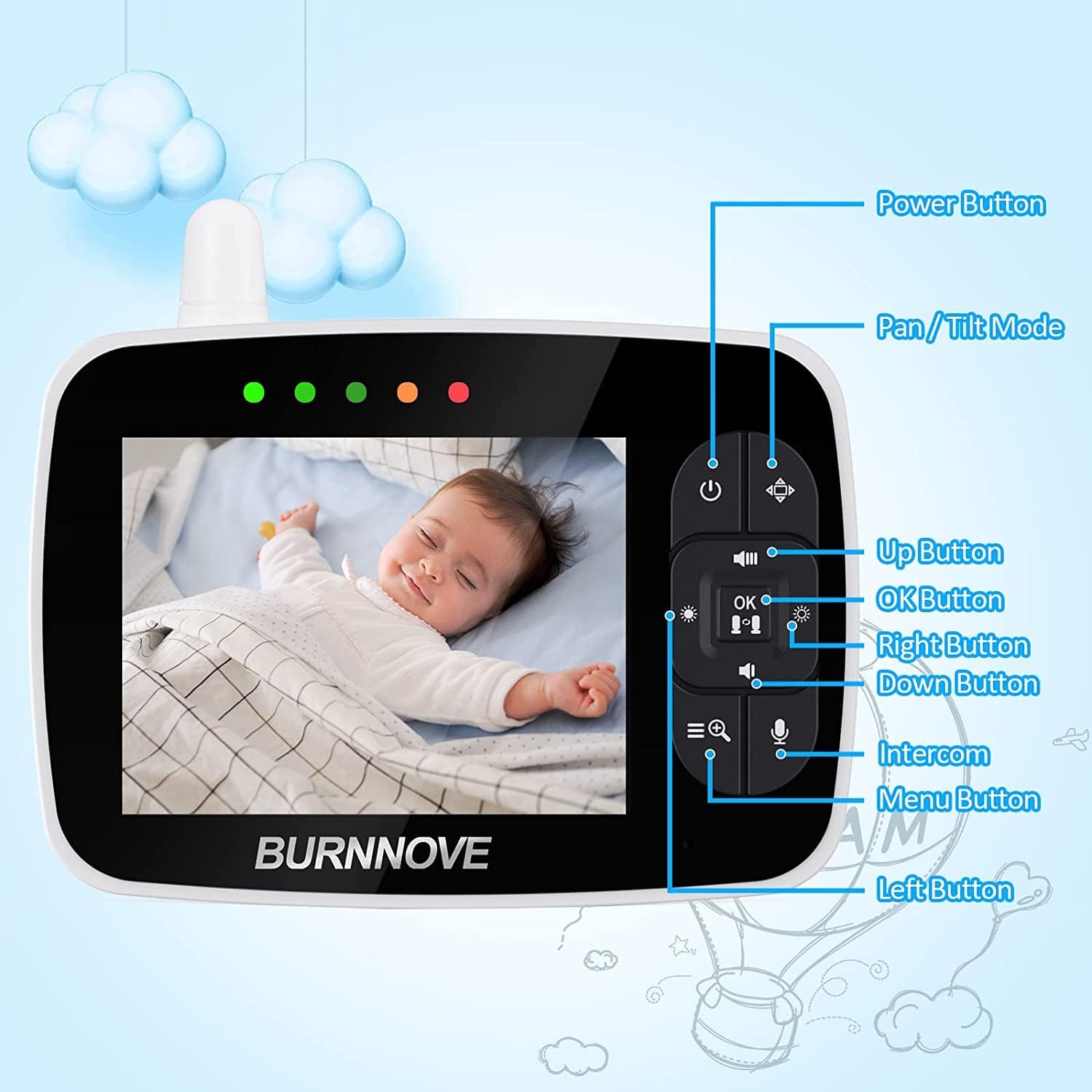
- Power Button: Long press to turn the device on or off.
- Pan/Tilt Mode Button: Short press to access this mode, allowing you to adjust the camera's view (up, down, left, and right).
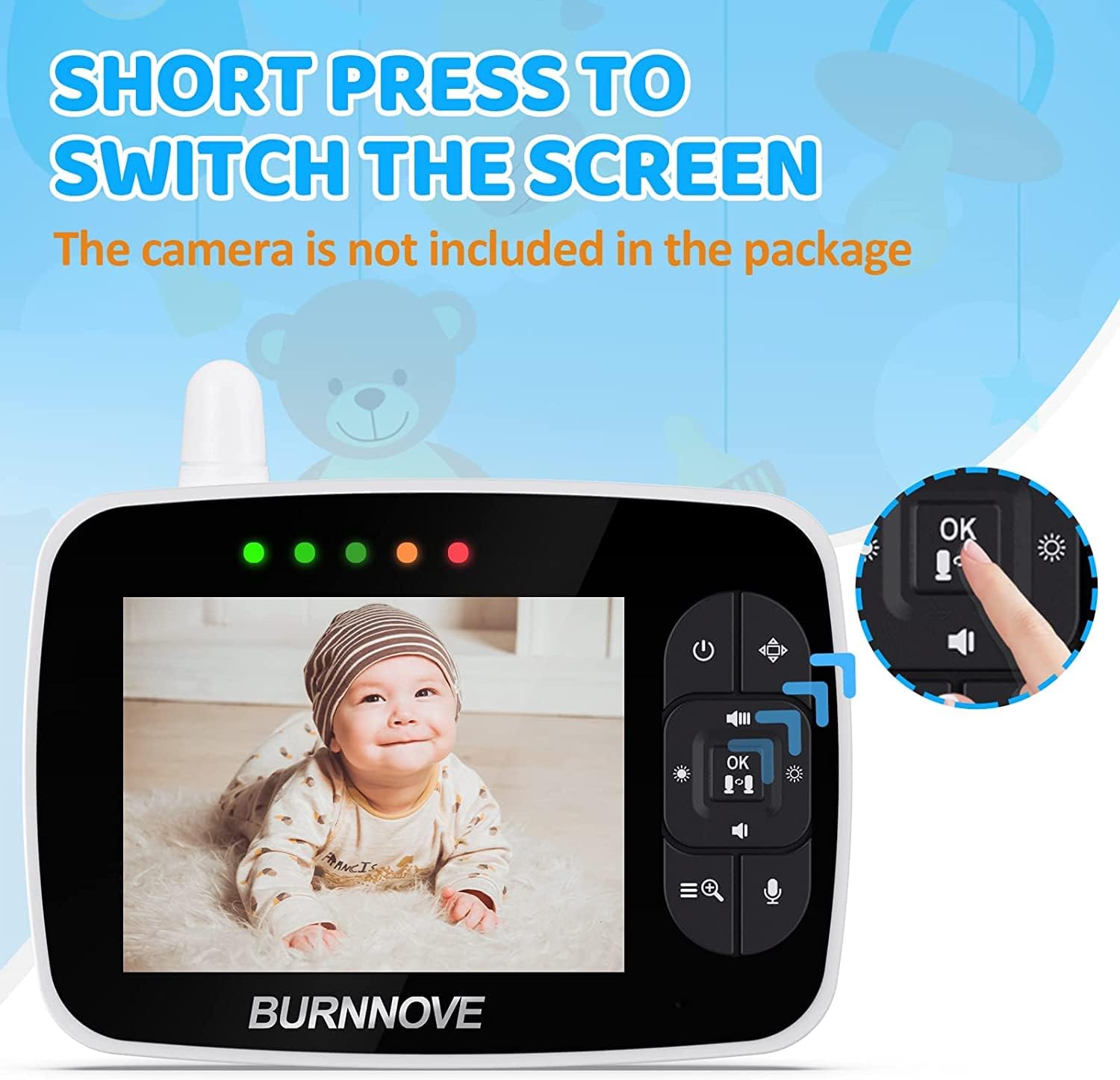
- OK Button: Short press to confirm selections or to switch between connected camera views.
- Volume Up/Down Buttons: Adjust the audio volume.
- Brightness Left/Right Buttons: Adjust the screen brightness.
- Menu/Zoom In Button: Short press to access the menu bar (for ECO mode, multiple camera connection, lullaby, alarm clock settings). Long press for 2x digital zoom.
- Microphone Button: Long press to speak to your baby through the camera's speaker. Release the button to hear your baby.
Connecting Multiple Cameras
The monitor supports connection with up to 4 BURNNOVE cameras. To switch between camera views, short press the OK Button. This allows you to monitor different areas or multiple children.
Pan/Tilt Mode
After entering Pan/Tilt mode by short pressing the dedicated button, you can control the connected camera's movement. The camera can move 120° vertically (up and down) and 355° horizontally (left and right), providing a comprehensive view of the room.

Zoom Function
To get a closer look at your baby, long press the Menu/Zoom In Button to activate the 2x digital zoom. This allows for clearer observation of your baby's movements and expressions.

Two-Way Talk
The two-way talk feature allows you to communicate with your baby from another room. Long press the Microphone Button on the monitor to speak. Release the button to hear your baby's response. This feature can help soothe your baby even when you are not physically present.

ECO Mode
The ECO mode helps conserve battery life. When activated, the monitor screen will turn off when no sound is detected from the baby's room. It will automatically turn back on when sound is detected. Access this setting via the menu.
Lullaby Function
The monitor can play lullabies through the connected camera to help soothe your baby to sleep. This feature can be accessed and controlled through the menu settings.
Alarm Clock Function
Set an alarm on the monitor to remind you of feeding times, diaper changes, or other important events. This function is available within the menu settings.
Maintenance
To ensure the longevity and optimal performance of your BURNNOVE Baby Monitor Screen, follow these maintenance guidelines:
- Cleaning: Use a soft, dry cloth to clean the monitor screen and body. Do not use abrasive cleaners or solvents.
- Storage: When not in use for extended periods, store the monitor in a cool, dry place away from direct sunlight and extreme temperatures.
- Battery Care: Avoid fully discharging the battery frequently. For best battery life, charge the monitor regularly.
- Handling: Handle the monitor with care. Avoid dropping it or subjecting it to strong impacts, as this can damage internal components or the charging port.
Troubleshooting
If you encounter issues with your BURNNOVE Baby Monitor Screen, please refer to the following table for common problems and their solutions:
| Problem | Possible Cause | Solution |
|---|---|---|
| No image on screen | Monitor is off; Camera is off or out of range; Battery is low. | Long press the Power button to turn on. Ensure camera is powered on and within range. Charge the monitor. |
| No sound | Volume is too low; Microphone on camera is muted. | Increase volume using the Volume Up button. Check camera settings to ensure microphone is active. |
| Poor image quality | Camera lens is dirty; Low light conditions; Camera is too far or obstructed. | Clean camera lens. Ensure adequate lighting. Reposition camera closer to monitor or remove obstructions. |
| Monitor not charging | Charger not connected properly; Faulty charger or cable; Damaged charging port. | Ensure charger is securely connected. Try a different compatible charger/cable. If port is damaged, contact support. |
| Cannot pair with camera | Camera is not a BURNNOVE model; Camera is not in pairing mode; Out of range. | Ensure camera is a compatible BURNNOVE model. Follow camera's instructions for pairing mode. Move camera closer to monitor. |
If the problem persists after attempting these solutions, please contact BURNNOVE customer support for further assistance.
Specifications
| Feature | Detail |
|---|---|
| Product Name | BURNNOVE Baby Monitor Screen (Parent Unit) |
| Model Number | YHde11049-Q |
| Screen Size | 3.5 inches |
| Display Resolution | 480p |
| Connectivity Technology | Wireless |
| Power Source | Battery Powered |
| Battery Type | 1 Lithium-polymer battery (required) |
| Battery Composition | Lithium-ion |
| Approx. Charging Time | 5.5 hours |
| Approx. Usage Time (ECO Mode) | 10 hours |
| Material | Plastic |
| Indoor/Outdoor Use | Indoor |
| Controller Type | Button |
| Max. Connected Cameras | 4 |
| Digital Zoom | 2x |
| Pan/Tilt Control | 120° Up/Down, 355° Left/Right (via compatible camera) |
| Special Features | Two-Way Talk, ECO Mode, Lullabies, Alarm Clock |
| Package Dimensions | 13.9 x 9.3 x 8.2 cm |
| Package Weight | 250 grams |

Important Notes
- This product is an accessory and must be used with a BURNNOVE baby surveillance camera. It is not compatible with cameras from other brands.
- The package includes only one monitor screen; no camera or charger is included.
- Always ensure the monitor and camera are placed in a safe location, out of reach of children.
- Do not expose the monitor to water or excessive humidity.
Warranty and Support
For any questions regarding your BURNNOVE Baby Monitor Screen, or if you require technical support, please contact BURNNOVE customer service. You can typically find the "Contact Seller" option within your order details on the platform where you made your purchase. We are committed to providing satisfactory service and support for our products.
Information regarding spare parts availability is currently unavailable.
Ask a question about this manual
Ask about setup, troubleshooting, compatibility, parts, safety, or missing instructions. Manuals+ will review the question and use this page’s manual context to help answer it.