
Introduction
This manual provides essential information for the proper installation, operation, and maintenance of your Samsung RF23A9675AP Bespoke 4-Door Flex Refrigerator. Please read all instructions carefully before using the appliance to ensure safe and efficient performance. This refrigerator is designed for modern living, offering customizable aesthetics and advanced cooling technologies.
Key Features
Bespoke Design & Panel Customization
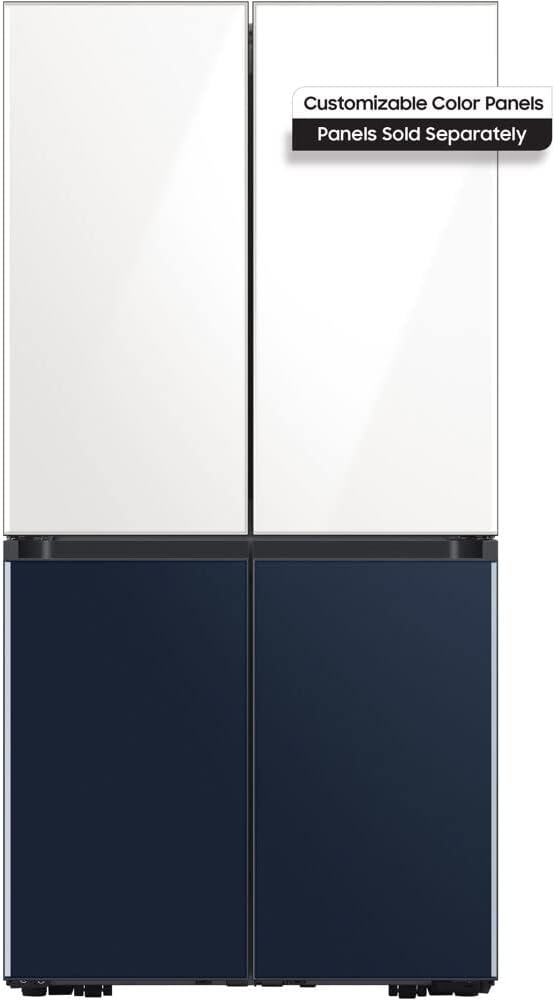
The Samsung Bespoke 4-Door Flex Refrigerator features a modern design with customizable panels. The image displays the refrigerator with white panels on the top two doors and navy blue panels on the bottom two doors. These panels are sold separately, allowing users to personalize the refrigerator's appearance to match their kitchen decor and personal style.
Spacious Interior & Capacity
With a generous 23 cubic feet capacity, this refrigerator offers ample space for groceries and large items. Its thoughtful interior layout, including adjustable shelves and spacious bins, allows for efficient organization. The design accommodates bulky items, such as a 14-pound turkey, without issues, making it suitable for families and entertaining.
Clearances and Installation Considerations
When installing the refrigerator, it is crucial to check all clearances. This model is not designed to be flush with the wall due to a rear component that extends approximately 4-5 inches. This design allows the doors to open fully without hitting adjacent cabinetry. Ensure adequate space on the sides and top for proper ventilation and door swing. The control panel is located at the top of the refrigerator, which may require careful consideration for built-in installations.
Beverage Center
The integrated Beverage Center provides convenient access to chilled water. It features both a manual water spigot and an auto-fill pitcher. For the auto-fill pitcher to function correctly, it must be slid into its designated slot precisely. If resistance is felt or the pitcher is not fully seated, it may not auto-fill. Users may need to manually press the activation button on the back of the pitcher's slot to initiate filling if it doesn't start automatically. Ensure the pitcher is pushed all the way back for optimal performance.
Dual Auto Ice Maker
The dual auto ice maker, producing two different types of ice. It has a high ice production capacity, ensuring a steady supply. To prevent ice from falling out the back of the bins when scooping, it is recommended to pull the ice forward in the bin before scooping. This simple action helps to contain the ice and minimize spills. Both ice types can be independently turned on or off as needed.
SmartThings Integration
The refrigerator integrates with Samsung's SmartThings app, allowing for remote monitoring and control. While basic settings can be adjusted via the internal control panel, the app offers a more convenient way to manage features like temperature settings for the fridge and freezer modes. The app also provides useful alerts, such as notifications if a door is accidentally left open.
Setup
- Unpacking and Placement: Carefully remove all packaging materials. Place the refrigerator on a level, stable surface, ensuring adequate clearance from walls and cabinets for ventilation and door opening.
- Leveling: Use the adjustable leveling feet to ensure the refrigerator is perfectly level. This prevents door alignment issues and ensures proper operation.
- Water Line Connection: Connect the refrigerator to a cold water supply line for the ice maker and beverage center. Ensure all connections are secure to prevent leaks.
- Initial Power On: Plug the refrigerator into a grounded electrical outlet. Allow several hours for the internal temperature to stabilize before loading with food.
Operating Instructions
- Temperature Control: Adjust the refrigerator and freezer temperatures using the internal control panel or the Samsung SmartThings app. Recommended temperatures are 37°F (3°C) for the refrigerator and 0°F (-18°C) for the freezer.
- FlexZone Usage: Utilize the 4-Door Flex capabilities to convert the bottom-right compartment between freezer and refrigerator modes based on your storage needs. Refer to the internal control panel or SmartThings app for mode selection.
- Beverage Center Use: To dispense water, use the manual spigot or ensure the auto-fill pitcher is correctly seated for automatic refilling.
- Ice Maker Operation: The dual ice maker produces two types of ice. Use the provided scoop to retrieve ice. For optimal performance and to prevent ice from falling behind the bins, pull the ice forward before scooping.
Maintenance
- Cleaning: Regularly clean the interior and exterior surfaces with a soft cloth and mild detergent. Avoid abrasive cleaners or solvents. For glass panels, use a glass cleaner.
- Water Filter Replacement: The refrigerator will alert you when it's time to replace the water filter. It is recommended to use genuine Samsung water filters to ensure proper filtration and prevent potential issues. The replacement process is straightforward and can be done by following the instructions on the internal control panel.
- Ice Maker Maintenance: Periodically check the ice bins for any ice buildup or blockages. If ice tends to fall behind the bins, ensure you are pulling the ice forward with the scoop before removing it.
Troubleshooting
If you encounter any issues with your refrigerator, please refer to the following common troubleshooting tips. For more detailed solutions, consult the full user manual or contact Samsung customer support.
- Refrigerator Not Cooling: Check if the power cord is securely plugged in. Ensure temperature settings are correct. Verify that the doors are fully closed and not obstructed.
- Ice Maker Not Producing Ice: Check if the ice maker is turned on. Ensure the water line is connected and the water filter is not clogged or due for replacement.
- Water Dispenser Issues: If the auto-fill pitcher is not filling, ensure it is correctly seated and the activation button is engaged. Check for kinks in the water line.
- Door Alarm: The refrigerator will sound an alarm if a door is left open for an extended period. Close all doors securely.
Specifications
| Feature | Specification |
|---|---|
| Brand | Samsung |
| Model Number | RF23A9675AP |
| Capacity | 23 Cubic Feet |
| Installation Type | Counter-Depth |
| Form Factor | Side By Side |
| Color Options | Navy Blue, White (panels sold separately) |
| Number Of Doors | 4 |
| Defrost System | Hot Gas Defrost |
| Door Material Type | Stainless Steel |
| Certification | Energy Star |
| Product Dimensions (D x W x H) | 78.5"D x 38.2"W x 36.15"H |
Warranty and Support
For detailed warranty information, product registration, or technical support, please refer to the documentation included with your refrigerator or visit the official Samsung website. Keep your purchase receipt for warranty claims.