
1. Introduction
The Hearkent Atomic Talking Watch TG2105LCD is designed for individuals who are visually impaired or seniors, offering ease of use and clear audio announcements. This watch automatically sets itself using signals from the official U.S. atomic clock, ensuring accurate timekeeping and adjusting for daylight saving time. It features a large, easy-to-read LCD display and provides clear, loud English voice announcements for time and date.

Figure 1: Key features of the Hearkent Atomic Talking Watch, including radio control, large display, automatic adjustments, alarm, hourly chime, clear voice, and long battery life.

Figure 2: The watch is suitable for the elderly, blind individuals, and for setting wake-up and medication reminders.
2. Setup
2.1 Initial Activation
Upon first use or after a battery change, the watch may display "SHIP". To activate the watch, simultaneously hold down the 2 o'clock (TIME) button and the 8 o'clock (SET) button for approximately 5 seconds. The watch will then activate and begin to receive the atomic time signal.

Figure 3: Overview of watch buttons and their primary announcements.
2.2 Time Zone Setting
Before the watch can accurately set itself via the atomic signal, you must set your correct time zone. This is a one-time setup unless you change time zones.
- Hold the 8 o'clock (SET) button for more than 3 seconds. The watch will speak, indicating it has entered a setting mode.
- Push the 8 o'clock (SET) button another 3 times in a row until the watch says "Time Zone Setting".
- Press the 2 o'clock (TIME) button repeatedly to cycle through the available time zones: USA Pacific (-8), USA Mountain (-7), USA Central (-6), USA Eastern (-5). The watch will verbally announce each time zone.
- Once your desired time zone is announced, press the 8 o'clock (SET) button to confirm your selection. The watch will confirm the setting.
The watch will then attempt to synchronize with the atomic clock signal, typically overnight between 3 AM and 4 AM. For best reception, place the watch near a window.
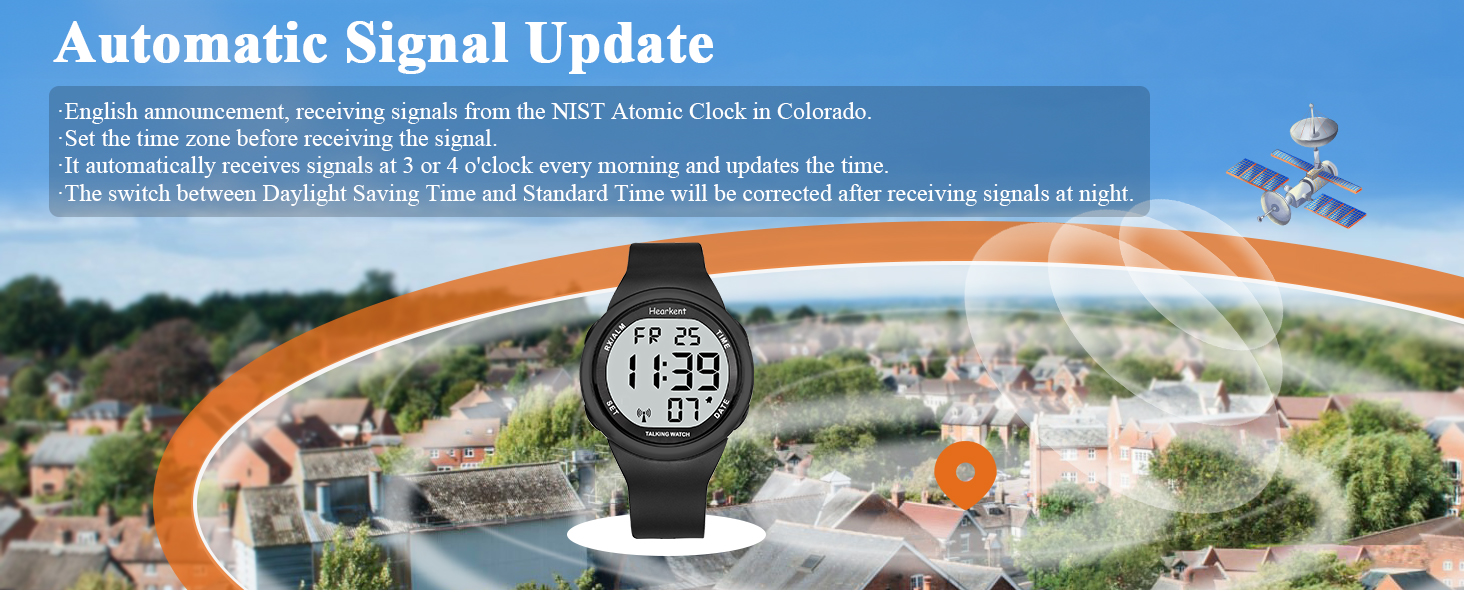
Figure 4: The watch receives signals from the NIST Atomic Clock for automatic time updates, including Daylight Saving Time adjustments.
Video 1: This video demonstrates how the Hearkent Digital Watch sets itself to the Atomic Clock and how to set the time zone.
3. Operating Instructions
3.1 Basic Button Functions
- 2 o'clock (TIME) button: Press once to hear the current time (e.g., "The time is 10:30 PM").
- 4 o'clock (DATE) button: Press once to hear the current date (e.g., "Today is Thursday, November 18, Year 2020").
- 10 o'clock (RX/ALM) button: Press once to hear the alarm time or if the alarm is set to OFF (e.g., "The Alarm Time is 7:50 AM" or "Alarm is OFF").
- 8 o'clock (SET) button: Long press to enter setting mode. Short press to confirm selections within setting modes.
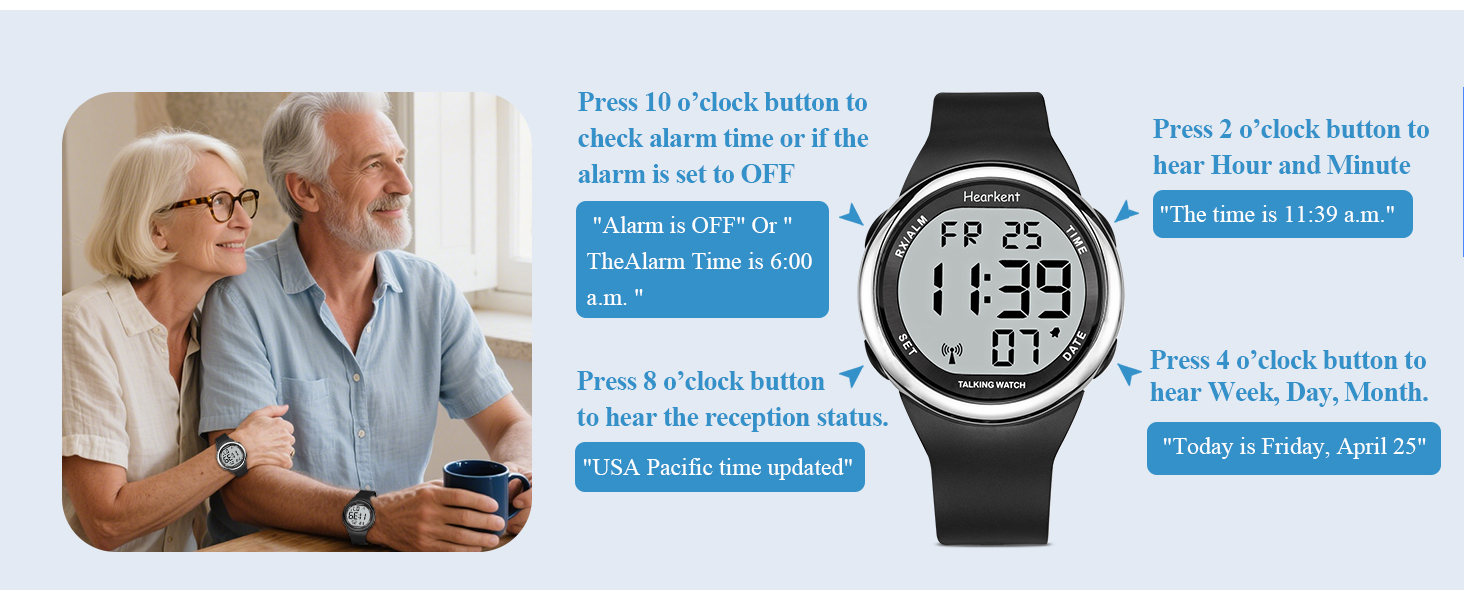
Figure 5: Detailed functions of each button on the Hearkent Talking Watch.
Video 2: This video provides a comprehensive guide to the settings of the 2105 Talking Watch, covering various functions.
3.2 Setting Daily Alarm Time
- Hold the 8 o'clock (SET) button for more than 3 seconds until the watch speaks.
- Press the 8 o'clock (SET) button once to enter the alarm setting mode. The watch will say "Set Alarm".
- Press the 2 o'clock (TIME) button repeatedly to set the desired alarm hour. The watch will announce the hour.
- Press the 4 o'clock (DATE) button repeatedly to set the desired alarm minute. The watch will announce the minute.
- Press the 8 o'clock (SET) button to confirm the alarm time. The watch will confirm the setting.

Figure 6: The watch features an alarm function to help manage daily schedules.
3.3 Alarm ON/OFF
- Hold the 8 o'clock (SET) button for more than 3 seconds until the watch speaks.
- Press the 8 o'clock (SET) button twice to enter the alarm ON/OFF mode. The watch will say "Alarm ON" or "Alarm OFF".
- Press the 10 o'clock (RX/ALM) button to toggle the alarm ON or OFF.
- Press the 8 o'clock (SET) button to confirm your selection.
3.4 Chime ON/OFF (Hourly Chime)
- Hold the 8 o'clock (SET) button for more than 3 seconds until the watch speaks.
- Press the 8 o'clock (SET) button three times to enter the chime ON/OFF mode. The watch will say "Chime ON" or "Chime OFF".
- Press the 10 o'clock (RX/ALM) button to toggle the hourly chime ON or OFF.
- Press the 8 o'clock (SET) button to confirm your selection.
3.5 Manual Time Setting (If Atomic Signal Unavailable)
If the watch cannot receive the atomic signal, you can set the time manually.
- Hold the 8 o'clock (SET) button for more than 3 seconds until the watch speaks.
- Press the 8 o'clock (SET) button four times to enter the manual time setting mode. The watch will say "Set Time".
- Press the 2 o'clock (TIME) button repeatedly to set the desired hour. The watch will announce the hour.
- Press the 4 o'clock (DATE) button repeatedly to set the desired minute. The watch will announce the minute.
- Press the 8 o'clock (SET) button to confirm the manual time setting.
4. Maintenance
4.1 Battery Life and Replacement
The watch uses one CR2032 battery, which can last for over 1 year. When the battery is low, the display may dim or the voice function may become weak. To replace the battery, consult a professional watch repair service or follow specific instructions for CR2032 battery replacement for this model.

Figure 7: The watch is powered by a CR2032 battery, offering a lifespan of over one year.
4.2 Cleaning and Care
Clean the watch with a soft, dry cloth. Avoid using harsh chemicals or abrasive materials. The watch features a sturdy dial design that is scratch-resistant.

Figure 8: The watch features a sturdy, scratch-resistant dial for durability.
4.3 Water Resistance
The watch is rated as "Waterproof". However, it is recommended to avoid prolonged exposure to water or submersion to ensure longevity. Avoid pressing buttons while the watch is wet.
4.4 Strap Replacement
The watch comes with a soft PU strap. If replacement is needed, ensure to use compatible straps to maintain comfort and functionality.

Figure 9: The watch features a replaceable band for extended use and comfort.
5. Troubleshooting
- Watch not setting time automatically: Ensure the correct time zone is set. Place the watch near a window, preferably on a higher floor, overnight for optimal atomic signal reception. Avoid placing it near electronic devices that might interfere with the signal.
- Incorrect time displayed: Verify the time zone setting. If the atomic signal is consistently weak, consider using the manual time setting option.
- No voice announcement or weak voice: Check the battery level. A low battery can affect voice clarity and volume. Replace the CR2032 battery if necessary.
- Buttons not responding: Ensure the watch is not in a locked mode (if applicable, though not specified for this model). Check for physical damage or debris around the buttons. If the issue persists, a battery replacement might be needed.
6. Specifications
| Feature | Detail |
|---|---|
| Product Dimensions | 1.6 x 1.5 x 1.6 inches |
| Item Weight | 1.76 ounces |
| Model Number | TG2105LCD |
| Battery | 1 CR2032 battery required (lasts >1 year) |
| Display Type | Digital LCD |
| Watch Movement Type | DIGITAL |
| Additional Features | Talking watch, Atomic time setting, Alarm, Hourly Chime |
| Water Resistance Level | Waterproof |
| Band Material Type | Resin |
| Case Material Type | Stainless Steel |
| Case Diameter | 44 Millimeters |
| Case Thickness | 16.5 Millimeters |
| Band Length | 240 Millimeters |

Figure 10: Front view with key dimensions of the watch face and strap width.

Figure 11: Side view with wrist circumference details and case thickness.
7. Warranty and Support
For any questions, concerns, or support regarding your Hearkent Atomic Talking Watch TG2105LCD, please contact Hearkent customer service. Refer to your purchase documentation for specific warranty details and contact information.