
Introduction
Thank you for choosing the Borofone BR15 Portable Bluetooth Speaker. This manual provides essential information for the safe and efficient use of your device. Please read it thoroughly before operating the speaker and keep it for future reference.
Product Overview
The Borofone BR15 is a versatile portable Bluetooth speaker designed for various environments, including sports activities. It features Bluetooth 5.0 connectivity, a durable plastic build, and water resistance.
Key Features:
- Bluetooth 5.0: Ensures stable and efficient wireless connection.
- Waterproof Design: Provides protection against water splashes, suitable for outdoor use.
- Multiple Playback Modes: Supports Bluetooth, FM Radio, TF Card, USB Disk, and TWS (True Wireless Stereo).
- Portable and Durable: Compact size with a robust plastic construction.
- Long Battery Life: 1200 mAh battery offers up to 2.5 hours of music or talk time.
Speaker Components:
Familiarize yourself with the speaker's layout:
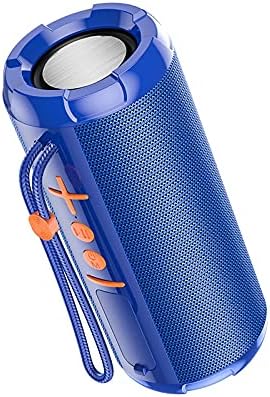
Image 1: Front view of the Borofone BR15 speaker, showing the control panel with power, volume, and mode buttons.

Image 2: Side view of the Borofone BR15 speaker, highlighting its cylindrical design and the Borofone branding.
- Power Button: Turns the speaker on/off.
- Volume Up/Next Track Button: Increases volume or skips to the next track.
- Volume Down/Previous Track Button: Decreases volume or goes to the previous track.
- Play/Pause Button: Controls music playback and answers/ends calls.
- Mode Button: Switches between Bluetooth, FM Radio, TF Card, and USB Disk modes.
- Charging Port: For connecting the charging cable.
- TF Card Slot: For inserting a MicroSD card.
- USB Port: For connecting a USB flash drive.
Setup
1. Charging the Speaker:
- Connect the provided charging cable to the speaker's charging port.
- Connect the other end of the cable to a USB power adapter (not included) or a computer's USB port.
- The charging indicator light will illuminate. Charging takes approximately 2 hours.
- Once fully charged, the indicator light will change or turn off. Disconnect the charging cable.
2. Powering On/Off:
- To power on, press and hold the Power button for a few seconds until you hear an audible prompt.
- To power off, press and hold the Power button again until the speaker shuts down.
3. Bluetooth Pairing:
- Ensure the speaker is powered on and in Bluetooth mode (indicated by a flashing LED or audible prompt). If not, press the Mode button to switch to Bluetooth.
- Enable Bluetooth on your smartphone, tablet, or other compatible device.
- Search for "BR15" in the list of available Bluetooth devices.
- Select "BR15" to connect. Once paired, you will hear a confirmation sound, and the LED indicator will stop flashing.
- The speaker will automatically reconnect to the last paired device when powered on, if the device's Bluetooth is active and within range.
Operating Instructions
Music Playback:
- Play/Pause: Press the Play/Pause button once.
- Next Track: Press and hold the Volume Up button.
- Previous Track: Press and hold the Volume Down button.
- Volume Up: Short press the Volume Up button.
- Volume Down: Short press the Volume Down button.
Call Handling (in Bluetooth mode):
- Answer Call: Press the Play/Pause button once.
- End Call: Press the Play/Pause button once during a call.
- Reject Call: Press and hold the Play/Pause button.
Mode Switching:
Press the Mode button repeatedly to cycle through available modes:
- Bluetooth Mode: For wireless audio streaming.
- FM Radio Mode: Automatically scans and plays FM stations.
- TF Card Mode: Plays audio files from a MicroSD card (insert card before selecting mode).
- USB Disk Mode: Plays audio files from a USB flash drive (insert drive before selecting mode).
- TWS Mode (True Wireless Stereo): Connects two BR15 speakers for stereo sound. (Instructions for TWS pairing are typically separate and more detailed, but I'll keep it brief here as the JSON doesn't provide specifics).
Maintenance
- Cleaning: Use a soft, dry cloth to wipe the speaker. Do not use abrasive cleaners or solvents.
- Water Resistance: The speaker is waterproof, but it is not designed for submersion. Ensure the charging port cover is securely closed to maintain water resistance. Avoid exposing it to strong jets of water.
- Storage: Store the speaker in a cool, dry place away from direct sunlight and extreme temperatures.
- Battery Care: To prolong battery life, charge the speaker fully before first use and at least once every three months if not used regularly.
Troubleshooting
| Problem | Solution |
|---|---|
| Speaker does not power on. | Ensure the battery is charged. Connect the speaker to a power source and try again. |
| Cannot pair via Bluetooth. |
|
| No sound or low volume. |
|
| FM Radio reception is poor. | Move the speaker to an open area, away from obstructions or interference. Some speakers use the charging cable as an antenna; try connecting it. |
Specifications
| Model Name: | BR15 |
| Brand: | Borofone |
| Bluetooth Version: | 5.0 |
| Bluetooth Chip: | Jerry JL |
| Battery Capacity: | 1200 mAh |
| Charging Time: | Approximately 2 hours |
| Music/Talk Time: | Up to 2.5 hours |
| Speaker Unit: | 45mm x 2 |
| Power Output: | 5W x 2 |
| Dimensions (L x W x H): | 162 x 70 x 70 mm |
| Material: | Plastic |
| Waterproof: | Yes |
| Connectivity: | Bluetooth |
| Power Source: | Battery Powered |
| Audio Output Mode: | Stereo |
| Mounting Type: | Tabletop |
| Compatible Devices: | Laptop, Smartphone, Tablet |
| Supported Modes: | Bluetooth, FM Radio, TF Card, USB Disk, TWS |
Warranty and Support
For warranty information and technical support, please refer to the warranty card included with your product or visit the official Borofone website. Keep your purchase receipt as proof of purchase.
If you encounter any issues not covered in this manual, please contact Borofone customer service for assistance.


