Product Overview
The Inrico T310 V3.0 is a robust 4G LTE Push-to-Talk (PoC) radio designed for reliable mobile network communication. It features a dual SIM card slot, NFC capabilities, a touch screen, and a camera, making it a versatile tool for various professional environments.
Key features include:
- Android 4G LTE PoC portable radio with 8.0MP camera, NFC, and touch screen.
- Customized hardware platform offering flexibility.
- Anti-slip design with curved rims for easy grip and better in-hand experience.
- Dedicated torch light on top, activated with a physical shortcut key, ideal for illumination.
- Front and rear cameras (13MP auto-focus rear camera) for easy image and video recording.

Figure 1: Front and rear view of the Inrico T310 V3.0 4G LTE Walkie Talkie, showcasing its compact and rugged design.
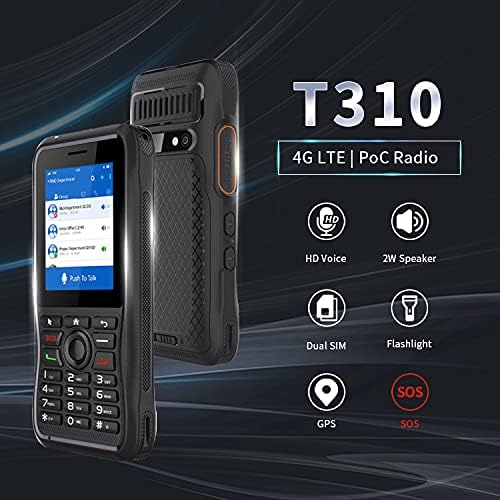
Figure 2: Overview of key features including HD Voice, 2W Speaker, Dual SIM support, built-in Flashlight, GPS, and SOS functionality.
Getting Started: Setup
Package Contents
Before beginning, ensure all items are present in the package:
- Inrico T310 Radio (x1)
- Battery (x1)
- Power Adapter (x1)
- USB Cable (2.0) (x1)
- Belt Clip (x1)
- Strap (x1)
- User Manual (x1)
Battery and SIM Card Installation
- Install the Battery: Locate the battery compartment on the rear of the device. Open the compartment cover, insert the provided 2800mAh Lithium Ion battery, ensuring proper alignment of the contacts. Close the cover securely.
- Insert SIM Cards: The T310 supports dual micro SIM cards. Locate the SIM card slots, typically beneath the battery or on the side. Carefully insert your micro SIM cards into the designated slots.
- Charge the Device: Connect the USB cable to the radio and the power adapter. Plug the adapter into a power outlet. Allow the device to fully charge before first use. The indicator light will show charging status.
- Attach Belt Clip/Strap: If desired, attach the belt clip or strap to the designated points on the radio for convenient carrying.

Figure 3: Rear and side views of the Inrico T310, highlighting the battery area, camera, PTT, and volume controls.
Operating Instructions
Power On/Off
- Power On: Press and hold the Power button (usually located on the side or top) until the screen illuminates and the device boots up.
- Power Off: Press and hold the Power button until a power-off menu appears on the screen. Select "Power Off" and confirm.
Basic Navigation and Functions
The Inrico T310 features a 2.4-inch touch screen and a physical keypad for navigation.

Figure 4: Detailed view of the Inrico T310's front panel, showing the screen, keypad, and various button functions.
- Touch Screen: Navigate menus, select applications, and input text using the touch screen.
- Keypad: Use the physical buttons for dialing, navigating, and quick access to functions.
- Push-to-Talk (PTT): The dedicated PTT button on the side allows for instant communication in group or private calls. Press and hold to transmit, release to listen.
- Volume Control: Use the volume up/down buttons on the side to adjust audio levels.
- Flashlight: The dedicated LED flashlight can be activated via a physical shortcut key or through the menu.
- Camera: Access the camera application to capture photos or videos. The rear camera is 13MP with auto-focus.
Network and Connectivity
The T310 supports 4G LTE for mobile network communication, Wi-Fi (802.11 a/b/g/n, 2.4G and 5G), Bluetooth 4.2, and GPS/GLONASS/AGPS for navigation.
For a visual demonstration of the T310's features and operation, please watch the following video:
Video 1: Demonstration of the Inrico T310 PoC walkie talkie, showcasing its features and functionality in a Zello environment. This video provides a practical overview of the device's operation.
Maintenance
Proper maintenance ensures the longevity and optimal performance of your Inrico T310 radio.
- Cleaning: Use a soft, dry cloth to clean the device. For stubborn dirt, a slightly damp cloth can be used, but ensure no moisture enters ports or openings. Avoid harsh chemicals or abrasive cleaners.
- Storage: Store the device in a cool, dry place away from direct sunlight and extreme temperatures.
- Battery Care: To prolong battery life, avoid fully discharging the battery frequently. Charge the device regularly, especially if it will be stored for an extended period.
- Protection: The T310 has an IP54 physical protection level, meaning it is protected from limited dust ingress and water spray from any direction. While rugged, avoid submerging the device in water or exposing it to excessive dust.

Figure 5: The anti-slip design of the Inrico T310, providing a secure grip and enhanced durability.
Troubleshooting
This section addresses common issues you might encounter with your Inrico T310 radio.
| Problem | Possible Cause | Solution |
|---|---|---|
| Device does not power on. | Low or no battery charge; battery not properly installed. | Charge the battery fully. Ensure the battery is correctly inserted and the compartment cover is secure. |
| No network signal. | Out of network coverage; SIM card not inserted or faulty. | Move to an area with better network coverage. Check SIM card installation. Contact your network provider if issues persist. |
| Audio issues (no sound, distorted). | Volume too low; speaker/microphone obstructed; software glitch. | Adjust volume. Check for obstructions on speaker/microphone. Restart the device. |
| Touch screen unresponsive. | Temporary software issue; screen damage. | Restart the device. If the problem persists, contact customer support. |
Specifications
Detailed technical specifications for the Inrico T310 V3.0 4G LTE Walkie Talkie.
| Feature | Detail |
|---|---|
| Model | T310 |
| Network (US Version) | GSM: B2/B3/B5/B8; WCDMA: B1/B2/B4/B5/B8; FDD: B2/B4/B7/B12/B17/B28a/B28b/B66 |
| Wi-Fi | IEEE 802.11 a/b/g/n (2.4G and 5G) |
| Bluetooth | BT4.2 |
| GPS | GPS, GLONASS, AGPS |
| Memory | 1GB (RAM) + 8GB (ROM) |
| TF Card Support | Up to 32GB |
| SIM Card Slot | Dual micro SIM card |
| Interface | 3.5mm earphone jack, USB 2.0 |
| Screen Size | 2.4 inches |
| Flashlight | Supported LED Flashlight |
| Speaker | Ø36mm Speaker, 8Ω 2W |
| Microphone | Anti-interference MIC |
| Battery | 2800mAh Lithium Ion (included) |
| Speaking Time | Approx. 8 Hours |
| Standby Time | Approx. 23 Hours |
| Software | Android 7.1 |
| Protection Level | IP54 |
| Drop Resistance | 1.0 Meter |
| Product Dimensions | 1.97 x 0.79 x 4.72 inches |
| Item Weight | 1.1 pounds (0.5 Kilograms) |

Figure 6: Comprehensive technical specifications and included accessories for the Inrico T310.
Warranty and Support
For warranty information and technical support, please refer to the documentation provided with your purchase or contact the manufacturer directly. Specific warranty terms and support channels may vary by region and retailer.
Manufacturer: G GENEINNO


