
Introduction
Thank you for choosing the JOYO JF-02 Ultimate Drive Overdrive Pedal. This manual provides essential information for the proper setup, operation, and maintenance of your new overdrive pedal and its accompanying DC 9V power supply. Please read this manual thoroughly before use to ensure optimal performance and longevity of your equipment.
Product Overview
The JOYO JF-02 Ultimate Drive is an overdrive effect pedal designed to deliver rich, bordering-on-distortion overdrive tones, exceeding the capabilities of a standard diode tube amp. It is bundled with a reliable DC 9V power supply (800mA - 1A) to ensure consistent and clean power delivery.

Image: The JOYO JF-02 Ultimate Drive Overdrive Pedal, showcasing its controls and design.
Setup Instructions
- Power Connection: Connect the included DC 9V power supply to the pedal's 9V DC input jack. Ensure the power supply is rated for 800mA - 1A and has a negative center polarity.
- Input Connection: Connect your guitar or the output of a preceding effect pedal to the IN jack on the right side of the JF-02 pedal using a standard 1/4-inch instrument cable.
- Output Connection: Connect the OUT jack on the left side of the JF-02 pedal to your amplifier's input or the input of the next effect pedal in your signal chain using a standard 1/4-inch instrument cable.
- Power On: Once all connections are secure, plug the power supply into an appropriate electrical outlet.
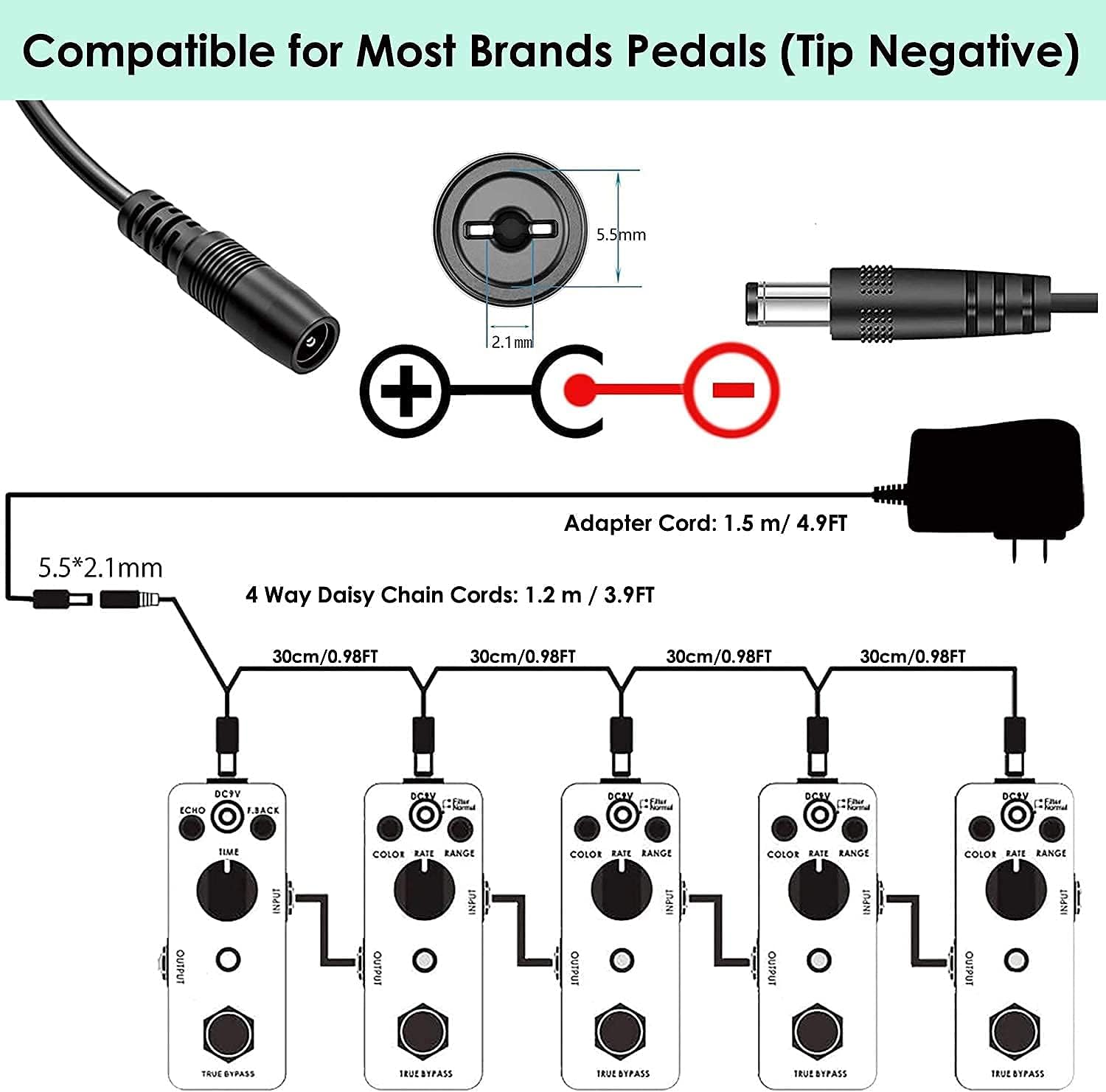
Image: Diagram illustrating the DC 9V power supply connection, showing the 5.5x2.1mm barrel connector with tip-negative polarity, and a daisy chain for multiple pedals.
Important: Always ensure all connections are properly made before powering on your equipment to prevent unexpected noise or damage. Using a JOYO original power adapter or another reliable brand that meets the working current requirements is recommended.
Operating Instructions
The JOYO JF-02 Ultimate Drive pedal features intuitive controls to shape your overdrive tone.

Image: Close-up view of the JOYO JF-02 Ultimate Drive pedal, highlighting the GAIN, TONE, LEVEL knobs, and the HIGH/LOW toggle switch.
- GAIN Knob: Controls the amount of overdrive or distortion. Turn clockwise for more saturation, counter-clockwise for less.
- TONE Knob: Adjusts the tonal character of the overdrive. Turn clockwise for brighter tones, counter-clockwise for warmer, darker tones.
- LEVEL Knob: Sets the overall output volume of the effect. Use this to balance the effect volume with your bypassed signal or to boost your signal.
- HIGH/LOW Toggle Switch: This switch selects between two different gain modes.
- HIGH: Provides a higher gain setting, suitable for more aggressive overdrive or distortion.
- LOW: Offers a lower gain setting, ideal for subtle overdrive and bluesy tones.
- Bypass Footswitch: Engages or disengages the effect. When the effect is engaged, the LED indicator will illuminate. When disengaged, the pedal is in true bypass mode, allowing your guitar's dry signal to pass through unaffected.

Image: Close-up of the footswitch on the JOYO JF-02 Ultimate Drive pedal, used to engage or bypass the effect.
Maintenance
- Cleaning: Use a soft, dry cloth to clean the pedal's exterior. Avoid using abrasive cleaners or solvents, which can damage the finish.
- Storage: Store the pedal in a dry environment, away from extreme temperatures and direct sunlight, when not in use.
- Power Supply Care: Ensure the power supply cable is not bent sharply or placed under heavy objects. Inspect the cable periodically for any signs of wear or damage.

Image: Internal view of the JOYO power supply, highlighting smart IC control for over-current, over-temp, over-voltage, and short circuit protection, designed to reduce noise disturbance.
Troubleshooting
- No Sound:
- Check all cable connections (guitar to pedal, pedal to amp, power supply).
- Ensure the power supply is correctly connected and functioning.
- Verify that your amplifier is turned on and its volume is up.
- Test with different cables to rule out faulty connections.
- Excessive Noise/Hum:
- Poor shielding of electric guitar circuits or lack of a ground wire can cause noise.
- An amplifier without a proper ground wire can contribute to noise.
- Poor quality instrument cables are a common source of unwanted noise.
- Some pickups, especially single-coil pickups in high-gain settings, can naturally produce more noise.
- Ensure the power supply is isolated and not interfering with other electronics. The included power supply features smart IC control for noise reduction.
- Effect Not Engaging:
- Confirm the power supply is connected and providing power (LED should light up when engaged).
- Check the footswitch for proper operation.
Specifications
| Model | JF-02 Ultimate Drive |
| Brand | JOYO |
| Effect Type | Overdrive |
| Signal Format | Analog |
| Power Source | DC 9V Adapter (included) |
| Power Supply Output | 800mA - 1A |
| Power Supply Voltage | 240 Volts (Input, typical for adapter) |
| ASIN | B09H5GHGWS |
Warranty
JOYO Technology Co.,LTD stands by the quality of its products. For specific warranty details and duration, please refer to the documentation included with your purchase or contact the seller directly. Keep your proof of purchase for any warranty claims.
Customer Support
Should you encounter any product issues or require assistance, the fastest and most effective way to receive support is to contact the seller directly through your order details. This ensures prompt and dedicated service.
For more information about JOYO products, you can visit the official JOYO store:


