
1. Product Overview
The JOYO JF-16 British Sound Amp Simulator Pedal is a guitar effect pedal designed to emulate the tones of classic British amplifiers. It offers a range of tones from bluesy overdrive to powerful rock sounds, providing versatility for various musical styles. This pedal features true bypass to maintain signal integrity when disengaged.

Image 1.1: Top view of the JOYO JF-16 British Sound Pedal.
2. Safety Information
- Ensure proper power supply (DC 9V, center negative) to avoid damage to the pedal.
- Always connect the guitar fully to the pedal before playing to prevent unexpected noise.
- Avoid using the pedal in extremely hot, cold, humid, or dusty environments.
- Do not disassemble or attempt to repair the pedal yourself. Refer to qualified service personnel.
3. Package Contents
The bundle includes:
- JOYO JF-16 British Sound Amp Simulator Pedal
- DC 9V Power Supply (800mA - 1A) AC Adapter
Note: Items may be shipped separately.
4. Controls and Functions

Image 4.1: Angled view of the JOYO JF-16 British Sound Pedal showing controls and jacks.
- LOW Knob: Adjusts the low-frequency response.
- MID Knob: Adjusts the mid-range frequency response.
- HIGH Knob: Adjusts the high-frequency response.
- LEVEL Knob: Controls the overall output volume of the effect.
- VOICE Knob: Shapes the tonal character, simulating different amplifier voicings.
- DRIVE Knob: Adjusts the amount of gain/distortion.
- FOOTSWITCH: Engages or bypasses the effect. Features true bypass.
- INPUT Jack: 1/4-inch mono audio input for your guitar.
- OUTPUT Jack: 1/4-inch mono audio output to your amplifier or next pedal.
- DC 9V Input: Power input for a 9V DC center-negative adapter.
5. Setup
- Connect your guitar to the INPUT jack of the JF-16 pedal using a standard 1/4-inch instrument cable.
- Connect the OUTPUT jack of the JF-16 pedal to your amplifier's input or the next pedal in your signal chain.
- Connect the DC 9V power adapter to the pedal's power input. Ensure the adapter meets the specified requirements (9V DC, center negative, 800mA - 1A).
- Turn on your amplifier.

Image 5.1: The JOYO JF-16 pedal integrated into a guitar setup.
6. Operating Instructions
- Engage/Bypass: Press the footswitch to toggle the effect on or off. The LED indicator will illuminate when the effect is active.
- Adjusting Tone: Use the LOW, MID, and HIGH knobs to sculpt your desired EQ. Experiment with these controls to match your guitar and amplifier characteristics.
- Setting Gain: Turn the DRIVE knob clockwise for more distortion and sustain, or counter-clockwise for cleaner tones.
- Voicing the Amp: The VOICE knob allows you to fine-tune the amplifier's tonal character. This control is crucial for achieving specific British amp sounds, from classic blues-rock to aggressive hard rock.
- Controlling Volume: Adjust the LEVEL knob to set the overall output volume of the pedal. Ensure the volume is balanced with your bypassed signal or other effects.
7. Power Supply Information
The JOYO JF-16 pedal requires a DC 9V power supply with a center-negative polarity. The recommended current draw is between 800mA and 1A. Using an incorrect power supply can damage the unit and void the warranty.
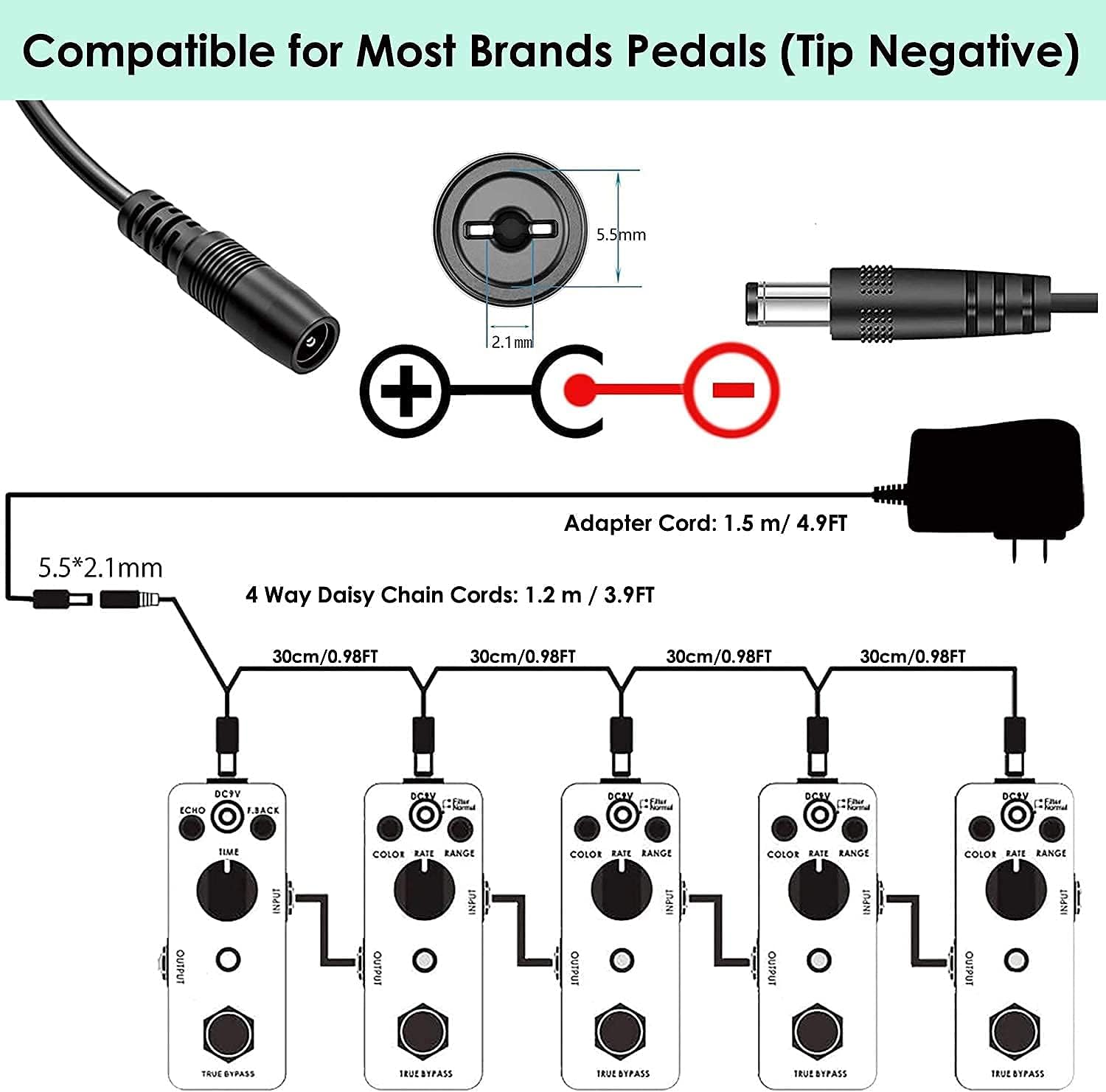
Image 7.1: Diagram illustrating the DC 9V power adapter specifications (5.5x2.1mm, tip negative).

Image 7.2: Internal view of a power adapter with Smart IC Control for protection against over-current, over-temp, over-voltage, and short circuits.
8. Noise Reduction Tips
- Ensure your electric guitar circuits are properly shielded and have a ground wire.
- Use high-quality instrument cables to minimize signal interference.
- Verify that your amplifier has a proper ground connection.
- Be aware that some pickups, especially single-coil pickups in high-gain settings, can naturally produce more noise.
- Consider using a dedicated power supply designed for guitar pedals to reduce noise disturbance.
9. Specifications
| Feature | Specification |
|---|---|
| Brand | JOYO |
| Model | JF-16 |
| Audio Output Effects | Distortion |
| Controls Type | Knob |
| Signal Format | Analog |
| Power Source | Adapter, Electric (DC 9V, 800mA-1A, center negative) |
| Hardware Interface | HP-HSC |
| Color | Purple (based on product images) |
10. Maintenance
- Clean the pedal regularly with a soft, dry cloth. Do not use abrasive cleaners or solvents.
- Avoid exposing the pedal to moisture or extreme temperatures.
- Store the pedal in a dry, cool place when not in use.
- Periodically check all cable connections for wear and tear.
11. Troubleshooting
- No Sound: Check all cable connections, power supply, and ensure the pedal is engaged. Test with different cables and a different power supply if possible.
- Excessive Noise/Hum: Refer to the "Noise Reduction Tips" section. Ensure proper grounding and use high-quality cables. Test in a different electrical outlet.
- Weak/Distorted Sound (unexpectedly): Check your guitar's battery (if active pickups), cable integrity, and amplifier settings. Adjust the pedal's LEVEL and DRIVE knobs.
- LED Not Lighting Up: Verify the power supply connection and ensure it meets the correct specifications.
12. Warranty and Support
For any product issues or support inquiries, please contact the seller directly through your order details on Amazon. This is the fastest and most effective way to receive assistance.

Image 12.1: The JOYO pedal is compatible with various brands of effect pedals and keyboards.


