Introduction
This manual provides instructions for the installation, operation, and maintenance of your Philips Shower Filter AWP1775CH. This product is designed to enhance your showering experience by reducing various impurities in your water supply. Please read this manual thoroughly before use and retain it for future reference.

Image: The Philips Shower Filter AWP1775CH in its chrome finish, a cylindrical device designed for shower water filtration.
Setup and Installation
The Philips Shower Filter AWP1775CH is designed for easy installation without the need for special tools or a plumber. It is compatible with most handheld and rainfall shower heads.
Components Overview

Image: An exploded diagram showing the internal components of the Philips Shower Filter, including the outer casing and the filter cartridge.
Installation Steps
- Prepare the Filter Cartridge: Unscrew the filter casing. Take out the filter cartridge and remove any protective covers from both ends. Place the cartridge back into the casing, ensuring it is seated correctly.
- Disconnect Shower Hose: Carefully remove the shower hose from the water mixing valve (faucet).
- Connect Filter to Valve: Connect the Philips shower filter to the water mixing valve at the water inlet end. Hand-tighten until secure.
- Check for Leaks: Turn on the tap for 2-3 minutes to flush the filter and check for any leaks.
- Connect Shower Hose: Connect your shower hose to the water outlet end of the filter. Hand-tighten until secure.

Image: A four-step diagram illustrating the process of installing the shower filter between the shower arm and the shower hose.

Image: The Philips Shower Filter shown installed in a shower setup, connected to a handheld showerhead.
Operating Principles
The Philips Shower Filter utilizes a multi-stage filtration process to improve water quality.
KDF Filtration Technology
The core of this filter is its 100% KDF (Kinetic Degradation Fluxion) material, a combination of copper and zinc. KDF works through a redox (reduction-oxidation) reaction to reduce free chlorine, heavy metals (such as lead, mercury, and iron), hydrogen sulfide, and other impurities. This process helps to improve water quality, which can contribute to healthier skin and hair.
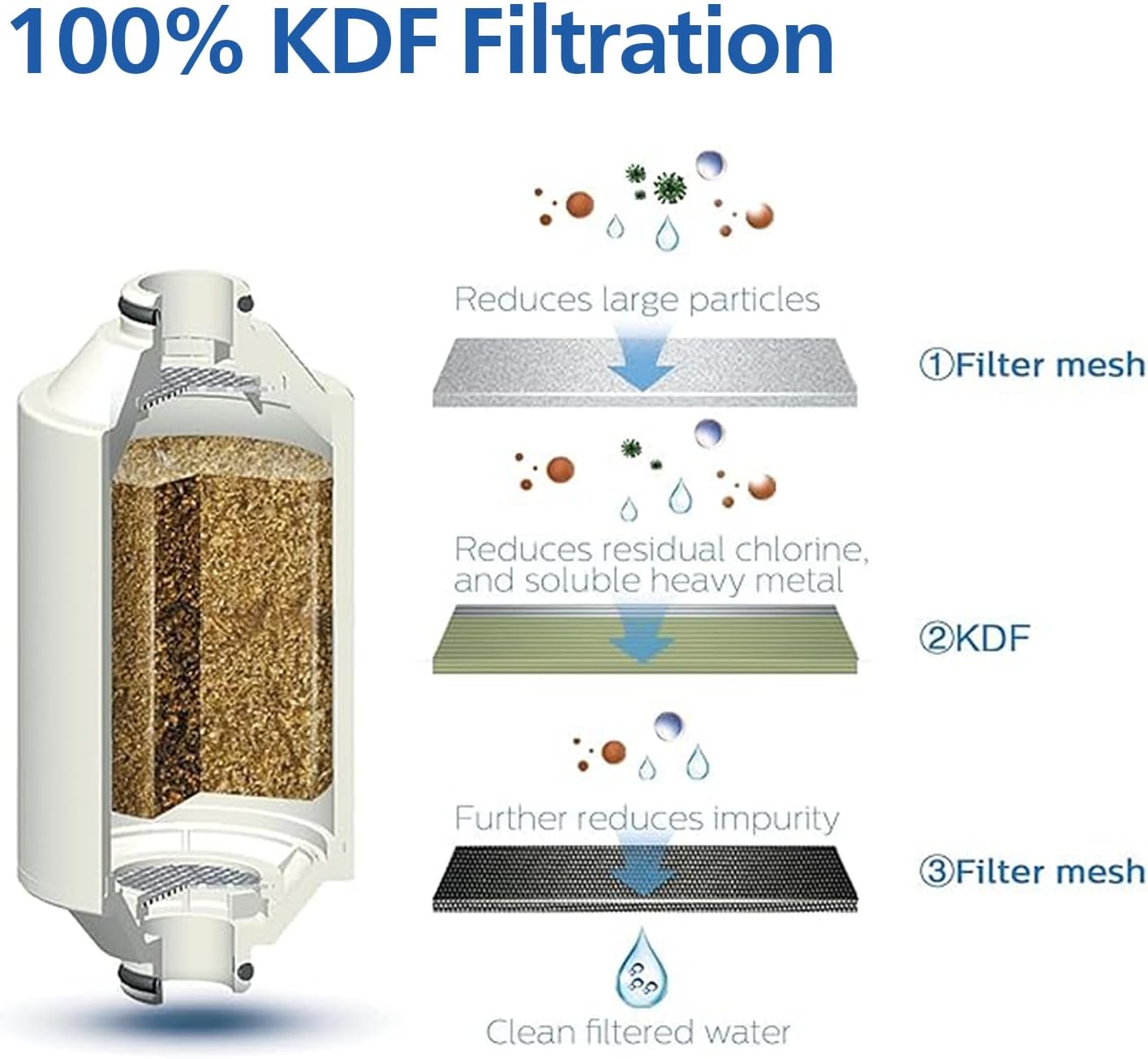
Image: A diagram detailing the three stages of filtration: initial filter mesh for large particles, KDF for chlorine and heavy metals, and a final filter mesh for further impurity reduction, resulting in clean filtered water.
Water Flow and Temperature
The filter is designed to maintain a high water flow rate, typically 2.1 gallons per minute (8 liters per minute), ensuring no significant restriction to your shower experience. It is constructed from anti-scald material, allowing it to adapt to both hot and cold water temperatures without compromising performance.

Image: An infographic explaining KDF technology and highlighting key features such as compatibility, quick installation, three-stage filtration, skin/hair benefits, temperature adaptability, and large filtration capacity.
Maintenance
Regular maintenance, primarily filter cartridge replacement, is essential for optimal performance.
Filter Cartridge Replacement
The filter cartridge (model AWP175) has a capacity of up to 50,000 liters (13,208 gallons) and should be replaced every 4-6 months. The replacement frequency may vary depending on your local tap water quality and usage.

Image: A diagram illustrating the filter cartridge and its lifespan, indicating 4-6 months or 13,200 gallons capacity.
Replacement Procedure
- Turn off the water supply to the shower.
- Unscrew the shower filter casing from the shower arm and the shower hose.
- Open the filter casing and remove the old cartridge.
- Insert a new Philips AWP175 filter cartridge, ensuring it is correctly oriented.
- Close the filter casing securely.
- Reinstall the filter onto the shower arm and connect the shower hose.
- Turn on the water supply and flush the filter for a few minutes to remove any air and check for leaks.
Troubleshooting
| Problem | Possible Cause | Solution |
|---|---|---|
| Water leakage at connections | Loose connections, worn O-rings, or incorrect installation. | Ensure all connections are hand-tightened. Check O-rings for damage and replace if necessary. Re-install following the setup steps. |
| Reduced water flow | Clogged filter cartridge, air trapped in the system. | Flush the filter for several minutes. If flow remains low, the cartridge may need replacement. Ensure the cartridge protective covers were removed during installation. |
| Filter cartridge difficult to remove/install | Over-tightened casing, mineral buildup, or cartridge jammed. | Apply gentle, firm pressure to unscrew the casing. For stubborn cases, try using a rubber grip. Ensure the new cartridge is aligned correctly before tightening. |
| No noticeable improvement in water quality | Filter cartridge expired or not installed correctly. | Check the date of last cartridge replacement. Replace if it's been 4-6 months or more. Verify correct installation of the cartridge and filter unit. |
Specifications
| Feature | Detail |
|---|---|
| Model Number | AWP1775CH |
| Filter Cartridge Model | AWP175 |
| Material | Iron (housing), KDF (filtration media) |
| Product Dimensions | 3.5 x 4 x 9 inches (8.9 x 10.2 x 22.9 cm) |
| Item Weight | 1.23 pounds (0.56 kg) |
| Filtration Capacity | Up to 50,000 L / 13,208 gallons |
| Filter Lifespan | 4-6 months (depending on water quality and usage) |
| External Testing Certification | NSF |
| Product Benefits | Reduces Chlorine and Impurities, Ensures Safe Use, High Water Flow Rate, Long Filtration Capacity |

Image: A visual representation of the Philips Shower Filter's dimensions (6.85"/17.4cm height, 2.4"/6.1cm width) and key benefits including skin/hair protection, reduction of chlorine/lead/pesticides, high water flow (2.1 gal/min), and filter capacity.

Image: A woman enjoying a shower, illustrating the benefit of filtered water for skin and hair protection.
Warranty and Support
For detailed warranty information and customer support, please refer to the official Philips website or contact Philips customer service directly. Keep your purchase receipt as proof of purchase for any warranty claims.


