
VINABTY AKB74475403 AKB74475463 AKB74475444
User Manual
VINABTY Replacement Remote Control
Model: AKB74475403, AKB74475463, AKB74475444
Introduction
This manual provides detailed instructions for the VINABTY replacement remote control, designed for various LG Smart TV LCD LED Plasma TVs. This remote is a direct replacement and requires no programming for most compatible models. Please read this manual carefully to ensure proper use and longevity of your remote control.
Product Overview
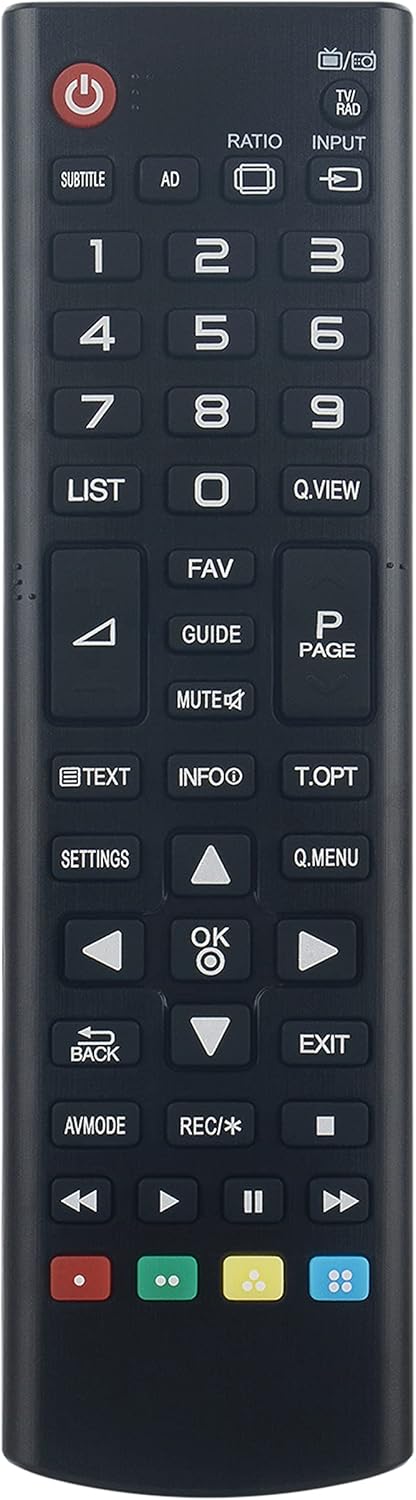
Figure 1: Front view of the remote control, showing all buttons and layout.

Figure 2: Back view of the remote control, showing the battery compartment cover.
The remote control features a standard layout with dedicated buttons for power, channel navigation, volume control, input selection, and smart TV functions. It is designed for comfortable handling and intuitive operation.
Setup
Battery Installation
- Locate the battery compartment on the back of the remote control.
- Slide the battery compartment cover downwards or press the latch to open it.
- Insert two (2) AAA batteries, ensuring the positive (+) and negative (-) terminals align correctly with the markings inside the compartment.
- Close the battery compartment cover by sliding it back into place until it clicks securely.
Note: No programming is needed for this basic IR remote. It is ready to use once batteries are installed.
Operating Instructions
Basic Functions
- Power Button (●): Turns the TV on or off.
- Number Buttons (0-9): Directly select channels.
- Volume Up/Down (VOL +/-): Adjusts the sound volume.
- Channel Up/Down (CH +/-): Changes the TV channel.
- Mute Button (🔇): Mutes or unmutes the TV sound.
- Input Button (INPUT): Cycles through available input sources (HDMI, AV, etc.).
Navigation and Menu Functions
- Directional Pad (Up, Down, Left, Right): Navigates through menus and options.
- OK Button: Confirms selections in menus.
- Back Button (BACK): Returns to the previous screen or menu.
- Exit Button (EXIT): Exits the current menu or application.
- Settings Button (SETTINGS): Accesses the TV's main settings menu.
- Q.MENU Button: Opens the Quick Menu for common settings.
Special Functions
- LIST Button: Displays the channel list.
- FAV Button: Accesses favorite channels.
- GUIDE Button: Opens the electronic program guide (EPG).
- TEXT Button: Activates or deactivates Teletext.
- INFO Button: Displays information about the current program.
- Colored Buttons (Red, Green, Yellow, Blue): Used for specific functions within smart TV apps or menus, as indicated on screen.
Compatibility
This VINABTY remote control is compatible with a wide range of LG Smart TV LCD LED Plasma TVs, including but not limited to the following models:
- AKB74475403, AKB74475463, AKB74475444 (Original Remote Models)
- 32LF5100-TA, 32LF510T-TA, 32LF510Y-TA, 32LF510B-TC, 32LF510D-TC, 32LF510Z-TC
- 43LF5100-TA, 43LF510T-TA, 43LF510Y-TA, 43LF510B-TC, 43LF510D-TC, 43LF510Z-TC
- 49LF5100-TA, 49LF510T-TA, 49LF510Y-TA, 49LF510B-TC, 49LF510D-TC, 49LF510Z-TC
- 32LF510B, 43LF5100, 49LF5100, 43LF5400, 49LF5400, 43LF5410, 49LF5410
- 32LF550B, 49LF5500, 32LF565B, 50LF5650, 55LF5650, 60LF5650, 40LF5700, 43LF5700
- 32LF5600-ZA, 42LF5600-ZA, 50LF5600-ZA, 55LF5600-ZA
- And many other LG models listed in the product description.
If your original remote control is one of the listed models (AKB74475403, AKB74475463, AKB74475444), this replacement remote will function directly without any setup.
Maintenance
- Cleaning: Use a soft, dry cloth to clean the remote control. Do not use liquid cleaners or abrasive materials.
- Battery Replacement: Replace batteries when the remote's response becomes sluggish or stops working. Always replace both batteries at the same time with new ones.
- Storage: If the remote control will not be used for an extended period, remove the batteries to prevent leakage and damage. Store in a cool, dry place.
- Avoid Damage: Do not drop the remote control or expose it to extreme temperatures, humidity, or direct sunlight.
Troubleshooting
| Problem | Possible Cause | Solution |
|---|---|---|
| Remote not responding. | Dead or incorrectly inserted batteries. | Replace batteries with new AAA batteries, ensuring correct polarity. |
| Remote works intermittently. | Low battery power; obstruction between remote and TV; infrared sensor on TV is blocked. | Replace batteries. Ensure a clear line of sight to the TV's IR sensor. Remove any obstructions. |
| Certain buttons do not work. | Button malfunction; TV model incompatibility for specific advanced functions. | Ensure the remote is compatible with your specific TV model. If basic functions fail, the remote may be faulty. |
| TV does not respond to any remote. | TV power issue; TV's IR sensor is damaged. | Check if the TV is powered on. Consult your TV's manual for troubleshooting its IR sensor. |
Specifications
- Model Numbers: AKB74475403, AKB74475463, AKB74475444
- Brand: VINABTY
- Connectivity Technology: Infrared (IR)
- Compatible Devices: LG Smart TV LCD LED Plasma TVs
- Power Source: 2 x AAA Batteries (not included)
- Product Dimensions: Approximately 7.2 x 2 x 0.7 inches
- Item Weight: Approximately 2.6 ounces
- Special Feature: Ergonomic design
Warranty and Support
This VINABTY replacement remote control is designed for reliable performance. For any issues not covered in this manual, please refer to the seller's return policy or contact customer support through the platform where the product was purchased.
Please retain your purchase receipt as proof of purchase for any warranty claims.
Ask a question about this manual
Ask about setup, troubleshooting, compatibility, parts, safety, or missing instructions. Manuals+ will review the question and use this page’s manual context to help answer it.