
Introduction
This manual provides comprehensive instructions for the Lowepro PhotoSport PRO BP 55L backpack. Designed for professional photographers, this backpack offers a lightweight and comfortable solution for multi-day photoshoots in remote environments. It ensures robust protection for photography equipment through its integrated, removable GearUp PRO XL camera insert and a versatile accessory strap system. The backpack provides ample storage for essential gear, including sleeping bags, tents, food, jackets, trekking poles, hydration tanks, and water bottles. The ActivLift harness system, with its adjustable torso length, guarantees maximum comfort and optimal weight distribution during extended excursions. Constructed from 85% recycled fabric, including 100% recycled Nylon 420D Oxford and 420D Ripstop Diamond Nylon with carbonate coating, it also features an All Weather AW Cover for protection against rain, snow, and dust.

Image: Front view of the Lowepro PhotoSport PRO BP 55L backpack in light gray and black, showcasing its design and various straps.
Setup and Adjustment
1. Adjusting the ActivLift Harness System
The ActivLift harness system allows for precise torso length adjustment to ensure a comfortable and stable fit, crucial for carrying heavy loads over long distances. Proper adjustment distributes weight effectively across your hips and shoulders.
- Measure Torso Length: Use a flexible tape measure to find the distance from your C7 vertebra (the most prominent bone at the base of your neck) down to the top of your hip bones (iliac crest).
- Loosen Adjustment Straps: Locate the adjustment straps on the back panel of the backpack, typically near the shoulder straps. Loosen these straps to allow the harness to move freely.
- Slide Harness to Match Torso: Adjust the harness up or down until the shoulder strap attachment point aligns with your measured torso length. The top of the hip belt should rest comfortably on your iliac crest.
- Secure Adjustment Straps: Once the desired position is found, tighten the adjustment straps to lock the harness in place. Ensure it is securely fastened to prevent shifting during use.
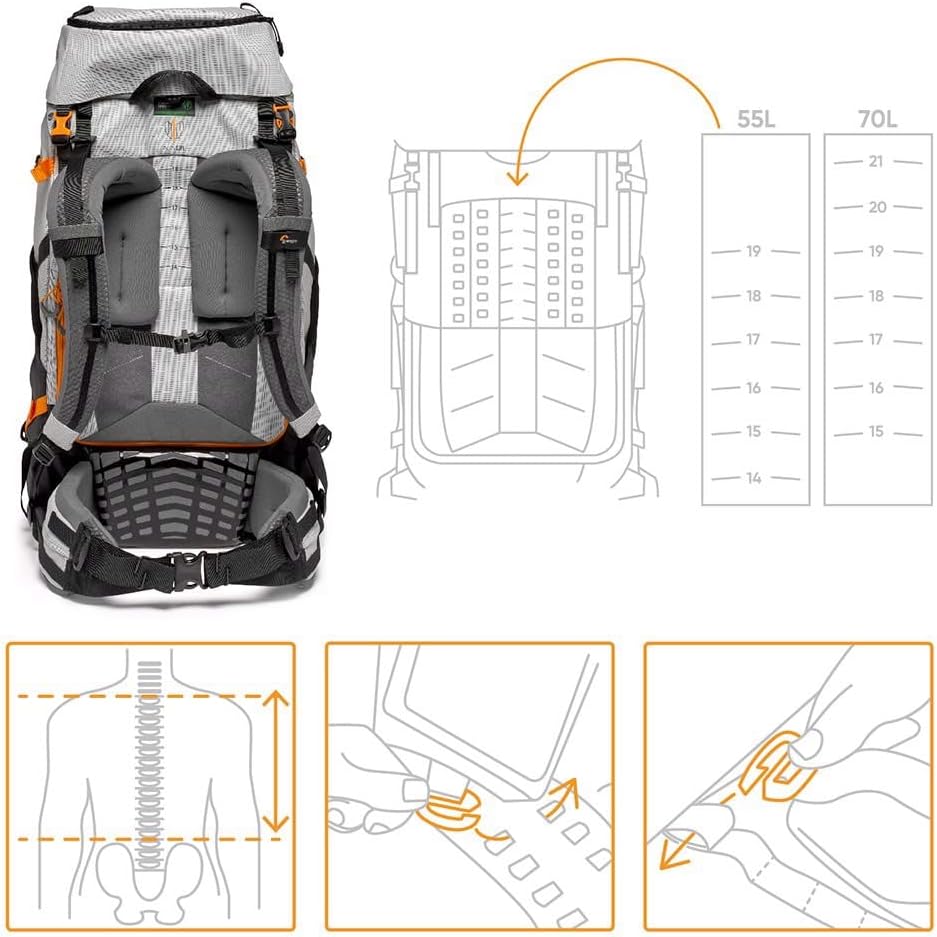
Image: A diagram illustrating how to measure torso length and adjust the ActivLift harness system for optimal fit, showing the backpack's back panel and hip belt.
2. Installing the GearUp PRO XL Camera Insert
The removable GearUp PRO XL camera insert provides dedicated protection for your camera gear and can be configured to suit various setups.
- Access Main Compartment: Open the main access points of the backpack (front or rear).
- Position Insert: Place the GearUp PRO XL insert into the designated lower compartment of the backpack. Ensure it sits snugly.
- Secure Insert: The insert may have internal attachment points or straps to secure it within the backpack, preventing movement. Fasten these if present.
- Arrange Dividers: Customize the internal padded dividers within the GearUp PRO XL insert to fit your camera body, lenses, and accessories securely.

Image: The backpack shown with its main compartments open, revealing the removable GearUp PRO XL camera insert loaded with a camera and lenses, and a separate image of the insert itself.
3. Utilizing Accessory Straps
The backpack includes a system of accessory straps for modular equipment transport, allowing you to attach additional items externally or carry smaller cases.
- External Attachment: Use the various external loops and compression straps to secure items like trekking poles, tripods, or sleeping pads.
- GearUp Case Integration: The accessory strap system is designed to integrate with other Lowepro GearUp cases, allowing you to attach them to the shoulder straps or hip belt for quick access to smaller items like phones or extra lenses.

Image: A collection of accessory straps and examples of how they can be used to carry a camera on the chest or a small pouch on the shoulder strap, demonstrating modularity.
Operating the Backpack
1. Accessing Gear
The PhotoSport PRO BP 55L offers multiple access points for convenience.
- Front Access: The main front zipper provides full access to the primary compartment, including the camera insert and other stored items.
- Rear Access: A dedicated rear panel zipper allows direct access to the camera insert without needing to open the entire main compartment, enhancing security and quick retrieval.
- Top Access: The roll-top closure provides access to the upper storage compartment for clothing, food, and other non-camera essentials.
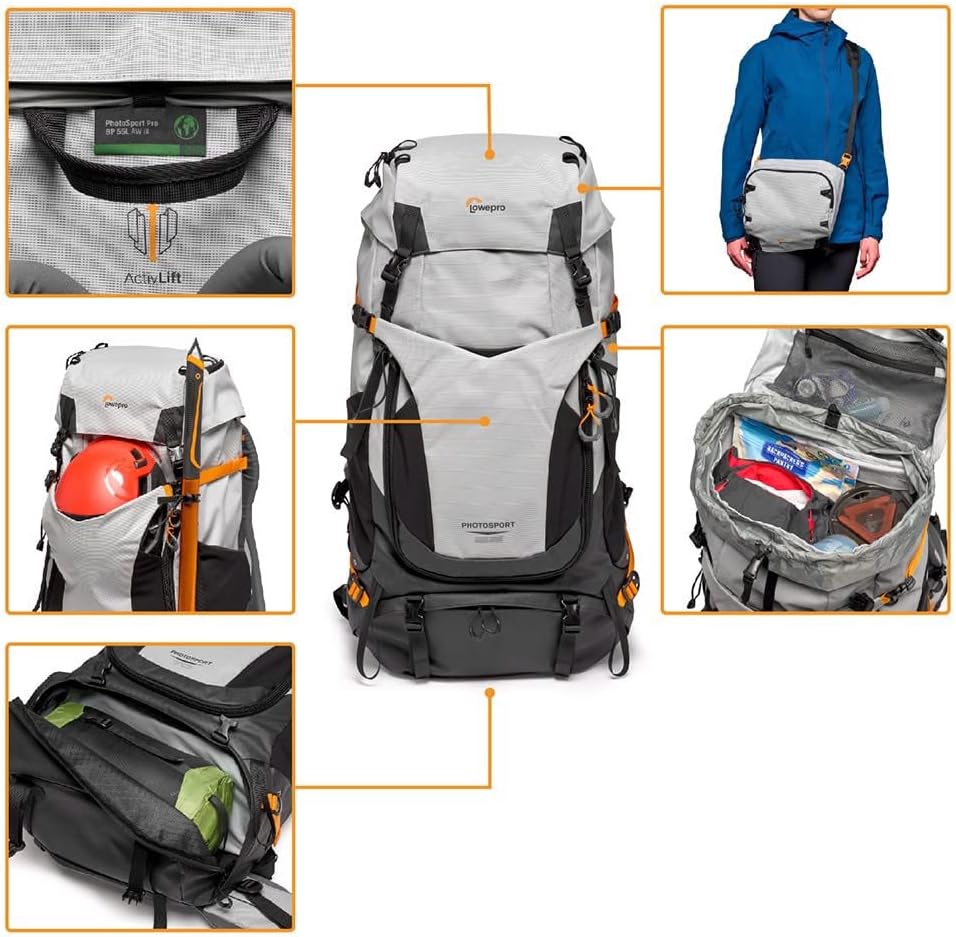
Image: A composite image highlighting various features of the backpack, including the ActivLift harness label, external gear attachment points, and internal storage for personal items.
2. Packing Essentials
Beyond camera gear, the backpack is designed to accommodate multi-day excursion necessities.
- Upper Compartment: Utilize the spacious upper compartment for soft goods like sleeping bags, tents, and extra clothing. The roll-top closure allows for flexible capacity.
- Side Pockets: Integrated side pockets are suitable for water bottles or quick-access items.
- Hydration Sleeve: A dedicated sleeve is available for a hydration reservoir (not included), with a port for the drinking tube.
- Accessory Pockets: Smaller pockets on the hip belt or lid can store snacks, maps, or other small personal items.
3. Using the All Weather AW Cover
The integrated All Weather AW Cover provides protection for your gear in adverse conditions.
- Deployment: Locate the AW Cover, typically stored in a dedicated pocket at the bottom of the backpack.
- Coverage: Pull the cover over the entire backpack, ensuring all exposed areas are protected from rain, snow, or dust.
- Securing: Fasten any elastic bands or drawstrings to keep the cover snug against the backpack, preventing it from being blown off by wind.
Maintenance
Proper care extends the life of your Lowepro PhotoSport PRO BP 55L backpack.
- Cleaning: For general cleaning, wipe the exterior with a damp cloth and mild soap. Avoid harsh detergents or solvents. For stubborn dirt, use a soft brush.
- Drying: Always allow the backpack to air dry completely before storing, especially after exposure to moisture. Do not use direct heat sources.
- Zipper Care: Periodically clean zippers with a small brush to remove dirt and debris. Lubricate with a silicone-based zipper lubricant if they become stiff.
- Storage: Store the backpack in a cool, dry place away from direct sunlight when not in use.
- AW Cover Care: Clean the All Weather AW Cover separately if needed and ensure it is completely dry before folding and storing it back in its pocket.
Troubleshooting
Here are solutions to common issues you might encounter:
- Discomfort or Uneven Weight Distribution:
- Ensure the ActivLift harness is correctly adjusted to your torso length.
- Verify that the hip belt is snug and resting on your iliac crest, bearing most of the weight.
- Check that shoulder straps are tightened enough to keep the pack close to your back but not so tight as to lift the hip belt.
- Distribute contents evenly within the backpack, placing heavier items closer to your back and centered.
- Zippers Sticking:
- Clean any dirt or debris from the zipper teeth using a small brush.
- Apply a silicone-based zipper lubricant to the teeth.
- Water Leakage (despite AW Cover):
- Ensure the AW Cover is fully deployed and securely fastened around the entire backpack.
- Check for any tears or damage to the AW Cover. If damaged, it may need replacement.
- Inspect the backpack's fabric for any punctures or compromised seams.
Specifications
| Feature | Detail |
|---|---|
| Model Number | PhotoSport PRO 55L |
| Product Dimensions | 14.17 x 27.56 x 16.14 inches (36 x 70 x 41 cm) |
| Item Weight | 6.6 pounds (3 Kilograms) |
| Capacity | 55 Liters |
| Materials | 85% recycled fabric (100% recycled Nylon 420D Oxford and 420D Ripstop Diamond Nylon with carbonate coating) |
| Camera Insert | Removable GearUp PRO XL (fits mirrorless or full-frame DSLR with grip and 70/200mm f/2.8 lens attached plus 2 extra lenses) |
| Harness System | ActivLift (adjustable torso length) |
| Weather Protection | All Weather AW Cover included |
Warranty Information
Lowepro products typically come with a limited warranty covering manufacturing defects. For specific warranty terms, conditions, and duration applicable to your PhotoSport PRO BP 55L backpack, please refer to the official Lowepro website or contact their customer support. It is recommended to retain your proof of purchase for warranty claims.
Customer Support
For further assistance, product registration, frequently asked questions (FAQs), or to view additional product resources, please visit the official Lowepro website:
Visit the Lowepro Store on Amazon
You may also find contact information for Lowepro customer service on their official brand website for direct inquiries.


