Product Overview

Image: The Ankle Monitor "Keep" strap.
The Ankle Monitor "Keep" is a specialized strap designed to make wearing a GPS ankle monitor and tracker more comfortable and secure. It is crafted from durable neoprene material, offering a lightweight, waterproof, and adjustable solution to common issues associated with ankle monitors.
This product is not intended for concealment but rather to prevent the monitor from sliding down your leg, twisting, or flopping during movement, ensuring it stays comfortably in place above your ankle.
Key Features:
- Made from durable Neoprene material.
- Fits several styles of GPS ankle monitors.
- Designed for comfort, waterproof, lightweight, and secure fit.
- Prevents the monitor from sliding down past your pant leg.
- Eliminates twisting and flopping of the monitor.
- Works on both legs and can be used with or without socks.
- Includes an extension strap for wider monitors.
Setup and Installation
Proper installation of The Ankle Monitor "Keep" is crucial for optimal comfort and stability. Follow these steps to secure your GPS ankle monitor effectively.
Step-by-Step Guide:
- Prepare the Monitor: Ensure your GPS ankle monitor is already securely fastened to your ankle as per its manufacturer's instructions.
- Position the "Keep" Strap: Take The Ankle Monitor "Keep" strap. The main body of the strap should be positioned around your leg, just above the ankle monitor.
- Secure the Vertical Straps: The "Keep" strap features smaller vertical straps. Carefully thread these vertical straps through the openings or around the main body of your GPS ankle monitor.
- Fasten the Vertical Straps: Pull the vertical straps firmly and secure them using the hook-and-loop fasteners (Velcro) provided. Ensure there is ample contact between the Velcro pieces to prevent slippage. This firm attachment prevents the monitor from moving vertically.
- Adjust for Comfort: Once the vertical straps are secured, adjust the main strap around your leg for a snug yet comfortable fit. It should be tight enough to hold the monitor in place but not restrict circulation.
- Utilize Extension Strap (if needed): If your ankle monitor is wider or you require additional length for a comfortable fit, attach the provided extension strap to the main strap.

Image: Close-up view of the "Keep" strap being fastened around a GPS ankle monitor.
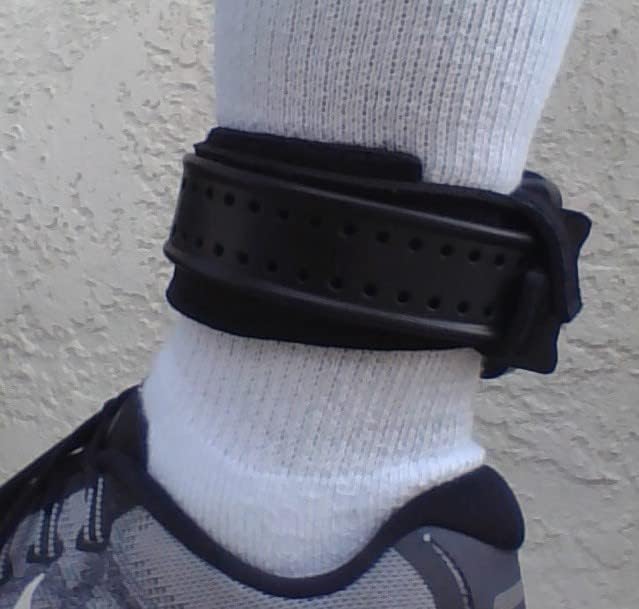
Image: Side view demonstrating the secure fit of the "Keep" strap with an ankle monitor.
Installation Video:
Video: This video demonstrates the simple process of attaching The Ankle Monitor "Keep" to your GPS ankle monitor.
Operating and Usage
Once properly installed, The Ankle Monitor "Keep" works to enhance your daily comfort and prevent common annoyances associated with wearing a GPS ankle monitor.
Benefits in Daily Use:
- Prevents Sliding: The strap holds the monitor firmly in place, preventing it from sliding down your leg, which can be uncomfortable and make the monitor more visible.
- Eliminates Twisting: By securing the monitor, the "Keep" strap stops it from twisting around your leg, maintaining a consistent and comfortable position.
- Reduces Flopping: The secure fit minimizes the "flopping" motion of the monitor during walking or exercise, reducing irritation and discomfort.
- Enhanced Comfort: The neoprene material is soft against the skin, and by keeping the monitor stable, it prevents it from digging into your ankle.

Image: The "Keep" strap in use, holding an ankle monitor securely while outdoors.

Image: The "Keep" strap providing stability for an ankle monitor, even when wearing open footwear.

Image: The "Keep" strap maintaining the monitor's position while wearing a shoe.
Usage Benefits Video:
Video: This video illustrates the practical benefits of using The Ankle Monitor "Keep" for improved comfort and stability.
Maintenance and Care
To ensure the longevity and hygiene of your Ankle Monitor "Keep" strap, follow these simple maintenance guidelines:
- Cleaning: The neoprene material is waterproof. For cleaning, gently hand wash the strap with mild soap and cool water.
- Drying: Air dry the strap completely before re-attaching it to your monitor or storing it. Avoid direct sunlight or high heat, which can degrade the material.
- Storage: Store the strap in a clean, dry place when not in use.
- Inspection: Periodically inspect the strap and its hook-and-loop fasteners for any signs of wear or damage. Replace the strap if it shows significant wear to ensure continued effectiveness.
Troubleshooting
If you encounter any issues while using The Ankle Monitor "Keep", consider the following common solutions:
- Strap is still sliding or monitor is flopping:
- Ensure the vertical straps are pulled very firmly and have maximum Velcro contact when securing them around the monitor.
- Verify that the main strap around your leg is snug, but not overly tight.
- Check if the extension strap is needed for a more secure fit, especially for wider monitors.
- Discomfort or irritation:
- Adjust the tightness of both the main strap and the vertical straps. The goal is secureness without excessive pressure.
- Ensure the Velcro parts are not directly rubbing against your skin.
- Consider wearing socks underneath the strap for added cushioning, if not already doing so.
- Strap appears too small:
- Confirm you are using the included extension strap if your monitor or leg circumference requires it.
- Ensure the strap is positioned correctly, just above the monitor, not trying to cover it entirely.
Product Specifications
| Item Package Dimensions L x W x H | 8.75 x 5.5 x 0.14 inches |
| Brand | Generic |
| Color | Black |
| Material | Neoprene |
| Suggested Users | Unisex-Adult |
| Number of Items | 1 |
| Manufacturer | HHK Designs |
| Size | One Size |
| Sport Type | Running |
| ASIN | B09GXNKRLD |
| Date First Available | September 23, 2021 |
Warranty and Support
Specific warranty information for The Ankle Monitor "Keep" is not provided in this manual. For details regarding warranty coverage, returns, or technical support, please contact the manufacturer, HHK Designs, or the retailer from whom the product was purchased.
You may also refer to the product listing on the retailer's website for any available support contact information or FAQs.


