
1. Introduction
The Topping PA3S is a high-performance Class D power amplifier designed for audio enthusiasts. It features a fully balanced design with dual MA12070 amplifier chips, offering both balanced (TRS) and single-ended (RCA) inputs. This manual provides detailed instructions for setting up, operating, and maintaining your PA3S amplifier to ensure optimal performance and longevity.
2. Key Features
- Dual MA12070 Fully Balanced Class D Amplifier: Each channel utilizes a dedicated MA12070 chip for improved performance, reduced crosstalk, and enhanced reliability.
- High Output Power: Delivers 80W x 2 at 4Ω (10% THD+N) or 65W x 2 at 4Ω (1% THD+N), sufficient to drive various bookshelf and floor-standing speakers.
- Balanced and Single-Ended Inputs: Equipped with TRS balanced inputs to eliminate ground loop issues and RCA single-ended inputs for versatile connectivity.
- Optimized Distortion Performance: Achieves lowest THD+N in the 10-20W output range, ideal for typical listening volumes.
- Expandable Functionality: Can be paired with a Digital-to-Analog Converter (DAC) or DAC+Headphone Amplifier (HPA) for broader digital input options and comprehensive audio setups.

Image: Summary of key features including power output, THD+N, amplifier type, and input options.
3. Package Contents
Please check the package for the following items:
- Topping PA3S Power Amplifier Unit
- Power Adapter
- User Manual
If any items are missing or damaged, please contact your retailer.
4. Product Overview
4.1 Front and Rear Panels

Image: Front panel showing power/select button and volume knob, and rear panel with input and output connections.
Front Panel:
- Power / Select Button: Press to power on/off. Short press to cycle between SE (Single-Ended) and BAL (Balanced) inputs.
- Input Indicators (SE/BAL): LEDs indicate the currently selected input.
- Volume Knob: Rotates to adjust the output volume.
Rear Panel:
- TRS Balanced Input (L/R): For connecting audio sources with balanced outputs.
- RCA Single-Ended Input (L/R): For connecting audio sources with single-ended RCA outputs.
- Speaker Outputs (L/R): Connect to passive speakers. Ensure correct polarity.
- DC 26V Power Input: Connect the provided power adapter.
4.2 Internal Design

Image: Internal view highlighting the dual MA12070 Class D amplifier chips with heat sinks.
The PA3S employs two MA12070 Class D power amplifier chips, with one chip dedicated to each channel. This design optimizes layout, reduces crosstalk between channels, and distributes the power load, enhancing reliability and extending the product's lifespan.
4.3 Dimensions
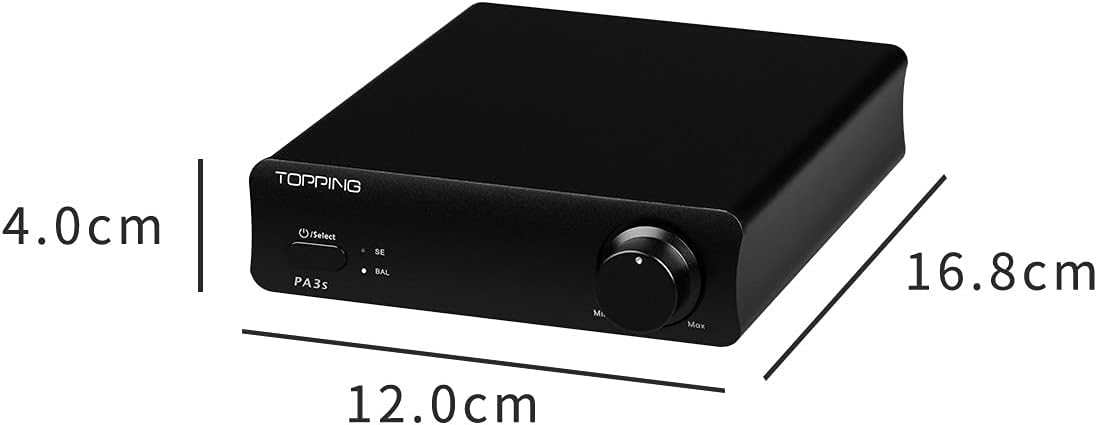
Image: Diagram illustrating the physical dimensions of the Topping PA3S amplifier (12.0cm width, 16.8cm depth, 4.0cm height).
5. Setup Instructions
Follow these steps to set up your Topping PA3S amplifier:
- Placement: Place the PA3S on a stable, flat surface with adequate ventilation. Avoid placing it near heat sources or in direct sunlight.
- Connect Speakers: Connect your passive speakers to the speaker output terminals on the rear panel. Ensure correct polarity (+ to + and - to -) for both left and right channels. Use high-quality speaker cables.
- Connect Audio Source:
- For Balanced Input: Connect your audio source (e.g., DAC with balanced output) to the TRS Balanced Input (L/R) using TRS cables.
- For Single-Ended Input: Connect your audio source (e.g., DAC, CD player) to the RCA Single-Ended Input (L/R) using RCA cables.
- Connect Power: Connect the provided DC 26V power adapter to the power input on the rear panel, then plug the adapter into a wall outlet.
- Initial Volume Setting: Before powering on, turn the volume knob to its minimum (Min) position to prevent sudden loud sounds.
6. Operating Instructions
- Power On: Press the Power / Select button on the front panel. The corresponding input indicator (SE or BAL) will light up.
- Select Input: Short press the Power / Select button to cycle between the SE (Single-Ended) and BAL (Balanced) inputs. The active input will be indicated by its illuminated LED.
- Adjust Volume: Slowly rotate the volume knob clockwise to increase the volume to your desired listening level. Rotate counter-clockwise to decrease.
- Power Off: Press and hold the Power / Select button for a few seconds until the unit powers off.
7. Maintenance
- Cleaning: Use a soft, dry cloth to clean the exterior of the amplifier. Do not use liquid cleaners or abrasive materials.
- Ventilation: Ensure that the ventilation holes are not blocked to prevent overheating.
- Storage: When not in use for extended periods, disconnect the power adapter and store the unit in a cool, dry place.
- Avoid Liquids: Do not expose the amplifier to water or other liquids.
8. Troubleshooting
If you encounter issues with your PA3S, refer to the following common problems and solutions:
- No Sound:
- Check if the power adapter is securely connected and the unit is powered on.
- Verify that the correct input (SE or BAL) is selected.
- Ensure speaker cables are correctly connected and not loose.
- Check the volume level; it might be set too low.
- Confirm the audio source is functioning correctly and outputting sound.
- Distorted Sound:
- Reduce the volume level.
- Check if the audio source output is too high, causing clipping.
- Ensure all cables are securely connected and not damaged.
- Verify speaker impedance matches the amplifier's recommended range (4-8Ω).
- Humming or Buzzing Noise:
- If using RCA inputs, try switching to TRS balanced inputs if your source supports it, as balanced connections are less susceptible to ground loops.
- Ensure all connections are tight.
- Try plugging the amplifier and source into different power outlets or a different circuit.
- Move the amplifier away from other electronic devices that might cause interference.
If the problem persists, please contact customer support.
9. Specifications
9.1 General Specifications
- Brand: Fanmusic (Topping)
- Model: PA3S
- Number of Channels: 2
- Mounting Type: Surface Mount
- Voltage: 48 Volts (Input to power adapter)
- Manufacturer: TOPPING
9.2 Detailed Performance Specifications

Image: Detailed table of PA3S specifications for Single-Ended (SE IN) and Balanced (BAL IN) inputs.
| Parameter | SE IN | BAL IN |
|---|---|---|
| THD+N @1kHz (A-wt) | <0.0050% @4Ω 5W <0.0040% @8Ω 5W | <0.0045% @4Ω 5W <0.0040% @8Ω 5W |
| THD @20-10kHz (20kBW) | <0.0080% @4Ω 5W <0.0070% @8Ω 5W | <0.0070% @4Ω 5W <0.0060% @8Ω 5W |
| SNR @MAX OUT 1kHz (A-wt) | 107dB | 112dB |
| Dynamic Range | 107dB | 112dB |
| Frequency Response | 20Hz-40kHz (±0.1dB) | 20Hz-40kHz (±0.1dB) |
| Output Level | 46Vpp @4Ω 48Vpp @8Ω | 46Vpp @4Ω 48Vpp @8Ω |
| Noise (A-wt) | <70uVrms | <70uVrms |
| Channel Crosstalk @1kHz | -96dB | -100dB |
| Input Sensitivity | 0.92Vrms | 1.75Vrms |
| Gain | 25.2dB | 19.5dB |
| Channel Balance | 0.5 dB | 0.5 dB |
| Output Power | 80W x 2 @4Ω THD+N<10% 45W x 2 @8Ω THD+N<10% 65W x 2 @4Ω THD+N<1% 37W x 2 @8Ω THD+N<1% | |
| Adapter Impedance | 4-8Ω | |
10. Safety Information
- Do not disassemble or modify the unit. This may void the warranty and pose a safety risk.
- Use only the provided power adapter. Using an incorrect adapter may damage the unit or cause fire.
- Keep the unit away from water, moisture, and high humidity environments.
- Ensure proper ventilation to prevent overheating. Do not cover the unit.
- Avoid placing heavy objects on the unit.
- In case of smoke, unusual odors, or abnormal operation, immediately disconnect the power adapter and contact support.
11. Warranty and Support
The Topping PA3S amplifier comes with a standard manufacturer's warranty. Please refer to the warranty card included in your package or contact your retailer for specific warranty terms and conditions.
For technical support, troubleshooting assistance, or warranty claims, please contact the retailer where you purchased the product or visit the official Topping website for contact information.

