1. Introduction
The Minn Kota Ulterra is an advanced freshwater electric-steer bow-mount trolling motor designed for superior boat control and fish finding capabilities. It features automatic stow and deploy, power trim, and integrated i-Pilot Link GPS with MEGA Down Imaging for precise navigation and clear underwater views.
This manual provides essential information for the safe and effective operation, installation, and maintenance of your Ulterra trolling motor.
2. Important Safety Information
Always read and understand all safety warnings and instructions before operating this product. Failure to follow these instructions could result in injury or damage to the product or vessel.
- Electrical Safety: Ensure all electrical connections are secure and properly insulated. Disconnect power before performing any maintenance or installation.
- Propeller Safety: Keep hands, feet, and clothing clear of the propeller at all times, especially during operation.
- Deployment/Stowing: Be aware of the motor's movement during automatic stow and deploy. Keep clear of moving parts.
- Battery Safety: Use appropriate batteries and charging equipment. Follow battery manufacturer's guidelines for safe handling and charging.
- Environmental Conditions: Avoid operating the motor in extreme weather conditions or in areas with known underwater obstructions.
- Proposition 65 Warning: This product may expose you to chemicals including Di(2-ethylhexyl)phthalate (DEHP), which is known to the State of California to cause cancer and birth defects or other reproductive harm. For more information go to www.P65Warnings.ca.gov.
3. Package Contents
Verify that all components are present before beginning installation:
- Minn Kota Ulterra Trolling Motor (60-inch shaft, 112 lbs thrust, 36 volts)
- i-Pilot Link Remote
- Multi-function Foot Pedal
- Heading Sensor
- Mounting Hardware
- Cabling
- Instruction Manual (this document)
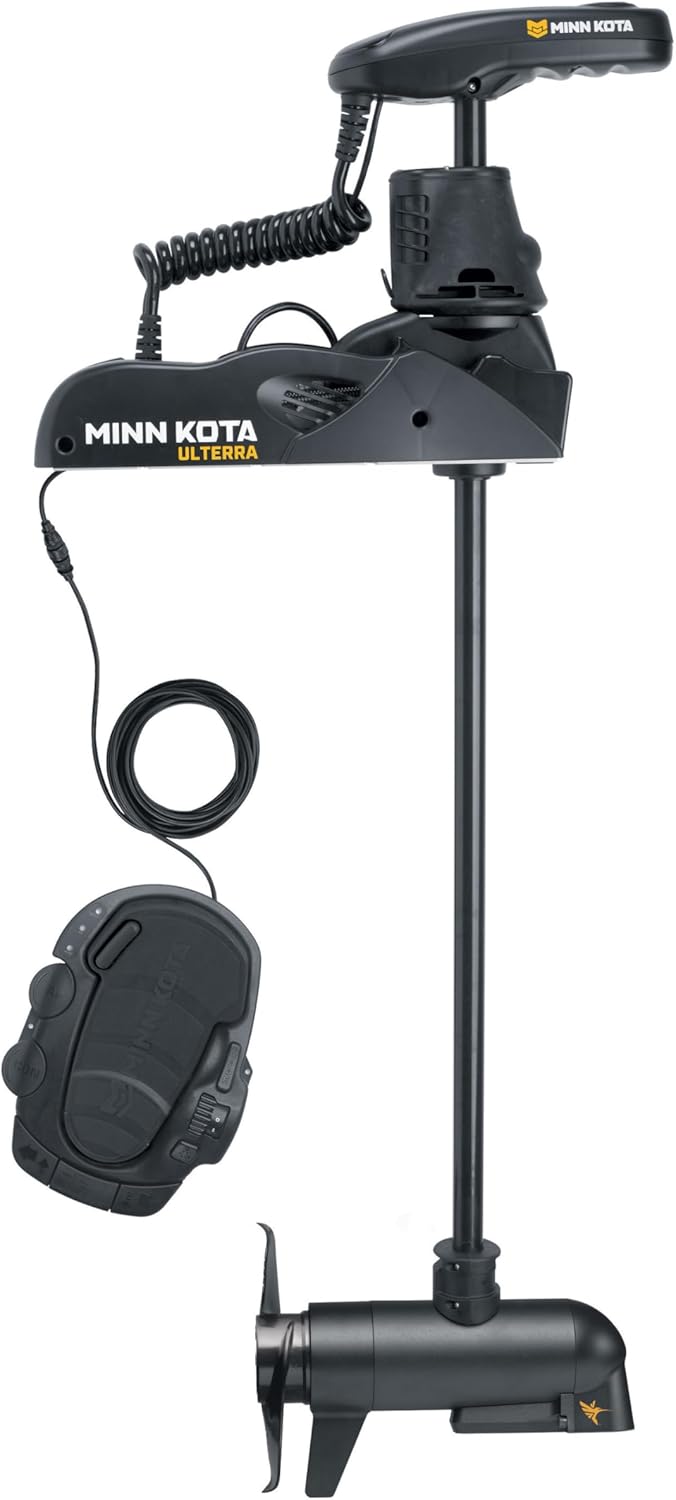
Figure 3.1: Complete Minn Kota Ulterra Trolling Motor system including the motor, foot pedal, and remote.
4. Setup and Installation
Proper installation is crucial for the performance and longevity of your Ulterra motor. It is recommended to have this installed by a qualified marine technician.
4.1 Mounting the Motor
The Ulterra is a bow-mount trolling motor. Ensure the mounting surface on your boat's bow is flat, stable, and strong enough to support the motor's weight and operational forces.
- Positioning: Place the motor on the bow, ensuring the shaft can fully deploy without obstruction and the propeller is clear of the boat hull.
- Marking Holes: Use the motor's base as a template to mark the drilling locations for the mounting hardware.
- Drilling: Drill pilot holes according to the recommended drill bit size in the mounting hardware instructions.
- Securing: Secure the motor to the bow using the provided mounting hardware. Ensure all bolts are tightened to the specified torque.

Figure 4.1: Diagram showing the mounting dimensions and base extension of the Minn Kota Ulterra motor.
4.2 Electrical Connections
The Ulterra 112 lbs thrust model requires a 36-volt power supply. This typically involves three 12-volt deep cycle marine batteries connected in series.
- Connect the batteries in series as per the wiring diagram provided in the full installation guide (not included here).
- Ensure all connections are clean, tight, and protected from corrosion.
- Install an appropriate circuit breaker (not included) as close to the battery bank as possible to protect the motor and wiring.
4.3 Heading Sensor Installation
The heading sensor provides accurate boat heading information to the i-Pilot Link system. Mount it on a flat, level surface away from magnetic interference (e.g., speakers, large metal objects).
5. Operating Instructions
The Minn Kota Ulterra offers intuitive control through its i-Pilot Link remote and foot pedal.
5.1 Stow and Deploy
The Ulterra features automatic stow and deploy functionality:
- Deploy: Press the "Deploy" button on the foot pedal or i-Pilot Link remote. The motor will automatically extend and lower into the water.
- Stow: Press the "Stow" button. The motor will automatically retract and lift out of the water, then secure itself in the stowed position.
5.2 Power Trim
Adjust the motor's depth with the power trim feature:
- Use the "Trim Up" and "Trim Down" buttons on the foot pedal or remote to raise or lower the motor shaft to the desired depth.
5.3 i-Pilot Link System
The i-Pilot Link system provides advanced GPS trolling motor control, allowing you to control your motor from the touchscreen remote or a compatible Humminbird fish finder (sold separately).
- Spot-Lock: Electronically anchor your boat in a specific location.
- Record a Path: Record and retrace your favorite fishing paths.
- Cruise Control: Maintain a consistent speed.
- Advanced AutoPilot: Automatically navigate your boat in a set direction, correcting for wind and current.
5.4 MEGA Down Imaging
The built-in MEGA Down Imaging transducer provides crystal-clear views of what's directly below your boat, up to 125 feet deep. This allows for easy identification of fish, structure, and bottom contours.
- Connect the transducer cable to your compatible Humminbird fish finder.
- Adjust settings on your fish finder for optimal Down Imaging performance.
6. Maintenance
Regular maintenance ensures the longevity and optimal performance of your Ulterra trolling motor.
- After Each Use: Rinse the motor shaft and propeller with fresh water, especially after use in saltwater or brackish water.
- Propeller Inspection: Periodically check the propeller for weeds, fishing line, or damage. Remove any debris.
- Electrical Connections: Inspect all electrical connections for corrosion or looseness. Clean and tighten as necessary.
- Lubrication: Refer to the full owner's manual for specific lubrication points and recommended lubricants.
- Storage: When storing the motor for extended periods, ensure it is clean, dry, and disconnected from power.
7. Troubleshooting
This section addresses common issues you might encounter with your Ulterra trolling motor. For more complex problems, contact Minn Kota customer support or an authorized service center.
| Problem | Possible Cause | Solution |
|---|---|---|
| Motor does not power on. | No power from battery; tripped circuit breaker; loose connection. | Check battery charge; reset circuit breaker; inspect and tighten all electrical connections. |
| Motor does not stow/deploy automatically. | Obstruction; low battery voltage; motor not fully seated. | Check for obstructions around the motor and shaft; ensure adequate battery voltage; manually adjust motor to ensure it's seated correctly. |
| Propeller not spinning or weak thrust. | Weeds/fishing line on propeller; damaged propeller; low battery. | Clear propeller of debris; replace damaged propeller; charge batteries. |
| i-Pilot Link remote not connecting. | Remote out of range; low remote battery; pairing issue. | Move closer to motor; replace remote battery; re-pair remote with motor (refer to i-Pilot Link manual). |
8. Specifications
| Feature | Detail |
|---|---|
| Model Name | Ulterra |
| Model Number | 1358991 |
| Thrust | 112 lbs |
| Voltage | 36 Volts |
| Shaft Length | 60 inches |
| Mounting Type | Bow Mount |
| Control | Electric-Steer, i-Pilot Link GPS, Foot Pedal, Wireless Remote |
| Sonar | Built-in MEGA Down Imaging |
| Material | Aluminum, Composite, Plastic |
| Item Weight | 79 Pounds |
| Dimensions (LxWxH) | 78 x 17 x 10 inches (Item) |
9. Warranty and Support
9.1 Warranty Information
The Minn Kota Ulterra Trolling Motor comes with a 2 Year Limited Manufacturer Warranty. This warranty covers defects in materials and workmanship under normal use. Please retain your proof of purchase for warranty claims.
For full warranty terms and conditions, please refer to the official Minn Kota warranty statement or visit their website.
9.2 Customer Support
For technical assistance, troubleshooting beyond this manual, or to locate an authorized service center, please contact Minn Kota customer support:
- Website: www.minnkotamotors.com
- Phone: Refer to the Minn Kota website for regional contact numbers.
- Service Centers: A list of authorized service centers can be found on the Minn Kota website.