
Introduction
This manual provides detailed instructions for the installation, operation, and maintenance of your Hogtunes BTS-U Universal Bluetooth Receiver. Please read this manual thoroughly before using the product to ensure proper function and safety.
The Hogtunes BTS-U is designed to add Bluetooth audio streaming capabilities to any vehicle with a 12-volt power source and a 1/8" (3.5mm) AUX input. It is ideal for motorcycles, boats, UTVs, and other applications where a factory radio AUX input is available or can be wired to low-level inputs on car stereo type amplifiers.
Safety Information
- Always disconnect the vehicle's battery before beginning any electrical installation.
- Ensure all wiring connections are secure and properly insulated to prevent short circuits.
- Do not operate the device in conditions that exceed its specified environmental ratings.
- Consult a professional installer if you are unsure about any part of the installation process.
- This product contains chemicals known to the State of California to cause cancer and birth defects or other reproductive harm. For more information, visit www.P65Warnings.ca.gov.
Package Contents
Your Hogtunes BTS-U Universal Bluetooth Receiver package should include:
- Hogtunes BTS-U Bluetooth Receiver Unit
- Wiring Harness (with power, ground, and remote turn-on wires)
- 3.5mm AUX Output Cable
- Instruction Manual
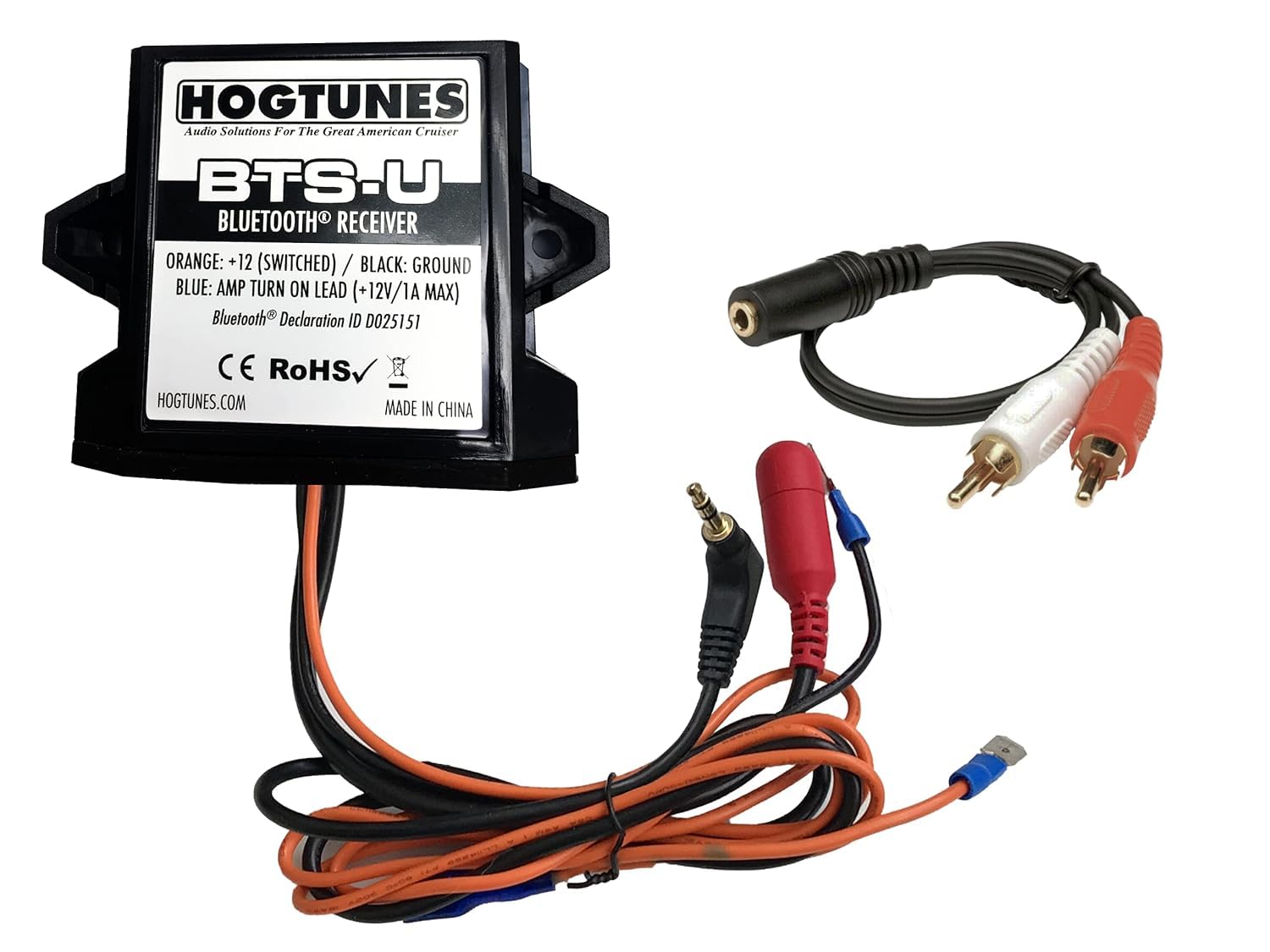
Figure 1: Hogtunes BTS-U Universal Bluetooth Receiver and included components.
Setup & Installation
The Hogtunes BTS-U is designed for easy plug-and-play installation in 1999-2013 touring bikes, but its universal fit allows it to be used in any vehicle with a 12-volt power source and a 1/8" AUX input.
Wiring Instructions:
- Power Connection: Connect the red wire (+12V) from the receiver to a constant 12-volt power source (e.g., directly to the battery positive terminal or a fused accessory wire).
- Ground Connection: Connect the black wire (GND) from the receiver to a chassis ground point on the vehicle.
- Remote Turn-On: The blue/white stripe wire is a remote turn-on output. Connect this to the remote input of your amplifier (if applicable). If not using an amplifier, this wire may not be needed or can be connected to an ignition-switched 12V source to turn the unit on/off with the vehicle.
- Audio Output: Connect the 3.5mm AUX output cable from the receiver to the 1/8" AUX input on your factory radio or amplifier.
Mounting:
The compact design of the BTS-U allows it to be hidden inside the fairing or other discreet locations. Ensure the mounting location is secure and away from excessive heat or moisture. The unit is controlled entirely by your playback device (e.g., smartphone), so direct access to the unit after installation is not required for operation.
Operating Instructions
Bluetooth Pairing:
- Ensure the Hogtunes BTS-U receiver is powered on.
- On your smartphone or Bluetooth-enabled device, navigate to the Bluetooth settings.
- Search for available devices. The Hogtunes BTS-U will appear as "BTS-U" or a similar identifier.
- Select "BTS-U" to pair. A confirmation tone may be heard once successfully connected.
- Once paired, your device will automatically connect to the BTS-U whenever it is powered on and within range (up to 40 feet).
Controlling Music Playback:
All music playback, volume control, track selection, and other audio functions are controlled directly from your paired smartphone or Bluetooth device. The BTS-U acts as a receiver, transmitting the audio signal to your vehicle's audio system.
Maintenance
- Keep the unit free from excessive dirt and debris.
- Periodically check all wiring connections to ensure they remain secure.
- The unit is designed to be durable, but avoid exposing it to extreme physical shock or prolonged submersion in water.
Troubleshooting
| Problem | Possible Cause | Solution |
|---|---|---|
| No power to the unit. | Incorrect wiring; blown fuse; no 12V supply. | Check red (+12V) and black (GND) wire connections. Verify fuse integrity. Ensure 12V power is present. |
| Cannot pair with Bluetooth device. | Unit not in pairing mode; device too far; Bluetooth off on phone. | Ensure BTS-U is powered on. Move device closer to the receiver. Turn Bluetooth on/off on your phone and retry. |
| No audio output. | Incorrect AUX connection; volume too low; incorrect source selected on radio. | Verify 3.5mm AUX cable is securely connected. Increase volume on both phone and radio. Select the correct AUX input on your radio. |
| Poor audio quality/static. | Interference; device too far; loose connections. | Move device closer to the receiver. Check all wiring for secure connections. Avoid sources of electromagnetic interference. |
Specifications
- Model: BTS-U
- Product Dimensions: 8.25 x 5 x 2 inches
- Item Weight: 6.4 ounces
- Connectivity Technology: Auxiliary, Bluetooth
- Controller Type: Bluetooth, Mobile App
- Compatible Devices: Smartphone, Speaker
- Connector Type: RCA (via 3.5mm adapter, not explicitly stated but implied by AUX output)
- Audio Output Mode: Stereo
- Surround Sound Channel Configuration: 2
- Color: Black
- Output Power: 50 Watts
- Number of Channels: 4
- Bluetooth Range: Up to 40 feet
- Power Requirement: 12 Volts DC
Warranty & Support
For warranty information and technical support, please refer to the official Hogtunes website or contact their customer service directly. Keep your purchase receipt as proof of purchase for any warranty claims.
Online resources and FAQs may also be available on the manufacturer's website to assist with common questions and issues.
Official Product Videos
No official product videos from the seller were found for the Hogtunes BTS-U Universal Bluetooth Receiver in the provided data.


