
Fastmark M1
Fastmark M1 Series Thermal Transfer Label Printer User Manual
Model: M1
1. Introduction
The Fastmark M1 Series is a high-performance thermal transfer label printer designed for reliable and efficient label printing. This manual provides detailed instructions for setting up, operating, maintaining, and troubleshooting your M1 Series printer to ensure optimal performance and longevity.
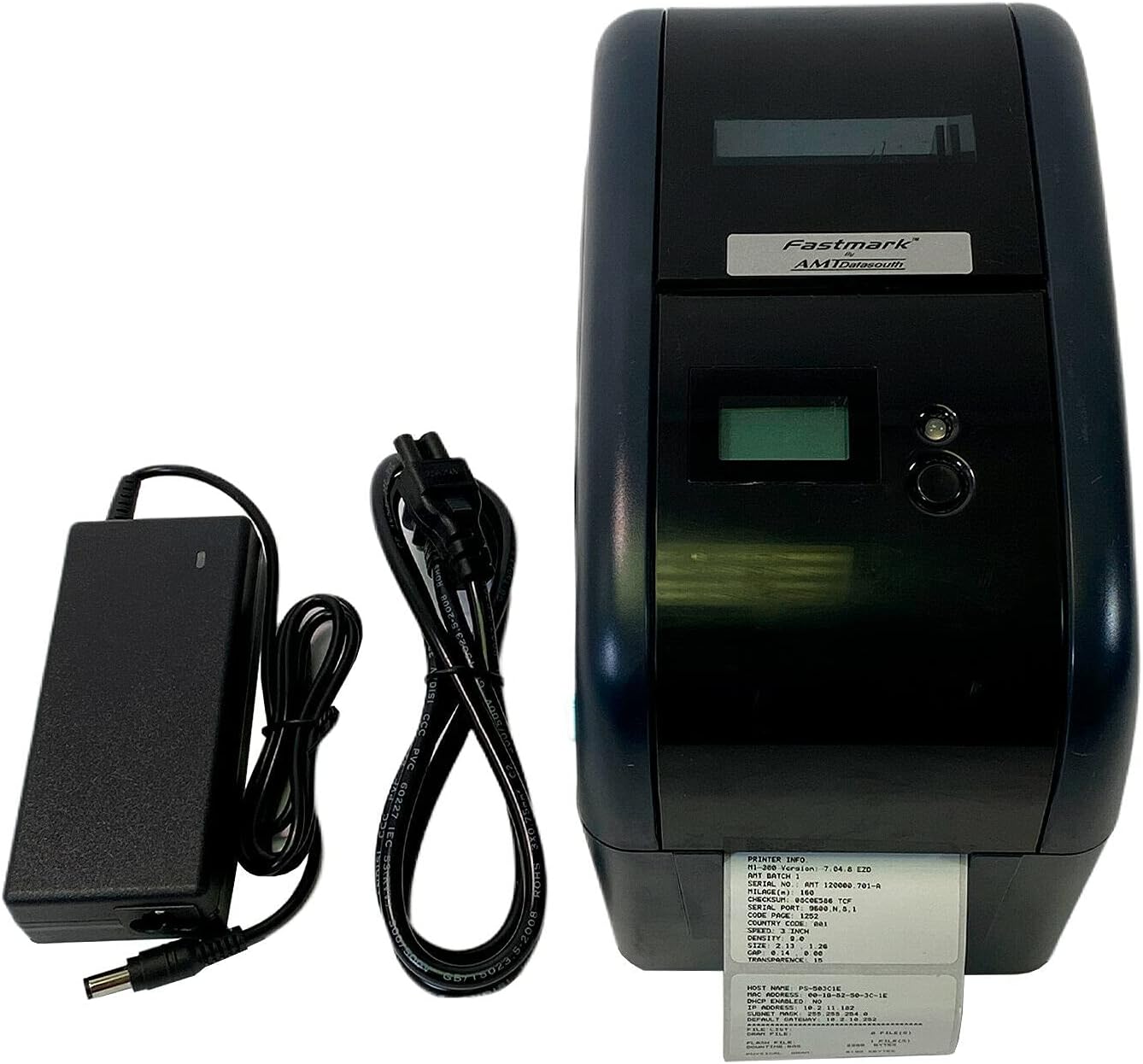
Figure 1.1: Fastmark M1 Series Thermal Transfer Label Printer with included power supply and cable.
2. What's in the Box
Upon unpacking your Fastmark M1 Series printer, please verify that all components are present:
- Fastmark M1 Series Thermal Transfer Label Printer
- Power Supply
If any items are missing or damaged, please contact your vendor or Fastmark customer support immediately.
3. Setup
3.1 Physical Placement
Place the printer on a stable, flat surface in a well-ventilated area. Ensure there is sufficient space around the printer for proper air circulation and access for loading media and maintenance.
3.2 Connecting Power
- Connect the power supply cable to the power input port on the rear of the printer.
- Plug the power supply into a grounded electrical outlet.
- Press the power switch to the 'ON' position. The printer's display should illuminate.
3.3 Connecting to a Computer or Network
The Fastmark M1 Series printer supports both USB and Ethernet connectivity.

Figure 3.1: Rear view of the Fastmark M1 Series printer, highlighting the power, USB, and Ethernet ports.
USB Connection:
- Connect one end of a USB cable (not included) to the USB port on the printer.
- Connect the other end of the USB cable to an available USB port on your computer.
- Install the printer drivers as per the instructions provided with your printer's software package or from the Fastmark support website.
Ethernet Connection:
- Connect one end of an Ethernet cable (not included) to the Ethernet port on the printer.
- Connect the other end of the Ethernet cable to your network router or switch.
- Configure network settings on the printer and your computer as required by your network environment. Refer to the advanced setup guide for detailed network configuration.
3.4 Loading Media (Labels)
The M1 Series printer is designed to use thermal transfer labels. Proper loading is crucial for print quality and printer longevity.
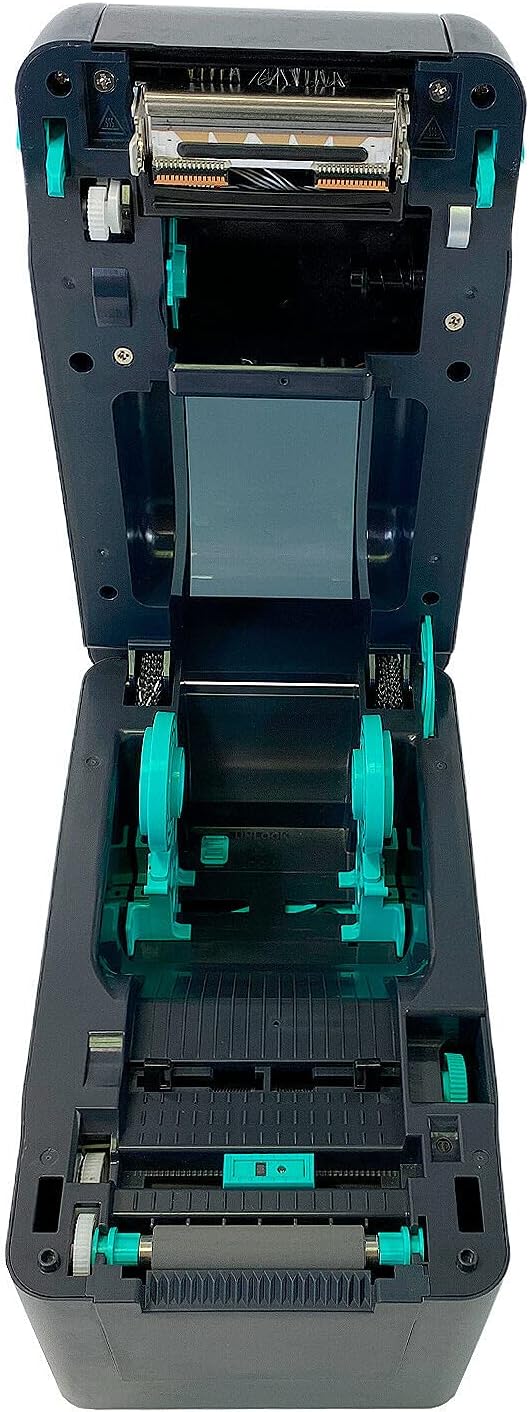
Figure 3.2: Internal view of the Fastmark M1 Series printer, illustrating the media loading path.
- Open the printer's top cover by pressing the release latches.
- Place the roll of labels onto the media supply spindle, ensuring the labels feed from the bottom of the roll.
- Thread the leading edge of the labels through the media guides and under the print head assembly.
- Adjust the media guides to fit the width of your labels snugly but without binding.
- Close the top cover securely.
4. Operating Instructions
4.1 Driver and Software Installation
Before printing, ensure the correct printer drivers are installed on your computer. These drivers facilitate communication between your computer and the printer. For label design and printing, use compatible label software. Refer to the Fastmark support website for the latest drivers and recommended software.
4.2 Basic Printing Process
- Ensure the printer is powered on and connected to your computer or network.
- Open your label design software or application.
- Create or open the label design you wish to print.
- Select the Fastmark M1 Series printer from your application's print dialog.
- Adjust print settings such as label size, orientation, and print quantity as needed.
- Initiate the print command. The printer will begin feeding and printing labels.
5. Maintenance
Regular maintenance ensures consistent print quality and extends the life of your Fastmark M1 Series printer. Always turn off and unplug the printer before performing any cleaning or maintenance.
5.1 Cleaning the Print Head
The print head is a critical component and should be cleaned regularly, especially if print quality degrades (e.g., missing lines or dots).
- Open the printer's top cover.
- Gently wipe the print head surface with a lint-free cloth moistened with isopropyl alcohol (99% pure).
- Allow the print head to dry completely before closing the cover and powering on the printer.
5.2 Cleaning the Platen Roller
The platen roller helps feed the media smoothly. Dust or adhesive residue can affect media feeding.
- With the top cover open, rotate the platen roller manually.
- Wipe the roller surface with a lint-free cloth moistened with isopropyl alcohol.
- Ensure the roller is dry before use.
6. Troubleshooting
This section addresses common issues you might encounter with your Fastmark M1 Series printer.
| Problem | Possible Cause | Solution |
|---|---|---|
| Printer does not power on | No power to the printer; faulty power supply or cable. | Check power connections, ensure outlet is functional. Test with a different power supply if available. |
| Poor print quality (faded, missing lines) | Dirty print head; incorrect media/ribbon; low ribbon. | Clean the print head (see Section 5.1). Ensure correct media and ribbon are used and properly loaded. Replace ribbon if empty. |
| Labels not feeding correctly | Improperly loaded media; media guides not adjusted; dirty platen roller. | Re-load media correctly (see Section 3.4). Adjust media guides. Clean the platen roller (see Section 5.2). |
| Printer not recognized by computer | Loose USB/Ethernet cable; incorrect/missing drivers. | Check cable connections. Reinstall or update printer drivers. Verify network settings for Ethernet connection. |
7. Specifications
Below are the technical specifications for the Fastmark M1 Series Thermal Transfer Label Printer:
- Brand: Fastmark
- Model Name: M1
- Printing Technology: Thermal Transfer
- Connectivity Technology: Ethernet, USB
- Printer Output: Monochrome
- Maximum Black and White Print Resolution: 300 dpi
- Resolution: 203 x 203 DPI, 300 x 300 DPI
- Maximum Media Size: A4
- Print Media: Labels
- Specific Uses For Product: Label Printing
- Hardware Interface: USB
- Duplex: Simplex (Single-sided printing)
- Special Feature: Network-Ready
- Included Components: Printer, Power Supply
8. Warranty and Support
8.1 Warranty Information
The Fastmark M1 Series Thermal Transfer Label Printer comes with a limited warranty. Please refer to the warranty card included with your product or visit the official Fastmark website for detailed terms and conditions regarding warranty coverage, duration, and claims procedures.
8.2 Customer Support
For technical assistance, troubleshooting beyond this manual, or inquiries about your Fastmark M1 Series printer, please contact Fastmark customer support. Support contact information can typically be found on the Fastmark official website or on the product packaging.
When contacting support, please have your printer's model number (M1) and serial number ready. The serial number is usually located on a label on the bottom or rear of the printer.