
Earbay headset
Earbay Headset Instruction Manual
Model: headset
1. Introduction
Thank you for choosing the Earbay Headset. This manual provides essential information for the proper setup, operation, and maintenance of your new headset. Please read it thoroughly before use to ensure optimal performance and longevity of the product.
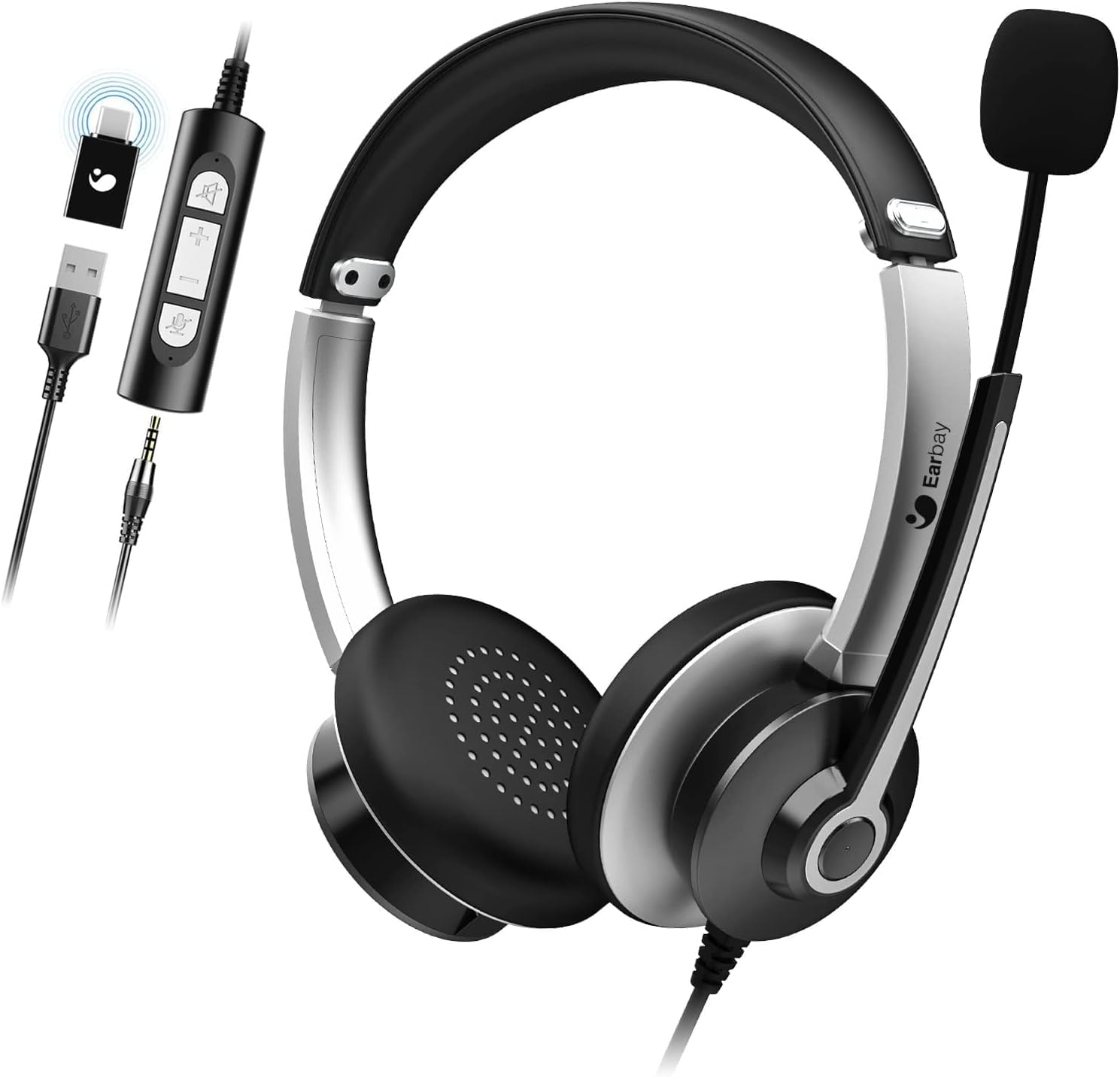
Image 1.1: The Earbay Headset, showcasing its design, adjustable microphone, and inline control unit with USB, 3.5mm, and Type-C adapters.
2. Package Contents
Verify that all items are present in your package:
- Earbay Headset with integrated microphone
- Inline control unit
- USB adapter
- 3.5mm audio jack
- Type-C adapter
3. Product Overview
The Earbay Headset is designed for clear audio communication and comfortable wear. It features multiple connectivity options for broad compatibility.

Image 3.1: A close-up view of the Earbay Stereo Computer Headset, highlighting its compatibility with USB, 3.5mm, and Type-C connections.
Key Features:
- Adjustable Headband: For a comfortable and secure fit.
- Breathable Ear Cushions: Designed for extended wear comfort.
- Noise Reduction Microphone: Enhances voice clarity by minimizing background noise.
- Inline Controls: Easy access to volume adjustment and mute functions for both microphone and speaker.
- Multiple Connectivity: Supports USB, 3.5mm, and Type-C connections for versatile use.

Image 3.2: Detail of the breathable ear cushions, designed for comfort during prolonged use.

Image 3.3: Illustration of the microphone's noise reduction technology, showing improved sound clarity.
4. Setup and Connection
The Earbay Headset offers flexible connection options for various devices.

Image 4.1: The headset is compatible with various platforms including laptops, PCs, and tablets.
4.1 Connecting to a Device
- Identify the correct connector: The headset comes with a 3.5mm jack, a USB adapter, and a Type-C adapter. Choose the one compatible with your device.
- For 3.5mm connection: Plug the 3.5mm jack directly into your device's audio port. This is typically used for smartphones, tablets, and some laptops/PCs.
- For USB connection: Connect the 3.5mm jack to the USB adapter, then plug the USB adapter into an available USB port on your computer (Laptop, PC).
- For Type-C connection: Connect the 3.5mm jack to the Type-C adapter, then plug the Type-C adapter into an available Type-C port on your device.
- Driver Installation: For most operating systems (Windows, macOS), the headset is plug-and-play and does not require additional drivers. The system should automatically detect and configure the device.

Image 4.2: The inline control unit, demonstrating its three connection options (USB, 3.5mm, Type-C) and dedicated buttons for microphone and speaker mute.
5. Operating Instructions
5.1 Adjusting the Headset
- Headband: Adjust the headband by sliding the earcups up or down until they rest comfortably over your ears.
- Microphone: Position the flexible microphone boom approximately 1-2 inches from your mouth for optimal voice pickup.
5.2 Using Inline Controls
The inline control unit provides convenient access to audio functions:
- Volume Up (+): Press to increase speaker volume.
- Volume Down (-): Press to decrease speaker volume.
- Microphone Mute: Press the microphone icon button to mute or unmute the microphone. An indicator light (if present) may show mute status.
- Speaker Mute: Press the speaker icon button to mute or unmute the headset speakers.
5.3 Call Functions
When connected to a communication application (e.g., Zoom, Skype, Microsoft Teams), the headset is ready for use.
- Ensure the headset is selected as the default audio input and output device in your application's settings.
- Use the inline controls for quick adjustments during calls.

Image 5.1: The Earbay Headset in use for business communication, emphasizing its design for clear calls and webinars.
6. Maintenance and Care
- Cleaning: Use a soft, dry cloth to clean the headset. For ear cushions, a slightly damp cloth can be used, but ensure they are completely dry before use. Do not use harsh chemicals or abrasive cleaners.
- Storage: Store the headset in a cool, dry place away from direct sunlight and extreme temperatures. Avoid tangling the cable.
- Handling: Do not pull on the cable to disconnect the headset. Always grasp the plug firmly. Avoid dropping or subjecting the headset to strong impacts.
7. Troubleshooting
| Problem | Possible Cause | Solution |
|---|---|---|
| No sound from headset |
|
|
| Microphone not working |
|
|
| Sound quality is poor or distorted |
|
|
8. Specifications
- Model Name: headset
- Brand: Earbay
- Connectivity Technology: Wired
- Wireless Communication Technology: Bluetooth (Note: Product is primarily wired, Bluetooth may refer to a variant or general capability not active in this model)
- Included Components: Cable
- Material: Acrylonitrile Butadiene Styrene (ABS)
- Item Weight: 104 Grams (3.67 ounces)
- Product Dimensions: 7.28 x 6.1 x 1.97 inches
- Special Feature: Adjustable Headband
- Hardware Platform: Laptop, PC, Tablet
- Headphones Jack: 3.5 mm Jack
- Noise Control: Active Noise Cancellation (for headphones)
9. Warranty and Support
Earbay products are manufactured to high-quality standards. For information regarding warranty coverage, technical support, or service inquiries, please refer to the warranty card included with your purchase or visit the official Earbay website. Please retain your proof of purchase for warranty claims.
Ask a question about this manual
Ask about setup, troubleshooting, compatibility, parts, safety, or missing instructions. Manuals+ will review the question and use this page’s manual context to help answer it.