Introduction
This user manual provides essential information for the safe and efficient operation, maintenance, and troubleshooting of your Toshiba 22 Liter 2200W Drum Vacuum Cleaner, Model VC-DR220ABF(G). Please read this manual thoroughly before using the appliance and retain it for future reference.
Safety Instructions
Always follow basic safety precautions when using electrical appliances to reduce the risk of fire, electric shock, or injury.
- Do not leave the vacuum cleaner unattended when plugged in.
- Unplug from outlet when not in use and before servicing.
- Do not use outdoors or on wet surfaces.
- Do not allow to be used as a toy. Close attention is necessary when used by or near children.
- Use only as described in this manual. Use only manufacturer's recommended attachments.
- Do not use with damaged cord or plug. If appliance is not working as it should, has been dropped, damaged, left outdoors, or dropped into water, return it to a service center.
- Do not pull or carry by cord, use cord as a handle, close a door on cord, or pull cord around sharp edges or corners. Do not run appliance over cord. Keep cord away from heated surfaces.
- Do not unplug by pulling on cord. To unplug, grasp the plug, not the cord.
- Do not handle plug or vacuum cleaner with wet hands.
- Do not put any object into openings. Do not use with any opening blocked; keep free of dust, lint, hair, and anything that may reduce air flow.
- Keep hair, loose clothing, fingers, and all parts of body away from openings and moving parts.
- Do not pick up anything that is burning or smoking, such as cigarettes, matches, or hot ashes.
- Do not use to pick up flammable or combustible liquids, such as gasoline, or use in areas where they may be present.
- Do not use without dust bag and/or filters in place.
Product Overview

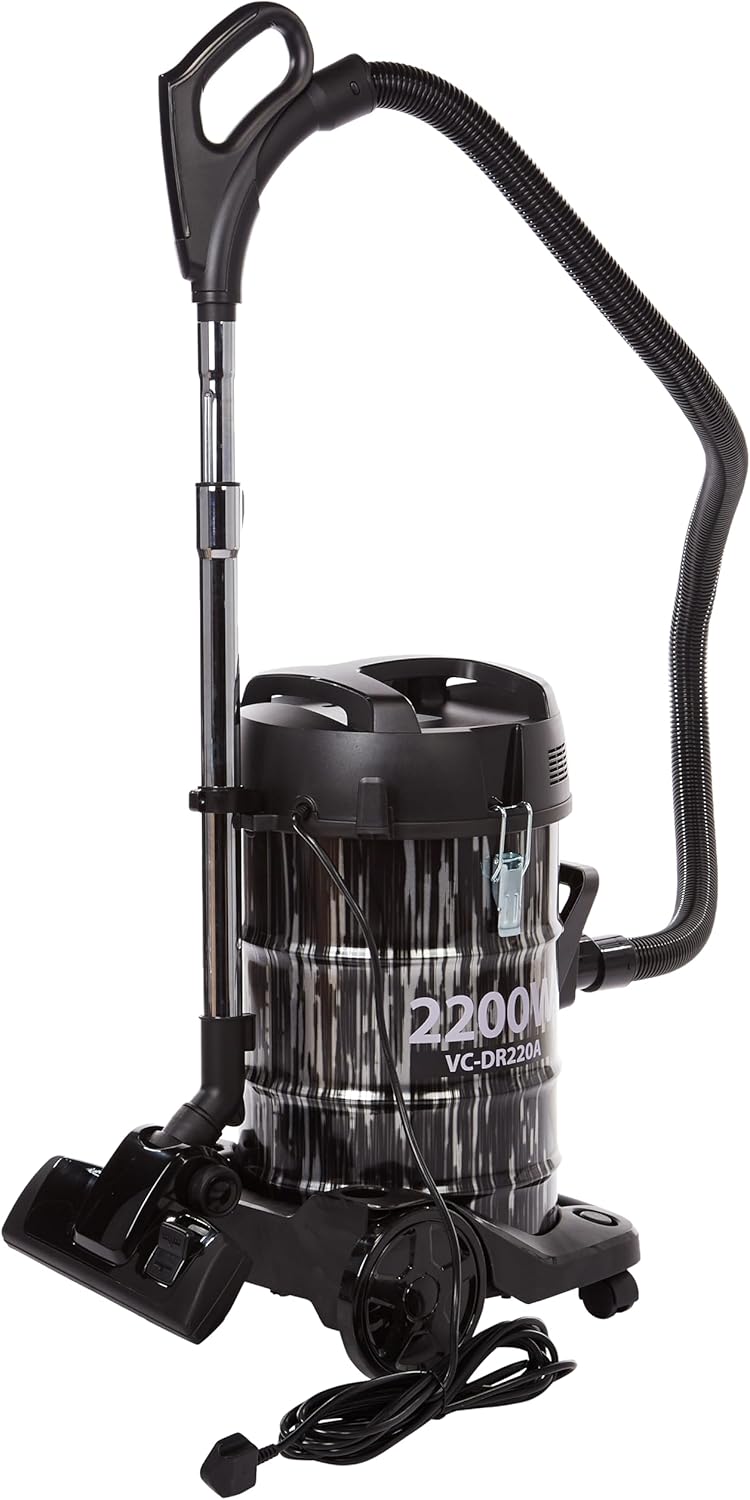

The Toshiba VC-DR220ABF(G) is a powerful 2200W drum vacuum cleaner designed for both dry and wet cleaning. It features a durable steel tub with a 22-liter capacity, making it suitable for large cleaning tasks. The bagless design simplifies maintenance, and its robust motor ensures strong suction.
Setup and Assembly
1. Unpacking
Carefully remove all components from the packaging. Ensure all parts listed below are present:
- Vacuum Cleaner Unit (Drum and Motor Head)
- Flexible Hose
- Telescopic Metal Wand
- Floor Nozzle
- Crevice Tool
- Dusting Brush
- Cloth Filter (pre-installed or separate)
2. Assembly Steps
- Attach the Flexible Hose: Insert the larger end of the flexible hose firmly into the suction inlet on the main vacuum unit until it clicks into place. For blowing function, insert the hose into the air outlet port.
- Connect the Telescopic Wand: Attach the smaller end of the flexible hose to the wider end of the telescopic metal wand.
- Attach the Floor Nozzle: Connect the desired cleaning attachment (e.g., floor nozzle) to the narrow end of the telescopic wand.
- Install the Cloth Filter: Ensure the cloth filter is properly installed inside the drum for dry vacuuming. For wet vacuuming, remove the cloth filter.
Operating Instructions
1. Dry Vacuuming
- Ensure the cloth filter is securely in place.
- Plug the power cord into a suitable electrical outlet (220V).
- Press the power switch (usually located on the motor head) to turn on the vacuum cleaner.
- Begin vacuuming the desired surface. The powerful suction will effectively pick up dust and debris.
- When finished, turn off the power switch and unplug the appliance.
2. Wet Vacuuming
This vacuum cleaner is capable of picking up liquids. Follow these steps for wet cleaning:
- Important: Remove the cloth filter before wet vacuuming to prevent damage.
- Ensure the drum is empty and clean.
- Plug in the vacuum cleaner and turn it on.
- Carefully vacuum up spills or liquids. Do not exceed the maximum liquid fill line indicated inside the drum.
- After wet vacuuming, empty the drum immediately and clean it thoroughly to prevent odors and mold.
3. Blower Function
The vacuum cleaner also features a blower function, useful for clearing debris from hard-to-reach areas or blowing leaves.
- Locate the air outlet port on the motor head (opposite the suction inlet).
- Insert the flexible hose firmly into the air outlet port.
- Turn on the vacuum cleaner. Air will now be expelled from the end of the hose/attachments.
Maintenance and Care
1. Emptying the Drum
For optimal performance, empty the drum regularly, especially after each use for wet vacuuming.
- Unplug the vacuum cleaner from the power outlet.
- Release the latches on the sides of the drum and carefully lift off the motor head.
- Dispose of collected dry debris or pour out liquids.
- Clean the inside of the drum with a damp cloth if necessary.
- Replace the motor head and secure the latches.
2. Cleaning the Cloth Filter
The cloth filter should be cleaned regularly to maintain suction power.
- Remove the cloth filter from the motor head.
- Gently shake off accumulated dust over a waste bin.
- If heavily soiled, the cloth filter can be hand-washed with mild soap and water. Ensure it is completely dry before re-installing.
- Do not use the vacuum cleaner without a dry and properly installed cloth filter for dry vacuuming.
3. General Cleaning
Wipe the exterior of the vacuum cleaner with a soft, damp cloth. Do not use abrasive cleaners or solvents.
4. Storage
Store the vacuum cleaner in a cool, dry place, away from direct sunlight and extreme temperatures. Ensure the power cord is neatly wrapped.
Troubleshooting
| Problem | Possible Cause | Solution |
|---|---|---|
| Vacuum cleaner does not turn on. | Not plugged in; Power outlet faulty; Power switch off; Thermal cut-out activated. | Check plug connection; Try another outlet; Turn power switch on; Unplug and let cool for 30 minutes. |
| Low suction power. | Drum full; Filter clogged; Hose/attachments blocked; Hose not properly connected. | Empty the drum; Clean or replace filter; Check hose and attachments for blockages; Re-connect hose securely. |
| Motor makes unusual noise. | Blockage in hose/nozzle; Motor overheating. | Check for and remove blockages; Turn off and unplug, allow to cool. If problem persists, contact service. |
| Water leaking during wet vacuuming. | Drum overfilled; Seal not properly seated. | Do not exceed max fill line; Ensure motor head and drum are sealed correctly. |
If the problem persists after attempting these solutions, please contact customer support.
Specifications

| Feature | Detail |
|---|---|
| Brand | TOSHIBA |
| Model Number | VC-DR220ABF(G) |
| Color | Black |
| Product Dimensions | 65 x 35 x 40 cm |
| Item Weight | 11 Kilograms |
| Capacity | 22 Liters |
| Power / Wattage | 2200 watts |
| Voltage | 220 Volts |
| Noise Level | 50 dB |
| Special Features | Bagless |
| Filter Type | Cloth |
| Surface Recommendation | Carpet |
| Power Source | Electric |
| Included Components | 1 x Toshiba 2200W Drum Vacuum Cleaner with Steel Tub, 22 Liter Capacity, Black/Grey |
Warranty and Support
Warranty Information
This Toshiba Drum Vacuum Cleaner comes with a 2-year warranty. Please retain your purchase receipt as proof of purchase for warranty claims.
Customer Support and Installations
For technical support, service, or installation inquiries, please contact the authorized service centers in your region:
- Riyadh: +966 -11- 4094006 Ext – 113
- Jeddah: +966- 12- 6577714
- Dammam: +966-13- 8343691
- Qassim: +966 581044198
- Abha: +966 593322785
When contacting support, please have your product model number (VC-DR220ABF(G)) and purchase details ready.