
1. Introduction
Thank you for choosing the Denpetec 49-Key Roll Up Piano. This portable and flexible electronic keyboard is designed for beginners and enthusiasts, offering a compact solution for learning and playing music anywhere. Its soft silicone keys and comprehensive features make it an ideal instrument for developing musical skills.
Package Contents:
- 1 x Denpetec 49-Key Roll Up Piano
- 1 x Data Cable (USB)
- User Manual (this document)

Image: The Denpetec 49-Key Roll Up Piano, showcasing its flexible keyboard and control panel, accompanied by musical notes.
2. Features
- 49 Standard Keys: A full 49-key layout (C4-C8) for comprehensive musical range.
- Portable & Rollable Design: Made from soft silicone rubber, allowing the keyboard to be rolled up for easy transport and storage.
- Built-in Speaker: Integrated stereo speaker for clear and melodious sound.
- Multiple Tones: Features 16 different built-in tones (instruments).
- Rhythm Accompaniment: Includes 10 built-in rhythms and 8 drum rhythms.
- Demo Songs: 6 pre-recorded demonstration songs for learning and enjoyment.
- Recording & Playback: Functionality to record and play back your performances (up to 600 notes).
- Volume & Tempo Control: 16-level volume adjustment and 32-level beat control.
- Automatic Sleep Function: Power-saving feature that activates after 3 minutes of inactivity.
- External Connectivity: Headphone jack for private practice and DC 6V power input.
- USB Connectivity: Connects to computer or mobile phone apps for teaching and entertainment.
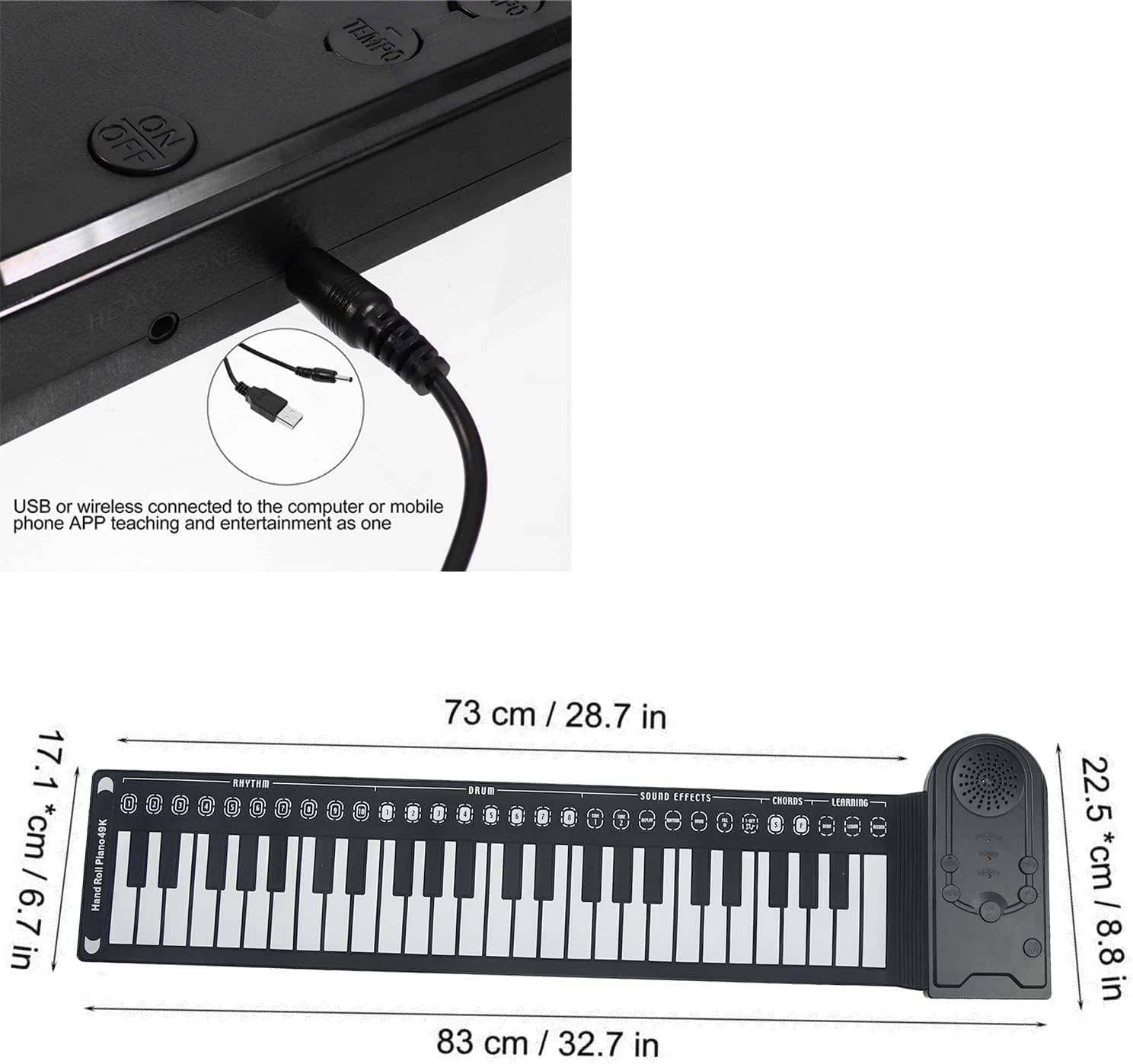
Image: The 49-key roll-up piano fully extended, showing the keyboard and the control panel with various function buttons.

Image: The roll-up piano in a compact, rolled-up state, demonstrating its portability.
3. Setup
Powering the Piano:
- Battery Power: Insert 3 x AA batteries (not included) into the battery compartment located on the underside of the control panel. Ensure correct polarity.
- DC Power: Connect a DC 6V power adapter (not included) to the DC 6V input port on the control panel.
Connecting Headphones:
For private practice, plug your headphones into the 3.5mm headphone jack on the control panel.

Image: A detailed view of the control panel's side, highlighting the headphone jack and USB port for external connections.
4. Operation
The control panel features various buttons to access the piano's functions. Familiarize yourself with the layout for optimal use.
Basic Functions:
- Power ON/OFF: Use the dedicated power button on the control panel to turn the piano on or off.
- Volume Control: Press the "Volume Down" or "Volume Up" buttons to adjust the sound level. There are 16 volume levels.
- Tempo Speed Control: Use the "Tempo Up" or "Tempo Down" buttons to adjust the playback speed of rhythms and demo songs. There are 32 tempo levels.
Musical Functions:
- Tone Selection: Press the "Tone" button to cycle through the 16 built-in instrument tones.
- Rhythm Selection: Press the "Rhythm" button to select from the 10 built-in rhythms.
- Drum Rhythm: Press the "DRUM" button to choose from 8 different drum rhythms.
- Demo Mode: Press the "DEMO" button to play the built-in demonstration songs. Press again to skip to the next song. There are 6 demo songs that loop. Press "DEMO" again to stop playback.
- Sound Mode (Replay): Press the "REPLAY" button to choose between three different sound modes (e.g., string, vibrato).
Recording and Playback:
- Enter Recording Mode: Press the "RECORD" button. The recording indicator light will blink.
- Record Performance: Begin playing on the keys. The system will record your played content (up to 600 notes).
- Play Recorded Content: Press the "PLAY" button to listen to your recorded performance.
- Exit Recording: Press "RECORD" or "START/STOP" to exit recording mode. The recording light will turn off.
Learning Mode:
- Enter Learning Mode: Press the "LEARN" key.
- Select Song: Press "LEARN" again to select a song.
- Guided Play: The system will play the song, and the keys will light up to guide your playing.
- Exit Learning Mode: Press "START/STOP" to exit learning mode.
Automatic Sleep Function:
If there is no operation for 3 minutes, the piano will automatically enter sleep mode to conserve power.

Image: A close-up view of the piano's control panel, showing the various buttons for rhythm, sound effects, chords, and learning functions, alongside the flexible keys.
5. Maintenance
- Cleaning: Wipe the piano surface with a soft, dry cloth. Do not use abrasive cleaners or solvents.
- Storage: When not in use, roll up the piano gently and store it in a dry place away from direct sunlight and extreme temperatures.
- Avoid Punctures: The silicone keyboard is durable but avoid sharp objects that could puncture or damage it.
- Battery Care: If not using the piano for an extended period, remove the batteries to prevent leakage.
6. Troubleshooting
| Problem | Possible Cause | Solution |
|---|---|---|
| No sound or low volume | Piano is off; Volume is too low; Batteries are dead/low; Power adapter not connected properly. | Ensure piano is ON; Increase volume; Replace batteries; Check power adapter connection. |
| Keys not responding or inconsistent sound | Keyboard not fully unrolled/flat; Silicone surface obstructed; Internal electronic issue. | Ensure keyboard is laid flat on a smooth surface; Check for debris under keys; Try restarting the piano. If issues persist, contact customer support. |
| Recording function not working | Not in recording mode; Memory full. | Ensure the "RECORD" light is blinking; The piano can record up to 600 notes. If you've reached this limit, you may need to clear the recording by turning the unit off and on. |
| Piano enters sleep mode too quickly | Automatic sleep function activated. | This is a normal power-saving feature. Simply press any key or button to wake the piano. |
7. Specifications
- Model Name: 49 Keys Hand Roll Piano
- Number of Keys: 49
- Material: Silicone rubber (keyboard); ABS plastic (control panel)
- Color: Black
- Tones: 16
- Rhythms: 10
- Demonstration Songs: 6
- Power: 3 x AA batteries or DC 6V adapter (not included)
- Control Box Dimensions (LxWxH): Approx. 10 x 22.2 x 2.2 cm (3.9 x 8.7 x 0.9 inches)
- Keyboard Dimensions (LxWxH): Approx. 73 x 17.1 x 0.3 cm (28.7 x 6.7 x 0.12 inches)
- Product Dimensions (Overall): 11.42 x 7.09 x 0.12 inches
- Item Weight: 0.46 Kilograms (1.01 pounds)
- Connectivity Technology: Auxiliary (3.5mm Jack)
- Manufacturer: DENPETEC
- UPC: 627653634781
8. Warranty and Support
For warranty information and customer support, please refer to the product packaging or contact Denpetec directly through their official website or the retailer from whom you purchased the product. Please retain your proof of purchase for any warranty claims.


