
Sinocare XYJ-FT
Sinocare Arm Blood Pressure Monitor
Model: XYJ-FT
1. Introduction
Thank you for choosing the Sinocare Arm Blood Pressure Monitor. This device is designed to measure your systolic and diastolic blood pressure, as well as your pulse rate, using the oscillometric method. It is intended for home use by adults and provides a convenient way to monitor your cardiovascular health regularly. Please read this manual thoroughly before use to ensure accurate readings and safe operation.
2. Important Safety Information
- Consult your physician for interpretation of blood pressure measurements. Self-diagnosis and treatment based on measurement results can be dangerous.
- Do not use this device on infants, young children, or individuals who cannot express their consent.
- Do not use this device if you have a serious arrhythmia.
- Avoid taking measurements immediately after bathing, exercising, or consuming alcohol/caffeine.
- Ensure the cuff is placed correctly and comfortably. Over-tightening can cause discomfort or injury.
- Keep the device away from strong electromagnetic fields.
- Use only specified batteries and dispose of them properly.
3. Package Contents
Upon opening the package, please verify that all items listed below are present and undamaged:
- 1 x Sinocare Arm Blood Pressure Monitor (Main Unit)
- 1 x Adjustable Arm Cuff (22-42 cm)
- 4 x 1.5V AAA Batteries
- 1 x User Manual
- 1 x Storage Box

Figure 3.1: Contents of the Sinocare Blood Pressure Monitor package, including the main unit, arm cuff, batteries, and user manual.
4. Product Overview
The Sinocare Blood Pressure Monitor features a clear LED display and intuitive controls for easy operation.

Figure 4.1: Detailed view of the Sinocare Blood Pressure Monitor's display and buttons. Key indicators include the number of user groups, irregular heartbeat symbol, low pressure value (DIA), high pressure value (SYS), pulse rate, WHO color scale, cuff detection, setting button, start/stop button, and memory button.
Display Indicators:
- SYS (Systolic Pressure): The top number, indicating the pressure in your arteries when your heart beats.
- DIA (Diastolic Pressure): The bottom number, indicating the pressure in your arteries between beats.
- PUL (Pulse Rate): Your heart rate, measured in beats per minute.
- BPM Check (Irregular Heartbeat Detection): An icon indicating if an irregular heartbeat was detected during measurement.
- WHO Color Scale: A vertical bar on the right side of the display that visually classifies your blood pressure reading according to WHO guidelines (e.g., green for optimal, red for hypertension).
- Cuff Detection: An indicator showing if the cuff is correctly applied.
- User Group Indicator: Shows which user (User 1 or User 2) is currently selected.
- Battery Indicator: Displays the current battery level.
Buttons:
- START/STOP Button: Powers the device on/off and initiates/stops a measurement.
- Memory Button: Used to review past measurements.
- Setting Button: Used to adjust settings such as date, time, and user selection.
5. Setup
5.1. Installing Batteries
The device requires 4 AAA batteries. Open the battery compartment on the back of the monitor and insert the batteries, ensuring correct polarity (+/-). Close the compartment securely.
5.2. Connecting the Arm Cuff
Insert the air plug of the arm cuff firmly into the air jack on the side of the main unit.

Figure 5.1: The monitor can be powered by 4 AAA batteries (slot shown) or via USB. The adjustable arm cuff measures 22-42 cm (8.66-16.53 inches) and the main unit dimensions are approximately 10.9 cm (4.29 inches) wide by 13.7 cm (5.39 inches) high.
6. Operating Instructions
Follow these steps for accurate blood pressure measurement:

Figure 6.1: Visual guide to the measurement process: Preparation, correct cuff placement, proper measurement posture, and obtaining accurate readings.
6.1. Preparation for Measurement
- Rest for at least 5-10 minutes before taking a measurement.
- Avoid eating, drinking alcohol, smoking, or exercising for 30 minutes prior to measurement.
- Ensure your bladder is empty.
- Take measurements at the same time each day for consistent results.
6.2. Correct Cuff Placement
- Slide the cuff onto your bare upper arm, approximately 1-2 cm above the elbow joint. The air tube should run down the inside of your arm.
- Ensure the cuff is snug but not too tight. You should be able to insert two fingers between the cuff and your arm.
- The cuff's artery mark (if present) should align with your brachial artery on the inside of your arm.
6.3. Measurement Posture
- Sit upright in a chair with your back supported and feet flat on the floor.
- Place your arm on a table so that the cuff is at the same level as your heart.
- Relax your arm and hand. Do not clench your fist.
- Remain still and silent during the measurement. Do not talk or move.
6.4. Taking a Measurement
- Press the START/STOP button. The cuff will automatically inflate.
- The device will automatically deflate and display your systolic pressure, diastolic pressure, and pulse rate.
- The results will be stored in the selected user's memory.
- The device will automatically shut off after 1 minute of inactivity.

Figure 6.2: The monitor features intelligent voice broadcast for readings and simple one-button operation for ease of use.
6.5. Dual User Mode
The monitor supports two users, each with 90 memory sets. To switch between User 1 and User 2, press the Setting button (left button) when the device is off. The user icon will change. Ensure you select the correct user before taking a measurement to store readings in the appropriate memory bank.

Figure 6.3: The device supports two distinct user profiles, allowing individuals to track their blood pressure readings separately.
7. Understanding Your Readings
Blood pressure readings are typically presented as two numbers: systolic (the higher number) and diastolic (the lower number). The World Health Organization (WHO) provides a classification for blood pressure levels:
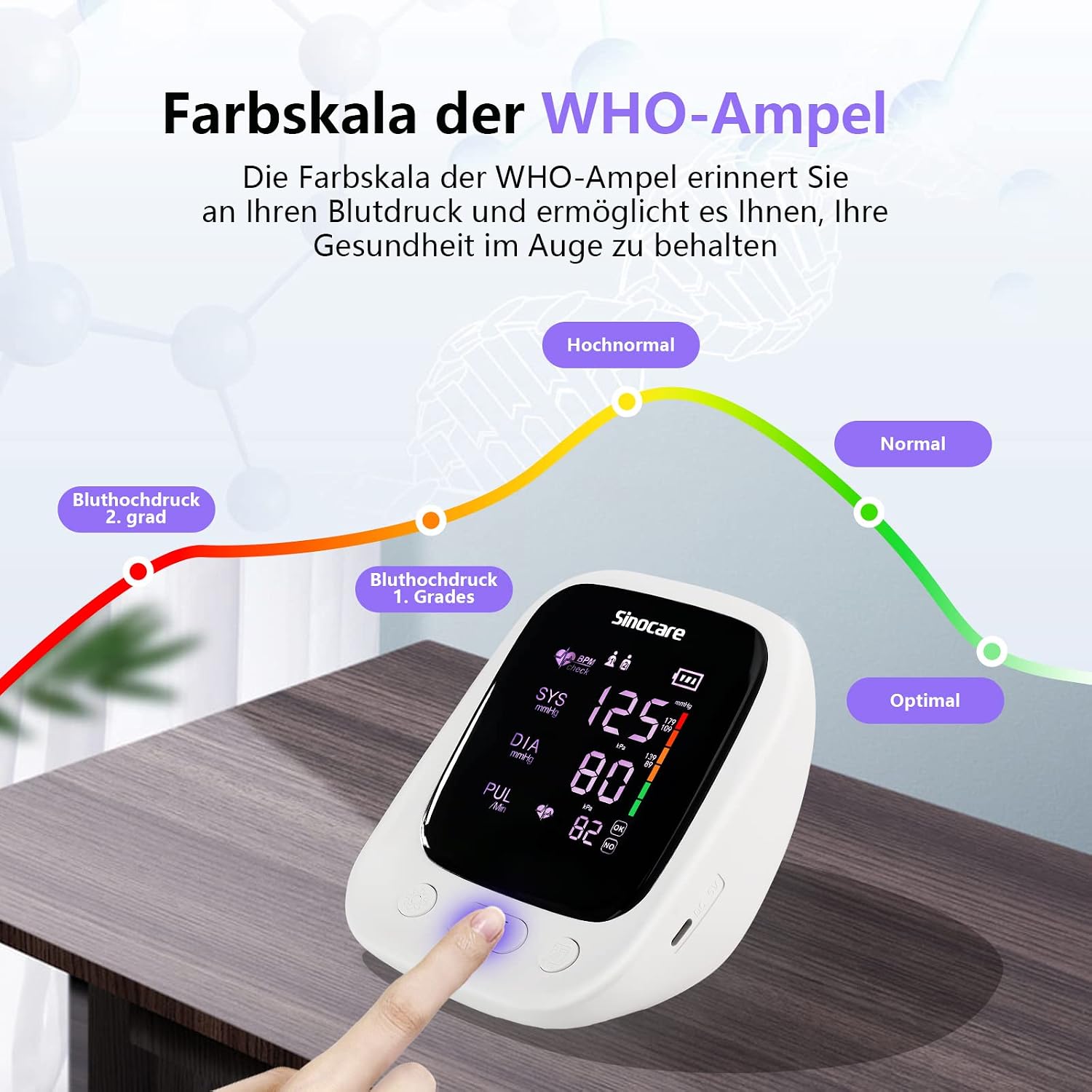
Figure 7.1: The WHO color scale on the display helps categorize blood pressure readings: Optimal (green), Normal (light green), High Normal (yellow), Grade 1 Hypertension (orange), and Grade 2 Hypertension (red).
The color bar on the right side of your monitor's display will indicate your reading's category based on the WHO guidelines. Always consult a healthcare professional for diagnosis and treatment of high or low blood pressure.
8. Memory Function
The monitor can store up to 90 readings for each of the two users, including the date and time of measurement. It also calculates the average of the last three measurements.
8.1. Recalling Measurements
With the device off, press the Memory button (right button). The most recent reading will be displayed. Press the Memory button repeatedly to scroll through older readings. The average of the last three readings will also be shown.
9. Maintenance
9.1. Cleaning
- Wipe the main unit and cuff with a soft, dry cloth.
- If necessary, use a cloth lightly dampened with water or a mild detergent, then wipe dry immediately.
- Do not use abrasive cleaners, alcohol, or organic solvents.
- Do not immerse the device or cuff in water.
9.2. Storage
- Store the device in its storage box in a cool, dry place, away from direct sunlight and extreme temperatures.
- If the device will not be used for an extended period, remove the batteries to prevent leakage.
10. Troubleshooting
| Problem | Possible Cause | Solution |
|---|---|---|
| No display when powered on. | Batteries are dead or incorrectly inserted. | Replace batteries or check polarity. |
| Cuff does not inflate or inflates too little. | Cuff not connected properly or air leakage. | Ensure cuff plug is fully inserted. Check cuff for damage. |
| Inaccurate or inconsistent readings. | Incorrect cuff placement, movement during measurement, or not resting before measurement. | Re-read Section 6 (Operating Instructions) and follow all steps carefully. Take multiple readings. |
| Error message on display. | Specific error (e.g., excessive movement, cuff too loose/tight). | Refer to the specific error code in the full manual (if available) or re-take measurement ensuring proper technique. |
11. Specifications
| Feature | Detail |
|---|---|
| Model | XYJ-FT |
| Brand | Sinocare |
| Measurement Method | Oscillometric |
| Cuff Size | 22-42 cm (8.66-16.53 inches) |
| Memory | 2 users x 90 sets |
| Power Source | 4 x 1.5V AAA Batteries (included) or USB |
| Display Type | Digital LED |
| Product Dimensions (approx.) | 15.8 x 12.1 x 9.7 cm |
| Product Weight (approx.) | 500 g |
12. Warranty and Support
Sinocare is committed to providing high-quality products. For any questions, concerns, or technical support regarding your blood pressure monitor, please contact Sinocare customer service. Refer to the contact information provided in the product packaging or visit the official Sinocare website for assistance.

Figure 12.1: The Sinocare Blood Pressure Monitor is designed for convenient home use, supporting family health monitoring.
Related documentsXYJ-FT


Ask a question about this manual
Ask about setup, troubleshooting, compatibility, parts, safety, or missing instructions. Manuals+ will review the question and use this page’s manual context to help answer it.