1. Introduction
This user manual provides detailed instructions for the setup, operation, and maintenance of your Knox Gear 60 Watt Compact Wireless 2.0ch Soundbar with Bluetooth 5.0. Please read this manual thoroughly before using the product to ensure proper functionality and to maximize your audio experience.
2. Product Overview
The Knox Gear 60-Watt Compact Wireless 2.0-Channel Soundbar with Bluetooth 5.0 is designed to enhance your audio experience for music, movies, and more. It features a compact 28-inch design with crystal clear sound and a stylish wood grain finish.

Figure 2.1: Front view of the Knox Gear Soundbar with its remote control.
3. Features
- 60-Watt Compact Wireless 2.0-Channel Soundbar: Enjoy your music, movies, and more to the fullest with crystal clear sound.
- Wireless Bluetooth 5.0 Transmission: Strong anti-interference, lossless audio transmission, and 360-degree sound for a high-quality home audio system.
- Dual Powerful Speaker: Features advanced digital sound with a unique loudspeaker cavity structure for premium acoustic sound and crystal-clear balanced bass. Includes two 20W full-frequency 3-inch drivers.
- Convenient TV Connection: Easily connect to your TV using Bluetooth or optical input, reducing cable clutter and improving sound clarity.
- Bass and Technology: Two built-in bass reflex ports provide richer and more powerful bass. The remote control includes Bass+ and Bass- buttons for adjustable bass levels.
- Slick and Stylish Wood Grain Finish: Aesthetically pleasing design to complement your home decor.
- DSP Technology: Choose from a variety of sound modes for optimized audio.

Figure 3.1: Key features of the soundbar including sound pressure level, sound technology, and Bluetooth version.
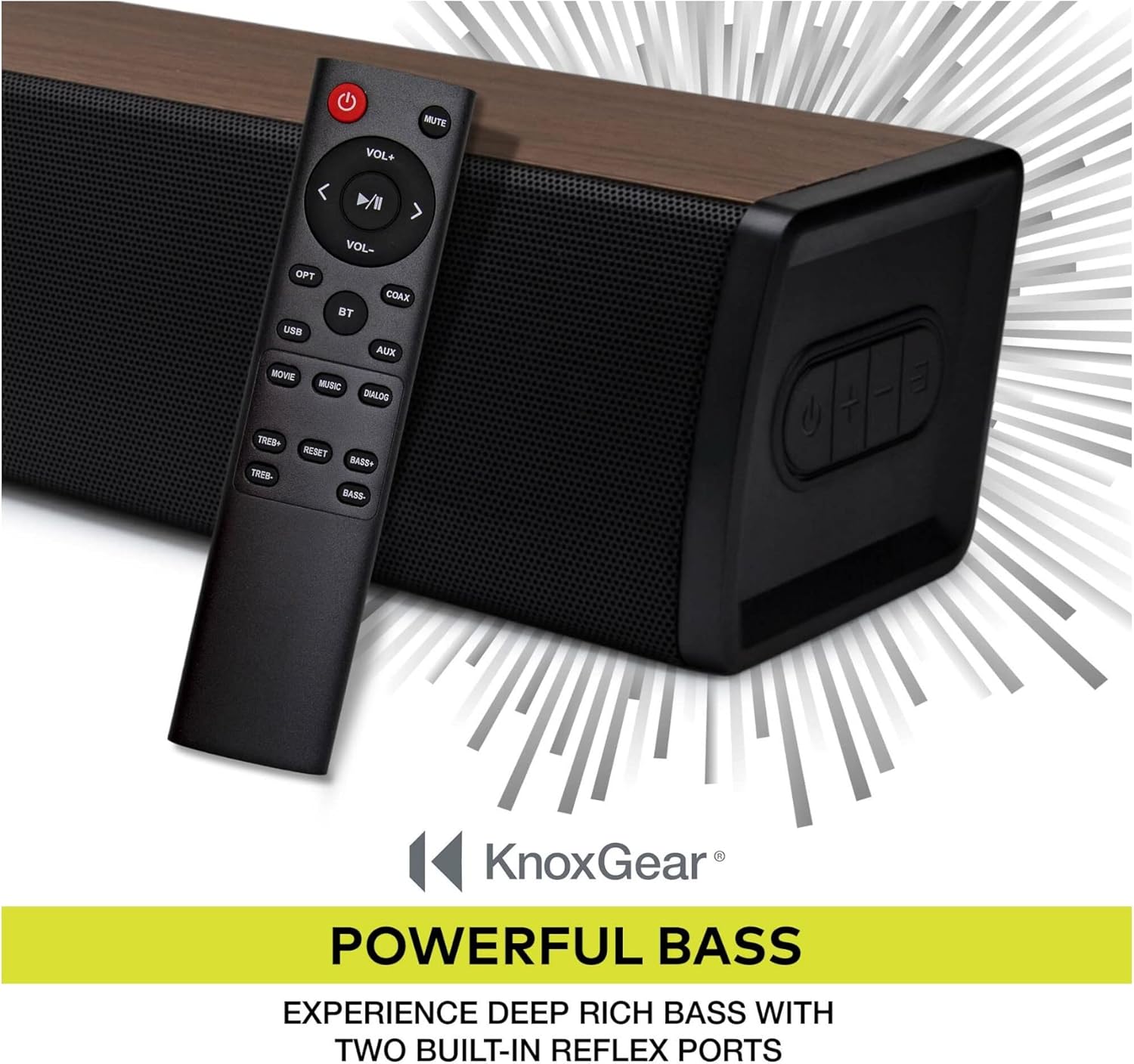
Figure 3.2: The soundbar features DSP technology for various sound modes.

Figure 3.3: The soundbar offers powerful bass with built-in reflex ports, adjustable via remote.
4. What's in the Box
Verify that all items are present in the packaging:
- Knox Gear 60 Watt Compact Wireless 2.0ch Soundbar
- Remote Control
- Power Adapter
- Digital Optical Cable
- Stereo RCA to 3.5 mm Audio Cable
- Wall Mount Brackets
- Mount Screws
- Wall Mount Template
- Instruction Manual (this document)

Figure 4.1: All included components with the soundbar.
5. Setup and Connections
Before connecting, ensure the soundbar is placed on a stable surface or securely mounted to a wall using the provided brackets and template.
5.1 Power Connection
- Connect the power adapter to the DC input port on the soundbar.
- Plug the power adapter into a wall outlet.
5.2 Audio Connections
The soundbar offers multiple connectivity options:
- Optical Input: For high-quality digital audio from your TV or other devices. Use the included optical cable.
- AUX Input: For analog audio connection using the 3.5mm audio cable.
- Coaxial Input: For digital audio connection.
- USB Input: For playing audio files directly from a USB drive.
- Bluetooth 5.0: For wireless audio streaming from compatible devices like smartphones, tablets, and laptops.

Figure 5.1: Rear panel with various input ports.

Figure 5.2: Wall mounting points on the back of the soundbar.

Figure 5.3: Visual representation of easy TV connection options.
6. Operating Instructions
The soundbar can be operated using the included remote control or the buttons on the side panel.
6.1 Remote Control Functions
- Power Button: Turns the soundbar on or off.
- Mute Button: Mutes or unmutes the sound.
- VOL+ / VOL-: Adjusts the volume up or down.
- Play/Pause: Plays or pauses audio (for Bluetooth/USB modes).
- Previous/Next Track: Skips to the previous or next track (for Bluetooth/USB modes).
- Input Selection Buttons (OPT, BT, USB, AUX, COAX): Selects the desired audio input source.
- Sound Mode Buttons (MOVIE, MUSIC, DIALOG): Selects preset equalizer modes.
- TREB+ / TREB-: Adjusts treble levels.
- BASS+ / BASS-: Adjusts bass levels.
- RESET: Resets audio settings to default.
6.2 Bluetooth Pairing
- Turn on the soundbar and select "BT" input mode using the remote or side panel button. The Bluetooth indicator will flash.
- On your device (smartphone, tablet, etc.), enable Bluetooth and search for "Knox Gear Soundbar".
- Select the soundbar from the list of available devices to pair. Once connected, the Bluetooth indicator will stop flashing and remain solid.
Video 6.1: An overview of the Knox Gear 60 Watt Compact Wireless 2.0ch Soundbar, demonstrating its features and design.
7. Maintenance
To ensure the longevity and optimal performance of your soundbar, follow these maintenance guidelines:
- Keep the soundbar in a dry environment, away from direct sunlight, heat sources, and excessive moisture.
- Clean the surface of the soundbar with a soft, dry cloth. Do not use abrasive cleaners, waxes, or solvents.
- Avoid blocking the speaker grilles to maintain proper airflow and sound quality.
- If the soundbar will not be used for an extended period, unplug it from the power outlet.
8. Troubleshooting
If you encounter issues with your soundbar, refer to the following common problems and solutions:
| Problem | Possible Cause | Solution |
|---|---|---|
| No power | Power cable not connected or power outlet not working. | Ensure the power cable is securely connected to the soundbar and a working power outlet. |
| No sound | Incorrect input source selected, volume too low, or audio cable not connected properly. | Verify the correct input source (Optical, BT, AUX, etc.) is selected. Increase the volume. Check all audio cable connections. Ensure your TV/device audio output is set to PCM if using optical. |
| Bluetooth pairing issues | Soundbar not in pairing mode, device too far, or interference. | Ensure the soundbar is in BT mode and the indicator is flashing. Move your device closer to the soundbar. Turn off other Bluetooth devices to reduce interference. |
| Remote control not working | Batteries are dead or remote is out of range/blocked. | Replace the batteries in the remote control. Ensure there are no obstructions between the remote and the soundbar's sensor. |
If the problem persists after trying these solutions, please contact customer support.
9. Specifications
| Feature | Detail |
|---|---|
| Brand | Knox Gear |
| Model Number | KN-BTSB24-OAK |
| Speaker Type | Soundbar |
| Speaker Maximum Output Power | 60 Watts |
| Surround Sound Channel Configuration | 2.0 |
| Wireless Communication Technology | Bluetooth 5.0 |
| Bluetooth Range | 10 Meters |
| Connectivity Technology | Optical, AUX, Coaxial, USB, Bluetooth |
| Audio Output Mode | Stereo, Dialogue, Movie, Music |
| Compatible Devices | Smartphone, Tablet, Television, Laptop |
| Control Method | Remote Control |
| Product Dimensions | 29.2 x 6.9 x 5.6 inches |
| Item Weight | 1 pounds |
| Color | Brown |
| Mounting Type | Bar Mount |
10. Warranty and Support
Knox Gear products are designed and manufactured to the highest quality standards. For warranty information or technical support, please refer to the warranty card included with your product or visit the official Knox Gear website. Keep your purchase receipt as proof of purchase.
For further assistance, you may contact the seller, Focus Camera LLC, through the platform where you purchased the product.