Introduction
The SunSun GR-200 Aquarium Heater Thermostat is designed to provide a stable and controlled temperature environment for your aquatic inhabitants. This device features a 200W heating element and an external temperature controller, allowing precise adjustment of water temperature within a range of 18°C to 34°C. This manual provides essential information for the safe and effective installation, operation, and maintenance of your heater.
Safety Instructions
Please read and understand all safety instructions before operating this appliance. Failure to follow these instructions may result in electric shock, fire, or serious injury.
- Voltage Compatibility: This product operates at 220V. Ensure your power supply matches this voltage to prevent damage to the device and potential hazards.
- Full Submersion: The heater must be fully submerged in water at all times when powered on. Operating the heater out of water will cause it to overheat and fail.
- Unplug Before Handling: Always unplug the heater from the power outlet before performing any maintenance, cleaning, or handling inside the aquarium.
- Power Cord: Do not operate the heater if the power cord or plug is damaged. Do not attempt to repair it yourself.
- Placement: Position the heater in an area with good water circulation to ensure even heat distribution.
- Children and Pets: Keep the appliance out of reach of children and pets.
- Indoor Use Only: This heater is designed for indoor aquarium use only.
- Temperature Fluctuation: Avoid sudden temperature changes in the aquarium, which can stress aquatic life.
Product Overview
The SunSun GR-200 heater consists of a submersible heating element with an integrated temperature sensor and a separate external control unit for setting the desired temperature.
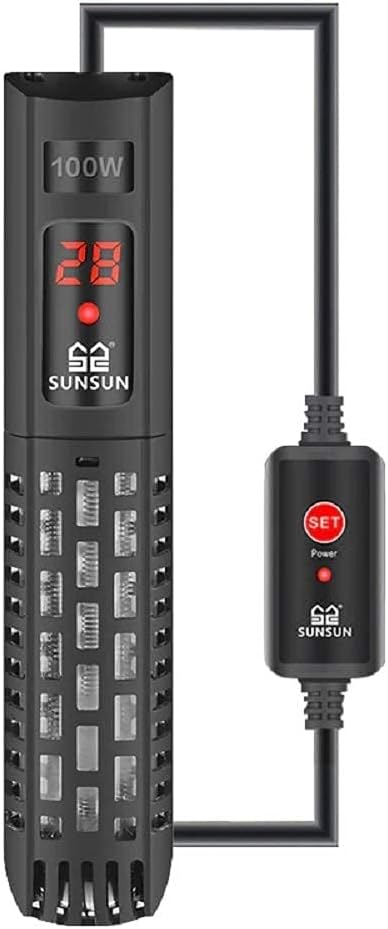
Figure 1: SunSun GR-200 Aquarium Heater showing the main submersible unit and the external control box with a 'SET' button and power indicator.
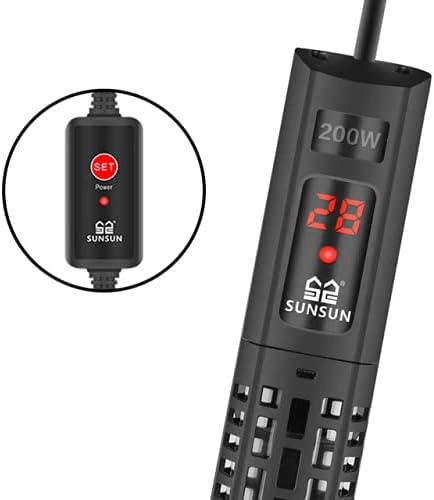
Figure 2: Detailed view of the external control unit, featuring the 'SET' button and a power indicator light.
Components:
- Heater Unit: Submersible heating element with a digital temperature display.
- External Control Box: Connected via cable, features a 'SET' button for temperature adjustment and a power indicator.
- Power Cord: Connects the control box to the electrical outlet.
- Suction Cups (not explicitly shown but implied for aquarium heaters): For mounting the heater inside the aquarium.
Setup and Installation
Proper installation is crucial for the safe and efficient operation of your aquarium heater.
- Unpack: Carefully remove the heater and all components from the packaging. Inspect for any signs of damage.
- Placement: Choose a location within your aquarium that allows for good water circulation around the heater. This helps distribute heat evenly and ensures accurate temperature readings. Avoid placing it directly in the substrate.
- Mounting: Use the provided suction cups to securely attach the heater to the inside wall of your aquarium. Ensure the heater is positioned vertically or horizontally, but always fully submerged.
- Submersion: The entire heating element must be completely underwater before plugging it in. The digital display on the heater unit should also be submerged.
- Drip Loop: Create a drip loop with the power cord to prevent water from running down the cord and into the electrical outlet.
- Connect to Power: Once the heater is securely installed and fully submerged, plug the power cord into a 220V electrical outlet.

Figure 3: The SunSun GR-200 heater correctly installed and fully submerged in an aquarium, with the external control box accessible outside the tank.
Operating Instructions
Follow these steps to set and maintain the desired water temperature in your aquarium.
- Power On: After plugging in the heater, the digital display on the submersible unit will show the current water temperature. The power indicator light on the external control box will illuminate.
- Set Temperature:
- Press the 'SET' button on the external control box. The digital display on the heater will begin to flash, indicating it is in setting mode.
- Each subsequent press of the 'SET' button will cycle through the available temperature settings (18°C to 34°C).
- Stop pressing 'SET' when your desired temperature is displayed. The display will flash for a few seconds and then revert to showing the current water temperature, confirming the new setting.
- Heating Indicator: When the heater is actively heating the water, the power indicator light on the external control box will be lit. It will turn off once the set temperature is reached.
- Monitoring: Regularly monitor the aquarium temperature with a separate thermometer to ensure the heater is functioning correctly and maintaining the desired temperature.
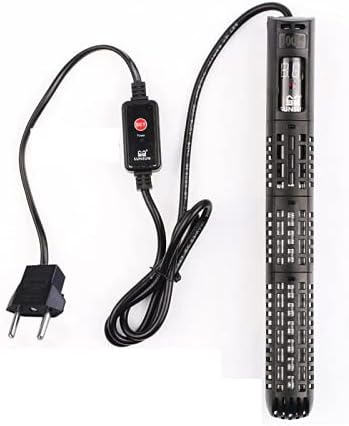
Figure 4: The heater's digital display showing the current temperature (e.g., 28°C) and the external control unit with the 'SET' button and power indicator.
Maintenance
Regular maintenance ensures the longevity and efficient operation of your heater.
- Unplug First: Always unplug the heater from the power outlet and allow it to cool down completely (at least 15-20 minutes) before removing it from the aquarium for cleaning or maintenance.
- Cleaning: Periodically clean the heater unit to remove algae or mineral deposits that can accumulate on its surface. Use a soft brush or cloth and aquarium water. Do not use soaps, detergents, or abrasive cleaners.
- Inspect Power Cord: Regularly check the power cord for any signs of damage, fraying, or exposed wires. If damage is found, discontinue use immediately.
- Suction Cups: Inspect the suction cups for wear and tear. Replace them if they lose their grip to ensure the heater remains securely attached.
- Water Changes: During water changes, ensure the water level does not drop below the minimum submersion line of the heater while it is still plugged in. It is best practice to unplug the heater during large water changes.
Troubleshooting
If you encounter issues with your SunSun GR-200 heater, refer to the following troubleshooting guide:
| Problem | Possible Cause | Solution |
|---|---|---|
| Heater not turning on / No display | No power, faulty outlet, damaged cord. | Check power connection. Test outlet with another device. Inspect power cord for damage. If damaged, discontinue use. |
| Water not heating / Temperature too low | Incorrect temperature setting, heater too small for tank, poor water circulation, heater malfunction. | Verify set temperature. Ensure heater is fully submerged. Check for adequate water flow around the heater. Confirm heater wattage is appropriate for your tank size (GR-200 is for tanks up to ~150L). |
| Temperature too high | Incorrect temperature setting, heater malfunction. | Verify set temperature. Unplug the heater immediately if overheating. Monitor with a separate thermometer. |
| Digital display flashing | In temperature setting mode, or error code. | If flashing after pressing 'SET', it's normal during setting. If flashing continuously without interaction, consult manufacturer support. |
If the problem persists after attempting these solutions, please contact SunSun customer support or your retailer for further assistance.
Specifications
Technical specifications for the SunSun GR-200 Aquarium Heater Thermostat.
| Feature | Specification |
|---|---|
| Model | GR-200 |
| Power | 200W |
| Voltage | 220V |
| Temperature Range | 18°C - 34°C |
| Heater Unit Dimensions (approx.) | 3cm (diameter) x 21.5cm (length) |
| Power Cord Length (approx.) | 1.2 meters |
| Recommended Tank Size | Up to 150 Liters (approx.) |
| Manufacturer | Sunsun |
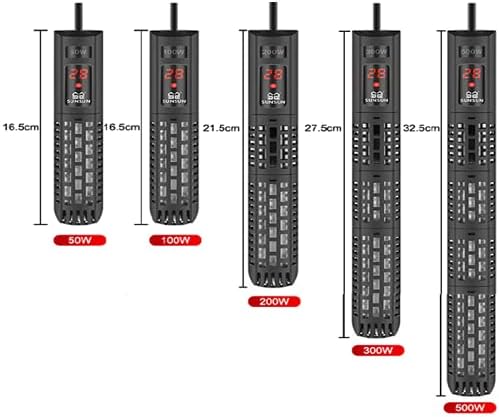
Figure 5: Visual representation of the GR-200 heater's dimensions and key specifications, including power, size, cord length, temperature range, and recommended tank volume.
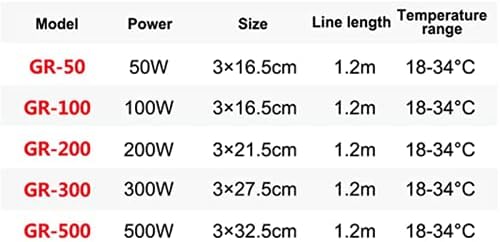
Figure 6: Comparative table of SunSun GR series heater models (GR-50, GR-100, GR-200, GR-300, GR-500) detailing their power, dimensions, cable length, and temperature range.
Warranty and Support
Specific warranty details may vary by region and retailer. Please retain your proof of purchase for any warranty claims.
- Warranty Information: For information regarding the warranty period and terms, please refer to the documentation provided with your purchase or contact your retailer.
- Customer Support: If you have questions, require technical assistance, or need to report a defect, please contact the retailer where you purchased the product or the SunSun manufacturer directly.
- Product Authenticity: Ensure you purchase from authorized sellers to guarantee product authenticity and valid warranty support.


