
Gueray G-2101
Gueray Portable CD Player with Bluetooth
User Manual - Model G-2101

This image displays the Gueray Portable CD Player, a sleek black circular device with an LCD screen and control buttons, accompanied by its essential accessories: a pair of wired earphones, an AUX audio cable, a USB Type-C charging cable, and a small black carrying pouch. These items are neatly arranged around the main unit, highlighting the complete package.
Introduction
Thank you for purchasing the Gueray Portable CD Player. This device is designed to provide a versatile and high-quality audio experience, combining traditional CD playback with modern Bluetooth connectivity. With its built-in rechargeable battery, anti-shock protection, and wide compatibility, it is an ideal companion for music enthusiasts, language learners, and anyone who enjoys portable audio.
This manual provides detailed instructions on how to set up, operate, and maintain your CD player to ensure optimal performance and longevity. Please read this manual thoroughly before using the device.
Product Features
- Enhanced Playback: Supports CD, MP3 CD, CD-R, and HDCD formats, with additional TF card playback capability.
- Integrated Bluetooth 5.0: Seamlessly connect to Bluetooth headphones or speakers for wireless audio.
- Long-lasting Battery: Built-in 2000mAh rechargeable battery provides extended playback time.
- Anti-Shock Protection (ASP): Ensures uninterrupted playback even during movement (40 seconds for CD, 120 seconds for MP3).
- Multiple Sound Effects: Choose from 5 preset equalizer modes: BBS, Pop, Jazz, Rock, and Classic.
- Various Playback Modes: Includes single track repeat, all track repeat, shuffle play, and intro play.
- Dual Headphone Ports: Share your audio experience with another person.
- AUX Output: Connect to external speakers, car audio systems, or other 3.5mm audio input devices.
- Memory Function: Resumes playback from the last stopped point.
- Hold Switch: Prevents accidental button presses during portability.
Package Contents
Please check the package contents upon unboxing:
- Gueray Portable CD Player (Model G-2101)
- Wired Earphones
- 3.5mm AUX Audio Cable
- USB Type-C Charging Cable
- Small Carrying Pouch
- User Manual (this document)
Product Diagram and Controls
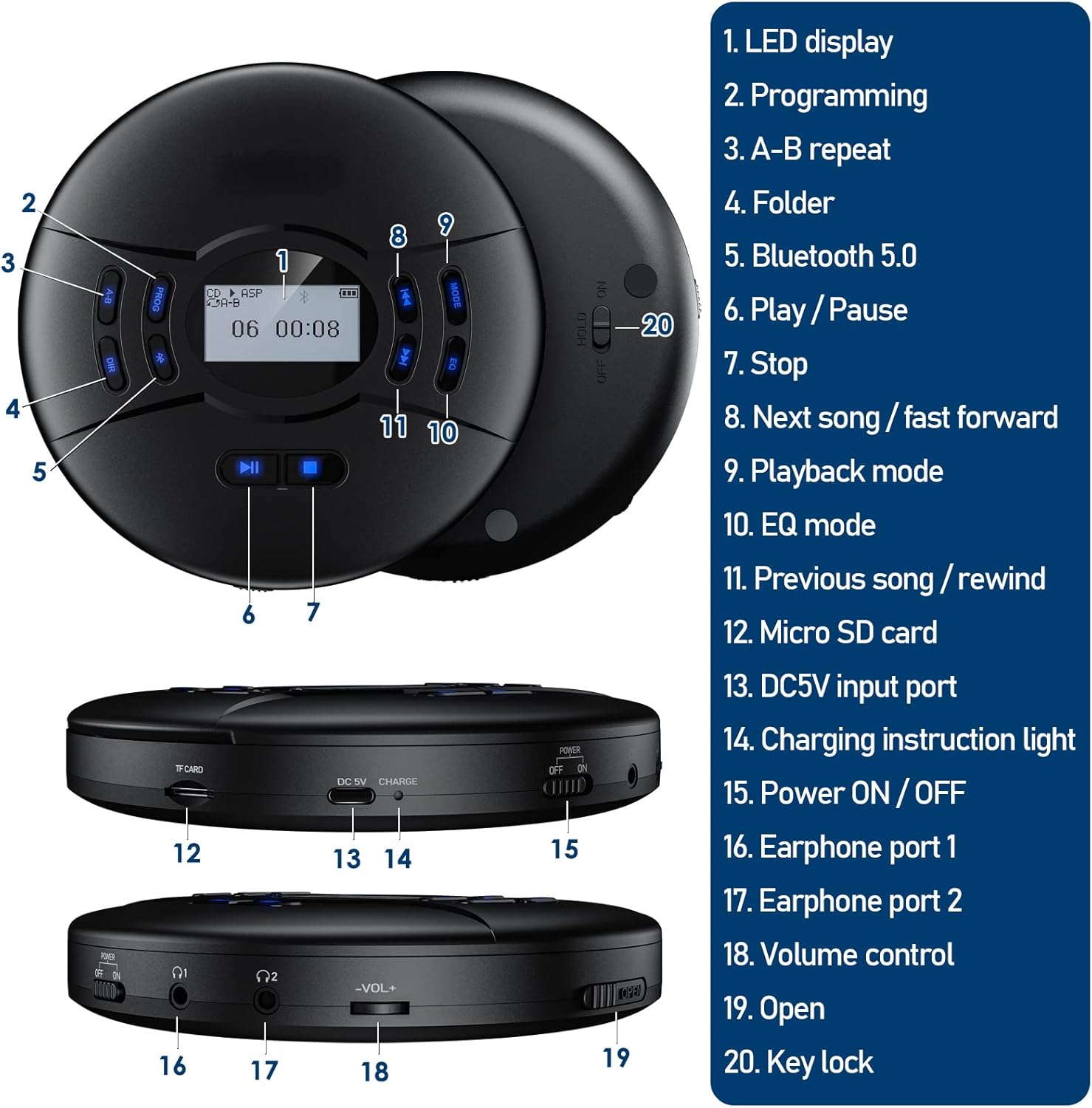
This diagram illustrates the various parts and controls of the Gueray Portable CD Player, including the top panel with its LCD display and buttons, and the side panels showing ports and switches.
- LED Display
- PROG (Programming) Button
- A-B (A-B Repeat) Button
- DIR (Folder) Button
- Bluetooth 5.0 Indicator/Button
- Play/Pause Button
- Stop Button
- Next Song / Fast Forward Button
- MODE (Playback Mode) Button
- EQ (Equalizer Mode) Button
- Previous Song / Rewind Button
- Micro SD Card Slot
- DC 5V Input Port (Type-C)
- Charging Instruction Light
- Power ON/OFF Switch
- Earphone Port 1 (3.5mm Jack)
- Earphone Port 2 (3.5mm Jack)
- Volume Control Wheel
- Open Button (for CD compartment)
- HOLD Switch (Key Lock)
Setup
1. Charging the Battery

This image shows the Gueray Portable CD Player connected to a Type-C charging cable, illustrating its rechargeable battery feature. Surrounding icons depict various charging methods: a power bank, a wall adapter, and a laptop, along with a battery icon indicating a full charge.
The CD player comes with a built-in 2000mAh rechargeable battery. Before first use, or when the battery is low, please charge the device.
- Connect the included Type-C charging cable to the DC 5V Input Port (13) on the player.
- Connect the other end of the cable to a DC 5V/1A power adapter (not included), a power bank, or a computer's USB port.
- The Charging Instruction Light (14) will illuminate during charging. It typically takes about 4 hours for a full charge. The light will change color or turn off when fully charged (refer to specific light behavior in the diagram or product details).
2. Powering On/Off
- Before powering on, ensure the HOLD Switch (20) on the back of the player is in the "OFF" position.
- Slide the Power ON/OFF Switch (15) to the "ON" position to turn on the player. The LCD Display (1) will light up.
- To turn off the player, slide the Power ON/OFF Switch (15) to the "OFF" position.
3. Inserting a CD or TF Card
- For CD: Press the Open Button (19) to open the CD compartment lid. Carefully place a CD (label side up) onto the spindle, ensuring it clicks into place. Close the lid firmly.
- For TF Card: Insert a TF (Micro SD) card into the Micro SD Card Slot (12) until it clicks. Ensure the card is inserted in the correct orientation.
Operating Instructions
1. Basic Playback
- Play/Pause: Press the Play/Pause Button (6) to start or pause playback.
- Stop: Press the Stop Button (7) to stop playback.
- Next/Previous Track: Press the Next Song / Fast Forward Button (8) or Previous Song / Rewind Button (11) to skip tracks.
- Fast Forward/Rewind: Press and hold the Next Song / Fast Forward Button (8) or Previous Song / Rewind Button (11) to fast forward or rewind within a track.
2. Volume Control
Adjust the volume by rotating the Volume Control Wheel (18) on the side of the player.
3. Sound Effects (EQ)

This image highlights the automatic anti-shock function (ASP) and the five sound effects (BBS, Pop, Jazz, Rock, Classic) available on the Gueray Portable CD Player, shown with a user enjoying music while jogging.
Press the EQ Button (10) repeatedly to cycle through the available sound effects: BBS, Pop, Jazz, Rock, Classic, and Normal (no effect).
4. Playback Modes
Press the MODE Button (9) repeatedly to select different playback modes:
- REP1: Repeats the current track.
- ALL: Repeats all tracks on the CD/TF card.
- SHUF: Plays tracks in random order.
- INTRO: Plays the first 10 seconds of each track.
5. Programming Playback
You can program up to 20 tracks to play in a specific order:
- In stop mode, press the PROG Button (2). "PROG" will flash on the display.
- Use the Next Song / Fast Forward Button (8) or Previous Song / Rewind Button (11) to select the desired track.
- Press PROG (2) again to confirm the selection. Repeat steps 2 and 3 to add more tracks.
- After programming all desired tracks, press the Play/Pause Button (6) to start programmed playback.
6. Bluetooth Connection

This image demonstrates the Gueray Portable CD Player's built-in Bluetooth 5.0 capability, showing it wirelessly connected to various audio devices such as over-ear headphones, true wireless earbuds, neckband earphones, and external speakers, with a person enjoying music.
The player features Bluetooth 5.0 for wireless audio streaming.
- Ensure the CD player is powered on and a CD/TF card is playing or paused.
- Activate Bluetooth on your desired receiving device (e.g., Bluetooth headphones, speaker) and set it to pairing mode.
- On the CD player, press and hold the Bluetooth 5.0 Indicator/Button (5) until the Bluetooth icon on the LCD display starts flashing, indicating pairing mode.
- The CD player will automatically search for and connect to the nearest available Bluetooth device. Once connected, the Bluetooth icon will stop flashing and remain solid.
- Note: If connecting to a car stereo, ensure your car stereo's Bluetooth can act as a receiver for a Bluetooth transmission device (like this CD player).
7. AUX Connection

This image shows the Gueray Portable CD Player connected to a car's audio system via an AUX cable, illustrating its ability to play music through car speakers. It emphasizes the need for a 3.5mm jack in the car and AUX playing support.
You can connect the CD player to external speakers, car audio systems, or other devices with a 3.5mm audio input using the included AUX cable.
- Connect one end of the 3.5mm AUX cable to either Earphone Port 1 (16) or Earphone Port 2 (17) on the CD player.
- Connect the other end of the AUX cable to the 3.5mm audio input jack on your external device (e.g., car stereo, home speaker system).
- Ensure the external device is set to its AUX input mode.
Maintenance
- Cleaning: Use a soft, dry cloth to clean the exterior of the player. For the lens inside the CD compartment, use a specialized CD lens cleaning kit. Do not use abrasive cleaners or solvents.
- Battery Care: To prolong battery life, avoid fully discharging the battery frequently. Charge the device regularly, even if not in use for extended periods.
- Storage: Store the player in a cool, dry place away from direct sunlight, extreme temperatures, and high humidity. When not in use, it is recommended to keep the HOLD switch in the "ON" position to prevent accidental power-on and battery drain.
- Handling CDs: Always handle CDs by their edges. Avoid touching the playing surface. Keep CDs clean and free from scratches.
Troubleshooting
| Problem | Possible Cause | Solution |
|---|---|---|
| Player does not power on. | Battery is low or dead; HOLD switch is ON. | Charge the battery. Ensure HOLD switch is in the "OFF" position. |
| No sound or low volume. | Volume too low; Headphones/speakers not connected properly; Bluetooth not paired. | Adjust volume. Check headphone/AUX cable connection. Re-pair Bluetooth device. |
| CD skipping or not playing. | CD is dirty or scratched; CD not inserted correctly; ASP is off. | Clean or replace CD. Re-insert CD properly. Ensure ASP is active (it's automatic). |
| Bluetooth connection unstable or fails. | Device too far; Interference; Pairing issue. | Move devices closer. Avoid strong interference sources. Re-pair the devices. |
| TF card not recognized. | Card inserted incorrectly; Card corrupted or unsupported format. | Re-insert TF card. Try a different TF card. Ensure files are compatible (e.g., MP3). |
Specifications
| Brand | Gueray |
| Model Number | G-2101 |
| Color | Black 21 |
| Connectivity Technology | Bluetooth 5.0, 3.5mm AUX |
| Special Features | Portable, Rechargeable, Wireless, Anti-shock Protection (ASP), TF Card Support |
| Supported Disc Formats | CD, MP3 CD, CD-R, HDCD |
| Battery Capacity | 2000mAh Lithium-polymer |
| Charging Port | Type-C (DC 5V/1A) |
| Anti-shock Protection | CD: 40 seconds; MP3: 120 seconds |
| Headphone Jack | Dual 3.5mm |
Warranty and Support
This Gueray product comes with a manufacturer's warranty of 1 year from the date of purchase. Please retain your proof of purchase for warranty claims.
For technical support, troubleshooting beyond this manual, or warranty inquiries, please contact Gueray customer service through the retailer where you purchased the product or visit the official Gueray website for contact information.
Note: Information regarding software updates or spare parts availability is not provided by the manufacturer at this time.
Ask a question about this manual
Ask about setup, troubleshooting, compatibility, parts, safety, or missing instructions. Manuals+ will review the question and use this page’s manual context to help answer it.