
1. Introduction
The 9H KC-607 is a versatile portable CD player designed for various audio playback needs. It functions as a CD player, Bluetooth speaker, FM radio, USB player, and AUX input/output device. Its design allows for both wall-mounted and desk stand placement, offering flexibility for home audio enjoyment.
2. Package Contents
Please check the box for the following items:
- CD Player
- Remote Control
- USB Adaptor
- 3.5mm Audio Cable
- Wall-mount Kit

Image: All components included in the product package.
3. Product Overview
Familiarize yourself with the main components and controls of your 9H KC-607 CD Player.
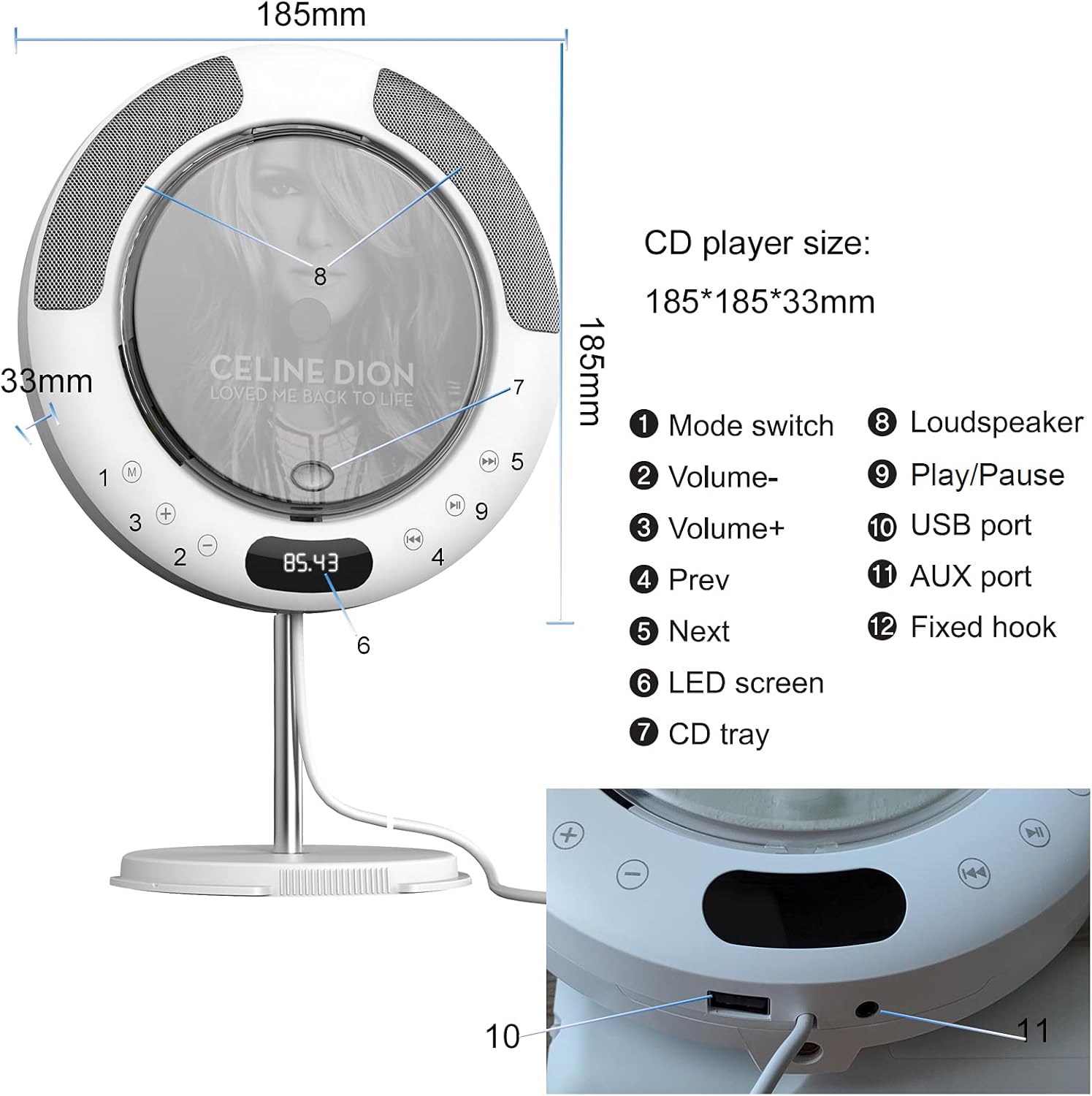
Image: Detailed diagram of the CD player with labeled parts.
- Mode switch
- Volume-
- Volume+
- Previous Track
- Next Track
- LED screen
- CD tray
- Loudspeaker
- Play/Pause
- USB port
- AUX port
- Fixed hook (for wall mounting)
4. Setup
4.1 Mounting Options
The 9H KC-607 offers two primary mounting options: a desk stand or wall mounting.
4.1.1 Desk Stand Assembly
To use the desk stand, locate the stand components within the packaging. The stand pole is often stored within the back panel of the CD player itself. Carefully remove the back cover, extract the metal pole, and then assemble the stand by screwing the pole into the base and attaching it to the player.

Image: Step-by-step guide for assembling the desk stand.
4.1.2 Wall Mounting
For wall mounting, use the provided wall-mount kit. Secure the mounting plate to your desired wall location using appropriate screws. Then, hang the CD player onto the plate using the fixed hook on the back of the player.

Image: The CD player securely mounted on a wall.
4.2 Power Connection
Connect the USB adapter to the player and plug it into a power outlet. The player is powered on and off by gently pulling the power cable downwards, similar to a pull-chain lamp.
Video: Demonstration of the CD player's features, including stand assembly and power operation via the pull cord.
5. Operating Instructions
5.1 Power On/Off
To power on the device, gently pull the power cable downwards. The LED screen will illuminate. To power off, pull the cable downwards again.
5.2 CD Playback
- With the player powered on, insert a CD into the disc slot.
- The player will automatically detect the CD and begin playback.
- Use the Play/Pause button (9) to pause or resume playback.
- Use the Previous Track (4) and Next Track (5) buttons to navigate between songs.
- Adjust volume using the Volume- (2) and Volume+ (3) buttons.
5.3 Bluetooth Mode
The player features Bluetooth 4.2 connectivity, allowing it to act as a Bluetooth speaker for your devices.
- Pull the power cable to turn on the player.
- Press the Mode switch (1) repeatedly until 'BT' appears on the LED screen.
- On your Bluetooth-enabled device (e.g., smartphone, tablet), search for available Bluetooth devices and select 'KC-607'.
- Once paired, audio from your device will play through the CD player's speakers.
Note: This CD player functions as a Bluetooth receiver only. It cannot connect to other Bluetooth speakers or headphones.
5.4 FM Radio Mode
To listen to FM radio:
- Press the Mode switch (1) repeatedly until 'FM' appears on the LED screen.
- The player will automatically scan and store available FM stations (87.5MHz-108.0MHz).
- Use the Previous Track (4) and Next Track (5) buttons to switch between stored stations.
5.5 USB Playback
Insert a USB flash drive into the USB port (10) to play audio files stored on it. The player supports MP3, WMA, and WAV formats.
5.6 AUX Input/Output
Use the 3.5mm audio cable to connect external devices:
- AUX Input: Connect an external audio source (e.g., mobile phone, laptop) to the AUX port (11) on the CD player. The player will function as a wired speaker for the external device.
- AUX Output: Connect the CD player's AUX port (11) to another external wired speaker system to output the player's audio through a more powerful speaker.
5.7 Remote Control Usage
The included remote control allows for convenient operation from a distance. It provides access to all major functions, including power, mode selection, play/pause, track navigation, and volume control.
6. Maintenance
To ensure the longevity and optimal performance of your CD player, follow these maintenance guidelines:
- Keep the device clean by wiping it with a soft, dry cloth. Avoid using abrasive cleaners or solvents.
- Ensure the CD tray is free of dust and debris.
- Avoid exposing the player to extreme temperatures, humidity, or direct sunlight.
- Handle CDs carefully to prevent scratches and smudges.
7. Troubleshooting
If you encounter issues with your 9H KC-607 CD Player, refer to the following common solutions:
| Problem | Possible Cause | Solution |
|---|---|---|
| Player does not power on. | Power cable not pulled correctly or power adapter issue. | Ensure the power cable is firmly connected and pulled downwards to activate. Check if the USB adapter is working. |
| CD does not play or skips. | CD is dirty, scratched, or inserted incorrectly. | Clean the CD with a soft cloth. Ensure the CD is inserted correctly with the label side facing up. Try a different CD. |
| Bluetooth device cannot connect. | Player not in Bluetooth mode, device too far, or already connected to another device. | Switch the player to Bluetooth mode ('BT'). Ensure your device is within 33ft (10m). Disconnect from other Bluetooth devices. Remember, the player is a receiver only. |
| No sound from speakers. | Volume too low, mute activated, or incorrect mode selected. | Increase volume. Check if the player is muted. Ensure the correct playback mode (CD, BT, FM, USB, AUX) is selected. |
| Remote control not working. | Batteries are dead or remote is not pointed at the player. | Replace remote control batteries. Point the remote directly at the player's sensor. |
| Desk stand appears missing. | Stand components are stored within the player's back panel. | Carefully remove the back panel of the CD player to find the stand pole and base. Assemble as per instructions in Section 4.1.1. |
8. Specifications
- Brand: 9H
- Model Number: KC-607
- Connectivity Technology: Bluetooth
- Color: White
- Speaker Type: Built-In HiFi Speakers
- Power Source: Corded Electric
- Supported Disc Formats: CD, CD-R, CD-RW, MP3, WMA, WAV
- Bluetooth Version: 4.2 (33ft/10m range)
- FM Radio Frequency: 87.5MHz-108.0MHz
- Input/Output: USB Port, 3.5mm AUX Input/Output
- Item Weight: 1.88 pounds
- Package Dimensions: 10 x 3.94 x 2.32 inches
9. Warranty and Support
For warranty information or technical support, please refer to the documentation included with your purchase or contact 9H customer service directly. Keep your purchase receipt for warranty claims.