
1. Introduction
This user manual provides comprehensive instructions for the safe and efficient operation of your NetCan Small Powerful USB Rechargeable LED Flashlight, Model Small-Flashlight-22. Please read this manual thoroughly before using the product and retain it for future reference.
2. Product Features
- High Brightness: Equipped with an XHP50.2 LED chip, providing high brightness and a beam distance of up to 1000 feet (320 meters).
- Dual Power Options: Includes a rechargeable battery and an adapter for AAA batteries (AAA batteries not included).
- Extended Runtime: Up to 10 hours of operation on a full charge with the rechargeable battery.
- Compact and Portable: Measures approximately 6.1 inches by 1.7 inches, designed for easy carrying.
- Waterproof Design: IPX4 rated for resistance against splashing water, suitable for various weather conditions.
- Multiple Lighting Modes: Features 5 modes: High, Low, Strobe, COB Sidelight, and COB Strobe.
- Zoomable Function: Adjustable head to switch between floodlight and spotlight.
- Smart One-Key Off: Press and hold the power button for 2 seconds to turn off the flashlight from any mode.
- Durable Construction: Made from aluminum for strength and durability.
3. Package Contents
Please verify that all items are present in the package:
- NetCan Small Powerful USB Rechargeable LED Flashlight (Model: Small-Flashlight-22)
- Rechargeable Lithium-Ion Battery (pre-installed or separate)
- USB Charging Cable
- AAA Battery Sleeve (for optional AAA battery use)
4. Product Overview
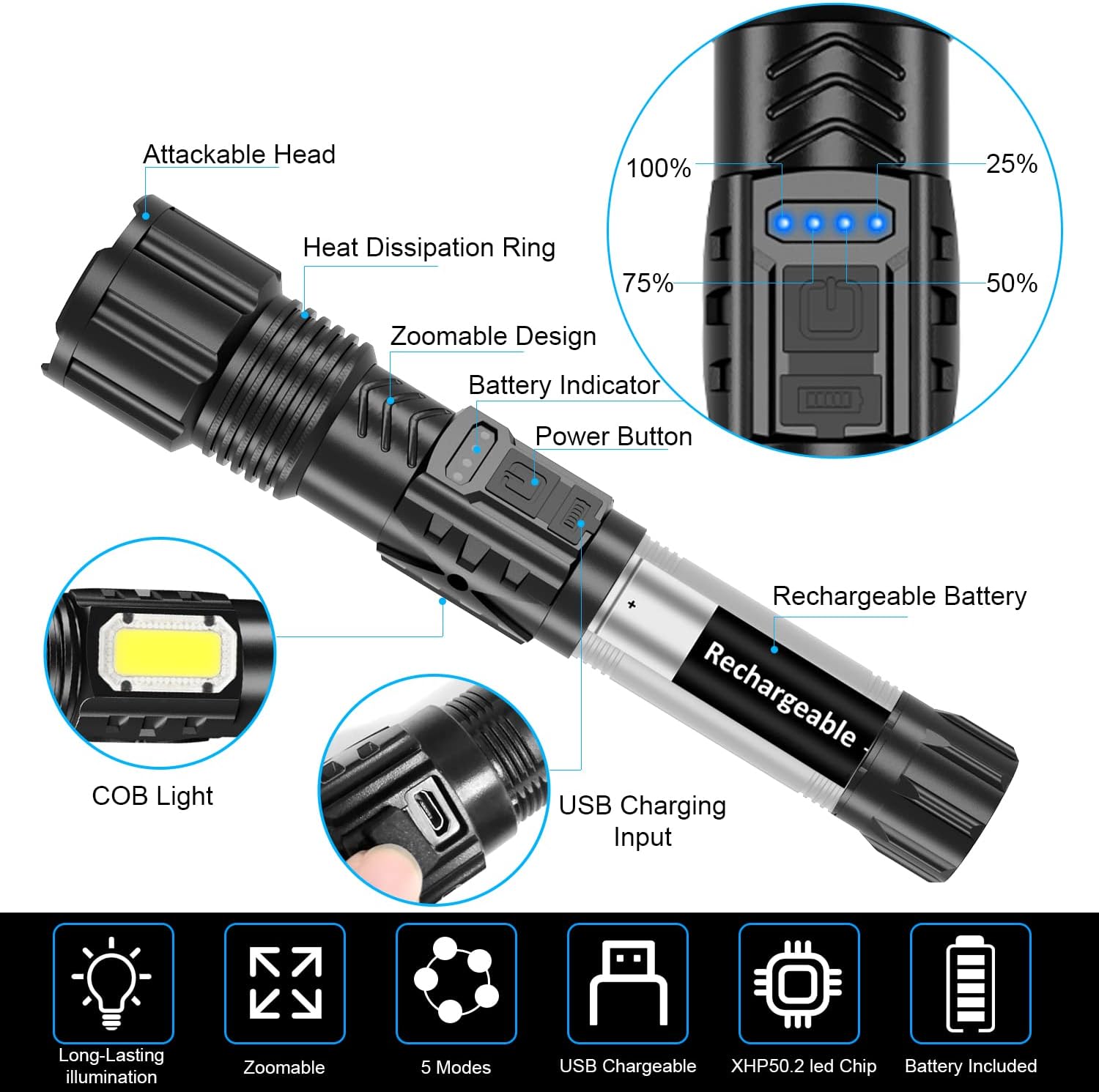
Figure 1: Flashlight Component Diagram. Shows the attackable head, heat dissipation ring, zoomable design, battery indicator, power button, COB light, USB charging input, and rechargeable battery.
Familiarize yourself with the main parts of your flashlight:
- Attackable Head: Designed for emergency situations.
- Heat Dissipation Ring: Helps manage heat during prolonged use.
- Zoomable Design: Allows adjustment of the beam from floodlight to spotlight.
- Battery Indicator: Displays the current battery charge level.
- Power Button: Controls power and mode selection.
- COB Light: Side-mounted light for broader illumination.
- USB Charging Input: Port for recharging the internal battery.
5. Setup
5.1 Battery Installation
Your flashlight comes with a rechargeable Lithium-Ion battery. It may be pre-installed or require installation.
- Unscrew the tail cap of the flashlight.
- Insert the rechargeable battery with the positive (+) end facing towards the head of the flashlight.
- Alternatively, if using AAA batteries (not included), insert three AAA batteries into the provided AAA battery sleeve, then insert the sleeve into the flashlight with the positive (+) end facing towards the head.
- Screw the tail cap back on securely.
5.2 Initial Charging
Before first use, fully charge the rechargeable battery.
- Locate the USB charging input port on the flashlight body.
- Connect the small end of the provided USB charging cable to the flashlight's USB input.
- Connect the larger end of the USB cable to a standard USB power adapter (e.g., phone charger, computer USB port) or a power bank.
- The battery indicator lights will illuminate to show charging progress. All lights will be solid when fully charged.

Figure 2: Flashlight with USB charging cable and AAA battery sleeve.
6. Operating Instructions
6.1 Power On/Off
- To Turn On: Press the power button once. The flashlight will turn on in the last used mode.
- To Turn Off: Press and hold the power button for approximately 2 seconds from any mode.
6.2 Mode Switching
With the flashlight on, short press the power button to cycle through the 5 lighting modes:
- High Brightness
- Low Brightness
- Strobe
- COB Sidelight
- COB Strobe

Figure 3: Demonstration of the 5 lighting modes.
6.3 Zoom Function (Spotlight/Floodlight)
To adjust the beam focus:
- Gently pull the head of the flashlight outwards to achieve a focused spotlight beam.
- Push the head of the flashlight inwards to achieve a wider floodlight beam.

Figure 4: Zoom function demonstrating floodlight and spotlight.
7. Charging
When the battery indicator shows low charge, recharge the flashlight using the provided USB cable.
- Connect the USB charging cable to the flashlight's charging port.
- Plug the other end into a compatible USB power source.
- The battery indicator lights will show the charging status. Disconnect once all lights are solid, indicating a full charge.

Figure 5: Battery indicator showing charge level.
8. Maintenance
8.1 Cleaning
Wipe the flashlight with a soft, damp cloth. Do not use abrasive cleaners or solvents.
8.2 Storage
Store the flashlight in a cool, dry place away from direct sunlight and extreme temperatures. If storing for extended periods, charge the battery every 3-6 months to maintain its lifespan.
8.3 Battery Care
If using AAA batteries, remove them if the flashlight will not be used for a long time to prevent leakage.
9. Troubleshooting
| Problem | Possible Cause | Solution |
|---|---|---|
| Flashlight does not turn on. | Battery is depleted or incorrectly installed. | Charge the rechargeable battery or replace AAA batteries. Ensure batteries are inserted with correct polarity. |
| Light is dim. | Low battery charge. | Recharge the battery. |
| Cannot switch modes. | Power button not pressed correctly or flashlight is off. | Ensure flashlight is on. Short press the power button firmly to cycle modes. |
| Flashlight not charging. | USB cable or power source issue. | Check USB cable connection. Try a different USB port or power adapter. |
10. Specifications
| Feature | Detail |
|---|---|
| Model Number | Small-Flashlight-22 |
| Brand | NetCan |
| Light Source Type | XHP50.2 LED Chip, COB Sidelight |
| Brightness | Up to 3000 Lumens |
| Beam Distance | Up to 1000 feet (320 meters) |
| Power Source | Rechargeable Lithium-Ion Battery (included), 3x AAA Batteries (not included, with adapter) |
| Runtime | Approximately 10 hours (on full charge) |
| Material | Aluminum |
| Water Resistance | IPX4 (Waterproof) |
| Dimensions | 6 x 1.7 x 1.7 inches |
| Weight | 7.8 ounces (0.22 kg) |
| Included Components | USB Cable |
11. Safety Information
- Do not look directly into the LED light.
- Keep out of reach of children.
- Do not disassemble the flashlight, as this may void the warranty and cause damage.
- Use only the provided charging cable or a certified equivalent.
- Avoid exposing the flashlight to extreme heat or fire.
12. Warranty and Customer Support
NetCan is committed to providing quality products. If you encounter any issues or have questions regarding your flashlight, please contact our customer support team. We aim to respond within 24 hours and provide a satisfactory solution.
For support, please refer to the contact information provided with your purchase or visit the official NetCan store page on Amazon: NetCan Store.