
1. Setup
1.1 Battery Installation
The remote control requires two AA batteries (not included). Follow these steps to install them:
- Locate the battery compartment on the back of the remote control.
- Press down on the tab and slide the battery cover downwards to open it.
- Insert two AA batteries, ensuring the positive (+) and negative (-) terminals align with the markings inside the compartment.
- Slide the battery cover back into place until it clicks securely.
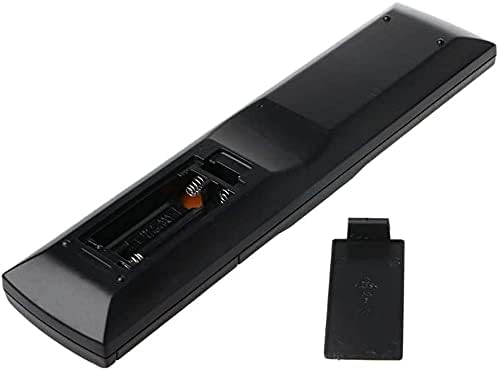
Figure 1: Back view of the remote control with the battery compartment open for battery installation.
1.2 Initial Use
This SymWell replacement remote control is pre-programmed and designed to be universally compatible with the specified Pioneer Receiver models. No additional programming is typically required. Simply install the batteries and point the remote towards your Pioneer Receiver to begin operation.
2. Operating Instructions
This section details the primary functions of your SymWell replacement remote control. Refer to the image below for button identification.

Figure 2: Front view of the remote control with button layout.
2.1 Basic Functions
- Power (RECEIVER ON/OFF): Press this button to turn your Pioneer Receiver on or off.
- Input Select (INPUT SELECT): Use this button to cycle through available input sources (e.g., BD, TV, DVR, CD, TUNER).
- Volume Control (VOL +/-): Adjust the master volume level of your receiver.
- Mute (MUTE): Temporarily silence the audio output. Press again to restore sound.
- Channel/Track Navigation (CH +/-): For compatible functions, navigate through channels or tracks.
- Navigation Pad (Up, Down, Left, Right, ENTER): Use these buttons to navigate menus and confirm selections on your receiver's display.
2.2 Advanced Functions
The remote includes buttons for various advanced functions specific to Pioneer Receivers. These may include:
- Audio Parameter (AUDIO PARAMETER): Access audio settings.
- Tuner Edit (TUNER EDIT): Manage radio tuner presets.
- Setup (SETUP): Access the receiver's main setup menu.
- BD Menu (BD MENU): Control Blu-ray Disc player menus if connected.
- Numeric Keypad (0-9, CLR, ENTER): Direct input for channels, tracks, or settings.
For detailed information on specific functions, please refer to your Pioneer Receiver's original instruction manual.
3. Maintenance
3.1 Battery Replacement
When the remote control's performance degrades or it stops responding, it is likely time to replace the batteries. Follow the battery installation steps outlined in Section 1.1. Always replace both batteries simultaneously with new AA batteries.
3.2 Cleaning
To clean the remote control, gently wipe its surface with a soft, dry cloth. For stubborn dirt, slightly dampen the cloth with water. Avoid using harsh chemicals, abrasive cleaners, or excessive moisture, as these can damage the remote's finish or internal components.
4. Troubleshooting
If you experience issues with your SymWell replacement remote control, consider the following troubleshooting steps:
- Remote Not Responding:
- Ensure the batteries are correctly installed with the correct polarity (+/-).
- Replace old batteries with new ones.
- Check for any obstructions between the remote control and the receiver's infrared sensor.
- Ensure you are within the effective operating range and pointing the remote directly at the receiver.
- Specific Buttons Not Working:
- This remote is designed to be compatible with many Pioneer models. Some buttons may not be applicable or fully functional with all compatible receiver models. Refer to your receiver's original manual for specific feature compatibility.
- Clean the remote control as described in Section 3.2 to ensure no debris is interfering with button presses.
5. Specifications
| Feature | Detail |
|---|---|
| Brand | SymWell |
| Manufacturer | SYMWELL |
| Compatible Devices | Pioneer Receivers (AXD7324, VSX-818V, VSX-819H-K, VSX-819H-S, SC-LX78-S, VSX-421-K, VSX-04, VSX-300-K, VSX-415K, VSX-C500, HTS-820DV, SC-27) |
| Special Features | Infrared, Pre-Programmed, Universal |
| Battery Type | 2 x AA (not included) |
| Connectivity Technology | Infrared |
| Parcel Dimensions | 24.8 x 6.9 x 3.2 cm |
| Weight | 60 g |
6. Warranty and Support
For information regarding warranty coverage or technical support for your SymWell replacement remote control, please contact the seller or manufacturer directly. Details for contacting the seller, SymTech, may be available through your purchase platform.
Manufacturer: SYMWELL
Brand: SymWell