
1. Introduction
Thank you for purchasing the Atvio 1.6 Cubic Feet Compact Refrigerator. This appliance is designed for efficient and convenient cooling, featuring digital temperature control, energy efficiency, and automatic defrost. Please read this manual thoroughly before operating your new refrigerator to ensure safe use, optimal performance, and proper maintenance.
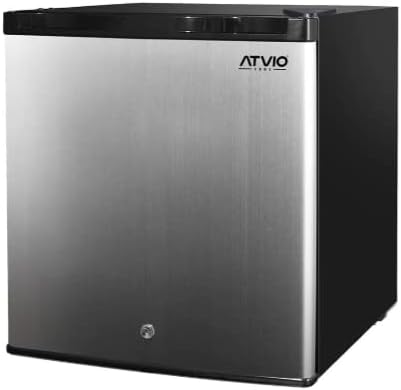
Figure 1: Front view of the Atvio 1.6 Cubic Feet Compact Refrigerator. This image shows the sleek silver door with the Atvio logo and a black top and sides.
2. Safety Information
Your safety and the safety of others are very important. We have provided many important safety messages in this manual and on your appliance. Always read and obey all safety messages.
Important Safety Instructions:
- Read all instructions before using the appliance.
- Do not store explosive substances such as aerosol cans with a flammable propellant in this appliance.
- This appliance is intended to be used in household and similar applications only.
- Keep ventilation openings, in the appliance enclosure or in the built-in structure, clear of obstruction.
- Do not use mechanical devices or other means to accelerate the defrosting process, other than those recommended by the manufacturer.
- Do not damage the refrigerant circuit.
- Do not use electrical appliances inside the food storage compartments of the appliance, unless they are of the type recommended by the manufacturer.
- Ensure the refrigerator is properly grounded.
- Unplug the refrigerator before cleaning or performing any maintenance.
3. Setup and Installation
3.1 Unpacking
Carefully remove all packaging materials, including the foam base and any adhesive tape holding accessories. Inspect the refrigerator for any shipping damage. Report any damage to your retailer immediately.
3.2 Placement
Place the refrigerator on a firm, level surface that is strong enough to support the unit when fully loaded. Ensure there is adequate ventilation around the appliance. Allow at least 5 cm (2 inches) of space on the back and sides, and 10 cm (4 inches) on top for proper air circulation. Avoid placing the refrigerator in direct sunlight or near heat sources like stoves or heaters, as this will affect its cooling efficiency.
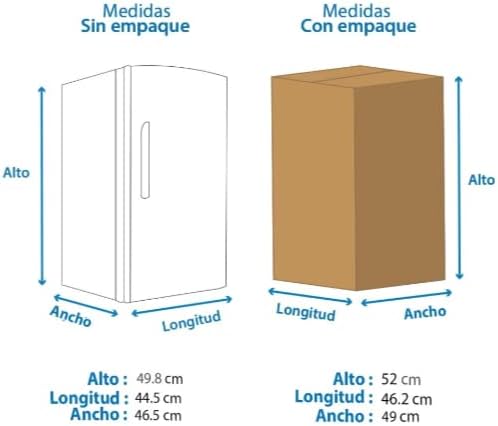
Figure 2: Diagram illustrating the dimensions of the refrigerator both unpacked and packed. Unpacked dimensions are approximately 49.8 cm (Height) x 44.5 cm (Length) x 46.5 cm (Width).
3.3 Leveling
The refrigerator must be level for proper operation. Use the adjustable leveling feet at the bottom front of the unit to ensure it is stable and level. A slight tilt to the rear is recommended to allow the door to close properly.
3.4 Initial Power-On
After placing the refrigerator, wait at least 2-4 hours before plugging it into a power outlet. This allows the refrigerant to settle. Once plugged in, let the unit run empty for 24 hours to reach its stable operating temperature before loading food items.
4. Operating Instructions
4.1 Digital Temperature Control
Your Atvio refrigerator is equipped with a digital temperature control system for precise temperature management. The control panel is typically located inside the refrigerator compartment. Refer to the specific markings on your unit for temperature adjustment buttons (e.g., '+' and '-' buttons or a dial with numerical settings). The recommended temperature for general food storage is between 0°C and 4°C (32°F and 39°F).
4.2 Food Storage
Organize food items to allow for proper air circulation. Do not overload the refrigerator. Keep perishable items, such as dairy and meats, in the coldest parts of the refrigerator. Ensure all food is covered to prevent drying out and odor transfer.
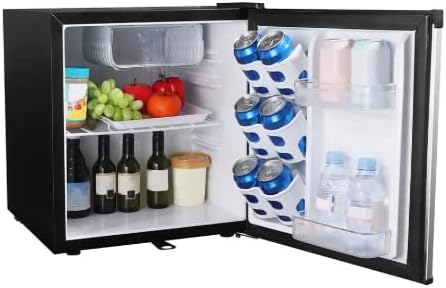
Figure 3: Interior view of the Atvio compact refrigerator, showing organized food items, bottles, and cans. The door features a can dispenser and shelves for bottles.
4.3 Automatic Defrost
This refrigerator features an automatic defrost system. This means that frost buildup on the evaporator coils is periodically melted and drained away, eliminating the need for manual defrosting under normal operating conditions. You may occasionally see water droplets on the back wall of the refrigerator, which is part of the automatic defrost cycle.
5. Maintenance and Cleaning
Regular cleaning and maintenance will extend the life of your refrigerator and ensure optimal performance.
5.1 Cleaning the Interior
Unplug the refrigerator before cleaning. Wash the interior surfaces, shelves, and drawers with a solution of mild detergent and warm water. Rinse thoroughly and dry with a soft cloth. Do not use abrasive cleaners, scouring pads, or harsh chemicals, as they can damage surfaces.
5.2 Cleaning the Exterior
Clean the exterior surfaces with a soft cloth dampened with mild detergent and water. For stainless steel finishes, use a specialized stainless steel cleaner. Wipe dry to prevent streaks. Regularly vacuum or brush the condenser coils at the back of the unit to remove dust and debris, which can improve energy efficiency.
5.3 Power Outages and Vacations
In case of a power outage, keep the refrigerator door closed to maintain temperature as long as possible. For extended vacations, unplug the refrigerator, empty all contents, clean it thoroughly, and leave the door slightly ajar to prevent odors and mold growth.
6. Troubleshooting
Before contacting customer service, please check the following common issues and their solutions:
| Problem | Possible Cause | Solution |
|---|---|---|
| Refrigerator does not operate. | Not plugged in; circuit breaker tripped; power outage. | Ensure plug is secure; check circuit breaker; verify power supply. |
| Temperature is not cold enough. | Door not closed properly; excessive door openings; warm food added; poor ventilation; temperature setting too high. | Check door seal; reduce door openings; allow warm food to cool before storing; ensure proper clearance; adjust temperature setting lower. |
| Noises (vibrating, rattling). | Refrigerator not level; items on top of refrigerator vibrating; fan obstruction. | Adjust leveling feet; remove items from top; check for obstructions around fan. |
| Water on floor or inside. | Drain tube clogged; excessive humidity. | Clear drain tube (refer to maintenance); ensure proper ventilation and avoid opening door frequently in humid conditions. |
7. Product Specifications
| Feature | Detail |
|---|---|
| Brand | gob (Atvio) |
| Model Number | 6953856905088 |
| Capacity | 1.6 Cubic Feet |
| Product Dimensions (D x W x H) | 19.49"D x 17.32"W x 19.49"H (approx. 49.5 cm x 44 cm x 49.5 cm) |
| Installation Type | Freestanding |
| Special Features | Digital Temperature Control, Energy Efficiency, Automatic Defrost |
| Defrost System | Automatic |
| Number of Doors | 1 |
| Refrigerant | R-600A |
| Finish Type | Matte |
8. Warranty and Customer Support
This Atvio compact refrigerator comes with a standard manufacturer's warranty. Please refer to the warranty card included with your purchase for specific terms and conditions, including warranty period and coverage details.
For technical assistance, troubleshooting beyond this manual, or to inquire about warranty service, please contact the retailer or the manufacturer's customer support. Keep your purchase receipt and model number handy when contacting support.
Note: Specific contact information is not provided in this manual. Please refer to your product packaging or the retailer's website for support details.