Introduction
This manual provides instructions for the safe and proper operation of your Crosley Voyager Portable Bluetooth Turntable. Please read this manual thoroughly before use and retain it for future reference.
Important Safety Instructions
- Read these instructions.
- Keep these instructions.
- Heed all warnings.
- Follow all instructions.
- Do not use this apparatus near water.
- Clean only with a dry cloth.
- Do not block any ventilation openings. Install in accordance with the manufacturer's instructions.
- Do not install near any heat sources such as radiators, heat registers, stoves, or other apparatus (including amplifiers) that produce heat.
- Protect the power cord from being walked on or pinched, particularly at plugs, convenience receptacles, and the point where they exit from the apparatus.
- Only use attachments/accessories specified by the manufacturer.
- Unplug this apparatus during lightning storms or when unused for long periods of time.
- Refer all servicing to qualified service personnel. Servicing is required when the apparatus has been damaged in any way, such as power-supply cord or plug is damaged, liquid has been spilled or objects have fallen into the apparatus, the apparatus has been exposed to rain or moisture, does not operate normally, or has been dropped.
Package Contents
Verify that all items listed below are included in your package:
- 1 x Crosley Voyager Portable Bluetooth Turntable (Amethyst)
- 1 x AC Power Adapter
- 1 x Instruction Manual
Product Overview
Turntable Components

The Crosley Voyager features a classic portable design with integrated speakers. Key components include the platter, tonearm with stylus, and various control knobs and switches.
Control Panel and Connections

- Function Switch: Selects between Turntable (Phono) mode and Bluetooth Input mode.
- Pitch Control: Adjusts the playback speed of the record.
- ON/OFF - Volume Knob: Turns the unit on/off and controls the speaker volume.
- Headphone Jack: For private listening with headphones.

- AC Power Adapter Input: Connects to the provided power adapter.
- RCA Output: Allows connection to external powered speakers or an amplifier.
- Aux-in: Connects external audio sources (e.g., MP3 player, smartphone) via a 3.5mm cable.
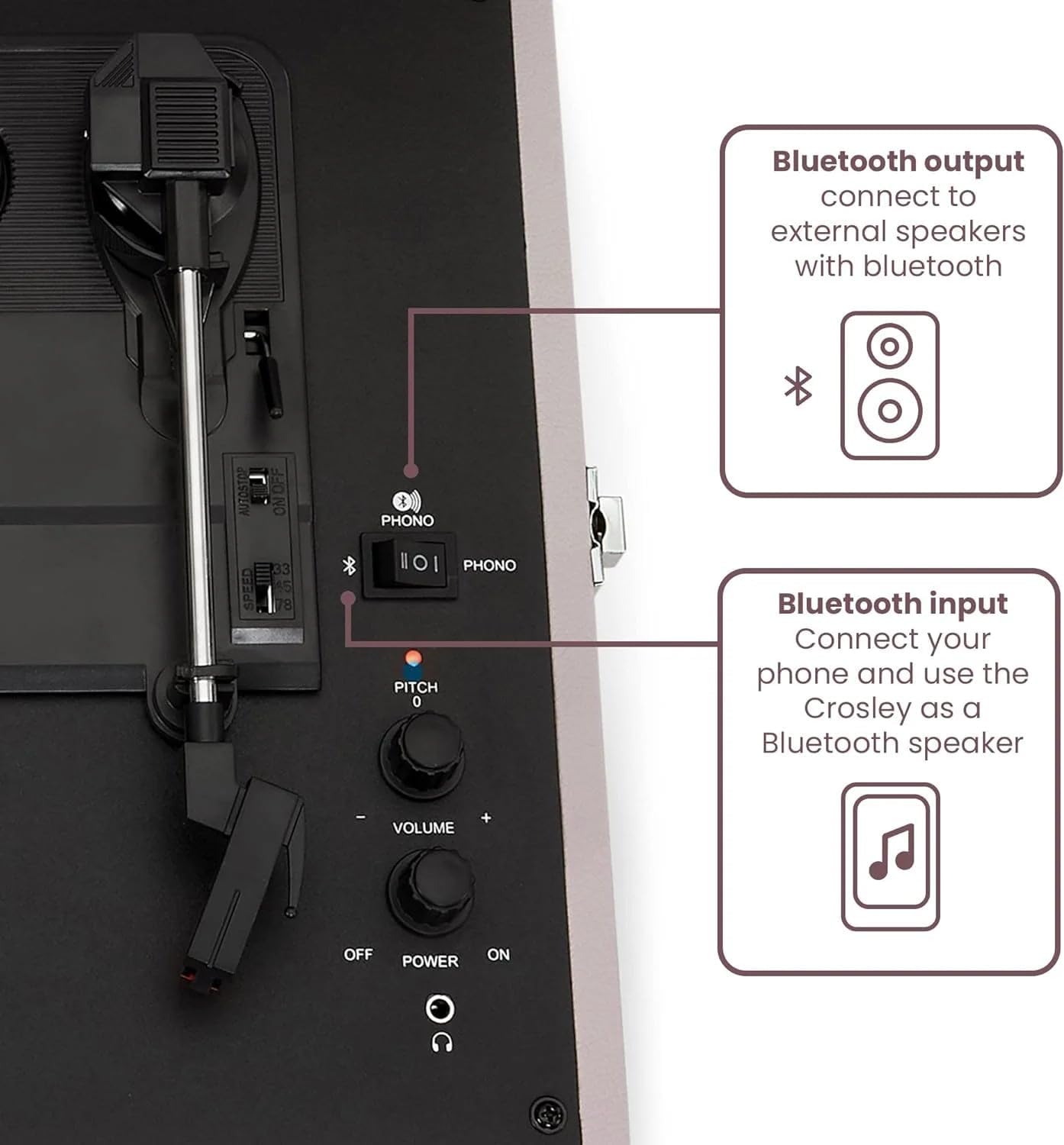
- Bluetooth Input: Allows wireless streaming of audio from a Bluetooth-enabled device to the turntable's built-in speakers.
- Bluetooth Output: Allows wireless streaming of audio from the turntable (records or Aux-in) to external Bluetooth speakers.
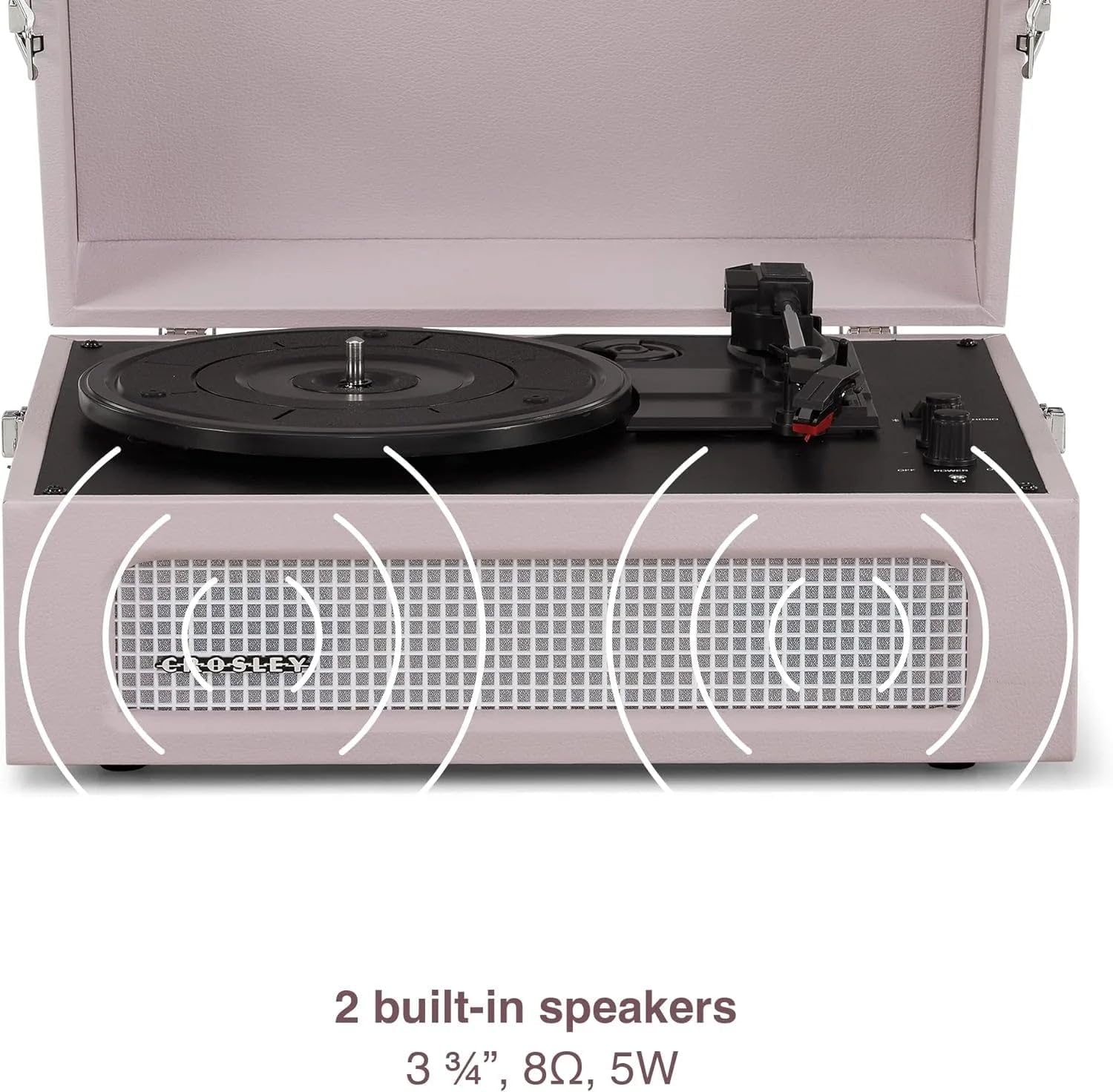
The turntable features two built-in speakers for direct audio playback.
Setup
- Unpack the Turntable: Carefully remove the turntable from its packaging. Retain all packaging materials for possible future transport or service.
- Placement: Place the turntable on a flat, level surface away from direct sunlight, heat sources, and excessive dust or vibration.
- Power Connection: Connect the AC power adapter to the DC IN jack on the back of the turntable, then plug the adapter into a wall outlet.
- Remove Stylus Protector: Before playing a record, gently remove the clear plastic stylus protector from the needle.
Operating Instructions
Playing a Record

- Power On: Turn the ON/OFF-Volume knob clockwise to power on the unit.
- Select Function: Set the Function Switch to "PHONO" (turntable mode).
- Select Speed: Choose the appropriate speed (33 1/3, 45, or 78 RPM) using the speed selector switch located on the turntable deck. For 45 RPM records, place the 45 RPM adapter (if included) on the center spindle.
- Place Record: Place a record on the turntable platter.
- Release Tonearm: Release the tonearm clip.
- Lift Tonearm: Use the cue lever to gently lift the tonearm.
- Position Tonearm: Move the tonearm over the desired starting track of the record.
- Lower Tonearm: Gently lower the tonearm onto the record using the cue lever. The platter will begin to spin.
- Adjust Volume: Adjust the volume using the ON/OFF-Volume knob.
- Adjust Pitch: Use the Pitch Control knob to fine-tune the playback speed if needed.
- End of Play: When the record finishes, the tonearm will automatically return to its rest position (auto-stop feature). Lift the tonearm, return it to the tonearm rest, and secure it with the clip. Turn the unit off.
Bluetooth Input (Streaming to Turntable Speakers)
- Power On: Turn the ON/OFF-Volume knob clockwise to power on the unit.
- Select Function: Set the Function Switch to "Bluetooth" mode. The indicator light will flash, indicating pairing mode.
- Pair Device: On your Bluetooth-enabled device (e.g., smartphone), enable Bluetooth and search for "Crosley Voyager". Select it to pair.
- Confirmation: Once paired, the indicator light will stop flashing and remain solid.
- Play Audio: Play music from your device. Audio will stream through the turntable's built-in speakers.
- Adjust Volume: Control volume using both your device and the turntable's ON/OFF-Volume knob.
Bluetooth Output (Streaming from Turntable)
The Crosley Voyager can transmit audio from playing records or the Aux-in source to external Bluetooth speakers.
- Power On: Turn the ON/OFF-Volume knob clockwise to power on the unit.
- Prepare External Speaker: Place your external Bluetooth speaker in pairing mode.
- Activate Turntable Bluetooth Output: While in PHONO or AUX mode, press and hold the Bluetooth button on the turntable (refer to Figure 2 for location). The indicator light will flash rapidly.
- Pairing: The turntable will automatically search for and connect to the nearest Bluetooth speaker in pairing mode. Once connected, the indicator light will stop flashing and remain solid.
- Play Audio: Play a record or an Aux-in source. Audio will now be transmitted to your external Bluetooth speaker.
- Adjust Volume: Control volume primarily on your external Bluetooth speaker.
External Connections (RCA Output and Headphone Jack)
- RCA Output: To connect to external powered speakers or an amplifier, use an RCA cable (not included) to connect the RCA Output jacks on the back of the turntable to the corresponding input on your audio system. Ensure the Function Switch is set to "PHONO" for record playback.
- Headphone Jack: Plug standard 3.5mm headphones into the headphone jack on the front panel for private listening. The built-in speakers will be muted when headphones are connected.
- Aux-in: Connect an external audio device (e.g., smartphone, MP3 player) to the Aux-in port on the back of the turntable using a 3.5mm audio cable (not included).
Maintenance
Cleaning the Turntable
- Wipe the exterior of the turntable with a soft, dry cloth.
- Do not use harsh chemicals or abrasive cleaners.
- Keep the dust cover closed when not in use to prevent dust accumulation.
Stylus Care
- Handle the stylus (needle) with extreme care. Avoid touching it with your fingers.
- Clean the stylus periodically using a soft brush, brushing gently from back to front.
- A worn stylus can damage records and degrade sound quality. Replace the stylus approximately every 200-300 hours of playback, or if you notice a decrease in sound quality.
Troubleshooting
| Problem | Possible Cause | Solution |
|---|---|---|
| No power | Power adapter not connected or outlet not working. | Ensure power adapter is securely connected to the turntable and a working wall outlet. |
| No sound from speakers | Volume too low; Function Switch incorrect; Headphones connected. | Increase volume. Set Function Switch to "PHONO" or "Bluetooth" as appropriate. Disconnect headphones. |
| Turntable not spinning or spinning too slow/fast | Speed selector incorrect; Pitch Control misadjusted. | Select the correct speed (33 1/3, 45, or 78 RPM). Adjust the Pitch Control knob. |
| Bluetooth pairing issues | Turntable not in pairing mode; Device too far; Interference. | Ensure turntable is in Bluetooth pairing mode (flashing light). Move device closer. Reduce interference from other devices. |
| Distorted sound | Worn or dirty stylus; Dirty record; Volume too high. | Clean or replace stylus. Clean record. Reduce volume. |
Specifications
| Model Name | Voyager |
| Model Number | CR8017B-AM4 |
| Power | AC Power Adapter (Input: 100-240V ~ 50/60Hz, Output: 12V DC) |
| Turntable Speeds | 33 1/3, 45, 78 RPM |
| Maximum Rotational Speed | 78 RPM |
| Bluetooth | Bluetooth Receiver (Input), Bluetooth Transmitter (Output) |
| Speakers | 2 x Built-in Speakers |
| Outputs | RCA Audio Output, 3.5mm Headphone Jack |
| Inputs | 3.5mm Aux-in |
| Product Dimensions (L x W x H) | 14.17 x 11.61 x 5.51 inches (36 x 29.5 x 14 cm) |
| Item Weight | 7.24 pounds (3.29 kg) |
| Material | Wood |
| Color | Amethyst |
Warranty and Support
Crosley products are designed for quality and reliability. For specific warranty information, please refer to the warranty card included with your product or visit the official Crosley website. For technical support or service inquiries, please contact Crosley customer service.
Manufacturer: Crosley
Website: www.crosleyradio.com


