
1. Introduction
The HealthyLine TAJ Far Infrared Heating Pad is designed to provide a restorative therapy experience. This mat combines natural crystal gemstones (Amethyst, Jade, Tourmaline) with Far Infrared Heat, Negative Ion Therapy, PEMF (Pulsed Electromagnetic Field) therapy, and Photon Light technology to promote muscle relaxation, reduce discomfort, enhance joint flexibility, and support circulation.

Image: HealthyLine TAJ Mat 2020 Photon in use, designed to promote local blood flow and muscle relaxation.
2. Safety Information
- Avoid direct skin contact: Do not place the heating pad directly on bare skin. Use a cover or clothing.
- Do not use while sleeping: This device is not intended for unsupervised use during sleep.
- Keep away from water: Do not immerse the mat or controller in water. Avoid use in wet environments.
- Consult a healthcare provider: Not suitable for children or individuals with certain medical conditions without prior consultation with a healthcare professional.
- Follow usage times: Adhere to recommended usage times and intervals as specified in this manual.
- Automatic Shut-off: The device features an auto shut-off function for safety.
3. Package Contents
Your HealthyLine TAJ Far Infrared Heating Pad package includes:
- HealthyLine TAJ Far Infrared Heating Pad (Small 20" x 20")
- LED Controller
- Carrying Case
- Waterproof Cover
- Thick Cotton Padded Cover
- Sauna Foil Blanket
- Instruction Manual
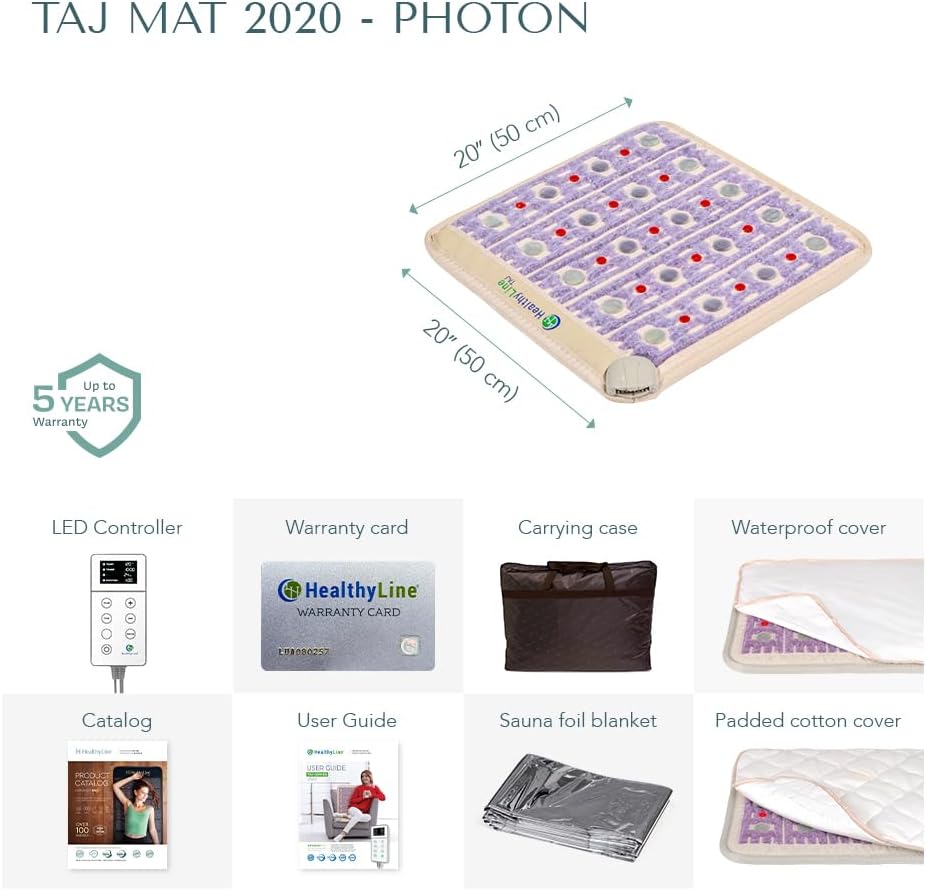
Image: Overview of the HealthyLine TAJ Mat 2020 Photon and its included accessories.
4. Setup
- Unpack: Carefully remove all components from the packaging.
- Placement: Place the heating pad on a flat, stable surface where you intend to use it (e.g., bed, floor, chair).
- Connect Controller: Plug the LED controller into the designated port on the heating pad.
- Power Connection: Plug the controller's power cord into a standard electrical outlet.
- Cover (Optional but Recommended): For hygiene and comfort, place the waterproof cover and/or the thick cotton padded cover over the mat.
5. Operating Instructions
- Power On: Press the power button on the LED controller to turn on the device.
- Set Temperature: Use the 'TEMP' button and '+' / '-' buttons to select your desired heat setting. The mat can reach up to 158°F.
- Set Timer: Use the 'TIME' button and '+' / '-' buttons to set the desired session duration. The mat features a 12-hour auto shut-off timer.
- Activate Photon Lights (if applicable): If your model includes photon lights, activate them using the dedicated button on the controller.
- Position Yourself: Lie down or sit comfortably on the mat, ensuring the gemstones are evenly distributed and in contact with the area you wish to treat.
- Enjoy: Relax and allow the therapies to work.
- Power Off: The mat will automatically shut off after the set time. You can also manually turn it off by pressing the power button.

Image: The high-tech customizable controller for the HealthyLine TAJ Mat, showing temperature and timer settings.
Video: An overview of the HealthyLine TAJ mat, highlighting its features and benefits for relaxation and wellness.
6. Therapy Modes
The HealthyLine TAJ Far Infrared Heating Pad integrates multiple natural therapies:
- Far Infrared Heat: Deep-penetrating heat emitted by natural gemstones (Amethyst, Jade, Tourmaline) to promote muscle relaxation and improve local blood flow.
- Negative Ion Therapy: Generates negative ions to help purify and clear the air.
- Photon Light Therapy: Uses visible red light to support cellular energy and recovery.
- PEMF (Pulsed Electromagnetic Field) Therapy: Supports overall relaxation and circulation.
- Hot Gemstone Therapy: The heated gemstones provide a soothing, relaxing experience.

Image: Visual representation of the four natural therapies offered by the HealthyLine TAJ Mat.

Image: Close-up view of the Amethyst, Jade, and Tourmaline gemstones integrated into the mat.
7. Maintenance
- Cleaning: Disconnect the mat from power before cleaning. Wipe the surface with a soft, damp cloth. Do not use harsh chemicals or abrasive cleaners.
- Storage: When not in use, store the heating pad in its provided carrying case in a cool, dry place.
- Avoid Folding: Do not sharply fold the mat, as this may damage the internal wiring. Roll it loosely for storage if not using the carrying case.
8. Troubleshooting
| Problem | Possible Cause | Solution |
|---|---|---|
| Mat does not heat up. | Not properly plugged in; power outlet issue; controller malfunction. | Ensure all connections are secure. Try a different power outlet. Contact customer support if the issue persists. |
| Lights are not working. | Photon lights not activated; malfunction. | Press the photon light button on the controller. If still not working, contact customer support. |
| Mat feels too hot/cold. | Temperature setting incorrect. | Adjust the temperature using the '+' / '-' buttons on the controller. |
9. Specifications
- Model Number: TAJ-2020-PP
- Product Dimensions: 20 x 20 x 1.2 inches
- Weight: 11.45 Pounds
- Material Type: PU Medical Grade Leather + Natural Amethyst, Tourmaline & Jade Gemstones
- Color: Beige
- Wattage: 130 watts
- Number of Heating Elements: 30
- Number of Settings: 3 (Temperature, Time, Photon Lights)
- Additional Features: Calming Negative Ion Therapy, EMF Protection, Infrared Heating Pad, Relaxing Hot Stone Therapy, Time and Temperature settings, 12-hour auto shutoff timer
- UPC: 811249032475
10. Warranty & Support
HealthyLine products are designed for durability and performance. This product comes with a warranty of up to 5 years. For detailed warranty information, product support, or service inquiries, please refer to the warranty card included in your package or visit the official HealthyLine website.

Image: The HealthyLine TAJ Mat 2020 Photon, indicating an 'Up to 5 Years Warranty'.


