
1. Introduction
This manual provides essential information for the safe and efficient operation of your N-Gear LET'S GO PARTY 23M Portable Speaker System. Please read these instructions carefully before using the product and retain them for future reference.
2. Package Contents
- N-Gear LET'S GO PARTY 23M Portable Speaker
- Wired Microphone
- USB Charging Cable
- User Manual
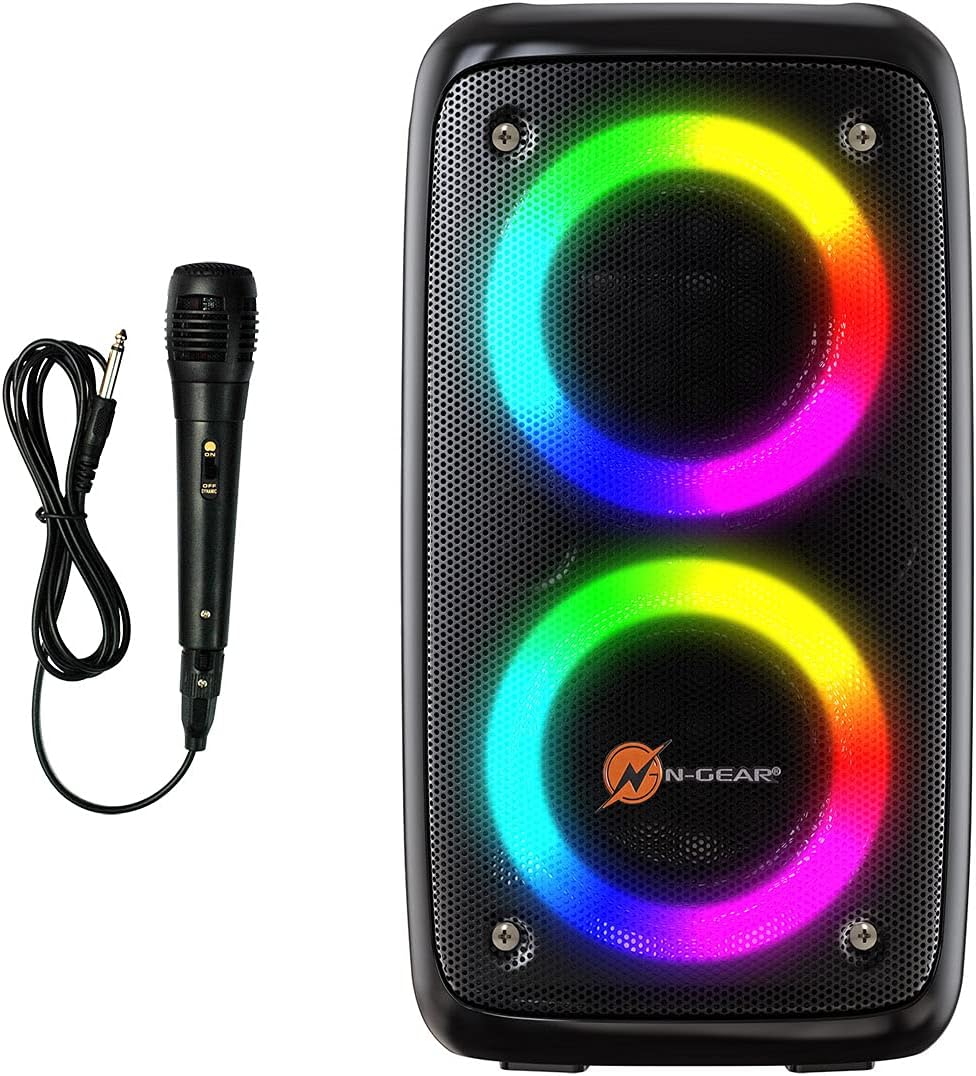
Image 2.1: N-Gear LET'S GO PARTY 23M speaker with its included wired microphone and cable.
3. Product Overview
Familiarize yourself with the speaker's components and controls.
3.1 Front Panel

Image 3.1: Front view of the N-Gear LET'S GO PARTY 23M speaker, highlighting the dual LED-lit woofers.
3.2 Top Control Panel
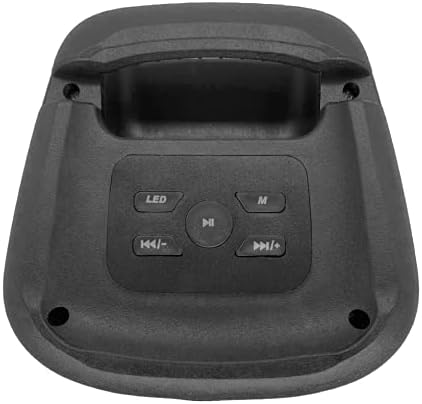
Image 3.2: Top control panel of the N-Gear LET'S GO PARTY 23M speaker. This panel includes buttons for LED light control, mode selection (M), play/pause, and track navigation (previous/volume down, next/volume up).
3.3 Rear Input/Output Panel

Image 3.3: Rear input/output panel of the N-Gear LET'S GO PARTY 23M speaker. From left to right, it features a power switch (ON/OFF), DC 5V power input, USB port, TF card slot, AUX input, and a microphone input (MIC).
4. Setup
4.1 Charging the Speaker
- Connect the USB charging cable to the DC 5V port on the rear panel of the speaker.
- Connect the other end of the USB cable to a compatible USB power adapter (not included) or a computer's USB port.
- The charging indicator light (if present) will illuminate during charging and turn off when fully charged.
- For optimal battery life, fully charge the speaker before first use.
4.2 Powering On/Off
- To power on, slide the power switch on the rear panel to the 'ON' position.
- To power off, slide the power switch to the 'OFF' position.
5. Operating Instructions
5.1 Bluetooth Pairing
- Power on the speaker. It will automatically enter Bluetooth pairing mode, indicated by a flashing LED.
- Enable Bluetooth on your smartphone, tablet, or other Bluetooth-enabled device.
- Search for available Bluetooth devices and select "N-Gear LGP23M" from the list.
- Once paired, the speaker will emit a confirmation sound, and the LED indicator will stop flashing.
5.2 USB/TF Card Playback
- Insert a USB flash drive or TF (microSD) card with MP3 audio files into the respective port on the rear panel.
- The speaker will automatically switch to USB/TF card mode and begin playing music.
- Use the Play/Pause, Previous, and Next buttons on the top panel to control playback.
5.3 AUX Input
- Connect an external audio device (e.g., MP3 player, laptop) to the AUX input port on the rear panel using a 3.5mm audio cable (not included).
- Press the 'M' (Mode) button on the top panel to switch to AUX mode.
- Control playback and volume from your connected audio device.
5.4 Microphone Usage (Karaoke)
- Connect the wired microphone to the MIC input port on the rear panel.
- Ensure the microphone's power switch is in the 'ON' position.
- Adjust the microphone volume using the dedicated control on the microphone itself or the main volume control on the speaker.
- For karaoke, play music via Bluetooth, USB, TF card, or AUX, and sing along through the microphone.
For additional karaoke tracks, visit www.easykaraoke.com.
5.5 LED Light Modes
- Press the 'LED' button on the top panel to cycle through different light modes or to turn the LED lights off.
5.6 Volume Control
- Press and hold the 'Previous' button (K
- Press and hold the 'Next' button (>>|) to increase the volume.
6. Maintenance
6.1 Cleaning
- Wipe the speaker with a soft, dry cloth.
- Do not use abrasive cleaners, waxes, or solvents.
- Avoid exposing the speaker to water or excessive moisture.
6.2 Storage
- Store the speaker in a cool, dry place away from direct sunlight and extreme temperatures.
- If storing for an extended period, charge the battery periodically to maintain its health.
6.3 Battery Care
- Do not attempt to replace the battery yourself. Contact qualified service personnel.
- Avoid fully discharging the battery frequently.
7. Troubleshooting
| Problem | Possible Cause | Solution |
|---|---|---|
| Speaker does not power on. | Battery is depleted. Power switch is off. | Charge the speaker. Ensure the power switch is in the 'ON' position. |
| No sound. | Volume is too low. Incorrect input mode. Device not connected properly. | Increase speaker volume. Press 'M' to select the correct input mode. Reconnect your device. |
| Bluetooth connection fails. | Speaker is not in pairing mode. Device is too far. Interference. | Ensure speaker is in pairing mode. Move device closer to speaker. Avoid obstacles. Try re-pairing. |
| Microphone not working. | Microphone switch is off. Microphone not fully plugged in. | Ensure microphone switch is 'ON'. Check microphone connection to the MIC port. |
| LED lights not working. | LEDs are turned off. | Press the 'LED' button to cycle through light modes or turn them on. |
8. Specifications
| Brand: | N-Gear |
| Model Number: | NGear LGP023 |
| Connectivity Technology: | Bluetooth, USB |
| Power Source: | Power Cable (DC 5V) |
| Audio Input: | Microphone, AUX (3.5mm) |
| Recommended Use: | Karaoke |
| Color: | Black |
| Compatible Devices: | Laptop, Smartphone |
| Mounting Type: | Floor Mount |
| Connector Type: | RCA, TRS 6.35 mm, XLR (for external connections, not directly on speaker) |
| Number of Channels: | 1 |
9. Warranty and Support
For warranty information and customer support, please refer to the documentation provided at the time of purchase or contact your retailer. The manufacturer of this product is N-Gear.


