
KAOLALI HUD OBD+GPS Digital Smart Gauge Display
KAOLALI Car HUD Display User Manual
Model: HUD OBD+GPS Digital Smart Gauge Display
1. Product Overview
The KAOLALI Car HUD Display is a versatile head-up display unit designed to project essential driving data onto your car's windshield. It features a dual OBD+GPS system, ensuring compatibility with a wide range of vehicles. This device enhances driving safety by allowing drivers to view critical information without diverting their eyes from the road.

The package includes the main HUD unit, an OBD connection cable, an anti-slip mat for dashboard placement, and a pry tool for cable routing during installation.
2. Product Components and Controls
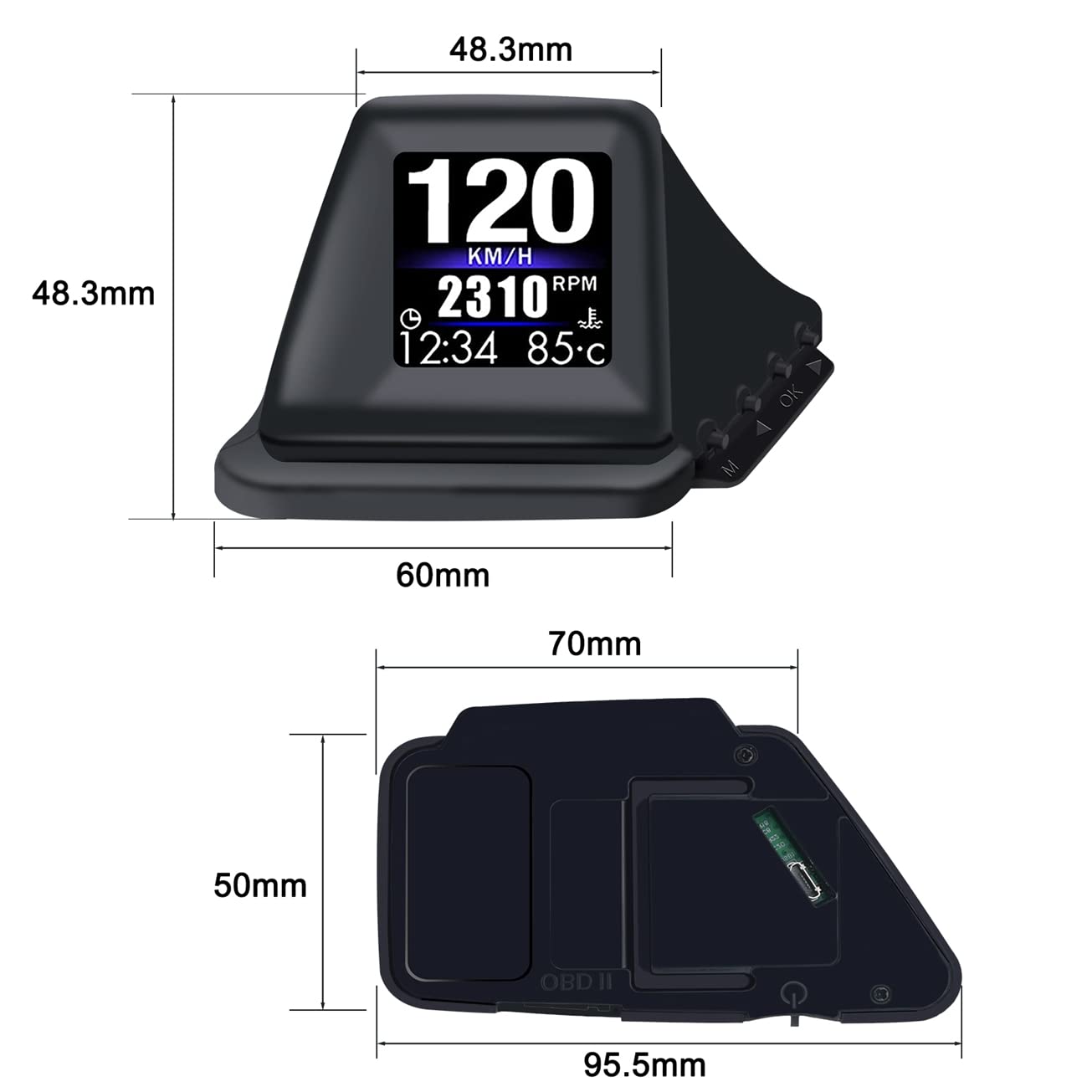
Familiarize yourself with the various parts and control buttons of the HUD unit.

- Screen: Main display area for vehicle data.
- Power On/Off: Button located on the side for turning the unit on or off.
- OBD2 Interface: Port for connecting the OBD cable to your vehicle's OBD2 port.
- Control Buttons (M, OK, Left, Right): Used for navigating menus, confirming selections, and adjusting settings.
3. Setup and Installation
The KAOLALI Car HUD Display offers two primary installation methods to suit your vehicle's interior and personal preference.

3.1. Installation Methods
- Dashboard Placement: Place the HUD unit directly on the car's center console using the provided anti-slip mat to secure it. Ensure the unit is positioned where the display is clearly visible on the windshield without obstructing your view of the road.
- A-Pillar Trim Installation: For a more integrated look, the unit can be mounted on the A-pillar trim. Use the included tape or adhesive to secure the unit. Route the OBD cable discreetly along the trim using the pry tool.
3.2. Connecting the Device
Connect the provided OBD cable to the OBD2 interface on the HUD unit and then plug the other end into your vehicle's OBD2 diagnostic port. This port is typically located under the dashboard on the driver's side.
Video 1: Demonstration of the HUD unit's functionality and display modes after connection.
4. Operating Instructions
The HUD unit automatically powers on when the vehicle starts and off when the engine is turned off. It supports both OBD and GPS modes.
4.1. Dual System (OBD+GPS)
- The device defaults to OBD mode. If your vehicle does not have an OBD2 port or if the OBD connection is unstable, the unit will automatically switch to GPS working mode.
- In OBD mode, GPS functions can be displayed simultaneously, offering comprehensive data.
4.2. Display Interfaces
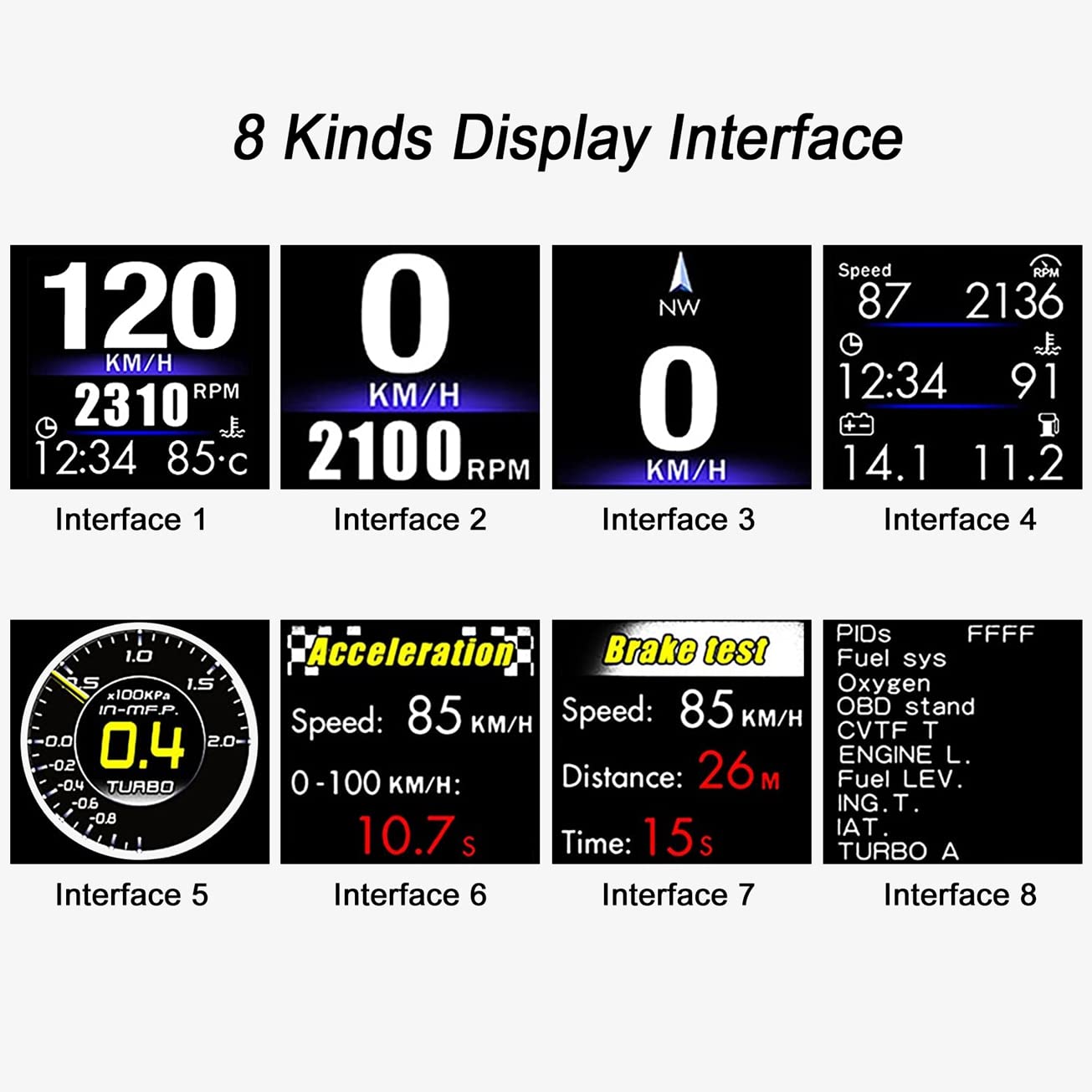
The HUD offers 8 different display interfaces, allowing you to customize the information shown. Use the control buttons (M, OK, Left, Right) to cycle through and select your preferred interface.
4.3. OBD2 Mode Functions
When operating in OBD2 mode, the HUD can display a wide array of vehicle data and provide various alerts:
- Driving Data: Speed, RPM, water temperature, voltage, fuel consumption, clock, single travel distance, single travel time, oil temperature, turbine pressure.
- Performance Tests: Acceleration test, brake test.
- Alarms: Overspeed alarm, engine failure alarm, water temperature alarm, speed alarm, voltage alarm, fatigue driving reminder.
- Diagnostics: Elimination of fault codes.
- Settings: Mile/Kilometer switch, automatic and manual brightness adjustment.
5. Maintenance
To ensure the longevity and optimal performance of your KAOLALI Car HUD Display, follow these maintenance guidelines:
- Cleaning: Use a soft, dry cloth to clean the display screen and the unit's exterior. Avoid using abrasive cleaners or solvents that could damage the surface.
- Temperature: Do not expose the unit to extreme temperatures (very high or very low) for extended periods, as this may affect its electronic components.
- Storage: If storing the unit for a long time, disconnect it from the vehicle and keep it in a cool, dry place.
- Cable Care: Ensure the OBD cable is not pinched or excessively bent, which could damage the internal wiring.
6. Troubleshooting
If you encounter issues with your HUD unit, refer to the following common troubleshooting steps:
| Problem | Possible Cause | Solution |
|---|---|---|
| No display/Unit not powering on. | Loose OBD connection, vehicle's OBD port issue, unit malfunction. |
|
| Inaccurate speed reading. | Speed calibration needed, GPS signal interference. |
|
| Unit frequently switches to GPS mode. | OBD connection issues, vehicle not fully OBD2 compliant. |
|
| Display is too dim or too bright. | Brightness settings. |
|
If the problem persists after trying these solutions, please contact customer support.
7. Specifications
| Feature | Detail |
|---|---|
| Model | HUD OBD+GPS Digital Smart Gauge Display |
| Brand | KAOLALI |
| System | OBD2 + GPS Dual System |
| Screen Size | 2 Inches |
| Material | Acrylonitrile Butadiene Styrene (ABS) |
| Item Weight | 40 Grams |
| Package Dimensions | 4 x 4 x 2.3 inches; 1.41 ounces |
| Manufacturer | KAOLALI |
| Compatibility | Universal (all vehicles via GPS mode, OBD2 compatible vehicles via OBD mode) |

8. Warranty and Support
For warranty information and customer support, please refer to the contact details provided with your purchase or visit the official KAOLALI store on Amazon.
Manufacturer: KAOLALI
Amazon Store: Visit the KAOLALI Store
Ask a question about this manual
Ask about setup, troubleshooting, compatibility, parts, safety, or missing instructions. Manuals+ will review the question and use this page’s manual context to help answer it.