
1. Introduction
Thank you for choosing the KANBIT Digital Travel Alarm Clock. This compact and portable device is designed to provide accurate time, date, day, and temperature readings, along with alarm and countdown timer functions. Its large display and backlight ensure readability in various conditions, making it an ideal companion for travel or daily use.

This image displays the KANBIT Digital Travel Alarm Clock in its open, standing position, showcasing its large digital display. The screen clearly shows the current time, month, date, day of the week, and temperature. The clock features a silver finish and a foldable cover that acts as a stand.
2. Product Overview and Button Functions
Familiarize yourself with the clock's components and control buttons located on the back panel.
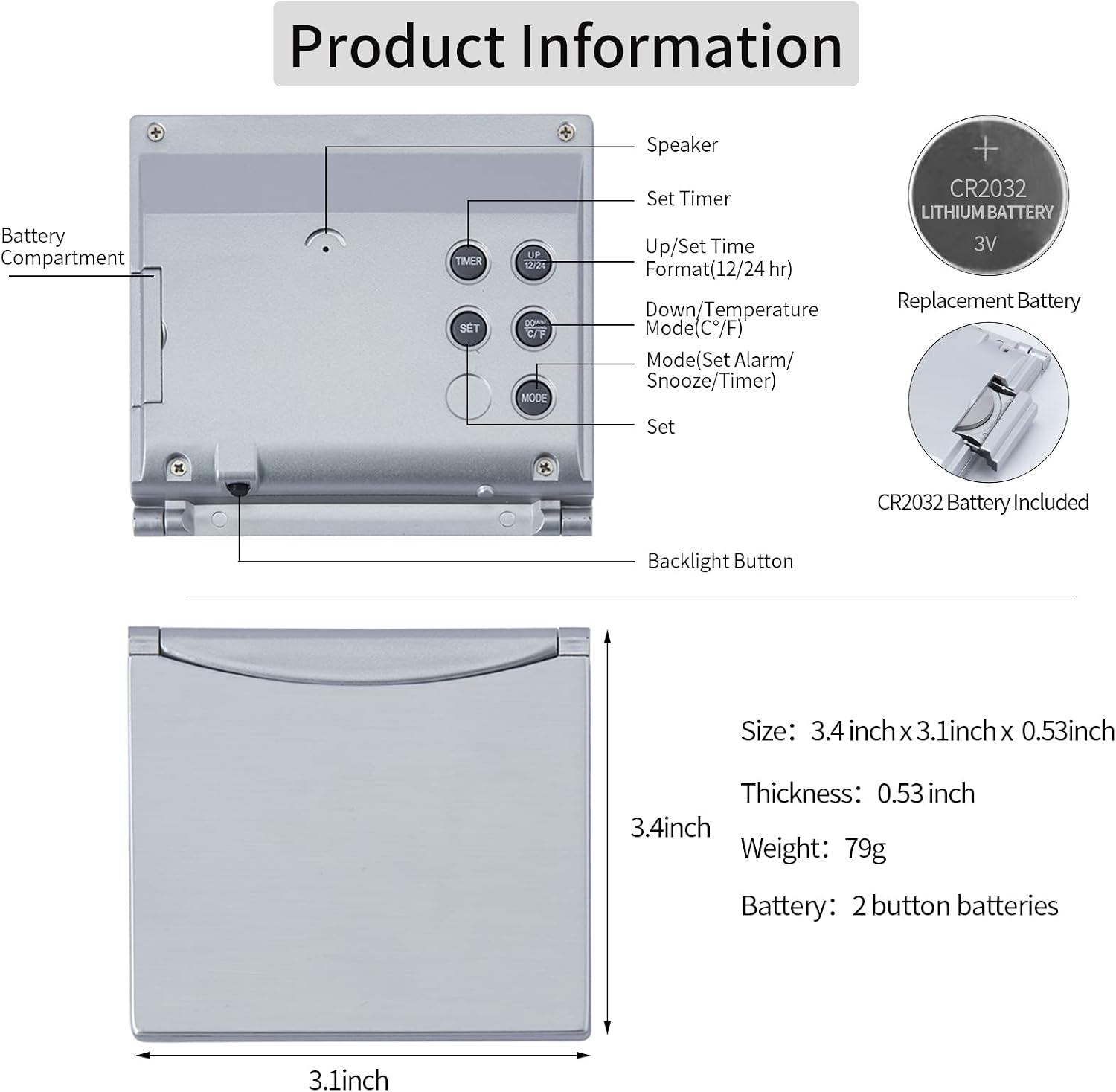
This diagram provides a detailed view of the back of the KANBIT Digital Travel Alarm Clock, labeling each button for its function: Speaker, Set Timer, Up/Set Time Format (12/24 hr), Down/Temperature Mode (C°/F°), Mode (Set Alarm/Snooze/Timer), and Set. It also illustrates the battery compartment for a CR2032 Lithium 3V battery and provides the clock's dimensions: 3.4 inches by 3.1 inches by 0.53 inches thick, with a weight of 79g.
- SET Button: Used to confirm settings during time, alarm, or timer setup.
- UP / 12/24 HR Button: Increases values during setting. Toggles between 12-hour and 24-hour time format.
- DOWN / C°/F° Button: Decreases values during setting. Toggles between Celsius and Fahrenheit temperature display.
- MODE Button: Cycles through Time, Alarm, and Timer modes. Activates Snooze when an alarm sounds.
- TIMER Button: Initiates or pauses the countdown timer.
- Backlight Button: Located on the top edge of the clock. Press to activate the backlight.
3. Setup
3.1 Battery Installation
- Locate the battery compartment on the back of the clock.
- Open the battery compartment cover.
- Insert two CR2032 Lithium 3V button cell batteries, ensuring correct polarity (+ and -). The clock comes with two batteries included, plus a spare.
- Close the battery compartment cover securely.
Upon successful battery installation, the clock display will activate.
4. Operating Instructions
4.1 Setting Time and Date
- In Time mode (default display), press and hold the SET button for approximately 3 seconds until the year flashes.
- Use the UP or DOWN buttons to adjust the year. Press SET to confirm and move to the next setting.
- Repeat this process for Month, Date, Hour, and Minute.
- After setting the minutes, press SET to exit the time setting mode.
4.2 Switching 12/24 Hour Format
In Time mode, press the UP / 12/24 HR button to toggle between 12-hour (with AM/PM indicator) and 24-hour formats.
4.3 Setting the Alarm
- Press the MODE button once to enter Alarm mode. The alarm time will be displayed.
- Press and hold the SET button for approximately 3 seconds until the alarm hour flashes.
- Use the UP or DOWN buttons to adjust the alarm hour. Press SET to confirm.
- Adjust the alarm minute using the UP or DOWN buttons. Press SET to confirm.
- After setting the alarm time, you can select an alarm melody. Use UP or DOWN to cycle through 16 different melodies. Press SET to confirm your choice.
- To activate or deactivate the alarm, press the UP button in Alarm mode (without holding SET). An alarm icon will appear on the display when active.

This image shows the KANBIT Digital Travel Alarm Clock with the time displayed, and icons indicating that the alarm and snooze functions are active. The clock is designed to help users manage their daily schedule.
4.4 Using the Snooze Function
When the alarm sounds, press the MODE button (or the top backlight button) to activate the snooze function. The alarm will temporarily stop and sound again after a set interval (default is 5 minutes, adjustable from 1-60 minutes in alarm setting mode).
4.5 Activating the Backlight
To illuminate the display in low light conditions, gently tap the Backlight Button located on the top edge of the clock. The backlight will activate for approximately 10 seconds. Note that the backlight is not designed to stay on continuously.

A hand is shown tapping the top of the KANBIT Digital Travel Alarm Clock, illustrating how to activate the backlight. The backlight illuminates the display for 10 seconds, allowing for easy viewing in low-light conditions.
4.6 Temperature Display
The clock displays the ambient room temperature. In Time mode, press the DOWN / C°/F° button to switch between Celsius (°C) and Fahrenheit (°F) units.
4.7 Using the Countdown Timer
- Press the MODE button twice to enter Timer mode. The display will show 00:00.
- Press and hold the SET button for approximately 3 seconds until the hour flashes.
- Use the UP or DOWN buttons to set the desired countdown hour. Press SET to confirm.
- Repeat for minutes and seconds. Press SET to confirm the final setting.
- Press the TIMER button to start the countdown. Press TIMER again to pause, and once more to resume.
- When the countdown reaches zero, an alarm will sound. Press any button to stop the alarm.

The image shows the KANBIT Digital Travel Alarm Clock set to timer mode, displaying a countdown. This function is useful for various activities such as studying or cooking.
5. Maintenance
5.1 Battery Replacement
When the display dims or functions become erratic, it is time to replace the batteries. Follow the steps in Section 3.1 to replace the two CR2032 Lithium 3V batteries.
5.2 Cleaning
To clean the clock, use a soft, dry cloth. Avoid using abrasive cleaners, solvents, or chemical sprays, as these may damage the display or casing.
6. Troubleshooting
- Clock not turning on or display is dim: Ensure batteries are correctly installed and are not depleted. Replace with fresh CR2032 batteries if necessary.
- Alarm not sounding: Verify that the alarm is activated (alarm icon visible on display) and the volume is set appropriately (if adjustable, though this model has fixed volume).
- Backlight not working: Ensure batteries are not low. The backlight is designed for short illumination periods (approx. 10 seconds) and is activated by tapping the top button.
- Buttons unresponsive or erratic: Try removing and reinserting the batteries to reset the device. If the issue persists, contact customer support.
- Alarm sound is too quiet: This model features a gentle alarm sound. If a louder alarm is required, consider alternative solutions.
7. Specifications
- Brand: KANBIT
- Model Number: KB-2109
- Display Type: Digital
- Power Source: Battery Powered (2 x CR2032 Lithium 3V, included)
- Product Dimensions: 3.1"W x 3.4"H x 0.53"D
- Item Weight: 79 grams (0.282 ounces)
- Material: Acrylonitrile Butadiene Styrene (ABS), Silver finish
- Special Features: Alarm, Temperature Display (C°/F°), Backlight, 12/24 Hour Format, Countdown Timer
8. Warranty and Support
The KANBIT Digital Travel Alarm Clock comes with a one-year limited warranty. If you encounter any issues with your clock, or if it is not functioning correctly upon receipt, please contact our customer service team. You can reach us through the Amazon buyer center for assistance, replacement, or refund. We aim to respond promptly to all inquiries.