Introduction
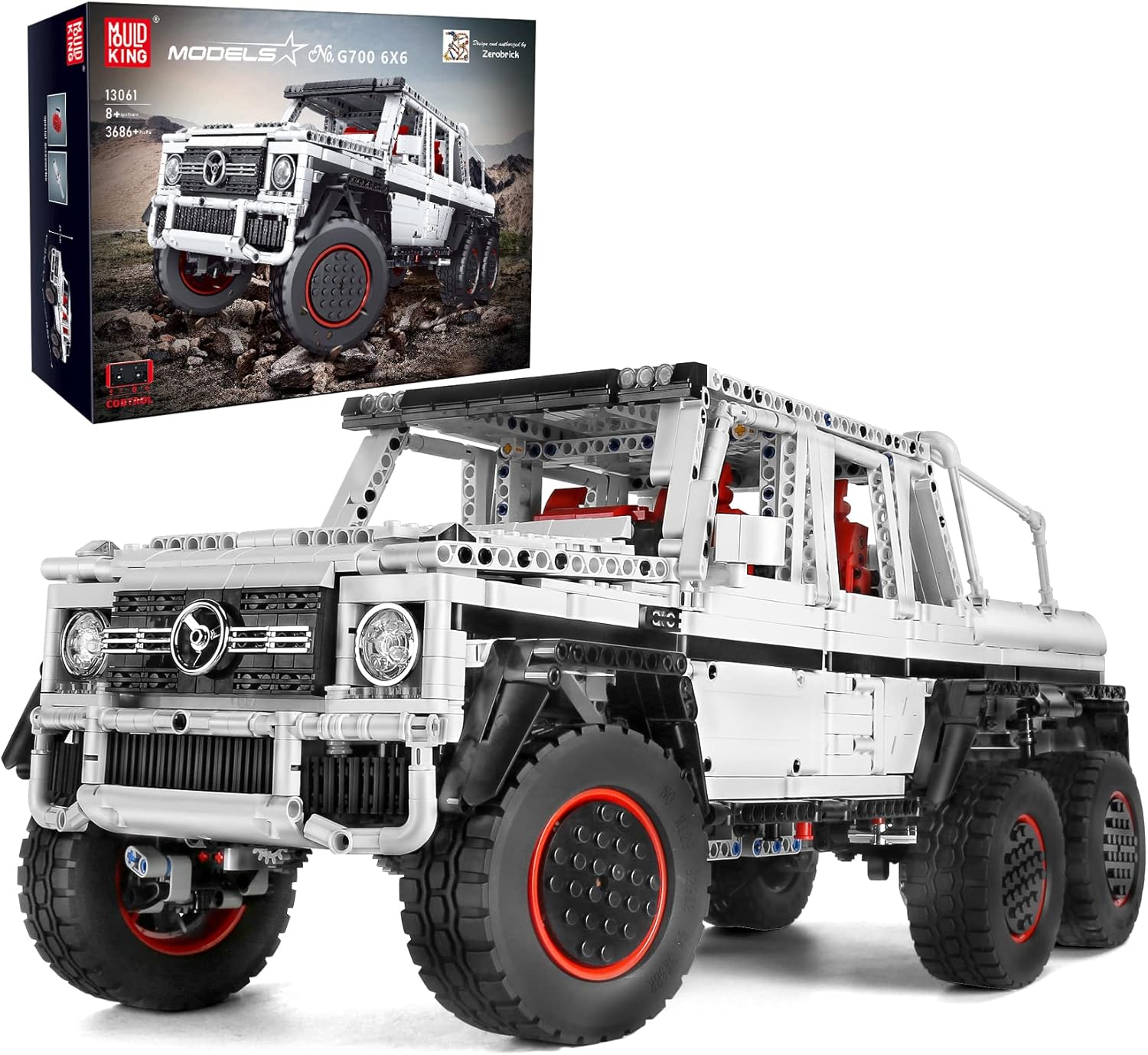
This instruction manual provides detailed guidance for the assembly, setup, and operation of your Mould King 13061 Off-Road Pickup Truck building kit. This advanced building set features a 6x6 off-road vehicle design, complete with motorized functions and control options via a 2.4GHz remote control or a dedicated mobile application. Please read all instructions carefully before beginning assembly to ensure a smooth and enjoyable building experience.
Package Contents
Before starting, verify that all components listed below are present in your package. If any parts are missing, please refer to the "Support and Warranty" section for assistance.
- 3686 Building Block Pieces (distributed across 23 bags)
- 1 Remote Control (2.4GHz)
- 1 Lithium Battery Box
- 1 User Manual (paper instructions)
- 1 Servo Motor
- 2 Monster Motors
- 1 M Type Motor
- 6 Tires
- 3 Small Frames


Assembly Instructions
The Mould King 13061 Off-Road Pickup Truck is assembled from 3686 building block parts. Detailed, step-by-step assembly instructions are provided in the included paper manual. Follow these instructions carefully to construct the model correctly.
- Unpack Components: Carefully open all bags containing building blocks and sort them as needed.
- Follow Paper Manual: Refer to the colorful paper instruction manual for the precise sequence and placement of each building block.
- Motor and Wiring Integration: Pay close attention to the steps involving the installation of the servo motor, monster motors, and M type motor, as well as their wiring connections to the lithium battery box.
- Structural Integrity: Ensure all connections are firm to maintain the model's structural integrity and functionality.

Setup
1. Battery Installation
The model requires one Lithium Metal battery, which is included. Ensure the battery is correctly installed into the lithium battery box according to the polarity markings. The remote control may require separate batteries (not specified, assume standard AA/AAA if not included in the kit's lithium battery).
2. Remote Control Pairing
After installing batteries in both the model's battery box and the remote control, power on both devices. Follow the instructions in the paper manual to pair the 2.4GHz remote control with the vehicle. This typically involves a synchronization process to establish a connection.
3. Mobile APP Control Setup
The Mould King 13061 supports Bluetooth control via a mobile phone application.
- Download APP: Search for the official Mould King control app on your smartphone's app store (e.g., Apple App Store or Google Play Store).
- Enable Bluetooth: Ensure Bluetooth is enabled on your mobile device.
- Connect to Model: Open the app and follow the on-screen instructions to connect to your Mould King 13061 model via Bluetooth.

Operating Instructions
Once the model is assembled and connected, you can operate it using either the 2.4GHz remote control or the mobile application.
1. Basic Movement (Remote Control / APP)
- Forward/Backward: Use the designated controls on the remote or app interface to move the vehicle forward or backward.
- Steering: Use the steering controls to turn the vehicle left or right. The 6x6 drive system provides enhanced maneuverability.
2. Interactive Features
The model includes several interactive features:
- Opening Doors: The body doors can be opened manually.
- Opening Hood: The front hood can be opened to reveal simulated engine details.
- Rear Cabin Cover: The rear cabin cover can also be opened.


Maintenance
- Cleaning: Use a soft, dry cloth to clean the building blocks and electronic components. Avoid using water or harsh chemicals.
- Storage: Store the model in a cool, dry place away from direct sunlight to prevent discoloration or damage to the plastic.
- Battery Care: If the model will not be used for an extended period, remove the lithium battery to prevent leakage and damage.
- Component Check: Periodically check for any loose connections or blocks and re-secure them to maintain optimal performance.
Troubleshooting
- Missing Parts:
- If you discover any missing building blocks or components upon unpacking, please contact Mould King customer support via email immediately. Provide details of the missing items, and replacements will be sent to you.
- Vehicle Not Responding:
- Ensure the lithium battery in the model is charged and correctly installed.
- Verify that the remote control has working batteries and is properly paired with the vehicle.
- If using the APP, confirm Bluetooth is active and the app is connected to the model.
- Motors Not Functioning:
- Check all motor connections to the battery box. Ensure wires are securely plugged in and not damaged.
Specifications
| Feature | Detail |
|---|---|
| Product Dimensions | 22 x 9 x 9 inches (approximately 56 x 23 x 23 cm) |
| Item Weight | 9.79 pounds (approximately 4.44 kg) |
| Total Building Blocks | 3686 pieces |
| Control Method | 2.4GHz Remote Control / Mobile APP (Bluetooth) |
| Power Source | 1 Lithium Metal battery (included) |
| Recommended Age | 8 years and up |
| Manufacturer | Mould King |
Support and Warranty
Mould King is committed to providing quality products. If you encounter any issues or have questions regarding your Mould King 13061 Off-Road Pickup Truck, please contact customer support.
For missing parts or technical assistance, please reach out to the seller via email. They will assist you with replacements or troubleshooting.
Note: Specific warranty details may vary. Please refer to your purchase documentation or contact the seller for comprehensive warranty information.


