
Product Overview

The Canon EOS R3 is a high-performance mirrorless camera designed for speed, reliability, and exceptional image quality. It features a 24.1-megapixel back-illuminated stacked CMOS sensor and the powerful DIGIC X image processor, enabling continuous blackout-free shooting at up to 30 frames per second with minimal rolling distortion. Its advanced autofocus system, Dual Pixel CMOS AF II, includes 1,053 AF points with evolved subject tracking for people, animals, and vehicles, alongside innovative Eye Control AF. The camera supports internal 6K RAW video recording and offers flexible connectivity options.

This camera is built to satisfy the most demanding expectations of professional photographers and enthusiasts, emphasizing speed, performance, and reliability in various shooting conditions.
Setup
What's in the Box
- Canon EOS R3 Camera Body
- Battery Pack LP-E19
- Battery Charger LC-E19
- Power Cable
- Interface Cable (USB)
- Strap
- Body Cap

The package includes the camera body and essential accessories to get started. Ensure all components are present before proceeding.
Battery Installation and Charging
Insert the LP-E19 battery into the battery compartment located at the bottom of the camera. Ensure it clicks securely into place. To charge the battery, use the provided LC-E19 battery charger. Connect the charger to a power outlet using the power cable. The charging indicator lights on the charger will show the charging status. A full charge is indicated when all lights are solid green.
Memory Card Installation
The EOS R3 features dual memory card slots: one for CFexpress Type B cards and one for SD/SDHC/SDXC (UHS-II) cards. Open the memory card slot cover on the side of the camera. Insert the CFexpress card into Slot 1 and the SD card into Slot 2, ensuring they are oriented correctly until they click into place. Close the cover firmly.

For optimal performance, especially with high-speed continuous shooting and 6K video recording, use high-speed CFexpress Type B cards (VPG400 or VPG200 recommended).
Operating the Camera
Basic Operation
To power on the camera, rotate the main switch to the ON position. The camera is ready for use when the display lights up. To take a photo, compose your shot using the electronic viewfinder (EVF) or the vari-angle touchscreen. Press the shutter button halfway to focus, then press it fully to capture the image.

The top display provides quick access to key shooting settings such as ISO, aperture, and shutter speed.
Image Quality and Processor
The EOS R3 features a 24.1-megapixel full-frame CMOS sensor, delivering exceptional image clarity and low-light performance. The DIGIC X image processor enhances detail, reduces noise, and enables a native ISO range of 100-102400 (expandable to 204800).

The combination of the sensor and processor ensures high image quality even in challenging lighting conditions.
High-Speed Continuous Shooting
Capture fast-moving subjects with high-speed continuous shooting: up to 12 frames per second (fps) with the mechanical shutter and an impressive 30 fps using the electronic (silent) shutter. The stacked sensor design minimizes rolling distortion during electronic shutter use.
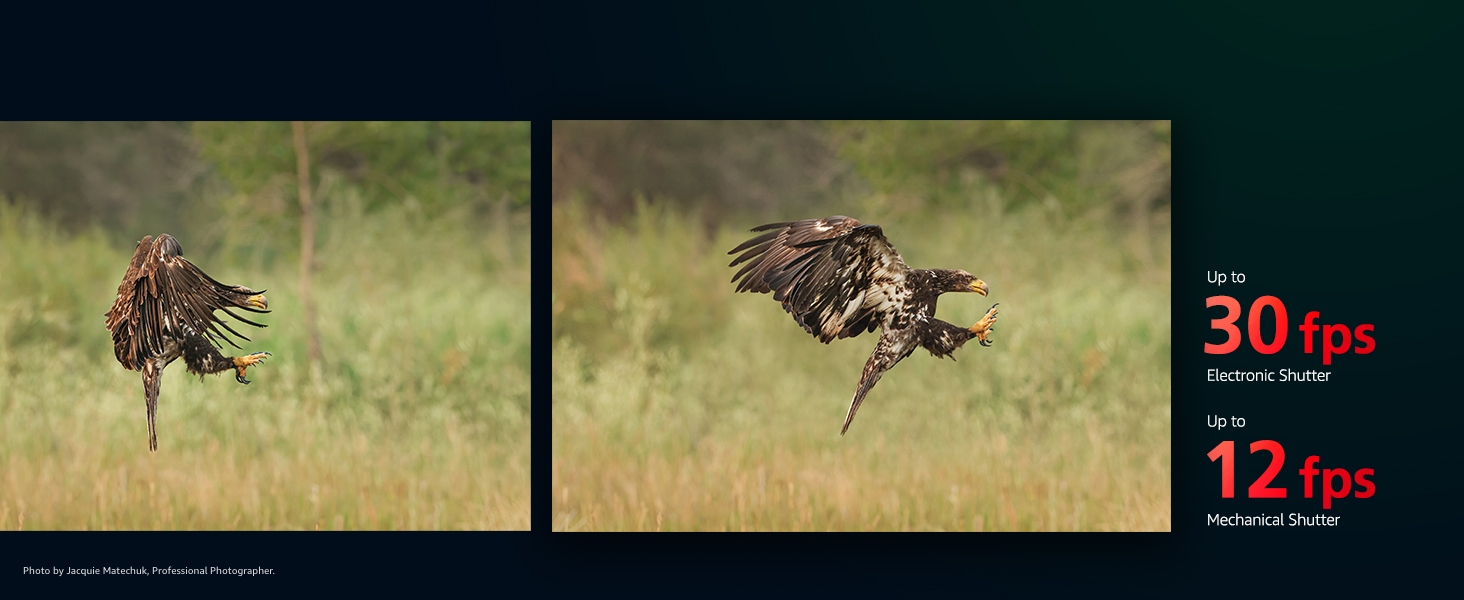
This capability is ideal for sports, action, and wildlife photography.
Autofocus System
The improved Dual Pixel CMOS AF II system features 1,053 AF points, covering nearly the entire sensor area. It offers advanced subject detection for people (eye, face, head, body), animals, and vehicles (cars, motorcycles). The revolutionary Eye Control AF allows photographers to select or shift focus points simply by looking at them through the EVF.
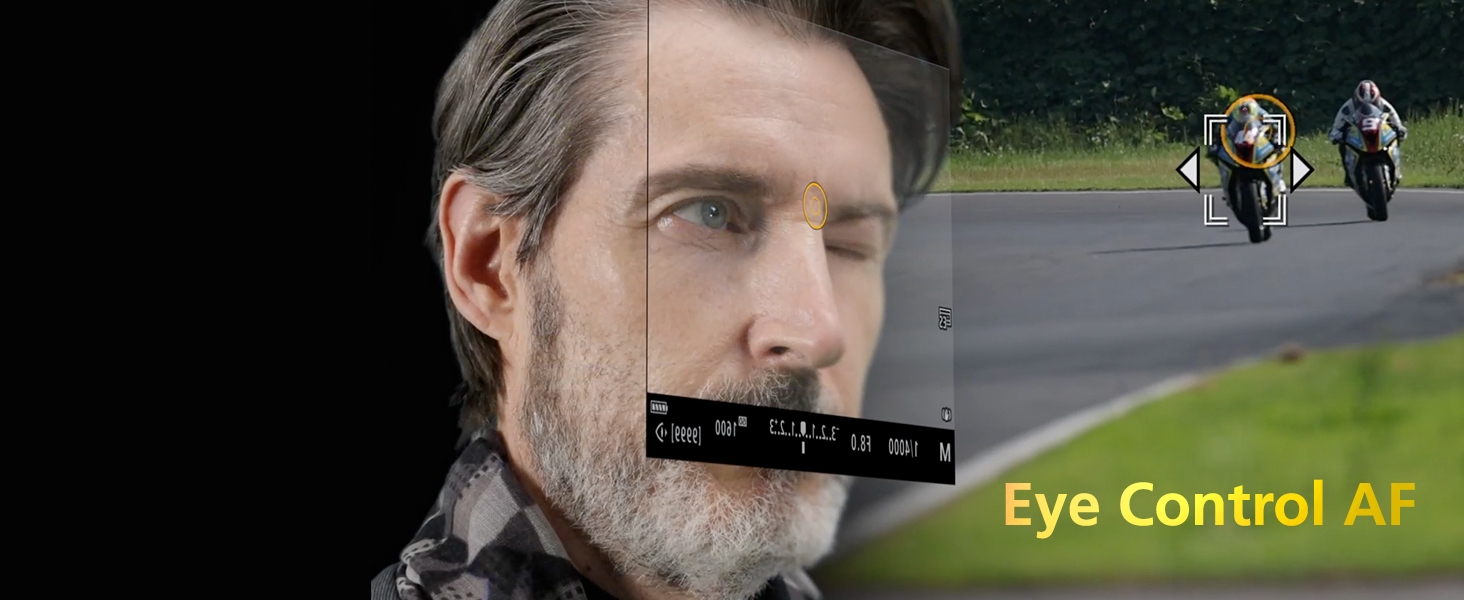
This system ensures precise and rapid focusing, even in challenging conditions down to EV -7.5.
Video Recording
The EOS R3 is a powerful video camera, capable of internal 6K RAW recording at up to 60 fps. It also supports 4K video at up to 120 fps (with firmware 1.2.0 or higher) and Full-HD at up to 240 fps, all uncropped. The in-body image stabilization (IBIS) provides up to 8 stops of shake correction when paired with select RF lenses.
These video capabilities make it suitable for professional filmmaking and high-speed video capture.
Viewfinder and Display
The camera features a 5.76-Million-Dot Electronic Viewfinder (EVF) with a 120fps refresh rate for a smooth, blackout-free viewing experience. The 3.2-inch vari-angle touchscreen LCD allows for flexible shooting angles and intuitive menu navigation.

The vari-angle screen is particularly useful for low-angle shots or video work.
Connectivity
The EOS R3 offers robust connectivity options, including built-in wired LAN (Ethernet), GPS, USB 3.2 Gen 2 (Type-C), 5GHz Wi-Fi, and Bluetooth 5.0. It also features a new multi-function hot shoe for enhanced accessory integration without additional batteries or cables.

These options facilitate fast image transfer, remote control, and seamless integration into professional workflows.
Advanced Features
- Panning Assist: Detects and corrects motion blur on panned subjects, leading to sharper images at slower shutter speeds (requires firmware 1.4.0 or later).
- Registered Person Priority: Allows the camera to recognize, prioritize, and track up to 10 specific, registered individuals for consistent focus (requires firmware 1.4.0 or later).
Maintenance
Regular maintenance ensures the longevity and optimal performance of your Canon EOS R3. Keep the camera body and lens clean using a soft, lint-free cloth. Avoid touching the sensor directly. Use a blower brush to remove dust from the sensor and lens elements. Store the camera in a dry, cool place, away from direct sunlight and extreme temperatures. When not in use for extended periods, remove the battery.
Troubleshooting
If you encounter issues with your camera, try the following basic troubleshooting steps:
- Camera not powering on: Ensure the battery is fully charged and correctly inserted.
- Memory card error: Reinsert the memory card or try a different compatible card. Ensure the card is not locked.
- Autofocus issues: Check lighting conditions. Ensure the lens is clean and properly mounted. Try resetting AF settings.
- Overheating warning: Stop recording video or continuous shooting to allow the camera to cool down.
For more complex issues, refer to the full digital manual available on the Canon website or contact Canon support.
Specifications
| Feature | Specification |
|---|---|
| Sensor Type | 24.1 MP Full-Frame Stacked BSI CMOS |
| Image Processor | DIGIC X |
| ISO Range | 100-102400 (Expandable to 204800) |
| Continuous Shooting (Electronic Shutter) | Up to 30 fps |
| Continuous Shooting (Mechanical Shutter) | Up to 12 fps |
| Autofocus System | Dual Pixel CMOS AF II (1,053 AF points) |
| Video Recording | 6K RAW (60 fps), 4K (120 fps), Full-HD (240 fps) |
| Image Stabilization | Sensor-shift (IBIS) |
| Viewfinder | 5.76-Million-Dot OLED EVF |
| Display | 3.2" Vari-Angle Touchscreen LCD |
| Memory Card Slots | 1x CFexpress Type B, 1x SD/SDHC/SDXC (UHS-II) |
| Connectivity | Wired LAN, GPS, USB 3.2 Gen 2, Wi-Fi, Bluetooth |
| Weight | 2.2 Pounds (Body Only) |
Official Product Videos
Canon R3 Mirrorless Camera (Body Only)
This video provides an overview of the Canon EOS R3 Mirrorless Camera body, highlighting its key features and design from the perspective of a seller.
Is it worth it? Canon EOS R3 Body
A seller's review discussing the value proposition and performance of the Canon EOS R3 camera body, covering aspects like sensor, processor, and autofocus.
My thoughts on the R3
A seller shares personal insights and experiences with the Canon EOS R3, detailing its practical use and performance in various scenarios.
R3 vs. R6ii - My thoughts!!
A comparative review by a seller, contrasting the features and performance of the Canon EOS R3 with the R6 Mark II to help users decide between models.
Warranty and Support
The Canon EOS R3 Mirrorless Camera comes with a 1-year manufacturer warranty. For warranty claims, technical support, or service inquiries, please visit the official Canon USA website or contact their customer support line. Keep your purchase receipt as proof of purchase.


