
1. Introduction
This manual provides essential information for the safe and effective operation, maintenance, and troubleshooting of your Gikaida ABH841 4-Gas Portable Detector. This device is designed to continuously monitor and detect concentrations of Hydrogen Sulfide (H2S), Oxygen (O2), Carbon Monoxide (CO), and Combustible Gas (EX) in the ambient air. Please read this manual thoroughly before using the device.
2. Product Overview
2.1 Package Contents
Upon opening the package, verify that all items are present and undamaged:
- Gikaida ABH841 4-Gas Portable Detector
- USB Charging Cable
- User Manual
- Carrying Case
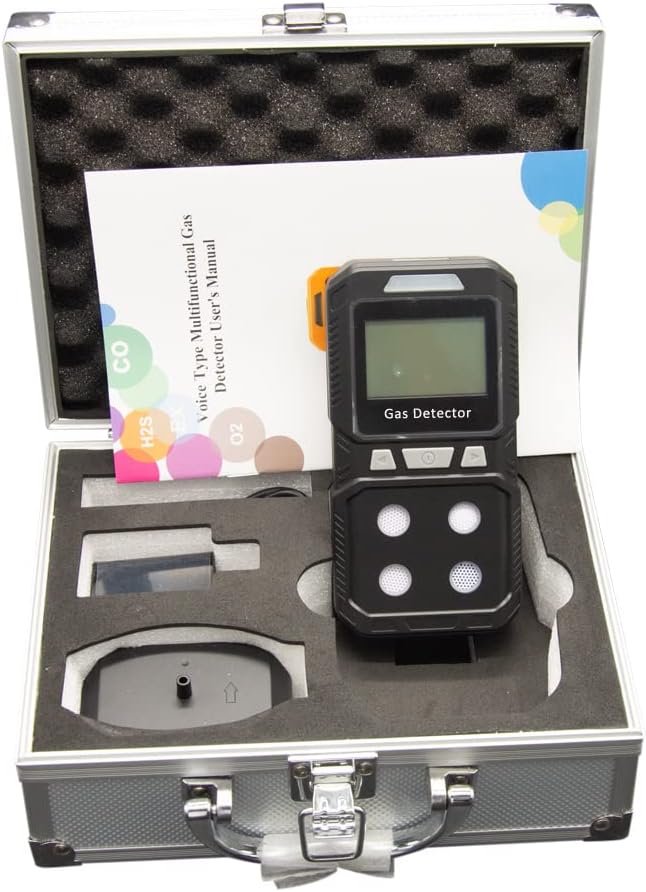
Figure 2.1: Gikaida ABH841 detector and accessories in its carrying case.
2.2 Device Components

Figure 2.2: Front view of the Gikaida ABH841 detector with labeled components.
The Gikaida ABH841 detector features an intuitive design for ease of use:
- Alarm Light: Provides visual indication during alarm events.
- LCD Screen: Displays real-time gas concentrations, battery status, and other operational information.
- USB Charger Port: For recharging the internal battery.
- Press Keys: For navigation and control of device functions.
- H2S Sensor: Detects Hydrogen Sulfide gas.
- O2 Sensor: Detects Oxygen levels.
- CO Sensor: Detects Carbon Monoxide gas.
- EX Sensor: Detects Combustible Gas (e.g., Methane, Propane).

Figure 2.3: Key features including USB charging, alarm indicator, and jacket clip.
3. Safety Information
Always adhere to the following safety guidelines to prevent injury or damage to the device:
- Do not attempt to open or modify the device. This may compromise its explosion-proof rating and void the warranty.
- Ensure the device is regularly calibrated according to local regulations and manufacturer recommendations.
- Do not expose the device to extreme temperatures, humidity, or corrosive environments.
- Always perform a bump test before each use to confirm sensor and alarm functionality.
- The device is designed to detect specific gases. It may not detect other hazardous substances.
- In case of an alarm, immediately follow your company's safety protocols for gas exposure.
- Charge the device only with the provided USB cable and a compatible power adapter.
4. Setup
4.1 Initial Charging
Before first use, fully charge the device. Connect the USB charging cable to the device's USB port and plug the other end into a standard USB power adapter (not included) or a computer USB port. The charging indicator on the screen will show charging status. A full charge typically takes several hours.
4.2 Powering On/Off
- To Power On: Press and hold the power button (usually the central button) for approximately 3 seconds until the device vibrates and the screen illuminates. The device will perform a self-test and warm-up sequence.
- To Power Off: While the device is on, press and hold the power button for approximately 3 seconds. A countdown or confirmation prompt may appear on the screen. Release the button when prompted or when the screen turns off.
5. Operating Instructions
5.1 Display Information
The LCD screen displays real-time gas concentrations for H2S, O2, CO, and EX. It also shows battery level, time, and alarm status. Pay close attention to the readings, especially in environments where gas hazards are present.
- H2S: Hydrogen Sulfide concentration in parts per million (ppm).
- O2: Oxygen concentration in percentage (%). Normal atmospheric oxygen is approximately 20.9%.
- CO: Carbon Monoxide concentration in parts per million (ppm).
- EX: Combustible Gas concentration in % LEL (Lower Explosive Limit).
5.2 Alarm Functions
The device is equipped with three types of alarms that activate when gas concentrations exceed predefined thresholds:
- Audible Alarm: A loud beeping sound.
- Visual Alarm: The alarm light flashes brightly.
- Vibrating Alarm: The device vibrates to alert the user.
Alarm thresholds are factory-set but may be adjustable through the device's menu (refer to advanced settings in the full manual if available). In case of an alarm, evacuate the area immediately and follow safety protocols.
5.3 Calibration
The Gikaida ABH841 comes factory-calibrated for immediate use. However, regular calibration is crucial for maintaining accuracy and compliance. The device supports both zero and span calibration options. Consult the full user manual or a qualified technician for detailed calibration procedures.
6. Maintenance
6.1 Cleaning
Clean the exterior of the device with a soft, damp cloth. Do not use abrasive cleaners, solvents, or immerse the device in water. Ensure sensor openings are free from dust and debris.
6.2 Battery Care
To prolong battery life, avoid fully discharging the battery frequently. Recharge the device when the low battery indicator appears. Store the device in a cool, dry place if not in use for extended periods, and recharge it periodically.
6.3 Sensor Maintenance
Sensors are critical components. Avoid exposing them to high concentrations of target gases unnecessarily, as this can shorten their lifespan. Regular bump tests and calibrations help ensure sensor integrity.
7. Troubleshooting
This section addresses common issues you might encounter with your Gikaida ABH841 detector.
| Problem | Possible Cause | Solution |
|---|---|---|
| Device does not power on | Low battery; Device malfunction | Charge the device fully. If issue persists, contact support. |
| Inaccurate gas readings | Sensor contamination; Out of calibration; Sensor end-of-life | Perform a bump test. Recalibrate the device. If issue persists, sensor replacement may be needed. |
| Alarms not activating | Alarm settings incorrect; Sensor malfunction | Check alarm threshold settings. Perform a bump test. Contact support if alarms still fail. |
| Short battery life | Battery degradation; Frequent alarms; Extreme temperatures | Ensure full charge. Avoid prolonged use in extreme conditions. Battery replacement may be necessary over time. |
8. Specifications
The following table details the technical specifications of the Gikaida ABH841 4-Gas Portable Detector:
| Feature | Detail |
|---|---|
| Model Number | ABH841 |
| Product Dimensions (L x W x H) | 14 x 7.8 x 3.2 cm |
| Weight | 790 grams |
| Brand | Gikaida |
| Manufacturer | Shenzhen Jikaida Technology Co., Ltd |
| Power Source | Battery Powered (1800 mAh) |
| Color | Black |
| Alarm Type | Audible, Visual, Vibration |
| Operating Humidity | 95% (non-condensing) |
| Sensor Type | Electrochemical (H2S, CO, O2), Catalytic Combustion (EX) |
| Detection Error | ≤ ±5% F.S. |
| Response Time (T) | < 30 seconds |
| Calibration Options | Zero and Span |
9. Warranty and Support
9.1 Warranty Information
The Gikaida ABH841 4-Gas Portable Detector comes with a 2-year limited warranty from the date of purchase. This warranty covers defects in materials and workmanship under normal use. It does not cover damage caused by misuse, accidents, unauthorized modifications, or improper maintenance.
9.2 Customer Support
For any questions, technical assistance, or warranty claims, please contact Gikaida customer support. When contacting support, please have your product model number (ABH841) and purchase information readily available.
Contact information can typically be found on the product packaging or the official Gikaida website.