
1. Introduction
The LEXiBOOK Powerman Star Robot (Model ROB85EN) is an interactive, programmable toy designed to engage children aged 3 years and up. This robot offers a variety of functions including talking, dancing, telling jokes, playing music, and educational activities. It can be controlled via a remote control, gesture sensors, and programmable actions, providing an engaging experience for young users.

Image 1.1: The Powerman Star Robot and its retail packaging.
2. What's in the Box
- 1 LEXiBOOK Powerman Star Robot (Model ROB85EN)
- 1 Remote Control
- 1 Instruction Manual
- 9 Foam Discs
3. Battery Installation
The Powerman Star Robot and its remote control require batteries for operation. Please ensure you have the correct type and quantity of batteries before beginning.
3.1 Robot Battery Installation
- The robot requires 5x LR6/AA batteries (not included).
- Locate the battery compartment on the back of the robot.
- Using a small screwdriver (not included), open the battery compartment cover.
- Insert 5 new LR6/AA batteries, ensuring correct polarity (+/-).
- Replace the battery compartment cover and secure it with the screw.
3.2 Remote Control Battery Installation
- The remote control requires 2x LR6/AA batteries (not included).
- Locate the battery compartment on the back of the remote control.
- Using a small screwdriver (not included), open the battery compartment cover.
- Insert 2 new LR6/AA batteries, ensuring correct polarity (+/-).
- Replace the battery compartment cover and secure it with the screw.
Important: Do not mix old and new batteries. Do not mix alkaline, standard (carbon-zinc), or rechargeable (nickel-cadmium) batteries. Remove batteries if the device is not used for an extended period.
4. Remote Control Overview
The remote control allows for comprehensive command of your Powerman Star Robot. Familiarize yourself with the buttons and their functions:
- Directional Arrows: Control the robot's movement (forward, backward, turn left, turn right).
- Music Button: Activates various music tracks.
- Dance Button: Initiates dance routines.
- Program Button: Enters programming mode to record custom action sequences.
- Record/Playback Button: Records and plays back your voice with a robot effect.
- Foam Disc Button: Commands the robot to shoot foam discs.
- Volume Control: Adjusts the robot's sound volume.
- Educational Activities Button: Accesses learning quizzes and games.
- Story Maker Button: Initiates story creation or plays pre-recorded fables.

Image 4.1: The Powerman Star Robot and its remote control.
5. Robot Features and Functions
The Powerman Star Robot is equipped with a wide array of features designed for entertainment and education:
5.1 Interactive Functions
The robot is fully English-speaking and can engage in various interactive activities, including talking, dancing, telling jokes, and producing light and sound effects to enhance playtime.
5.2 Educational Activities
With over 300 learning quizzes, the robot offers 6 educational activities covering numbers, animals, daily life, and musical instruments, making learning fun and interactive for children.
5.3 Story Maker
Utilize the Story Maker function to create up to 10,000 unique stories. The robot also includes 10 Aesop's fables, perfect for bedtime stories.
5.4 Programmable Actions (STEM)
As a STEM robot, it helps children discover the logic of programming. Users can program up to 40 actions and add music to create and save custom choreographies.
5.5 Music and Dance
The robot can play several music tracks and perform various dance moves, providing dynamic entertainment.
5.6 Voice Recording and Playback
The playback and recording function allows the robot to repeat what you say in its unique robot voice. It can also memorize and reuse recorded phrases later.
5.7 Foam Disc Shooter
The robot can shoot soft, colored foam discs, adding an exciting play element that is safe for indoor use.
5.8 Gesture Sensor
In addition to remote control, the Powerman Star Robot features a gesture sensor, allowing it to follow your hand movements to go forward, backward, left, or right.

Image 5.1: Visual representation of the robot's learning, story, programming, repeat, music, and disc shooting features.
6. Operation
6.1 Powering On/Off
- Ensure batteries are correctly installed in both the robot and the remote control.
- Turn on the robot using the power switch (location typically on the back or chest).
- Turn on the remote control using its power switch. The robot and remote should automatically pair.
- To power off, turn off both the robot and the remote control.
6.2 Remote Control Operation
Use the directional arrows on the remote control to move the robot. Press specific function buttons (e.g., Music, Dance, Foam Disc) to activate corresponding features.
6.3 Gesture Control
The robot can detect hand movements. In gesture control mode, wave your hand in front of the robot's sensor to command it to move forward, backward, left, or right.
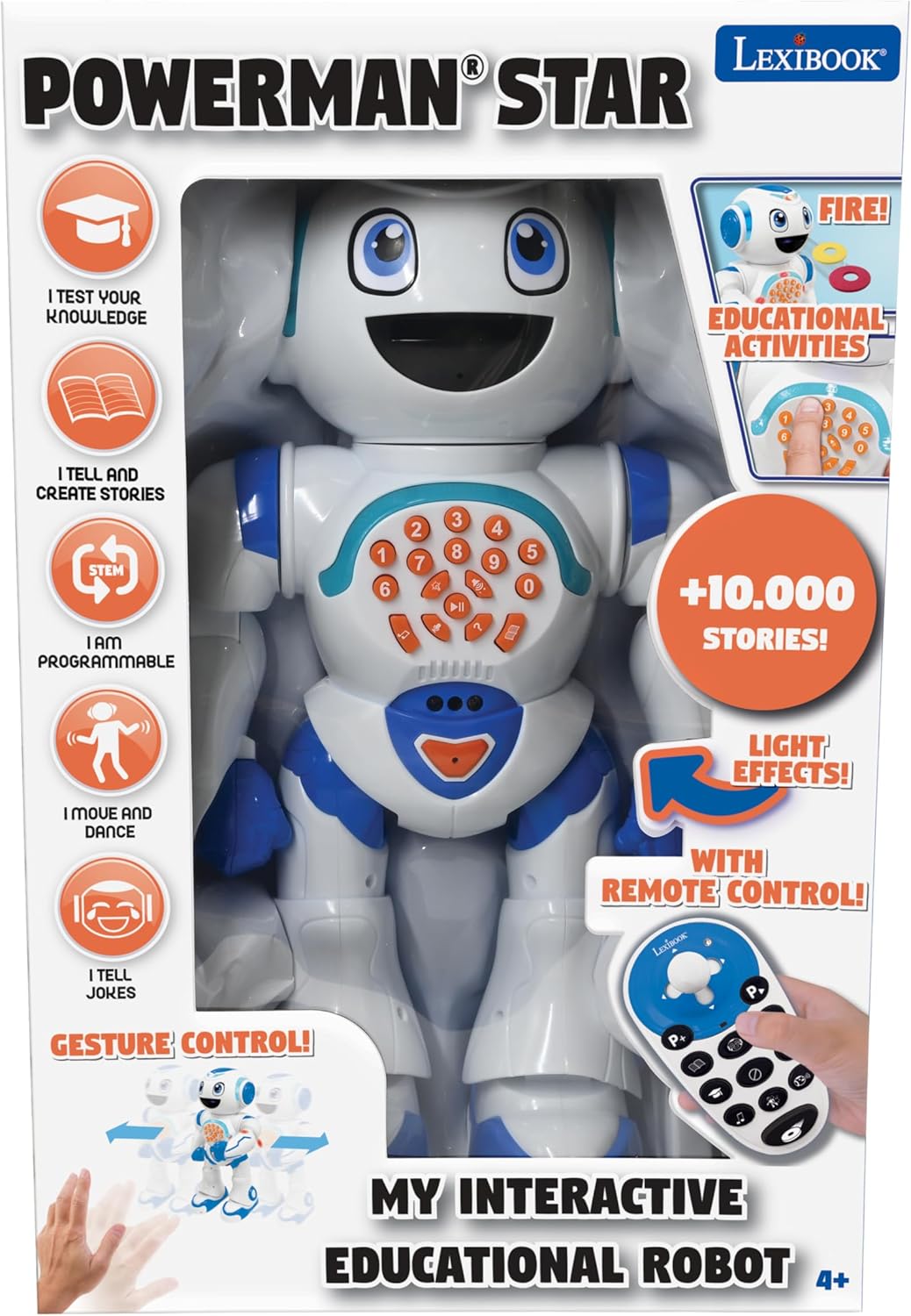
Image 6.1: The robot responding to hand gestures for movement.
6.4 Programming Actions
- Press the 'Program' button on the remote control to enter programming mode.
- Input a sequence of up to 40 actions using the remote control buttons (e.g., movements, arm actions, music).
- Press the 'Program' button again to save and execute the programmed sequence.
6.5 Official Product Video
Video 6.1: An official product video demonstrating the LEXiBOOK Powerman Star Robot's features and functions.
7. Safety Information
Please read and adhere to the following safety guidelines:
- Recommended for ages 3 years and up.
- Choking Hazard: Not suitable for children under 3 years of age due to small parts.
- Always ensure play is conducted under adult supervision.
- Review all important information provided on the product packaging.
- Retain the packaging for future reference, as it contains important product information. The packaging itself is not intended to be used as a toy.
8. Maintenance
To ensure the longevity and optimal performance of your Powerman Star Robot, follow these maintenance tips:
- Keep the robot and remote control clean by wiping them with a dry, soft cloth.
- Avoid exposing the robot to water or excessive moisture.
- Store the robot in a cool, dry place away from direct sunlight when not in use.
- Remove batteries from both the robot and remote control if storing for extended periods to prevent leakage.
9. Troubleshooting
If you encounter issues with your Powerman Star Robot, please refer to the following common solutions:
- Robot not responding: Check if both the robot and remote control are powered on. Ensure batteries are fresh and correctly installed. Try turning both devices off and on again to re-establish connection.
- Limited movement or erratic behavior: Ensure the robot is on a flat, smooth surface. Carpet or uneven surfaces may hinder movement. Check for any obstructions around the robot's wheels or joints.
- Sound or light issues: Verify that the volume is not set to minimum. Check battery levels.
- Foam discs not shooting: Ensure the disc compartment is loaded correctly and there are no jams.
- Gesture control not working: Ensure the robot is in gesture control mode and there are no obstructions between your hand and the robot's sensor.
If problems persist, consult the full instruction manual or contact LEXiBOOK customer support.
10. Specifications
| Product Dimensions | 8.15 x 5.2 x 14.45 inches |
| Item Weight | 1.96 pounds |
| Item Model Number | ROB85EN |
| Manufacturer Recommended Age | 3 years and up |
| Batteries Required | 5x LR6/AA for robot, 2x LR6/AA for remote (not included) |
| Manufacturer | Lexibook |
| Release Date | September 2, 2021 |
11. Warranty and Support
For detailed warranty information, product registration, or technical support, please visit the official LEXiBOOK website or contact their customer service department. Keep your purchase receipt as proof of purchase for any warranty claims.