1. Introduction
Thank you for purchasing the Generic H2O Portable Mini Humidifier. This compact and versatile device is designed to improve air quality by adding moisture to the air, helping to alleviate dry skin and respiratory discomfort. It also functions as an essential oil diffuser and features a colorful LED light, making it suitable for various environments such as bedrooms, offices, cars, and desktops.
Please read this manual carefully before use to ensure proper operation and maintenance.
2. Package Contents
- 1 x USB Cable
- 1 x Humidifier Unit
- 1 x Instruction Manual
- 1 x Cotton Swab (pre-installed or spare)
3. Specifications
| Feature | Detail |
|---|---|
| Input | DC 5.0V/1.0A |
| Power | 2W |
| Current | 250-350 mA |
| Container Volume | 300ml |
| Mist Modes | Continuous (4 hours), Intermittent (6 hours) |
| Special Features | Quiet Operation (30 dB), Automatic Shut-off, Colorful LED Light, Essential Oil Diffuser capability |
| Dimensions | 3.07 x 3.07 x 4.72 inches |
| Weight | 5.3 ounces |
4. Setup
- Unpack the Humidifier: Carefully remove all components from the packaging.
- Prepare the Cotton Swab: Ensure the cotton swab is properly inserted into the humidifier's mist outlet. If it's a new swab, soak it in water for a few minutes before insertion to ensure optimal misting.
- Fill the Water Container:
Remove the top cover of the humidifier. Fill the water container with clean tap water. Do not exceed the maximum fill line (300ml capacity). For best performance and longevity, use distilled or purified water.
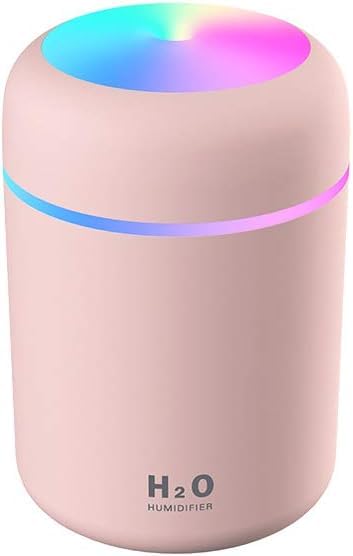
Image: The humidifier with its top removed, revealing the water tank and the cotton swab mechanism.
- Add Essential Oils (Optional): If using as an essential oil diffuser, add a few drops of water-soluble essential oil directly into the water tank. Do not use oil-based essential oils as they can clog the misting mechanism.
- Replace the Cover: Securely place the top cover back onto the humidifier.
- Connect Power: Plug the provided USB cable into the humidifier's USB port and connect the other end to a compatible USB power source (e.g., computer, power bank, USB wall adapter). The humidifier requires continuous power to operate.
5. Operating Instructions
The humidifier is controlled by a single multi-function button located on the front or top of the unit.
- Power On / Continuous Spray Mode:
Press the button once to turn on the humidifier. It will start in continuous spray mode, producing a steady mist for approximately 4 hours. The colorful LED light will also activate automatically.
- Intermittent Spray Mode:
While in continuous spray mode, press the button a second time to switch to intermittent spray mode. In this mode, the humidifier will spray mist for 3 seconds and then pause for 3 seconds, repeating the cycle. This mode extends operation time to approximately 6 hours.
- Turn Off Mist:
Press the button a third time to turn off the mist function. The LED light will remain on.
- Control LED Light:
- Turn On/Off Colorful Light: Long press the button for 3 seconds to turn the colorful LED light on or off.
- Fixed Color Mode: While the colorful light is on, long press the button again for 3 seconds to fix the light to a specific color.
- Automatic Shut-off: The humidifier features an automatic shut-off function. It will automatically turn off when the water level is too low or after the set operating time (4 hours for continuous, 6 hours for intermittent) to prevent dry burning and ensure safety.
6. Maintenance
Regular cleaning and maintenance will ensure the longevity and optimal performance of your humidifier.
- Cleaning the Water Tank:
- Unplug the humidifier and remove the top cover.
- Empty any remaining water from the tank.
- Wipe the inside of the water tank with a soft, damp cloth. For stubborn mineral deposits, use a small amount of white vinegar, then rinse thoroughly with clean water.
- Do not immerse the entire unit in water.
- Replacing the Cotton Swab:
- The cotton swab should be replaced every 1-3 months, or when mist output decreases significantly.
- Remove the top cover and gently pull out the old cotton swab.
- Insert a new cotton swab, ensuring it is fully saturated with water before first use.
- Cleaning the Mist Outlet:
Gently wipe the mist outlet with a cotton swab dipped in clean water to remove any residue that may affect mist production.
7. Troubleshooting
| Problem | Possible Cause | Solution |
|---|---|---|
| No mist or low mist output |
|
|
| Humidifier not turning on |
|
|
| Leaking water |
|
|
8. Safety Information
- Do not use oil-based essential oils, only water-soluble ones.
- Keep out of reach of children and pets.
- Do not immerse the entire unit in water or other liquids.
- Unplug the device before cleaning or refilling.
- Do not block the mist outlet.
- Use only the provided USB cable or a compatible replacement.
- If the device is damaged, discontinue use immediately.
9. Warranty and Support
This product comes with a standard manufacturer's warranty. For specific warranty details, please refer to the product packaging or contact your retailer. For technical support or inquiries, please reach out to the seller through the platform where the product was purchased.
Date First Available: September 12, 2021


