
Introduction
The BLACK+DECKER Verve Designer Smart Clamp Light offers versatile lighting control and seamless integration with the Amazon Alexa ecosystem. This 2-in-1 clamp design allows for secure attachment to various surfaces, providing customizable illumination for any environment. This manual provides detailed instructions for setup, operation, and maintenance to ensure optimal performance of your smart clamp light.
Product Overview
The Verve Designer Smart Clamp Light is engineered for adaptability and smart control. Key features include:
- 2-in-1 Clamp Design: Securely attaches to vertical or horizontal surfaces up to 3 inches thick, ideal for shelves, headboards, and cubicle walls.
- Alexa Integration: Works exclusively with Amazon Alexa for voice commands and app control without requiring a separate third-party application.
- Circadian Rhythm App Mode: Automatically adjusts light color and brightness based on your local time to support natural sleep-wake cycles and enhance productivity.
- True White Lighting & Color Changing: Offers adjustable white light (3000K, 4000K, 6000K) and a spectrum of 16 million RGB colors for mood lighting.
- Stepless Dimming: Provides smooth, continuous dimming levels for precise brightness control.
- Additional Preset Modes: Includes 'Chill Mode' for gradual color-changing relaxation and 'Sunset Mode' with ambient soft white light and a five-hour shutoff timer.
- PureOptics LED Technology: Utilizes energy-efficient LEDs with a lifespan of up to 50,000 hours.
- 3 Points of Adjustability: Allows for flexible positioning of the lamp head to direct light precisely where needed.
- Touch Control: Integrated touch controls on the lamp head for manual adjustments.

Figure 1: Alexa Integration and Smart Routines. The image displays how the smart clamp light connects to Alexa, allowing users to create routines and add the light to groups for easy control.

Figure 2: Dimming, Adjustable White Light, and Color Options. This image highlights the lamp's capabilities for stepless dimming, adjustable white light temperatures (Warm, Natural, Cool), and 16 million color choices.
Setup Instructions
- Unpack the Lamp: Carefully remove all components from the packaging. Ensure the lamp and charging cable are present.
- Assemble the Lamp (if required): If any assembly is needed, follow the included quick start guide for connecting the lamp head to the arm and base.
- Attach the Clamp: The 2-in-1 clamp allows for both vertical and horizontal mounting. Choose a surface (e.g., headboard, shelf, desk edge) that is between 0.27 and 3 inches thick. Securely tighten the clamp to the desired surface. Ensure the lamp is stable before proceeding.

Figure 3: 2-in-1 Clamp Design. This image demonstrates how the lamp's clamp can be used for both vertical mounting on a headboard and horizontal mounting on a shelf.
- Connect Power: Plug the charging cable into the lamp and then into a standard AC/DC power outlet.
- Alexa Integration: The lamp is designed for native integration with Amazon Alexa. No separate third-party app is required. Ensure your Alexa device is powered on and connected to the internet. Alexa should automatically discover the new device. If not, open the Alexa app, go to 'Devices', and select 'Add Device'. Follow the on-screen prompts to complete the setup.
Operating Instructions
The Verve Designer Smart Clamp Light offers multiple control methods:
1. Voice Control (via Alexa)
- Turn On/Off: "Alexa, turn on [Lamp Name]" or "Alexa, turn off [Lamp Name]".
- Adjust Brightness: "Alexa, dim [Lamp Name] to 50%" or "Alexa, brighten [Lamp Name]".
- Change Color: "Alexa, set [Lamp Name] to red" or "Alexa, change [Lamp Name] to blue".
- Set White Temperature: "Alexa, set [Lamp Name] to warm white" or "Alexa, set [Lamp Name] to cool white".
- Activate Circadian Rhythm Mode: "Alexa, enable Circadian Rhythm Mode on [Lamp Name]".
- Activate Preset Modes: "Alexa, turn on Chill Mode on [Lamp Name]" or "Alexa, turn on Sunset Mode on [Lamp Name]".
2. Alexa App Control
Open the Alexa app on your smartphone or tablet. Navigate to the 'Devices' section. Select your BLACK+DECKER Verve Smart Clamp Light. From here, you can:
- Toggle power on/off.
- Adjust brightness with a slider.
- Select from 16 million colors.
- Choose white light temperatures (3000K, 4000K, 6000K).
- Enable or disable Circadian Rhythm Mode, Chill Mode, or Sunset Mode.
- Create custom routines based on schedules, location, or other smart home triggers.

Figure 4: Alexa App for Preset Modes. This image illustrates the Alexa app interface, showing how to select and activate various preset lighting modes like Sunset Mode and Circadian Rhythm Mode.
3. Touch Control (on Lamp Head)
The lamp head features integrated touch controls for direct adjustments:
- Power Button: Tap to turn the lamp on or off.
- Brightness/Dimming: Press and hold the power button or dedicated dimming controls (if present) to adjust brightness.
- Color/White Adjustment: Use the dedicated buttons or touch areas to cycle through white light temperatures or switch to RGB color modes.
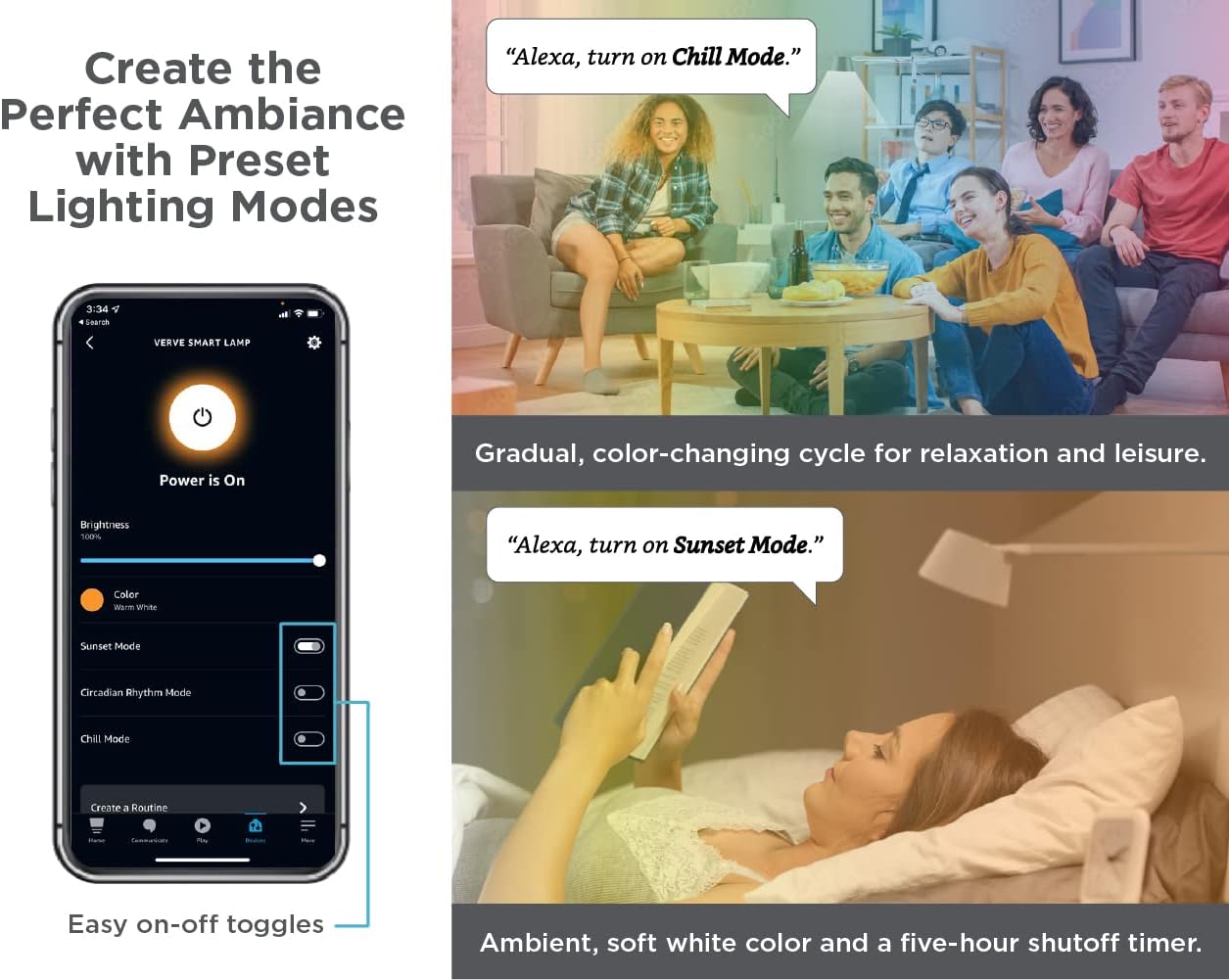
Figure 5: Lamp Head Controls. This image provides a close-up of the lamp head, indicating the locations for power control, dimming, white light adjustment, and RGB color tuning via touch.
4. Adjusting Lamp Position
The lamp features 3 points of adjustability. Gently move the arm and lamp head to direct light as desired. Avoid excessive force to prevent damage.
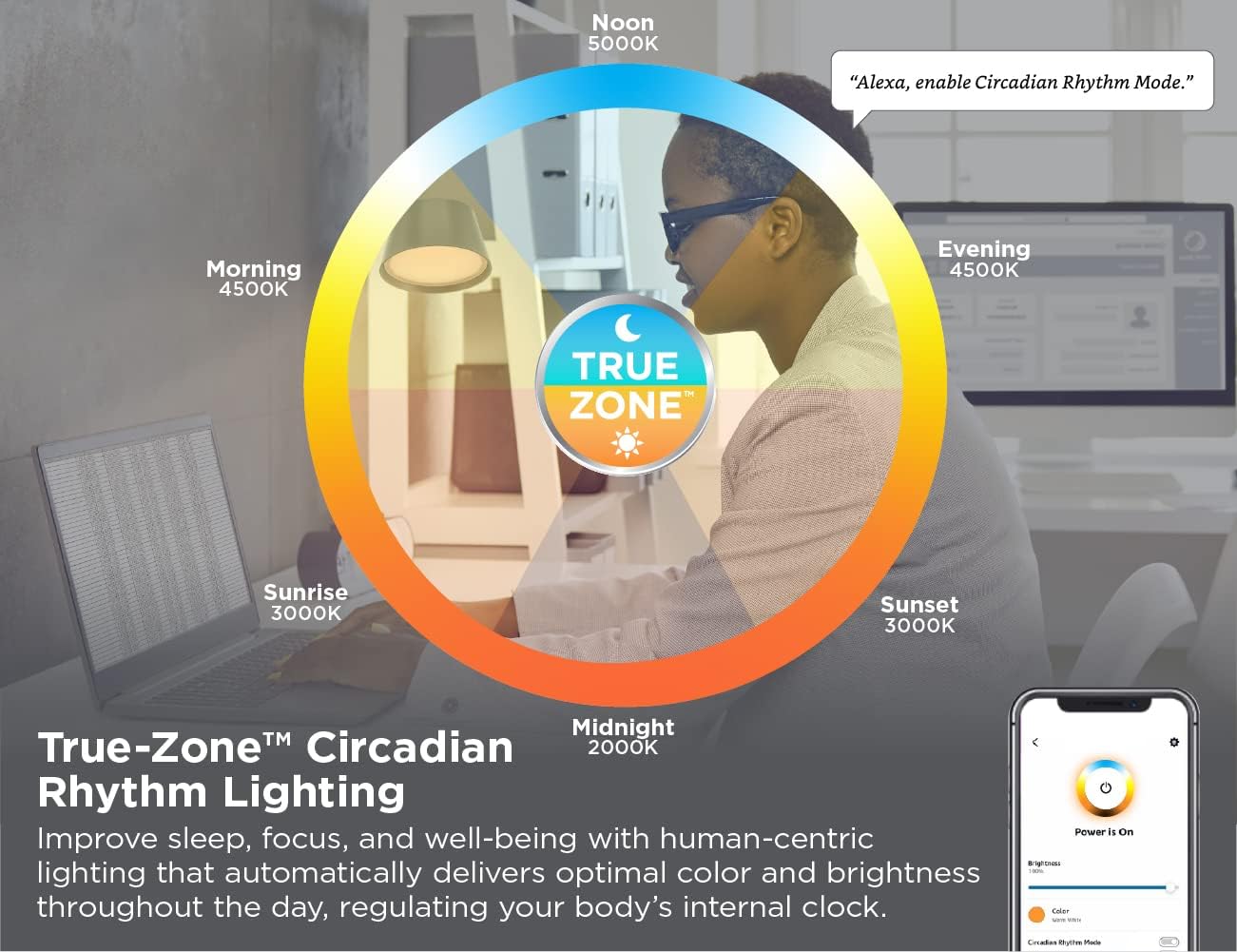
Figure 6: Lamp Dimensions and Adjustability. This diagram illustrates the lamp's dimensions, including the clamp's adjustment range (0.27"-3") and the lamp shade's 180-degree rotation and 30-degree tilt.
Maintenance
- Cleaning: Disconnect the lamp from power before cleaning. Use a soft, dry cloth to wipe the lamp's surfaces. Do not use abrasive cleaners, solvents, or harsh chemicals, as these may damage the finish or electronic components.
- LED Care: The integrated LED light source is designed for long-term use and does not require replacement.
- Cable Management: Ensure the power cable is not pinched or excessively bent to prevent damage.
Troubleshooting
| Problem | Possible Cause | Solution |
|---|---|---|
| Lamp does not turn on. | No power, loose connection, or lamp is off. | Check power cable connection. Ensure the outlet is functional. Press the power button on the lamp or use Alexa/app to turn on. |
| Cannot control with Alexa. | Alexa device not connected, lamp not discovered, or Wi-Fi issue. | Ensure Alexa device is online. Open Alexa app, go to 'Devices' and check if the lamp is listed. If not, try 'Add Device'. Verify Wi-Fi connection for both Alexa and the lamp. |
| Colors or brightness not changing. | Incorrect command, app error, or lamp mode conflict. | Use precise Alexa commands. Restart the Alexa app. Check if a specific mode (e.g., Circadian Rhythm) is active and overriding manual settings. |
| Lamp is unstable after clamping. | Clamp not tightened sufficiently or surface is too thin/thick. | Re-tighten the clamp securely. Ensure the mounting surface is within the 0.27"-3" thickness range. |
Specifications
- Model Name: BLACK+DECKER Verve Designer Smart Clamp Light
- Model Number: LED2100-CLSM
- Brand: PureOptics LED
- Power Source: AC/DC
- Wattage: 12 watts
- Light Source Type: LED
- Color Temperature: 3000K, 4000K, 6000K (Adjustable White Light) + 16 Million RGB Colors
- Control Method: Touch, Alexa Voice Control, Alexa App
- Mounting Type: 2-in-1 Clamp (Vertical/Horizontal)
- Clamp Thickness Range: 0.27" - 3"
- Material: Aluminum
- Product Dimensions: 5.5"D x 3.54"W x 15.16"H
- Item Weight: 1.85 pounds (0.84 Kilograms)
- Indoor/Outdoor Usage: Indoor
- Assembly Required: Yes
- UPC: 842048035299
Warranty and Support
This BLACK+DECKER Verve Designer Smart Clamp Light comes with a 3-year limited warranty. For warranty claims or technical support, please contact the manufacturer, Amax Inc. Refer to the product packaging or the official PureOptics LED website for the most current contact information.
Video: BLACK+DECKER Verve Design Smart Clamp Light Overview. This video provides a visual overview of the BLACK+DECKER Verve Design Smart Clamp Light, demonstrating its features and functionality.


