
Hama Freedom Lit (00184086)
Hama Freedom Lit Bluetooth On-Ear Headphones User Manual
Model: Freedom Lit (00184086)
1. Introduction
Thank you for choosing the Hama Freedom Lit Bluetooth On-Ear Headphones. This manual provides important information on the safe operation, setup, and maintenance of your device. Please read it carefully before using the product and keep it for future reference.
These wireless stereo headphones offer freedom of movement without tangled cables. The padded on-ear earcups and adjustable headband ensure a comfortable fit for extended listening sessions. The foldable design allows for space-saving storage.
2. Safety Instructions
- Protect the product from dirt, moisture, and overheating. Use it only in dry environments.
- Do not drop the product and do not expose it to any major shocks.
- Do not operate the product outside the power limits specified in the technical data.
- Do not open the device or continue to operate it if it becomes damaged.
- Do not attempt to service or repair the product yourself. Leave any service work to qualified experts.
- Keep the packaging material out of reach of children due to the risk of suffocation.
- Dispose of packaging material immediately according to locally applicable regulations.
- Do not modify the product in any way. Doing so voids the warranty.
- When using this product, observe the applicable local traffic laws and regulations.
- Be aware that components such as batteries, chargers, and cables may generate heat during operation.
3. Package Contents
Please check the package contents to ensure all items are present and undamaged:
- 1x Hama Freedom Lit Bluetooth On-Ear Headphones
- 1x USB/Micro-USB Charging Cable (15 cm)
- 1x Quick Guide (separate document)
- 1x Safety Instructions (separate document)
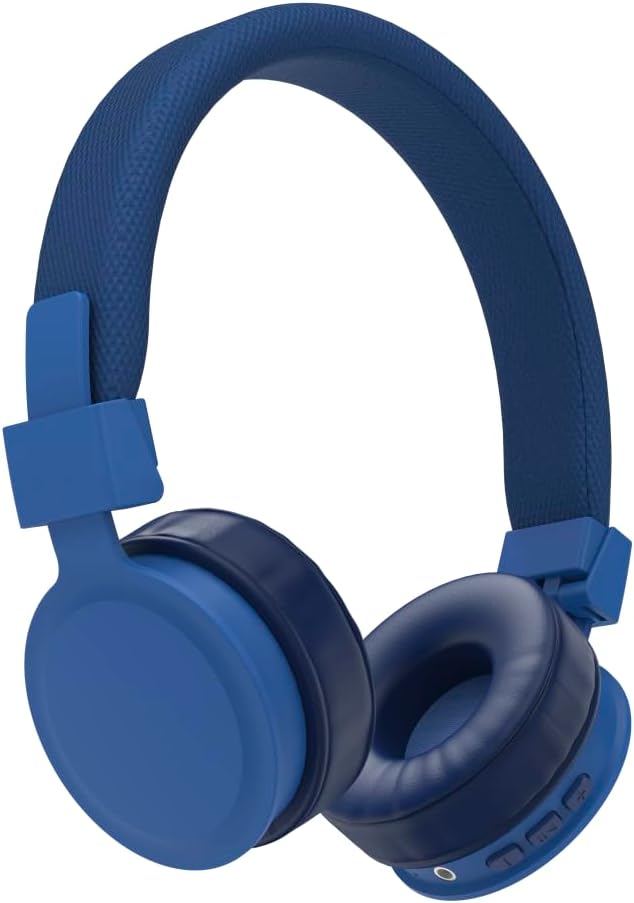
Figure 1: Hama Freedom Lit Bluetooth On-Ear Headphones (Blue)
4. Setup
4.1 Charging the Headphones
Before first use, ensure the headphones are fully charged.
- Connect the supplied Micro-USB charging cable to the charging port on the headphones.
- Connect the other end of the charging cable to a suitable USB power adapter (not included) or a USB port on a computer.
- The LED indicator on the headphones will show the charging status. It typically takes about 3 hours for a full charge.
- Once fully charged, disconnect the charging cable.
Note: The headphones cannot be used while charging.
4.2 Pairing with a Bluetooth Device
The Hama Freedom Lit headphones use Bluetooth 5.0 for wireless connection.
- Ensure the headphones are turned off.
- Press and hold the multi-function button (usually the power button) on the headphones until the LED indicator flashes alternately blue and red. This indicates pairing mode.
- On your Bluetooth-enabled device (smartphone, tablet, PC), open the Bluetooth settings.
- Search for available devices. "Hama Freedom Lit" or a similar name should appear in the list.
- Select "Hama Freedom Lit" to connect. Once successfully paired, the LED indicator on the headphones will typically flash blue slowly or turn solid blue.
- If prompted for a password, enter "0000".
Tip: The headphones support QuickPair for faster connection with compatible devices.
4.3 Adjusting the Headphones
For optimal comfort and sound quality, adjust the headphones to fit your head.
- Headband Adjustment: Extend or retract the headband on both sides until the earcups comfortably cover your ears.
- Foldable Design: The earcups can be folded inwards for compact storage and transport.

Figure 2: Foldable design for easy storage
5. Operating the Headphones
5.1 Power On/Off
- Power On: Press and hold the multi-function button for approximately 3 seconds until the LED indicator lights up blue.
- Power Off: Press and hold the multi-function button for approximately 5 seconds until the LED indicator lights up red and then turns off.
5.2 Music Playback
Control your music directly from the headphones:
- Play/Pause: Press the multi-function button once.
- Next Track: Press and hold the "Volume Up" button (usually labeled '+').
- Previous Track: Press and hold the "Volume Down" button (usually labeled '-').
- Volume Up: Short press the "Volume Up" button.
- Volume Down: Short press the "Volume Down" button.
5.3 Call Functions
The integrated microphone allows for hands-free calling.
- Answer Call: Press the multi-function button once when a call comes in.
- End Call: Press the multi-function button once during a call.
- Reject Call: Press and hold the multi-function button for approximately 2 seconds when a call comes in.
- Redial Last Number: Double-press the multi-function button.
5.4 Battery Life
The headphones offer:
- Up to 8 hours of talk time.
- Up to 8 hours of music playback.
- Up to 185 hours of standby time.
Actual battery life may vary depending on volume level and usage.
6. Maintenance and Care
- Only clean this product with a slightly damp, lint-free cloth and do not use aggressive cleaning agents.
- Ensure that no water gets into the product.
- Store the headphones in a clean, dry place when not in use. The foldable design helps protect them during storage and transport.
7. Troubleshooting
| Problem | Possible Cause | Solution |
|---|---|---|
| Headphones do not turn on. | Battery is empty. | Charge the headphones fully. |
| Cannot pair headphones with device. | Headphones not in pairing mode; Bluetooth on device is off; device too far away. | Ensure headphones are in pairing mode (flashing blue/red LED). Turn on Bluetooth on your device. Move device closer to headphones (within 10m). |
| No sound. | Volume too low; headphones not connected; incorrect audio output selected on device. | Increase volume on headphones and device. Re-pair headphones. Check audio output settings on your device. |
| Poor sound quality. | Interference; device too far away; low battery. | Move closer to the connected device. Charge the headphones. Avoid strong electromagnetic fields. |
8. Specifications
| Feature | Detail |
|---|---|
| Model Name | Freedom Lit |
| Model Number | 00184086 |
| Connectivity | Bluetooth 5.0 (Class 2) |
| Bluetooth Profiles Supported | A2DP V1.3, AVRCP V1.6, HFP V1.7 |
| Frequency Band | 2402-2480 MHz |
| Transmission Distance | Up to 10 m |
| Headphone Frequency Range | 20 Hz - 20 kHz |
| Microphone Frequency Range | 50 Hz - 8 kHz |
| Headphone Impedance | 32 Ω |
| Microphone Impedance | 2.2 kΩ |
| Headphone Sensitivity | 98 dB +/- 3 dB |
| Microphone Sensitivity | -42 dB ± 3 dB |
| Max. Talk Time | 8 hours |
| Max. Music Time | 8 hours |
| Max. Standby Time | 185 hours |
| Charging Time | Approx. 3 hours |
| Charging Port | Micro-USB |
| Weight | 120 g |
| Dimensions (Product) | 15 x 20 x 15 cm |
| Battery Type | 1 Lithium-Polymer battery (included) |
9. Warranty and Support
Hama GmbH & Co KG assumes no liability and provides no warranty for damage resulting from improper installation/mounting, improper use of the product, or from failure to observe the operating instructions and/or safety notes.
For technical support or warranty claims, please contact your retailer or the Hama customer service department. You can find more information and contact details on the official Hama website: www.hama.com
Ask a question about this manual
Ask about setup, troubleshooting, compatibility, parts, safety, or missing instructions. Manuals+ will review the question and use this page’s manual context to help answer it.