
1. Introduction
The KZ EDX PRO In-Ear Monitor (IEM) headphones are designed to deliver high-fidelity audio with deep bass, suitable for various applications including gaming, music listening, and stage monitoring. Featuring a 10mm dual magnetic circuit dynamic driver, these wired earbuds offer a rich and powerful sound experience.

Figure 1: KZ EDX PRO In-Ear Monitors (Cyan)
This image displays the KZ EDX PRO In-Ear Monitors in a cyan color, showcasing their transparent resin housing and the detachable braided cable. The ergonomic design is visible, intended for a secure and comfortable fit over the ear.
2. What's in the Box
Your KZ EDX PRO package includes the following components:
- 1 pair of KZ EDX PRO In-Ear Monitor Headphones
- 1 detachable earphones cable (0.75mm 2-pin connector)
- 3 pairs of silicone ear tips (S, M, L)
- 1 User Manual (this document)
3. Setup Instructions
3.1 Attaching the Detachable Cable
- Identify the left (L) and right (R) earpieces and the corresponding connectors on the cable. The cable connectors are typically marked.
- Align the 0.75mm 2-pin connector on the cable with the receptacle on the earpiece. Ensure the pins are correctly oriented.
- Gently push the cable connector into the earpiece receptacle until it is securely seated. Do not force the connection.
- Repeat for the other earpiece.

Figure 2: Detachable Cable Connection
This image illustrates the 0.75mm gold-plated 2-pin connector on the KZ EDX PRO earbud, highlighting the detachable cable feature which allows for easy replacement or upgrade.
3.2 Choosing and Installing Ear Tips
Selecting the correct size ear tips is crucial for optimal sound quality and comfort. Experiment with the included small, medium, and large ear tips to find the best fit for your ears.
- A good fit provides effective sound isolation and enhanced bass response.
- To change ear tips, gently pull off the existing tip and push the new tip onto the nozzle of the earbud, ensuring it is fully seated.
3.3 Wearing the Earbuds
The KZ EDX PRO earbuds are designed for an over-ear fit to ensure stability and comfort, especially during extended use.
- Insert the earbud into your ear canal.
- Loop the cable over the top of your ear, allowing the pre-formed ear hook to rest comfortably.
- Adjust the earbud and cable until you achieve a secure and comfortable fit.

Figure 3: Ergonomic Over-Ear Fit
This diagram illustrates the ergonomic design of the KZ EDX PRO earbud and how it is intended to be worn with the cable looped over the ear for a stable and comfortable fit.
4. Operating Instructions
Connect the 3.5mm jack of the earphone cable to your audio source (e.g., smartphone, computer, audio player).
4.1 Inline Remote Control (if applicable)
If your cable includes an inline remote, you can control media playback:
- Play/Pause: Press the button once.
- Next Song: Press the button twice.
- Previous Song: Press the button three times.

Figure 4: Inline Remote Control Functions
This image displays the inline remote control on the earphone cable, detailing its functions for media playback: single press for play/pause, double press for next song, and triple press for previous song.
Volume control is typically managed directly from your connected audio device.
5. Maintenance and Care
5.1 Cleaning the Earbuds and Ear Tips
- Regularly clean the ear tips with a soft, damp cloth to remove earwax and debris.
- Ensure ear tips are completely dry before reattaching them to the earbuds.
- Wipe the earbud housings with a dry, soft cloth. Avoid using harsh chemicals or abrasive materials.
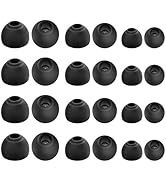
Figure 5: Included Ear Tips
This image shows a variety of silicone ear tips, emphasizing the importance of selecting the correct size for comfort and optimal sound isolation.
5.2 Cable Care
- Avoid sharp bends or excessive pulling on the cable to prevent damage.
- The detachable cable design allows for easy replacement if damaged or for upgrading to different cable types.
5.3 Storage
When not in use, store your KZ EDX PRO earbuds in a protective case to prevent tangling and damage.
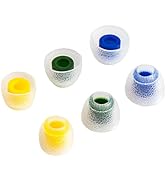
Figure 6: Earbud Storage Case
This image displays a hard protective case, ideal for storing the KZ EDX PRO earbuds and cable to prevent damage and tangling when not in use.
6. Troubleshooting
If you encounter issues with your KZ EDX PRO earbuds, please refer to the following common solutions:
| Problem | Possible Cause | Solution |
|---|---|---|
| No sound or sound from only one earbud |
|
|
| Poor sound quality or weak bass |
|
|
| Earbuds fall out easily |
|
|
7. Specifications
Key technical specifications for the KZ EDX PRO In-Ear Monitors:
| Feature | Detail |
|---|---|
| Model Name | KZ EDX PRO |
| Driver Type | 10mm Dual Magnetic Circuit Dynamic Driver |
| Impedance | 24 Ohm |
| Sensitivity | 112 dB |
| Frequency Range | 10-20kHz |
| Connectivity | Wired (3.5mm Jack) |
| Cable Feature | Detachable 0.75mm 2-pin, 5N OFC Oxygen-free Copper Wire |
| Noise Control | Sound Isolation |
| Material | Metal, Resin |
| Product Dimensions | 3.74 x 2.87 x 1.3 inches |
| Item Weight | 2.11 ounces (0.06 Kilograms) |

Figure 7: Dynamic Driver Components
This image provides an exploded view of the KZ EDX PRO's 10mm dual magnetic circuit dynamic driver, illustrating its internal components responsible for high-fidelity sound reproduction.
8. Warranty and Support
YINYOO Audio is committed to providing high-quality products and excellent customer service.
- Warranty: Any reported issues will be addressed with a replacement.
- Support: Expect quick responses to any questions you may have regarding the use of your product.
For further assistance, please contact YINYOO customer support through the retailer where you purchased the product or visit the official YINYOO brand store online.


