
Introduction
Welcome to the user manual for your LOPOM GPS Drone with 4K Camera. This guide provides essential information for safe operation, setup, and maintenance of your new drone. Please read this manual thoroughly before operating the drone to ensure a safe and enjoyable experience.
Safety Guidelines
Adhering to these safety guidelines is crucial for preventing accidents and ensuring the longevity of your drone.
- Always read the entire user manual before operating the drone.
- Ensure the drone and remote control batteries are fully charged before each flight.
- Fly in open, clear areas free from obstacles, people, and animals.
- Avoid flying in strong winds, rain, or other adverse weather conditions.
- Maintain a visual line of sight with the drone at all times.
- Respect privacy and do not fly over private property without permission.
- Keep fingers and loose clothing away from rotating propellers.
- Do not attempt to modify or disassemble the drone, as this may void the warranty and cause malfunction.
- Store the drone and its components in a cool, dry place when not in use.
Package Contents
Verify all items are present in your package:
- LOPOM GPS Drone
- Remote Control
- 7.4V 2000mAh Lithium Ion Batteries (2 included)
- USB Charging Cable
- Propeller Guards (4 pieces)
- Spare Propellers (4 pieces)
- Screwdriver
- Instruction Manual
- Carrying Case

Image: The complete package contents of the LOPOM GPS Drone, showing the drone, remote control, two batteries, USB charging cable, propeller guards, spare propellers, a screwdriver, and a carrying case.
Product Overview
The LOPOM GPS Drone (Model: gps X11) features a foldable design, dual cameras, and intelligent flight modes for an enhanced aerial experience. Its robust construction ensures durability, while advanced positioning systems provide stable and precise control.
Key Features:
- 4K Camera and Bottom 720p Camera: Equipped with a 4K UHD front camera and a 720p bottom camera for comprehensive aerial photography and videography.
- Extended Flight Time: Two 7.4V 2000mAh batteries provide approximately 40 minutes of total flight time (20 minutes per battery).
- Durable Construction: Fuselage made of robust ABS material, designed to withstand impacts.
- Precise Positioning: GPS Positioning and Optical Flow Positioning ensure stable hovering and accurate flight.
- Smart Flight Modes: Altitude Hold, Headless Mode, Follow Me, and other intelligent functions for ease of control.

Image: An overview of the drone's intelligent features, including various flight modes and camera functions.

Image: Detail of the drone's dual camera system, featuring a 4K front camera and a 720p bottom camera for versatile shooting.
Setup
1. Battery Installation and Charging
Insert the fully charged 7.4V 2000mAh Lithium Ion battery into the drone's battery compartment. Ensure it clicks securely into place.
To charge the battery, connect it to the provided USB charging cable and plug the cable into a compatible USB power source. The indicator light on the charger will show charging status. Allow the battery to cool down before recharging to prolong its lifespan.
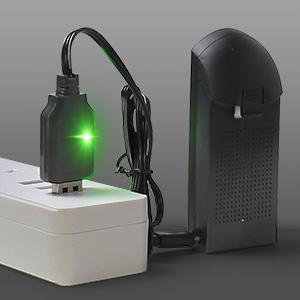
Image: Proper method for charging the drone battery using the provided USB cable.
2. Propeller Installation
Attach the propellers to the motor shafts, ensuring correct orientation (A and B propellers). Secure them with the provided screws. Install propeller guards for added protection, especially for beginners.
Image: The drone with propeller guards installed, demonstrating enhanced safety.
3. Remote Control Setup
Install 3x AAA batteries (not included) into the remote control.
Extend the phone holder on the remote control and securely place your smartphone.

Image: The remote control with a smartphone attached, ready for flight operation and live video feed.
4. App Installation and Connection
Download the official LOPOM drone application from your smartphone's app store.
Power on the drone and the remote control. Connect your smartphone to the drone's Wi-Fi network (usually named "LOPOM-XXXX").
Open the app and follow the on-screen instructions to calibrate the drone and establish a connection.
Operating Instructions
Pre-Flight Checklist
- Ensure batteries are fully charged for both drone and remote.
- Check propellers for damage and ensure they are securely attached.
- Verify the drone is connected to the app and calibrated.
- Choose an open, clear area free from obstacles, people, and animals.
- Check local regulations for drone operation.
Basic Flight Controls
Use the left joystick for altitude and rotation, and the right joystick for forward/backward and left/right movement. Refer to the remote control diagram in the app or included quick start guide for detailed control mapping.
Intelligent Flight Modes
GPS Positioning & Optical Flow Positioning
These modes enable precise hovering and stable flight, crucial for clear aerial photography and videography, especially outdoors.

Image: Visual representation of GPS-assisted flight modes, including auto-return, custom path design, and Follow Me.
Altitude Hold
The drone maintains a stable altitude, allowing you to focus on camera control without constant throttle adjustments.
Headless Mode
Simplifies flight by eliminating the need to orient the drone's front. The drone's direction is relative to the pilot, making it easier for beginners.
Follow Me Mode
The drone automatically follows the remote control or the connected smartphone, capturing dynamic footage as you move.

Image: The drone in Follow Me mode, tracking the user for hands-free filming.
3D Flip
Execute impressive aerial acrobatics with a single button press for exciting flight demonstrations.
Gesture Photo/Video
Use specific hand gestures, recognized by the drone's camera, to trigger photo or video recording without needing the remote control.
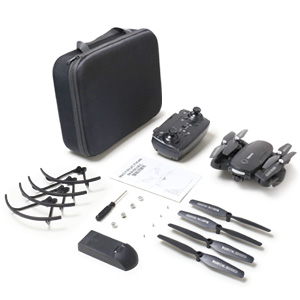
Image: Demonstrating the gesture photo feature, where a hand gesture triggers the camera.
Camera Operation
The drone features a 4K front camera and a 720p bottom camera. Captured media is streamed to the app in real-time, providing a comprehensive view.
Adjust the lens angle (if supported by your model) via the remote control or app for optimal shots and perspectives.
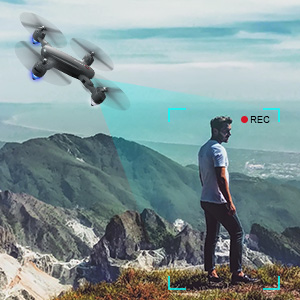
Image: A visual comparison highlighting the superior clarity of 4K video capture.
Maintenance
Proper maintenance ensures the longevity and optimal performance of your LOPOM GPS Drone.
- Battery Care: Always allow batteries to cool down before recharging. Store batteries in a cool, dry place away from direct sunlight and extreme temperatures.
- Cleaning: Gently wipe the drone's body and camera lenses with a soft, dry, lint-free cloth. Avoid using harsh chemicals, solvents, or abrasive materials.
- Propeller Inspection: Regularly check all propellers for any signs of cracks, bends, or damage. Replace damaged propellers immediately using the provided spare parts and screwdriver.
- Storage: When storing the drone for extended periods, ensure batteries are charged to about 50% and removed from the drone and remote control.
Troubleshooting
If you encounter any issues with your drone, refer to the table below for common problems and their solutions.
| Issue | Possible Cause | Solution |
|---|---|---|
| Drone not connecting to app | Incorrect Wi-Fi connection, app not open, drone/remote not powered on. | Ensure drone Wi-Fi is selected on your phone, restart app, power cycle drone and remote. |
| Short flight time | Battery not fully charged, old battery, cold weather. | Fully charge batteries, consider replacing old batteries, fly in moderate temperatures. |
| Unstable flight / Drifting | Improper calibration, strong winds, damaged propellers. | Recalibrate the drone, avoid flying in windy conditions, check and replace damaged propellers. |
| Poor video quality | Low light conditions, dirty lens, Wi-Fi interference. | Fly in well-lit areas, clean camera lens, ensure strong Wi-Fi signal. |
For further assistance, please contact LOPOM customer support.
Specifications
Detailed technical specifications for the LOPOM GPS Drone (Model: gps X11).
| Feature | Detail |
|---|---|
| Brand | LOPOM |
| Model Name | gps X11 |
| Special Feature | GPS Positioning, Optical Flow Positioning, Altitude Hold, Headless Mode |
| Age Range (Description) | Adult |
| Color | black |
| Video Capture Resolution | 720p (Bottom Camera), 4K (Front Camera) |
| Connectivity Technology | Wi-Fi |
| Included Components | Battery |
| Skill Level | Beginner |
| Battery Capacity | 2000 Milliamp Hours |
| Video Capture Format | 4k |
| Control Type | Remote Control |
| Media Type | SD |
| Material | ABS |
| Wireless Communication Technology | Wi-Fi |
| Battery Cell Composition | Lithium Ion |
| Are Batteries Included | Yes |
| Supported Image Format | JPEG |
| Remote Control Included? | Yes |
| Optical Sensor Technology | CMOS |
| Rechargeable Battery Included | Yes |
| Product Dimensions | 5.91"L x 1.18"W x 6.69"H |
| UPC | 717728998228 |
| Manufacturer | LOPOM |
| Item Weight | 1.9 pounds |
| Batteries | 2 Lithium Ion batteries required. (included) |
| Manufacturer Part Number | gpsX11 |
Note: Specifications are subject to change without prior notice.
Warranty and Support
LOPOM products come with a standard manufacturer's warranty. Please refer to the warranty card included in your package for specific terms and conditions regarding coverage and duration.
For technical support, troubleshooting assistance, or inquiries about parts replacement, please contact LOPOM customer service. You can find the most up-to-date contact information in your product packaging or on the official LOPOM website.