
1. Product Overview
The Bimirth Baby Hair Clipper with Vacuum is designed for safe and comfortable hair trimming for infants, toddlers, and children. It features ceramic blades, a low-noise motor, and an integrated vacuum system to minimize mess. This cordless, rechargeable device is also waterproof for easy cleaning.

Image: The Bimirth Baby Hair Clipper with Vacuum, highlighting its vacuum hair absorption technology, with a baby in the foreground.
2. Key Features
- Double Protection: Safe ceramic blades and an R-shaped beveled design prevent hair pulling and protect skin. Includes three safety guide combs for added protection.
- 3 Replaceable Safety Guide Combs: Includes combs for various hair lengths (bare head, 3mm, 6mm, 9mm, 12mm) and a sideburn trimming option.
- Lower Noise: Advanced noise-reduction technology and a premium brass-movement motor ensure ultra-quiet operation (45dB), ideal for sound-sensitive children.
- Two Levels of Vacuum: Dual-level vacuum system with stronger suction on Level 2 to capture trimmed hair and reduce mess.
- IPX-7 Waterproof: The entire body is waterproof, allowing for wet or dry use and easy rinsing under a faucet.
- USB Rechargeable: Charges via USB cable (laptop, computer, power bank, USB adapter). A 1-hour charge provides 40–50 minutes of use.
3. What's Included
Your Bimirth Baby Hair Clipper package includes the following items:
- Bimirth Baby Hair Clipper with Vacuum
- 3/6mm Short Guide Comb
- Sideburn Guide Comb
- 9/12mm Long Guide Comb
- USB Charging Cable
- Tonsorial Cloth (Haircut Cape)
- Cleaning Sponge
- Cleaning Brush
- EVA Storage Bag

Image: All items included in the Bimirth Baby Hair Clipper package, neatly arranged.
4. Setup and Charging
4.1 Initial Charge
Before first use, charge the device for at least 1 hour to ensure sufficient power. If the clipper has not been used for an extended period, charge it before use.

Image: The hair clipper connected to a USB charging cable, showing compatibility with various USB power sources.
The clipper includes a USB cable and can be charged via a laptop, computer, power bank, or USB adapter. A 1-hour charge provides up to 40–50 minutes of use.
4.2 Attaching Guide Combs
Select the appropriate guide comb for your desired hair length. To attach, position the guide comb bump into the clamping groove on the clipper. Push the comb up and hold it in place until it clicks securely.

Image: Step-by-step guide on how to correctly install a guide comb onto the hair clipper.
5. Operating Instructions
5.1 Power On/Off and Vacuum Function
Press the ON/OFF switch to power on the clipper. The device features two vacuum levels. Press the vacuum switch to cycle between Vacuum 1 and Vacuum 2. Level 2 offers stronger suction.
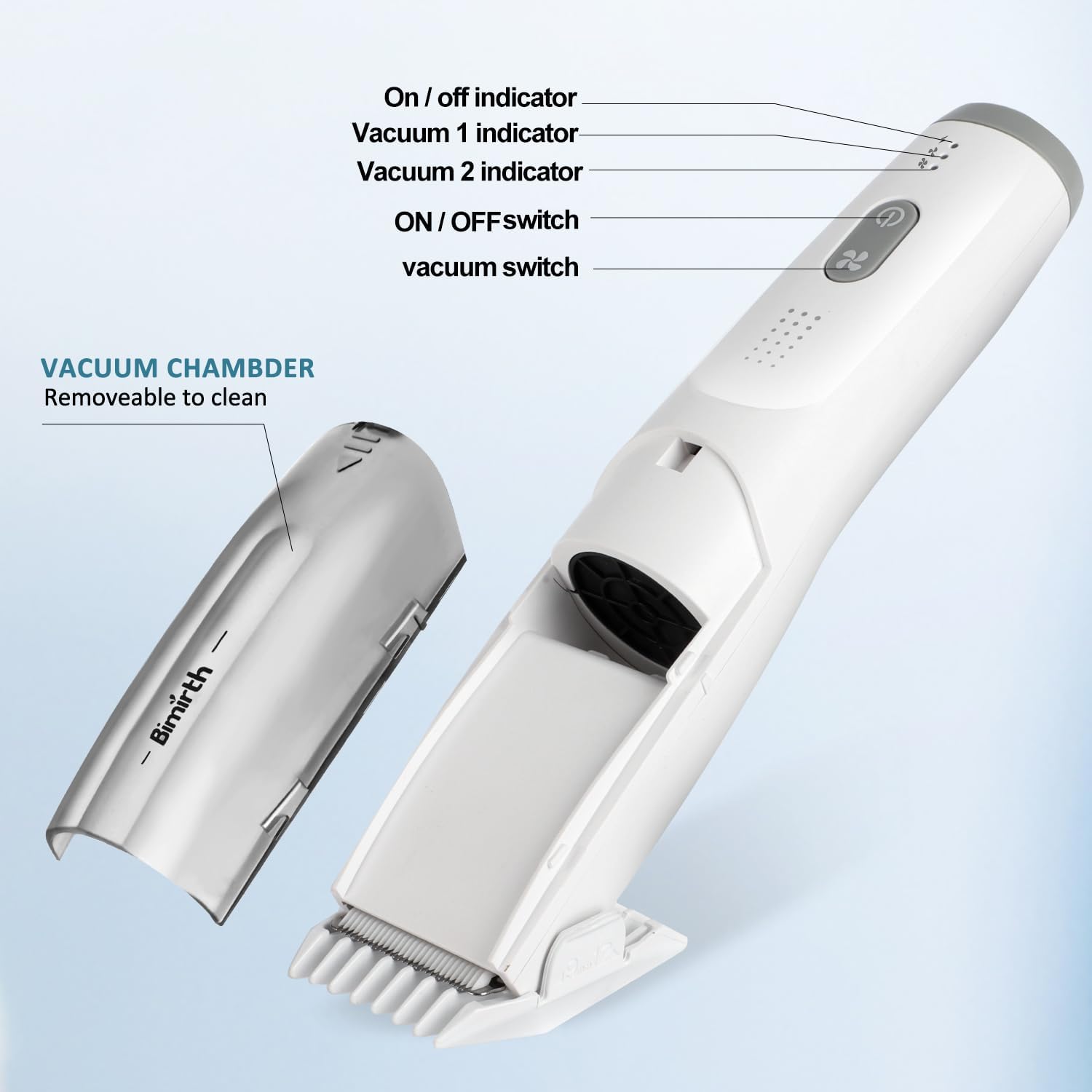
Image: Detailed view of the clipper's control panel, indicating the power button, vacuum switch, and corresponding indicator lights.
For best results with the vacuum function, cut hair slowly to improve suction of loose strands. Suction effectiveness may vary depending on hair type and cutting speed.
5.2 Hair Cutting Tips
- Ensure the chosen guide comb is securely attached.
- Move the clipper gently and steadily against the direction of hair growth.
- The low noise and vibration design helps keep children calm during haircuts.
Video: A demonstration of the Bimirth Baby Hair Clipper in use, showing its quiet operation and effective hair trimming with vacuum function.
6. Maintenance and Cleaning
The Bimirth Baby Hair Clipper is IPX-7 waterproof, allowing for easy and thorough cleaning.
6.1 Rinsing the Clipper
The entire body of the clipper is waterproof. After use, you can rinse the cutter head directly under running water. Ensure the vacuum chamber is empty before rinsing.

Image: The waterproof clipper being rinsed under a faucet, demonstrating its easy cleaning process.
6.2 Cleaning the Vacuum Chamber
The vacuum chamber is removable for easy cleaning. Detach the chamber and empty any collected hair. Use the provided cleaning brush to remove stubborn hair particles from the blades and chamber.
Image: The vacuum chamber of the clipper shown detached, indicating it is removable for thorough cleaning.
7. Troubleshooting
- Clipper not turning on: Ensure the device is fully charged. Connect it to a power source using the USB cable and allow it to charge for at least 1 hour.
- Poor suction: Ensure the vacuum chamber is not full and is properly attached. Clean any hair blockages from the vacuum intake. Cut hair slowly to allow the vacuum to effectively collect strands.
- Hair pulling or uneven cut: Ensure the guide comb is correctly attached and not damaged. Clean the blades to remove any trapped hair. If the issue persists, the blades may need replacement or professional servicing.
- Excessive noise: While designed for low noise, ensure no foreign objects are obstructing the blades or vacuum fan. If the noise is unusually loud, discontinue use and contact customer support.
If you encounter any issues not listed here or if troubleshooting steps do not resolve the problem, please contact Bimirth customer support.
8. Specifications
| Brand Name | Bimirth |
| Model Number | S40101S |
| Power Source | Battery Powered (USB Rechargeable) |
| Battery Type | 1 Lithium Ion battery required |
| Charging Time | Approx. 1 hour |
| Operating Time | 40-50 minutes per charge |
| Waterproof Rating | IPX-7 |
| Blade Material | Ceramic |
| Item Weight | 0.3 Kilograms (10.58 ounces) |
| Dimensions | 9.33 x 5 x 2.48 inches (Package) |
| Target Audience | Unisex-Babies |
9. Safety Information
- Always keep the hair clipper away from the face and eyes.
- Do not use on infants or near water sources without proper supervision.
- After use, clean the clipper and store it properly to prevent accidents.
- Always supervise children when using the hair clipper.
- Statements regarding dietary supplements have not been evaluated by the FDA and are not intended to diagnose, treat, cure, or prevent any disease or health condition.
10. Warranty and Support
The Bimirth Baby Hair Clipper comes with a 365-day (1-year) warranty from the date of purchase.
If you have any questions about its operation, maintenance, or require technical assistance, please contact Bimirth customer support. We are committed to providing a solution within 24 hours.
For support, please refer to the contact information provided with your product packaging or visit the official Bimirth website.